

An AI-powered SEO audit combines classic technical checks (crawlability, Schema, Core Web Vitals) with newer AI-citation checks like llms.txt access and passage citability. It matters because AI overviews and chatbots now pull answers straight from web pages, so a page that isn’t indexable or well structured won’t get cited. Your immediate move: scan your three most important pages for indexability, valid Schema, and AI-bot access before you do anything else.
TL;DR:
- AI SEO audits now evaluate indexability, Schema validation, and AI-crawler access, with firewall or CDN rules potentially blocking AI visibility despite good Google crawlability.
- Proper passage citability relies on clear, question-style headings and answer blocks between 134 to 167 words to optimize AI extraction.
- Prioritization should focus first on pages blocked from crawling or deindexed, then on improving AI-citability, technical signals, and schema, based on actual traffic and conversion data.
- Automated tools excel at parallel checks, draft schema, and generating fix lists but require human review for content accuracy, authority, and complex canonical strategies.
- A disciplined approach involves testing fixes against real metrics like impressions and clicks, avoiding auto-publishing AI suggestions without manual validation.
Table of Contents
- What Modern AI-Focused SEO Audits Actually Check
- How Do You Run an AI-Powered SEO Audit Step by Step?
- How Do You Prioritize Fixes After an Audit?
- What Can AI Automate in an SEO Audit, and What Still Needs a Human?
- Practitioner Notes And Resources From Will Buckley
- How AI Audits Fit Into an Affiliate Marketer’s Workflow
- An Alternative Path: Turning Audit Findings Into Action With Guided Playbooks
- Sources
- FAQ
What Modern AI-Focused SEO Audits Actually Check
Have you run a site scan lately and felt buried under a hundred flagged “issues” with no idea which ones matter? That’s the problem with most audit reports. A good AI-powered audit doesn’t just list problems, it groups them by what they actually affect: whether a page gets crawled, whether it gets cited, and whether it loads fast enough to keep a visitor around.
Here’s what these audits look at, and why each item earns its place on the checklist.
- Indexability and crawl access. This starts with robots.txt and moves into newer territory: whether an llms.txt file exists, and whether AI crawlers like GPTBot or ClaudeBot can actually reach your content. A firewall or CDN rule blocking those bots silently kills your AI visibility even if Googlebot gets through fine.
- Structured data and Schema.org markup. Article, FAQ, HowTo, and Product schema types tell search engines and AI systems what a page is about without guessing. Author fields, publish dates, and IPTC metadata on images round this out. Run every template through the Schema.org validator before you trust it.
- Passage citability and heading structure. AI systems tend to extract self-contained chunks of text, and the sweet spot for those chunks is 134 to 167 words. Question-format H2s and H3s (“How do I fix X?”) make it easier for an AI system to match your content to a search query.
- Technical signals. Core Web Vitals, JavaScript rendering quirks, canonical tags, redirect chains, and HTTP header issues like a stray
X-Robots-Tag: noindexstill decide whether a page gets crawled at all. - Content quality and E-E-A-T markers. Clear author attribution, cited sources, and demonstrated topical depth matter more now, not less, since AI systems weigh trust signals when deciding what to cite.
- Links and discovery. A clean, accurate sitemap, sensible internal linking, and no broken links keep both crawlers and AI bots moving through your site instead of hitting dead ends.
- AI visibility scoring. Many audit platforms now report a specific AI visibility or GEO readiness score, along with attribution density (how often your brand or content shows up in AI-generated answers) and whether your schema is even eligible for AI answer boxes.
None of this is a separate discipline from regular SEO. Google’s own guidance treats AEO and GEO as extensions of classic SEO rather than a new algorithm to chase. The pages that already rank well because they’re fast, well structured, and trustworthy tend to be the ones AI systems cite too.
How Do You Run an AI-Powered SEO Audit Step by Step?
You don’t need to scan your entire site on day one. Start narrow, get real answers, then expand. Here’s the order that works.
- Pick your scope first. Pull your highest-impression pages from Google Search Console, add your money pages and any content that answers a common customer question. Fifteen to twenty pages is plenty for a first pass.
- Run a combined crawl and AI-visibility scan. Use a tool that checks llms.txt presence, simulates AI bot access, validates Schema, and reports Core Web Vitals in one pass. Doing these separately wastes hours you don’t have.
- Connect Search Console data. Weighting your findings by actual clicks and impressions changes everything. A broken canonical tag on a page nobody visits is a low priority. The same issue on your top landing page is urgent.
- Verify manually before you trust the tool. View-source the page and confirm the JSON-LD actually renders the way the tool says it does. Run a live fetch test to confirm AI bots and Googlebot see the same content a browser does. Automated scans get this wrong more often than you’d expect, especially on JavaScript-heavy pages.
- Document findings as an impact-times-effort matrix. For every recommendation, write down how you’d know if the fix failed. If you added FAQ schema and expected a rich result within two weeks, and nothing shows up, that’s your signal to dig deeper, not just check a box and move on.
- Apply CMS-specific fixes and track changes in version control. A WordPress site handles canonical tags differently than a headless setup. Know your platform’s quirks before you push changes live, and keep a record of what changed and when so you can trace any ranking shift back to a specific fix.
Pro Tip: Before you fix anything, screenshot or export your current Search Console impressions for the pages you’re auditing. Four weeks from now, that snapshot is the only way you’ll know whether your fixes actually moved the needle or whether traffic shifted for unrelated reasons.
This process rewards patience more than speed. A rushed audit that flags fifty issues without weighting any of them just creates a longer to-do list, not a better site. The goal is a short list of fixes you can defend with data, not a wall of red flags.
How Do You Prioritize Fixes After an Audit?
Not every flagged issue deserves the same urgency, and treating them equally is the fastest way to burn a week fixing things nobody will notice. Weight every recommendation by two factors: how many impressions or clicks the affected page already gets, and how close that page sits to a conversion or revenue event.
Four buckets tend to cover almost everything an audit turns up:
- Crawl and index recovery. Pages that are blocked, deindexed, or returning errors. Fix these first, always, regardless of traffic level, because a page that isn’t indexed can’t rank or get cited by anything.
- AI-citability improvements. Rewriting key sections into tighter 134 to 167 word answer blocks, adding question-format subheadings, tightening author bylines.
- Performance and UX fixes. Core Web Vitals issues, slow-loading images, layout shift problems on mobile.
- Schema and trust fixes. Adding or correcting structured data, fixing missing author or date fields, cleaning up broken internal links.
Connecting Search Console data to your prioritization list makes the difference between guessing and knowing. Tools that import click and impression data let you rank fixes by actual traffic exposure instead of by how alarming an issue sounds in a report.
Once fixes ship, track leading indicators weekly for the first month, then shift to monthly monitoring for slower-moving signals. Watch AI citation mentions if you have access to a monitoring tool, featured snippet appearances, Search Console impressions and click-through rate, and Core Web Vitals trends. A rank tracking tool helps you catch movement on specific queries without manually checking rankings by hand.
A reasonable rollout looks like this: fix crawl and index issues immediately, ship citability blocks and schema corrections within two weeks, work on content quality and internal linking over the following month, and treat authority building as an ongoing quarterly effort. Rushing the last item never works. Authority signals accumulate slowly, and no audit tool can compress that timeline.
What Can AI Automate in an SEO Audit, and What Still Needs a Human?
AI tools are genuinely good at certain parts of an audit and genuinely bad at others, and knowing the line between them saves you from two opposite mistakes: doing everything manually out of distrust, or publishing whatever the tool outputs without a second look.
Where AI earns its keep:
- Running massive parallel checks. A single scan can simulate multiple AI crawlers, test hundreds of pages for Schema validity, and flag indexability problems in minutes instead of the hours a manual audit would take.
- Generating draft Schema markup. Most tools can produce a starting JSON-LD block for common content types, saving you the trouble of writing it from scratch.
- Producing plain-English fix lists. Instead of a raw error log, decent tools translate technical findings into “do this next” language.
- Drafting content briefs. Once an audit flags a content gap, AI can outline what a stronger version of that page should cover.
Some platforms go further and orchestrate multiple specialist checks in parallel, producing recommendations that include not just the fix but a way to test whether it worked, which is a meaningfully better format than a plain checklist.
Where AI still falls short:
- Fact verification. An AI tool cannot confirm that a statistic in your content is still accurate, or that a claim about a competitor is fair. That’s on you.
- Sourcing decisions. Choosing which authority to cite, or whether a source is trustworthy enough to link, is an editorial judgment call.
- Canonical and redirect strategy on complex sites. Nuanced situations, like a site migration with overlapping URL structures, need a person who understands the business context, not just the crawl data.
- Final editorial quality control. Nothing generated by an audit tool should go live without a human reading it first.
A simple rule of thumb: act quickly on templated technical fixes like Schema corrections or redirect cleanups, since those are low risk and easy to verify. Slow down on anything content-related, and route it through human review before publishing.
Pro Tip: Treat every AI-generated recommendation as a draft, not a directive. Ask “how would I know if this fix failed?” before you ship it. If you can’t answer that question, you’re not ready to implement the fix yet.
Practitioner Notes And Resources From Will Buckley
Auditing your site is only useful if you actually act on what you find, and that’s where a lot of marketers stall out. My own approach is to run a lighter version of this audit before every quarterly content review, focusing first on pages that already drive affiliate revenue rather than trying to fix the whole site at once. Prioritizing by revenue impact, not just traffic volume, keeps the work from turning into a never-ending technical to-do list.
If you’re building out the content side of your fixes, my guide on AI keyword research walks through the workflow for turning audit gaps into a real content plan, and the internal linking automation guide covers the discovery and linking fixes an audit often flags.
How AI Audits Fit Into an Affiliate Marketer’s Workflow
Here’s what I’ve learned watching AI change how audits get done: speed of detection has improved enormously, but speed of judgment hasn’t, and it shouldn’t. An AI tool can flag a hundred issues in the time it takes you to make coffee. What it can’t do is tell you which of those issues actually threatens the affiliate revenue tied to a specific page.
I focus on four numbers after any fix: Search Console impressions, click-through rate, any AI citation pickups I can track, and whether conversions moved. Everything else is noise until those numbers confirm the fix worked.
The one habit I’d push hardest: never auto-publish AI-generated content changes, especially on money pages, without reading them yourself first.
— Will
An Alternative Path: Turning Audit Findings Into Action With Guided Playbooks
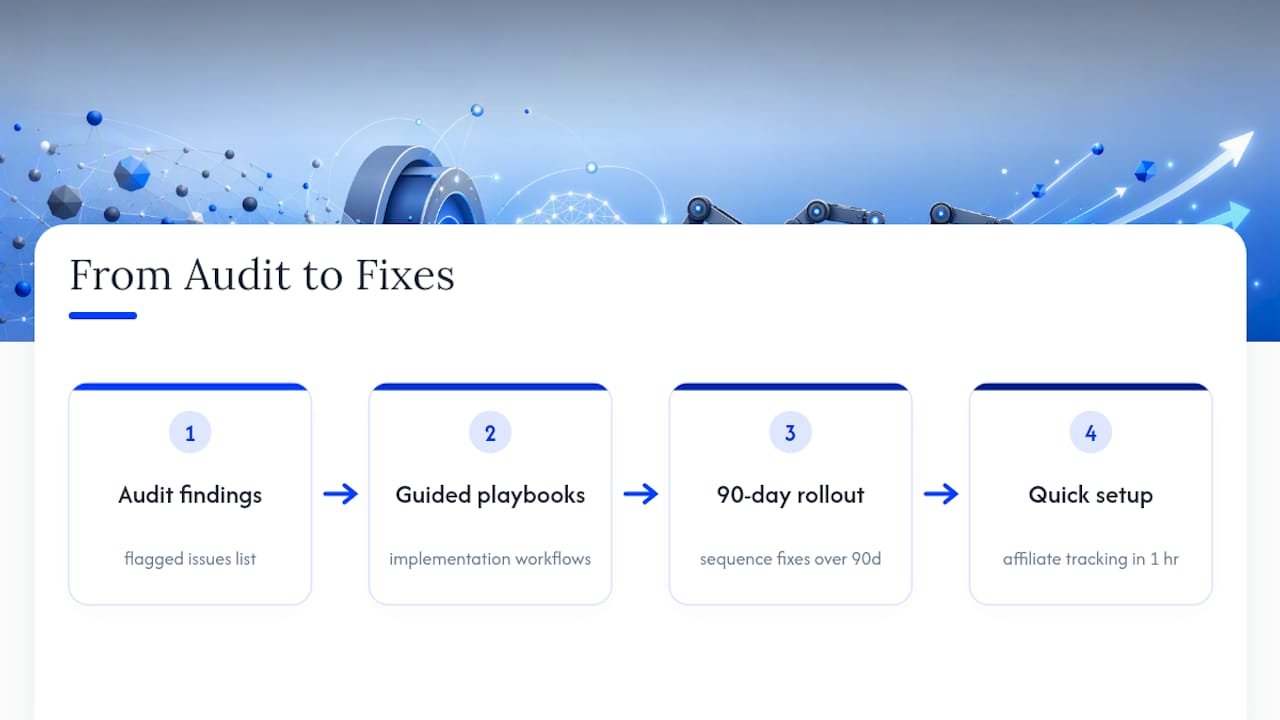
Running the audit is the easy part. Turning a list of forty flagged issues into shipped fixes, without burning a month on it, is where most marketers actually get stuck. That’s the gap coaching and playbooks are built to close.

The site’s workflow guides walk through implementation, not just diagnosis: how to turn a content-brief recommendation into a page that actually ranks, how to build a monitoring cadence so you’re not re-auditing blind every month, and how to fold editorial review into a process that started with an automated tool. If your audit flagged content gaps, the AI content strategy rollout shows how to sequence those fixes over 90 days instead of trying to fix everything at once. And if the audit pointed to weak affiliate tracking or attribution problems, the affiliate link tracking guide covers a cookieless setup you can build in about an hour.
Training doesn’t replace the audit tool. It replaces the guesswork of figuring out what to do with the tool’s output. Start with the AI workflow automation guide for a practical next step on turning this week’s audit findings into a fix schedule you’ll actually finish.
Sources
Confirm structured data with the Schema.org validator before trusting any tool’s schema report. Google’s own AI optimization guide lays out eligibility basics for AI features, and the ai-citation-patterns research backs the passage-length guidance used throughout this piece.
- ai-citation-patterns (GitHub)
- Google’s new AI search guide calls AEO and GEO ‘still SEO’ (Search Engine Journal)
- Schema.org validator
FAQ
Can ChatGPT Do an SEO Audit?
ChatGPT can review copied text, suggest heading structures, and flag obvious Schema errors, but it can’t crawl your live site, test AI-bot access, or verify rendered HTML the way a dedicated audit tool does.
Is SEO Still Relevant With AI?
Yes. Google’s guidance confirms that AI visibility depends on the same indexability and structured-data fundamentals that classic SEO has always relied on, not a separate ranking system.
Can SEO Be Done With AI?
AI tools handle the repetitive parts well, like parallel crawling, Schema drafting, and generating plain-English fix lists, but factual verification, sourcing judgment, and final editorial review still need a human.
Can AI Perform an Audit?
AI can run technical scans, simulate AI crawler access, and score pages for AI visibility, but the resulting recommendations should be verified manually and weighted against real Search Console data before you act on them.
What Word Count Works Best for AI-Cited Content?
Self-contained answer blocks of roughly 134 to 167 words tend to perform best for AI extraction and citation, especially when paired with a clear question-format heading.