

Yes, you can earn affiliate commissions on YouTube starting today, regardless of your subscriber count. The three primary routes are the YouTube Shopping affiliate program (native product tagging, available to eligible U.S. creators), external affiliate links placed directly in video descriptions and pinned comments, and the verified associated-website workaround that lets cards and end screens point to your own site where affiliate links live. Here is what you need to do next:
- YouTube Shopping affiliate program: Tag products natively inside YouTube Studio; requires YouTube Partner Program (YPP) membership and meeting channel-size thresholds.
- External affiliate links in descriptions and pinned comments: Paste links directly; works at any channel size with zero platform approval needed.
- Cards and end screens via a verified associated website: Link cards to your own verified domain, then host affiliate links on that page; bypasses the restriction that cards cannot point directly to third-party affiliate URLs.
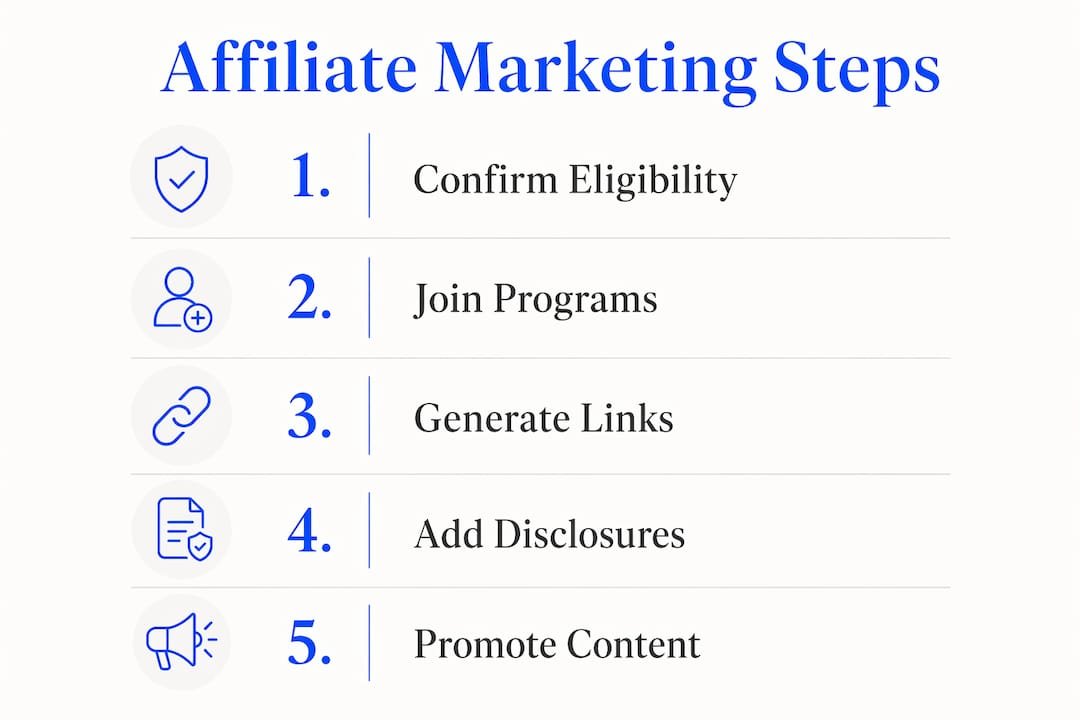
Whatever route you choose, your immediate next step is the same: confirm your eligibility and add a visible disclosure before your first link goes live.
Pro Tip: If you are brand new, start with external affiliate links in descriptions. You can launch today, earn on your very first video, and layer in YouTube Shopping later once you hit YPP requirements.
Table of Contents
- What is the YouTube Shopping affiliate program and who does it fit?
- How do you join YouTube Shopping or set up external affiliate programs?
- How do you add product tags, affiliate links, and cards inside YouTube Studio?
- What do FTC rules and YouTube policy require for affiliate disclosures?
- How much can you realistically earn from YouTube affiliate marketing?
- Which affiliate programs and tools work best for U.S.-based YouTube creators?
- What video formats and CTAs actually drive affiliate conversions?
- What are the most common sign-up and tagging problems, and how do you fix them?
- Will’s expert tips for scaling link hygiene and tracking with AI
- Key Takeaways
- Why chasing commissions before building trust is the wrong order
- Willbuckley’s coaching helps you build a YouTube affiliate system that actually scales
- Useful sources and further reading
What is the YouTube Shopping affiliate program and who does it fit?
The YouTube Shopping affiliate program is YouTube’s native product-tagging system. It lets eligible creators tag specific products directly on their videos, so viewers see product names, prices, and images without ever leaving YouTube. That is meaningfully different from dropping a raw URL in a description. The shopping experience is embedded in the video itself, which reduces friction and keeps the recommendation feeling organic.
When you join, you get access to the Affiliate Hub inside YouTube Studio, a dashboard where you browse participating retailers, browse their product catalogs, and select items to tag. YouTube tracks clicks and purchases through its own attribution system, so you do not need to manage separate tracking pixels or UTM parameters for the Shopping program specifically.
The concrete benefits worth knowing:
- Native product tagging: Products appear as clickable overlays on the video, not just buried text links.
- Integrated tracking and reporting: Commissions, clicks, and conversion data live inside YouTube Studio alongside your regular analytics.
- Product detail visibility: Viewers see price and product name before clicking, which pre-qualifies the click and tends to improve conversion quality.
- Access to major U.S. retailers: Participating sellers include large retail brands, so you are not limited to one merchant.
Eligibility is the catch. The YouTube Shopping affiliate program requires YPP membership, specific subscriber thresholds, and U.S. availability at the time you apply. YouTube updates these requirements periodically, so always verify current criteria directly in YouTube Support before planning your strategy around it.
If you do not yet qualify, that is not a problem. Affiliate income can start at any channel size through external programs, and the two approaches run well in parallel once you do qualify.
How do you join YouTube Shopping or set up external affiliate programs?
Checking your eligibility for YouTube Shopping
Before you apply, run through this checklist:
- You are enrolled in the YouTube Partner Program (requires Meeting standard YouTube Partner Program requirements for eligibility, including subscriber count and recent viewer engagement thresholds).
- Your channel is based in the United States and your AdSense account is in good standing.
- Your channel does not have active Community Guidelines strikes.
- You meet any additional subscriber thresholds YouTube specifies in its current Support documentation (check the program overview page for the latest numbers).
Joining YouTube Shopping step by step
- Go to YouTube Studio and open the Earn tab.
- Look for the Shopping affiliate program option and click Get started.
- Connect your channel to the Affiliate Hub and review participating retailers.
- Browse product catalogs and select items relevant to your content.
- Tag products on existing or new videos using the product-tagging tool.
- Test each tagged product by viewing your video as a viewer would to confirm the overlay appears correctly.
Setting up external affiliate programs if YouTube Shopping is not available yet
External programs are your best starting point if you are pre-YPP or simply want higher commission rates than Shopping offers. Common program categories worth exploring:
- Large retail networks like Amazon Associates or Walmart Affiliates: easy approval, enormous product selection, lower commission rates (typically 1%–8% depending on category).
- Software and SaaS affiliate programs (tools, apps, subscriptions): higher commissions, often 20%–50% recurring, but require a more specific audience.
- CPA networks like CJ Affiliate or ShareASale: aggregate hundreds of merchants, useful for finding niche brands that match your content.
Sign up directly on each program’s website, generate your unique affiliate link for each product, and you are ready to place them.

How do you add product tags, affiliate links, and cards inside YouTube Studio?
Adding external affiliate links to descriptions and pinned comments
- Open YouTube Studio and select the video you want to edit.
- Click Details (the pencil icon) to open the description editor.
- Paste your disclosure line first: “This description contains affiliate links” or a similar phrase.
- Add your top 1–3 affiliate links immediately below the disclosure, before any other text, so they appear above the “Show more” collapse on mobile.
- Save changes and view the description on a mobile device to confirm the links are visible without tapping “Show more.”
- Return to the video’s comment section, post your affiliate link with a brief helpful context sentence, and pin that comment to the top.
Descriptions and pinned comments accept affiliate links directly. Cards and end screens do not.
Using cards and end screens with a verified associated website
Cards and end screens can only link to a verified associated website, not directly to third-party affiliate URLs. The workaround is straightforward: verify your own domain in YouTube Studio under Settings > Channel > Advanced settings, then create a resource page on that domain that hosts your affiliate links. Point your cards and end screens to that page.

Pro Tip: Use managed URLs like go.yourdomain.com/product-name instead of raw affiliate links. When a merchant changes their product page or an affiliate program ends, you update the destination once in your link manager and every video description that uses that slug fixes itself automatically. This is one of the highest-leverage habits you can build early.
Placement checklist
- Top 1–3 affiliate links appear in the first 2–3 lines of the description, above the fold on mobile.
- Disclosure line sits above the first link, not below it.
- Pinned comment includes a helpful context sentence alongside the link.
- Cards fire at the moment in the video when the product is most relevant, not at the start.
- End screens point to your verified resource page, not directly to affiliate URLs.
What do FTC rules and YouTube policy require for affiliate disclosures?
What the FTC expects
The FTC’s guidance on endorsements is clear: disclosures must be clear and conspicuous, meaning a viewer cannot reasonably miss them. Burying “#ad” at the end of a long description block does not meet that standard. The safest approach combines a written disclosure in the first 2–3 lines of your description with a verbal disclosure on camera.
Practical wording that works:
- In the description (written): “This video includes affiliate links. If you purchase through one of my links, I may earn a small commission at no extra cost to you.”
- On camera (verbal): “Quick heads up — some links in the description are affiliate links, which means I earn a small commission if you buy through them.”
- Short version for pinned comments: “[Affiliate link]” placed before the URL.
YouTube’s own policy layer
YouTube’s paid promotions checkbox (found in video details under More options) is designed for paid sponsorships, not affiliate links. You should still check it if you received free products or payment in exchange for featuring something. For pure affiliate arrangements where you chose the product independently, the FTC disclosure in your description and on camera is the primary requirement.
YouTube can also remove or limit videos that violate its spam and deceptive practices policies, which overlap with disclosure requirements. Keeping your disclosures visible and honest protects you on both fronts.
For the authoritative source, the FTC’s official endorsement guidance is the document to bookmark and recheck whenever you change your disclosure format.
This article is general information, not legal advice. Verify current FTC and YouTube requirements directly with those sources for your specific situation.
How much can you realistically earn from YouTube affiliate marketing?
How commissions work
Most affiliate programs pay a percentage of the sale value (commission rate), though some pay a flat fee per lead or signup. Your affiliate network dashboard tracks clicks, conversions, and earnings in near real time. YouTube Shopping reports this data inside YouTube Studio; external programs report it on their own dashboards. You typically receive payment 30–60 days after a confirmed sale to account for return windows.
The main variables that determine your income
- Audience intent: A viewer searching “best budget mirrorless camera 2026” is far closer to buying than someone watching a vlog. High-intent audiences convert at higher rates.
- Niche commission rates: Software and SaaS programs often pay 20%–50% per sale. Large retail networks pay 1%–8%. The niche you choose has an outsized effect on earnings per click.
- CTA quality and placement: A strategically placed link with context can convert 5–10x better than a randomly dropped one.
- Video topic: Product reviews, tutorials, and “what I use” videos outperform general vlogs for affiliate clicks because the viewer’s attention is already on the product.
- Volume of evergreen content: Affiliate income compounds. A review video you published two years ago keeps generating clicks as long as it ranks.
A sample calculation
Say you publish a product review that gets 5,000 views per month. Assume a 3% click-through rate on your affiliate link (150 clicks), a 4% conversion rate (6 sales), an average order value of $80, and a 5% commission rate. That is $24 per month from one video. Publish 20 similar videos and you are looking at roughly $480 per month from that content set alone, before any growth in views. Swap in a SaaS programs that often offer higher commission rates on subscription products, which can significantly increase earnings and the math changes dramatically.
These are conservative, illustrative numbers. Real results vary based on your niche, audience trust, and how well your CTAs are written.
Which affiliate programs and tools work best for U.S.-based YouTube creators?
Program categories by creator type
- Large retail networks (Amazon Associates, Walmart Affiliates): Best for lifestyle, tech, home, and gear channels. Easy to join, massive product selection, but commission rates are modest. Good starting point because almost any product you mention has an affiliate link available.
- Software and SaaS programs: Best for tech, productivity, marketing, and education channels. Higher commissions and often recurring revenue. Requires an audience that buys digital tools.
- CPA networks (CJ Affiliate, ShareASale, Impact): Aggregate hundreds of brands. Useful when you want to find niche-specific merchants that are not on Amazon. Approval varies by merchant.
- Direct brand programs: Some companies run their own affiliate programs outside networks. Often the highest commissions, but require individual applications and relationships.
Tools for link management and tracking
| Tool category | What it does | Best for |
|---|---|---|
| Managed URL redirects (e.g., Pretty Links, ThirstyAffiliates) | Creates go.yourdomain.com/product slugs you control | Updating links across many videos at once |
| UTM parameter builders | Tags links so Google Analytics shows which video drives clicks | Identifying your highest-converting content |
| Link shorteners (Bitly) | Shortens URLs for readability; basic click tracking | Mobile-friendly descriptions |
| Affiliate dashboards (Amazon Associates, ShareASale) | Reports clicks, conversions, and earnings by link | Monitoring overall program performance |
The combination of managed URLs plus UTM parameters gives you the most complete picture: managed URLs let you update destinations without editing descriptions, and UTM parameters tell you exactly which video and placement drove each click.
What video formats and CTAs actually drive affiliate conversions?
The video types that consistently outperform for affiliate revenue are product reviews, tutorials that solve a specific problem, “what I use” or gear-list videos, and deal roundups. What they share is high viewer intent: the person watching already wants to know whether to buy something or how to do something specific.
Within those formats, a few tactical choices move the needle:
- Mention the product during the video’s peak engagement window (roughly 40%–70% through the video) rather than only at the start or end.
- Use specific, benefit-focused CTAs: “The link in the description gets you 10% off” outperforms “link below.”
- Reference the link twice: once verbally during the video and once in the description with a brief explanation of why you recommend it.
- Keep your top link above the fold in the description so it is visible without tapping “Show more” on mobile.
- Add a pinned comment with the same link and a helpful one-liner. Mobile viewers often check comments before descriptions.
Thumbnails, chapters, and playlists also improve affiliate performance indirectly by increasing discoverability and watch time, which means more viewers reach the moment in the video where you mention the product.
Pro Tip: Set up separate UTM parameters for your description link and your pinned comment link on the same video. After 30 days, check which placement drove more clicks. That single data point will tell you more about your specific audience than any general best-practice guide.
What are the most common sign-up and tagging problems, and how do you fix them?
Common errors and their causes
- YouTube Shopping eligibility rejection: Usually means you are not yet in YPP, have an active strike, or your AdSense account has a verification issue.
- Card or end-screen link rejected: You are trying to link directly to a third-party affiliate URL instead of your verified associated website.
- Affiliate links flagged or description hidden: Placing too many external links in one description can trigger YouTube’s spam classifiers. Dozens of links in a single description is a common cause.
- Broken or expired affiliate links: Merchants change product pages, retire ASINs, or end programs without notice.
- Tracking not attributing correctly: Raw affiliate links without UTM parameters make it impossible to know which video drove a sale.
Quick fixes
- For Shopping eligibility issues: check your YPP status and AdSense standing in YouTube Studio, resolve any strikes, and reapply after 30 days.
- For card/end-screen rejections: verify your domain under Settings > Channel > Advanced settings, then point cards to your verified resource page rather than the affiliate URL directly.
- For spam flags: consolidate all your affiliate links onto a single resource page on your website and link to that page from descriptions instead of listing every URL individually.
- For broken links: use managed URLs (go.yourdomain.com/product) so you update the destination once and every video that uses that slug is fixed automatically.
- For tracking gaps: add UTM parameters to every new link before publishing.
When to escalate
If your YouTube Shopping application is rejected and you believe you meet all criteria, use the Help button inside YouTube Studio to contact YouTube Support directly. For affiliate program issues (missing commissions, tracking discrepancies), contact the program’s publisher support team with your affiliate ID and the specific transaction dates in question.
Will’s expert tips for scaling link hygiene and tracking with AI
Managing affiliate links across dozens or hundreds of videos is where most creators quietly lose money. Links expire, merchants change URLs, and descriptions go stale. Here is how to stay ahead of it.
AI-driven workflows for link auditing
Use an AI writing assistant (ChatGPT, Claude, or a similar tool) to batch-process your video descriptions. Export your descriptions from YouTube Studio, paste them into a prompt that asks the AI to flag any URLs that appear broken, outdated, or missing UTM parameters, then work through the flagged list. This turns a multi-hour manual audit into a 20-minute task.
A second workflow: ask the AI to rewrite your CTAs across a set of descriptions using a consistent disclosure template and a benefit-focused format. You review and approve; the AI handles the repetitive drafting.
Script and description templates
A short, reusable description template that covers disclosure, context, and CTA:
Keep it under three lines so it sits above the fold on mobile.
Maintaining a central link index
Build a simple spreadsheet (or use a tool like Notion or Airtable) with columns for: video title, product name, managed URL slug, affiliate program, commission rate, and last verified date. Review it monthly. When a program ends or a product page changes, you update the destination in your link manager and mark the spreadsheet row as updated. No description editing required.
Pro Tip: Treat your affiliate links as infrastructure, not afterthoughts. A central link index combined with managed URLs means your oldest videos keep earning without you touching them. That compounding effect is where the real long-term income comes from.
Pair this with the content strategy principles around building trust through high-value recommendations, and you have a system that scales without burning you out.
Key Takeaways
YouTube affiliate marketing works at any channel size when you combine the right program, visible disclosures, managed URLs, and UTM tracking from the very first video you publish.
| Point | Details |
|---|---|
| Start with external links | External affiliate links in descriptions work at zero subscribers; no YPP required to begin earning. |
| Disclosure placement is non-negotiable | Place your FTC disclosure above the first link in the description so it is visible before “Show more” on mobile. |
| Managed URLs protect your income | Use go.yourdomain.com/product slugs so you can update expired links across all videos without editing each description. |
| Context drives conversions | A link placed with context and a specific CTA can convert 5–10x better than a randomly placed one. |
| Willbuckley’s AI workflows | Willbuckley’s coaching and AI-driven templates help you audit links, write disclosures, and scale tracking across your entire video library. |
Why chasing commissions before building trust is the wrong order
Here is something most beginner guides will not tell you: the fastest path to affiliate income on YouTube is actually the slower one. Creators who spend their first 20 videos building genuine authority in a specific niche, recommending only products they would use themselves, and tracking every link from day one almost always out-earn creators who slap affiliate links on every video from the start and optimize for volume.
The reason is trust. YouTube’s algorithm surfaces content to new viewers constantly, but those viewers make purchasing decisions based on whether they believe you. One dishonest or careless recommendation can cost you the credibility you spent months building. The FTC disclosure rules exist partly because this dynamic is real: undisclosed affiliate relationships erode the trust that makes the recommendation worth anything.
The tracking piece matters just as much. Most beginners skip UTM parameters and managed URLs because they feel like extra steps. Six months later, they have no idea which videos are actually driving revenue and which are dead weight. The creators who track from the beginning can double down on what works and stop wasting time on what does not. That is not a minor efficiency gain; it is the difference between a hobby and a business.
Start narrow, be honest, track everything, and let the compounding do its work. The commissions follow the trust, not the other way around.
Willbuckley’s coaching helps you build a YouTube affiliate system that actually scales
Most YouTube creators know they should be doing affiliate marketing. The part that trips them up is the system: keeping links current, writing disclosures that actually comply, figuring out which videos are earning and which are not, and doing all of it without spending 10 hours a week on maintenance.

Willbuckley’s coaching and educational resources are built specifically for affiliate marketers who want to use AI to handle the repetitive work, so you can focus on creating content. From link-hygiene workflows and description templates to tracking dashboards and step-by-step program setup guides, the resources are practical and immediately usable, not theoretical. Whether you are setting up your first affiliate link or trying to scale a library of 50 videos, the coaching meets you where you are. Visit the Willbuckley coaching page to see what is available and take the next step toward a YouTube affiliate setup that runs itself.
Useful sources and further reading
These are the primary sources used throughout this guide. Check them directly for the most current rules and program details, since YouTube and the FTC update their guidance regularly.
- YouTube Shopping affiliate program overview and eligibility (YouTube Support): The official source for current eligibility requirements, joining steps, and program features. Always verify here before applying.
- YouTube affiliate links policy and rules (Affiliyo): Covers what YouTube permits in descriptions, pinned comments, cards, and end screens, including the spam-classifier rules around excessive links.
- YouTube affiliate link placements and fixes (Affiliyo): Practical placement guidance, managed URL strategy, and FTC disclosure wording examples.
- Affiliate link placement on YouTube (Post Affiliate Pro): Detailed breakdown of placement options, UTM tracking setup, and the 5–10x conversion uplift data for contextual link placement.
- How to monetize YouTube videos by channel size (Growthscribe): Explains which monetization methods are available at each subscriber tier, useful for planning your affiliate strategy alongside YPP milestones.
- How to make money on YouTube (NerdWallet): Covers affiliate income as one of several parallel monetization streams, with context on how it fits alongside AdSense and sponsorships.
- YouTube affiliate marketing tips (Shopify): Practical creator tips on thumbnails, chapters, and CTAs that improve affiliate performance alongside strong link placement.