

The best free AI content detectors for quick, reliable checks are Grammarly, GPTZero, Copyleaks, and QuillBot. Here’s the one-line verdict on each:
- Grammarly — best for quick checks; clean sentence-level highlights show exactly which phrases triggered the flag, and it reports high accuracy in the RAID benchmark.
- GPTZero — best for educators; classroom-focused scoring with a document-level probability score plus per-sentence breakdown.
- Copyleaks — best for mixed-use; handles multiple file formats and languages, with both plagiarism and AI detection in one pass.
- QuillBot — best lightweight option; paste-and-scan simplicity with a clean percentage readout, no account required for short texts.
All four offer free tiers, though character limits vary. Grammarly and QuillBot handle roughly 1,000–1,500 characters per free scan; GPTZero’s free plan allows longer documents (up to about 5,000 characters); Copyleaks free credits cover a limited number of pages per month. When your text runs longer, split it into logical chunks rather than random cuts so each segment reads as a coherent unit.
Google’s guidance is worth keeping in mind here: Search evaluates content by expertise, experience, authoritativeness, and trustworthiness (E-E-A-T), not by whether AI was involved. A detector score is not a Google penalty signal. It’s a tool for your own quality review, nothing more.
Pro Tip: Run the same text through at least two detectors before drawing any conclusion. A single tool’s verdict is a data point, not a verdict.
Key Takeaways
Free AI content detectors are probabilistic tools, not proof of authorship — running multiple detectors and combining results with human review is the only defensible approach.
| Point | Details |
|---|---|
| Use multiple detectors | Run at least two tools (Grammarly and GPTZero recommended) before drawing any conclusion. |
| Accuracy has real limits | Studies found many detectors score below 80% accuracy, with higher false-positive rates for non-native writers. |
| Prepare text before scanning | Strip formatting, lists, and code; aim for at least 200 words of clean prose per scan. |
| Borderline scores need human review | A 30–70% AI-likelihood score is a prompt to investigate further, not a verdict. |
| Willbuckley coaching | Willbuckley offers workflow coaching to help you build a repeatable, documented AI-check process. |
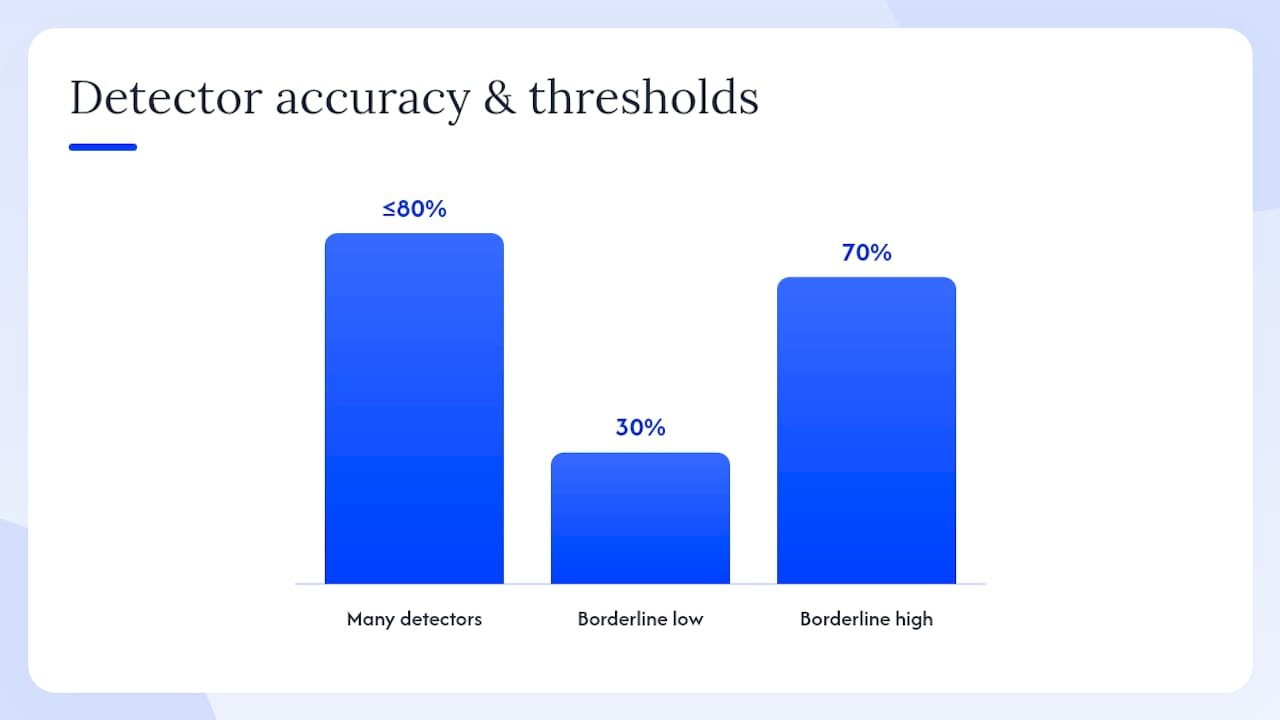
Table of Contents
- Which free AI detectors should you try right now?
- How do AI content detectors actually analyze text?
- How accurate are AI detectors, and where do they fail?
- How to run a check and interpret what you see
- What about privacy and academic integrity?
- Where is detection technology heading?
- Which types of AI content are easiest and hardest to detect?
- How to clean up text before running a detection scan
- How to handle borderline or ambiguous results
- How AI generation and detection are both evolving
- A practical checklist for a fast, defensible AI check
- Willbuckley coaching helps you build a responsible AI workflow
- Will’s take on AI detection in practice
- Sources
Which free AI detectors should you try right now?
Each tool below takes a different angle on the same problem. Knowing what each one is actually built for saves you from misreading a score.
Grammarly AI Detector
Grammarly’s detector sits inside a writing assistant most people already use, which makes it the lowest-friction starting point. Paste your text, and it highlights individual sentences it considers likely AI-generated rather than just returning a single percentage. That sentence-level granularity is genuinely useful: you can see where the writing feels formulaic, not just whether it does. The free tier covers short documents; longer texts require a paid plan. Grammarly is transparent that no detector is 100% accurate and recommends pairing automated checks with human review.
- Best for: Writers doing self-review, content editors, quick spot-checks
- Free limit: Roughly 1,000–1,500 characters per scan on the free plan
- Integrations: Chrome extension, Google Docs add-on, Microsoft Word add-in
- Output: Sentence-level highlights plus rewrite suggestions
- Privacy note: Grammarly’s privacy policy describes how submitted text is handled; review it before pasting confidential documents
GPTZero
GPTZero was built specifically with educators in mind. It returns a document-level AI probability score alongside a sentence-by-sentence breakdown, and it flags “perplexity” and “burstiness” scores separately so you can see which dimension triggered the result. The free plan is more generous than most, handling longer documents without requiring a paid upgrade. GPTZero also offers an LMS integration and a classroom dashboard, making it the most practical choice for teachers managing multiple submissions.
- Best for: Educators, academic integrity officers, students checking their own work
- Free limit: Up to approximately 5,000 characters per scan
- Integrations: Canvas LMS plugin, Chrome extension, API for institutional use
- Output: Document score, per-sentence highlights, perplexity/burstiness breakdown
- Privacy note: GPTZero states it does not use submitted text to train its models on the free tier; confirm current policy at their site
Copyleaks
Copyleaks combines AI detection with plagiarism checking in a single scan, which is a real time-saver when you need both. It supports multiple file formats (PDF, DOCX, plain text) and over 30 languages, making it the most flexible option for multilingual workflows. The free tier provides a limited number of monthly credits rather than a character cap, so heavy users will hit the ceiling quickly. Its API and LMS integrations make it a credible enterprise option too.
- Best for: Mixed-use teams, multilingual content, educators who also need plagiarism checks
- Free limit: Limited monthly credits (pages, not characters)
- Integrations: Google Classroom, Moodle, Canvas, API
- Output: AI probability score, source matching, sentence highlights
- Privacy note: Copyleaks offers a data-processing agreement for institutional users; personal-use submissions are subject to their standard policy
QuillBot AI Detector
QuillBot’s detector is the simplest of the four. Paste text, click scan, get a percentage. There’s no account required for short inputs, and the interface is clean enough that non-technical users won’t feel lost. It doesn’t offer sentence-level highlights on the free tier, so it works best as a fast triage tool rather than a detailed diagnostic. If the score comes back high, move to Grammarly or GPTZero for the sentence-by-sentence breakdown.
- Best for: Quick triage, writers doing a first-pass check, non-technical users
- Free limit: Roughly 1,200 characters per scan
- Integrations: Chrome extension; no LMS integration currently listed
- Output: Overall AI percentage score
- Privacy note: Review QuillBot’s current data policy before submitting sensitive content
Statistic callout: PCMag notes that most free AI detection tools are usable with character limits and are frequently used by educators, but all are fallible and work best for spotting generic or formulaic writing rather than confirming authorship.
How do AI content detectors actually analyze text?
Detectors don’t read text the way a human does. They run statistical analyses on patterns in word choice, sentence structure, and predictability. Understanding the method helps you interpret scores without over-trusting them.
The two core signals most tools rely on are perplexity and burstiness. Perplexity measures how predictable each word choice is given the words before it. AI models tend to pick high-probability, “safe” words, producing text with low perplexity. Burstiness measures variation in sentence length and complexity. Human writing tends to mix short, punchy sentences with longer, more complex ones; AI output often stays in a narrower band. Grammarly’s technical overview describes these as statistical signals, not definitive proof of authorship.
Beyond perplexity and burstiness, detectors also analyze:
- Word and n-gram frequencies — how often specific word combinations appear relative to large corpora of human and AI text
- Syntactic structures — whether sentence constructions follow patterns typical of transformer-model outputs
- Stylistic markers — formulaic transitions (“Furthermore,” “It is worth noting”), consistent hedging language, and repetitive paragraph shapes
- Model-trained classifiers — some tools train a secondary model to distinguish human from AI text directly, rather than relying solely on statistical features
Ahrefs’ detection overview notes that good practice is to corroborate detector results with manual review, precisely because these features can appear in human writing too.
Pro Tip: Short samples, bulleted lists, code blocks, and poetry all confuse detectors. Feed them at least 250 words of continuous prose for a meaningful result.
How accurate are AI detectors, and where do they fail?
Accuracy is the honest conversation most detector marketing avoids. The short answer: these tools are useful, but they are probabilistic, not definitive.
Multiple studies, including a 2023 Weber-Wulff analysis cited by Wikipedia, found that many detectors score below 80% accuracy, and false-positive rates can be especially high for non-native English writers and authors with atypical styles. A student who writes in short, clear sentences because English is their second language may score as “likely AI” on tools that associate simplicity with machine output.
The most common failure modes are worth knowing:
- Heavy editing or post-processing — rephrasing, rearranging, or adding deliberate stylistic variation breaks the statistical signals detectors rely on, causing edited AI text to read as human
- Short inputs — fewer than 150–200 words gives the detector too little signal; scores become unreliable
- Technical or creative text — code, poetry, and highly structured formats like legal boilerplate produce misleading perplexity readings
- Non-native speaker style — consistent, simple sentence structures can mimic AI patterns even when the author is human
- Neurodivergent writing styles — some human styles resemble patterns detectors associate with AI output, creating false positives for real authors
Grammarly itself acknowledges that no detector is 100% accurate and encourages combining automated checks with human review. That’s not a disclaimer buried in fine print; it’s the correct way to use these tools.
Key insight: A high AI-likelihood score is a reason to look more closely, not a reason to act. Treat every result as a prompt for human review, not a conclusion.
How to run a check and interpret what you see
A structured workflow produces more defensible results than a single paste-and-scan.
- Prepare your text. Strip out formatting, headers, footnotes, and metadata. Plain prose gives detectors the cleanest signal. Remove any code blocks or tables unless you’re specifically testing those elements.
- Check your sample size. Aim for at least 250 words of continuous prose per scan. If your document is longer, split it at natural section breaks, not mid-paragraph.
- Run two or three detectors. Use Grammarly for sentence-level highlights, GPTZero for the perplexity/burstiness breakdown, and QuillBot for a fast overall percentage. Disagreement between tools is itself informative.
- Review sentence-level highlights. Don’t stop at the overall score. Look at which specific sentences are flagged. Formulaic transitions and generic summary paragraphs are the most common triggers.
- Run a plagiarism check if needed. Copyleaks handles both in one pass. AI-generated text and plagiarized text are different problems, but they sometimes co-occur.
- Decide on next steps. Low AI likelihood across all tools: proceed with normal editing. Moderate or mixed results: apply the human review steps below. High AI likelihood on multiple tools: escalate.
For borderline or high results, the escalation path matters. Ask the author for a draft history or version file. Request a brief conversation about their process. Look for personal examples, specific citations, or original analysis that a language model would not generate unprompted. Ahrefs recommends corroborating detector output with manual review rather than treating any single score as conclusive.
“Detectors can help spot overly generic or formulaic writing, but they are imperfect and should not be used as sole evidence.”
PCMag
Pro Tip: Adding a personal anecdote, a specific data point, or a named example to AI-assisted text reduces false positives without hiding legitimate AI use. It also makes the content genuinely better.
What about privacy and academic integrity?
Pasting someone else’s unpublished work into an online tool raises real privacy questions. Most free detectors process text on their servers, and policies on storage and model training vary.
Before submitting any document, check these specifics for each tool:
- Does the tool store submitted text, and for how long?
- Is submitted text used to retrain or improve the detection model?
- Does the tool offer a data-processing agreement for institutional or enterprise users?
- Is there an option to opt out of data retention?
GPTZero states it does not use free-tier submissions for model training. Grammarly’s policy covers how text is processed and stored. Copyleaks offers institutional data agreements. QuillBot’s policy should be reviewed directly before submitting sensitive material. Policies change, so check the current version at each tool’s site rather than relying on cached summaries.
For educators, the stakes are higher. Using a detector score as the sole basis for an academic integrity decision is both procedurally risky and ethically problematic. A defensible classroom process looks like this:
- Establish and communicate a written AI use policy before assignments are submitted
- Use detector results as one input among several, not as proof
- Give students the opportunity to explain their process and provide supporting evidence (notes, drafts, sources)
- Document every step of the review process
Pro Tip: Before running a student’s work through any online detector, confirm your institution’s data-handling policies. Some schools prohibit uploading student work to third-party platforms without explicit consent.
For responsible AI use in broader marketing and content workflows, the Willbuckley blog covers ethical guidelines and transparency strategies that apply well beyond the classroom.
Where is detection technology heading?
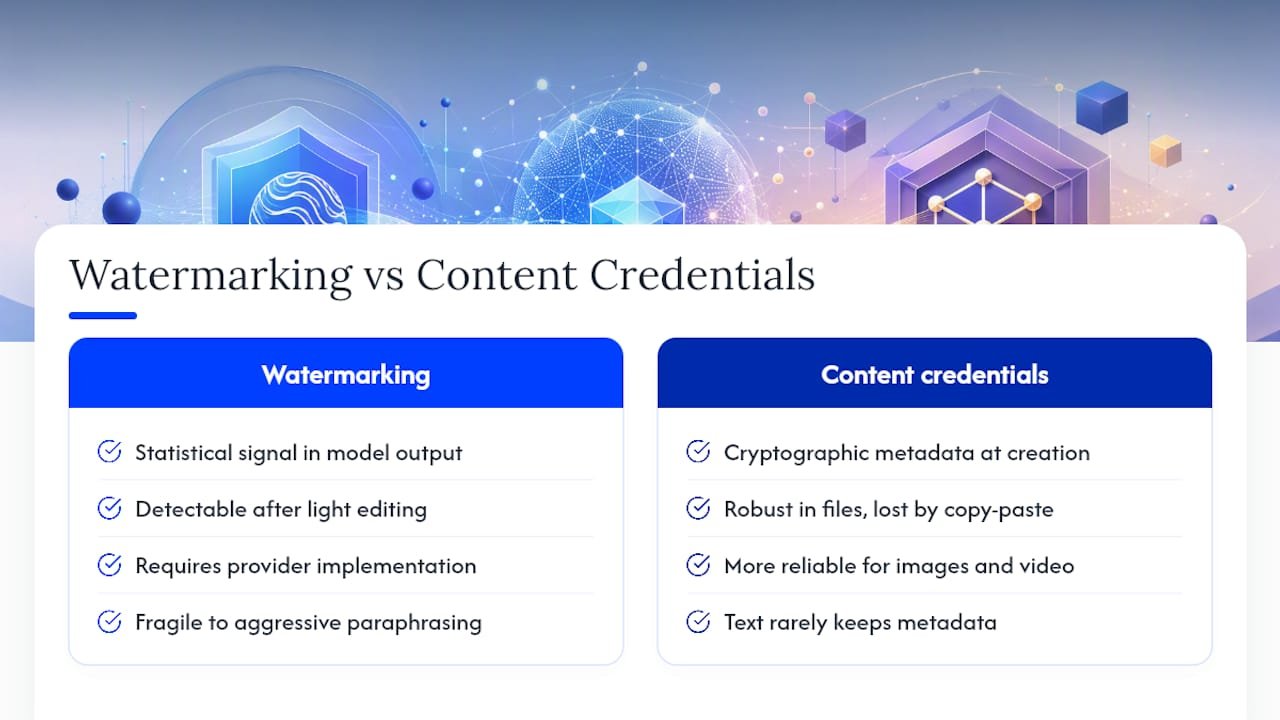
Two approaches are generating the most research attention right now: watermarking and content credentials.
Watermarking embeds a statistical signal into AI-generated text at the model level, making it detectable even after light editing. The concept is promising. In practice, it faces two problems: robustness (aggressive paraphrasing can strip the signal) and adoption (watermarking only works if the model provider implements it, and most have not done so universally). The Conversation’s analysis notes that watermarking and metadata approaches are not yet universal or reliable across all model outputs.
Content credentials (the C2PA standard, backed by Adobe and others) attach cryptographic metadata to files at creation, recording whether AI tools were used. This is more reliable than statistical detection for images and video, but text documents rarely carry this metadata through copy-paste workflows.
“The most reliable verification currently pairs automated checks with careful human review of factual accuracy and unique voice.”
The Conversation
Google’s public guidance reframes the whole debate usefully: focus on producing original, useful content and use detectors as a supplementary check rather than a compliance mechanism. Ahrefs’ large-scale analysis found that higher AI content levels often correlate with lower indexation and impressions, but content quality — depth, originality, and usefulness — remains the decisive factor for ranking.
Pro Tip: When evaluating a detector’s trustworthiness, look for two things: does it explain which features triggered the flag, and how recently was its model retrained? Tools that answer both questions openly are more reliable than those that return a score with no explanation.
Which types of AI content are easiest and hardest to detect?
Not all AI-generated text looks the same to a detector. The type of content matters a lot.
Essays and long-form articles are the most reliably detected content type. They contain enough continuous prose for perplexity and burstiness analysis to work properly, and AI models tend to produce consistent paragraph structures and generic transitions in this format.
Summaries and abstracts are moderately detectable. They’re short, which reduces signal quality, but the formulaic structure of AI summaries (topic sentence, three supporting points, closing restatement) is a recognizable pattern.
Code is essentially undetectable by text-based AI detectors. Code has its own syntax rules that have nothing to do with natural-language perplexity. Running code through a prose detector produces meaningless results.
Creative writing is the hardest category. AI can produce stylistically varied fiction, and human creative writing can be highly structured. Detectors perform poorly here, and false positives for human authors are common.
Social media posts and short-form copy are too short for reliable detection. Under 150 words, most tools acknowledge their scores are unreliable. For AI-driven social content workflows, human editorial review is more practical than automated detection.
How to clean up text before running a detection scan
The quality of your input directly affects the quality of your result. A few minutes of preparation can prevent misleading scores.
Remove non-prose elements first. Tables, bullet lists, numbered lists, headers, and code blocks all distort perplexity readings. If you want to check the prose sections of a document, extract just those paragraphs.
Strip formatting metadata. When copying from Google Docs or Microsoft Word, paste into a plain-text editor (Notepad, TextEdit in plain-text mode) first, then copy again into the detector. Hidden formatting characters can interfere with tokenization.
Normalize whitespace. Extra line breaks, double spaces, and special characters (smart quotes, em dashes copied from PDFs) can fragment the text in ways that confuse the detector’s tokenizer.
Check your word count. Below 200 words, treat any score as directional at best. Between 200 and 500 words, results are more reliable but still worth cross-checking. Above 500 words of clean prose, most detectors produce their most consistent output.
For teams integrating detection into larger AI-driven content workflows, building these pre-processing steps into a standard operating procedure saves time and reduces inconsistent results across reviewers.
How to handle borderline or ambiguous results
A score in the 30–70% AI-likelihood range is the hardest to act on, and it’s also the most common outcome for edited or hybrid content.
The first thing to do is resist the urge to treat a borderline score as a verdict either way. A 45% AI-likelihood score means the detector is genuinely uncertain. That uncertainty is informative: it usually means the text has been edited, combines human and AI writing, or was written in a style the detector’s training data doesn’t handle well.
When results are ambiguous, shift your focus from the overall score to the sentence-level highlights. Look for clusters of flagged sentences. A document where three consecutive paragraphs are flagged and the rest are clean suggests a specific section was AI-generated, not the whole piece. That’s a much more useful finding than a single percentage.
Ask yourself whether the flagged sections are also the weakest sections editorially. AI-generated text tends to be generic, hedge-heavy, and light on specific examples. If the flagged paragraphs are also the ones that feel vague or interchangeable, that’s a meaningful convergence of signals.
If you’re an educator or editor making a consequential decision, a borderline score should trigger a conversation with the author, not a conclusion. Request a draft history, ask about their research process, or ask them to expand on a specific claim in their own words. The goal is to understand the writing process, not to catch someone out.
How AI generation and detection are both evolving
The gap between generation capability and detection capability has been widening. GPT-4, Gemini, and Claude 3 produce text that is statistically closer to human writing than earlier models, which means detectors trained on GPT-3-era output are less reliable against current models.
Detection tools are responding by retraining more frequently and adding model-specific classifiers. GPTZero, for example, updates its model regularly and has added specific detection layers for GPT-4 and Gemini outputs. Grammarly has similarly updated its detection engine as new models have proliferated.
The practical implication: a detector that was accurate six months ago may be less accurate today if it hasn’t been retrained against current model outputs. This is why the update cadence of a tool is a genuine trust signal, not just a marketing claim.
Multimodal AI (text plus image generation in a single prompt) is creating new detection challenges. Current text detectors don’t analyze images, and image detectors don’t analyze text. Hybrid content requires hybrid review workflows, and no single free tool handles both well yet.
A practical checklist for a fast, defensible AI check
Here’s the workflow I use and recommend for anyone who needs results they can stand behind.
- Confirm you have permission to submit the text to an online tool (check privacy policies and institutional rules).
- Clean the text: remove formatting, lists, code, and anything under 200 words.
- Run the cleaned text through two detectors — Grammarly for sentence highlights, GPTZero for the perplexity breakdown.
- Screenshot and save both results with the date and document title.
- If both tools return moderate to high AI likelihood, run a plagiarism check through Copyleaks.
- Review the sentence-level highlights manually. Note which sections are flagged and whether they’re also the weakest editorially.
- If the decision is consequential (academic, editorial, legal), request author confirmation: draft history, notes, or a brief conversation about process.
- Document your findings and the steps you took before acting on them.
The most important thing to remember is that E-E-A-T signals — original analysis, specific examples, genuine expertise — are what make content worth reading and what detectors cannot replicate. A piece that scores low on AI likelihood but says nothing original is still poor content. A piece that scores moderate but contains real insight and specific evidence is worth keeping. Use detectors to flag, not to judge.
Willbuckley coaching helps you build a responsible AI workflow
Running one-off checks is a start. Building a repeatable, documented process that your whole team or classroom trusts is a different skill, and that’s where coaching makes the difference.

Willbuckley’s coaching and training resources are built for affiliate marketers, content creators, and educators who want to integrate AI responsibly without guesswork or compliance anxiety. Will Buckley covers practical workflow design: which tools to use at each stage, how to document your process, how to communicate AI use transparently to your audience, and how to build content that passes both automated checks and human scrutiny. Sessions focus on evidence-based decisions, not vendor hype. If you’re ready to move from ad-hoc checks to a workflow you can defend, explore the coaching resources at Willbuckley and take the first step toward a process that holds up.
Will’s take on AI detection in practice
The conventional wisdom treats AI detection as a binary: either the content is AI-generated or it isn’t. That framing is wrong, and it leads people to make bad decisions.
Almost every piece of content produced in 2026 exists on a spectrum. A writer who used ChatGPT to draft an outline, then rewrote every paragraph in their own voice, then added original research — is that AI content? A detector might say yes. A thoughtful editor would say no. The detector is measuring statistical patterns. The editor is measuring value.
The tools covered here are genuinely useful. Grammarly’s sentence highlights can show you exactly where writing becomes generic. GPTZero’s perplexity breakdown can reveal structural patterns worth examining. But the moment you treat a percentage score as a conclusion rather than a signal, you’ve misunderstood what these tools do.
The more useful question isn’t “was AI used?” It’s “does this content reflect real expertise, original thinking, and genuine usefulness to the reader?” Those are the E-E-A-T signals Google actually evaluates, and they’re the signals a human reviewer can assess far better than any algorithm.
Use the detectors. Run the workflow. But keep the human judgment at the center of the process, not at the end of it.
Sources
The sources below are the primary references used throughout this guide.
- AI Detector – Grammarly
- How do AI-detection tools actually work — and are they effective? – The Conversation
- Artificial intelligence content detection – Wikipedia
- How to detect AI-generated content – Ahrefs blog
- How to detect ChatGPT-written text – PCMag
- Google Search and AI-generated content – Google Developers blog