

Pick a simple, flat-priced all-in-one or lightweight CRM with built-in automation. Skip anything built for sales teams. That’s the whole verdict.
Here’s why it matters if you’re running the business by yourself. First, time. A CRM built for a team assumes someone else is handling onboarding, data entry, and admin while you sell. You don’t have that person. Second, app fatigue. Every extra tool you stack on top of a CRM is another login, another monthly charge, another thing that breaks during a client call.
Your next step takes less time than reading the rest of this article. Open whatever CRM you’re evaluating (or already pay for) and do this:
- Import a sample of 10 to 20 contacts from a spreadsheet or your email
- Turn on exactly one automation, like a follow-up reminder three days after first contact
- Watch what happens on day three
If the automation fires and the contact record looks clean, you’ve just tested the two things that actually matter for a one-person business: low setup friction and reliable follow-through.
Key Takeaways
A flat-priced, automation-ready CRM beats an enterprise system for solopreneurs because it saves setup time and avoids per-seat cost creep as the business grows.
| Point | Details |
|---|---|
| Choose flat pricing | Avoid per-seat CRMs; a predictable monthly fee prevents costs from creeping as you add help. |
| Prioritize nine core features | Focus on contact simplicity, automation, invoicing, and mobile access before anything more advanced. |
| Set up in one afternoon | A working CRM with two automations and synced email takes under 90 minutes to build. |
| Automate one thing at a time | Roll out a single follow-up sequence, measure reply rates, then expand rather than automating everything at once. |
| Consider guided setup | Willbuckley’s coaching offers done-with-you CRM selection and setup for solopreneurs short on time. |
Table of Contents
- What a CRM for Solopreneurs Actually Solves
- What Features Actually Matter for a One-Person Business?
- How Much Should a Solopreneur CRM Actually Cost?
- Which Automations Actually Save Time, and Which Backfire?
- How Fast Can You Actually Set Up a Working CRM?
- How Do You Use AI Without Losing Your Own Voice?
- What Integrations Does a Solopreneur CRM Actually Need?
- Does It Work Well on Your Phone, and Does It Stay Low-Maintenance?
- How Should Solopreneurs Handle Privacy and Security?
- What Trips Up Solopreneurs Using a CRM, and How Do You Fix It?
- How Do You Keep CRM Data Clean as Your Client List Grows?
- How Do You Scale a CRM Setup Without Starting Over?
- What the Data Actually Tells Solopreneurs to Prioritize
- A Faster Path if You Want Someone Else to Handle Setup
- Sources
What a CRM for Solopreneurs Actually Solves
The pain isn’t abstract. If you’re running solo, you already know the moments: a lead goes quiet for two weeks because you forgot to circle back, a client asks about a conversation from four months ago and you’re scrolling through email trying to reconstruct it, or you send a proposal at the wrong price because you copied last month’s document instead of pulling the client’s actual rate.
A CRM for solopreneurs exists to stop those three failures specifically. It’s not there to build a sales funnel with seventeen stages or score leads by demographic. It’s there to remember what you’d otherwise forget.
Here’s what minimal CRM functionality actually returns in value for a solo operator:
- A single source of truth for every contact. No more hunting across three inboxes and a notes app.
- Automated follow-up nudges. The system tells you who’s gone cold instead of you noticing three weeks too late.
- One-click access to history. Every email, invoice, and note tied to a contact, pulled up in seconds.
- Faster billing. Client details and rates live in one place instead of being retyped into every invoice.
You’ll know you’ve outgrown spreadsheets when a few signals show up together. If you’re juggling more than 15 to 20 active clients, if you can point to two or more missed follow-ups in the last month, or if you’ve ever sent a client the wrong price because you copied an old quote, spreadsheets have become the bottleneck, not the solution.
Pro Tip: Count your missed follow-ups for one week before switching tools. If you can’t remember without checking, that’s your answer. A CRM’s entire value for a solopreneur comes down to remembering things so you don’t have to.
Enterprise systems solve a different problem: coordinating handoffs between multiple salespeople. Microsoft Dynamics 365, for example, is built for exactly that complexity, with per-seat pricing and configuration options that assume an IT department is standing by. None of that helps you when the “team” is you and maybe a virtual assistant three hours a week.
What Features Actually Matter for a One-Person Business?
Enterprise CRM feature lists run fifty items deep. You need nine, maybe ten. Here’s the checklist, ranked by what actually moves the needle for independent workers.
Must-haves:
- Simple contact fields you can customize without a developer, so you can tag lead source or campaign without fighting the interface.
- Flat, predictable pricing with no per-seat surprises as you add a subcontractor or assistant.
- Built-in invoicing or proposals, so billing lives next to the client record instead of in a separate app.
- At least one real automation trigger, like a follow-up sequence or reminder, without needing a third-party workflow tool.
- A usable mobile app, since a lot of your client contact happens between meetings, not at a desk.
- Native email and calendar integration, so you’re not manually logging every call.
Nice-to-haves:
- Reusable templates for proposals and emails
- Clean CSV import/export, so you’re never locked in
- A basic client portal for shared files or approvals
Ignore these early: lead scoring, multi-level sales pipelines, and territory management. Those exist to coordinate teams across regions and quotas. As a solo operator, they add configuration time with zero payoff. Pipedrive’s own breakdown of solopreneur priorities backs this up. Simple pipelines, automation, and mobile access rank far above anything built for team coordination.
How Much Should a Solopreneur CRM Actually Cost?
Per-seat pricing is designed around teams, and it punishes you the moment you’re not one. A tool priced at $25 per user per month sounds reasonable until you realize the “per user” part doesn’t shrink just because there’s one of you doing the job of a sales rep, a bookkeeper, and a project manager combined.
Flat pricing works differently. You pay one number, usually somewhere between $15 and $50 a month, and every feature inside that plan is yours regardless of how many hats you’re wearing.
Here’s where the math actually gets interesting. If you’re stacking separate tools, a standalone CRM, a scheduling app, an invoicing platform, and a proposal tool, you’re often paying for four subscriptions instead of one. Plutio’s comparison of solo-business tooling makes the case that an all-in-one platform at a flat monthly fee can replace three or four separate apps, which adds up over a 6 to 12 month stretch. G2 reviewers echo this, pointing specifically to Plutio’s combined invoicing and project management as the reason they dropped other subscriptions entirely.
The real cost isn’t the subscription. It’s what happens when four tools stop talking to each other and you’re the one reconciling the mess by hand.
A few ways to keep total cost of ownership down:
- Use free tiers strategically while your client list is small. Forbes Advisor’s testing found Bigin’s free plan genuinely usable for early-stage solopreneurs, not just a stripped-down trial.
- Favor flat-rate vendors over anything that charges per contact or per automation.
- Check API and Zapier costs before you commit. Some platforms charge extra once you connect more than one or two outside tools, which erases the savings you thought you were getting. Resources like Act!’s pricing breakdown are worth a look if you want to understand how per-seat pricing traps show up in practice.
Which Automations Actually Save Time, and Which Backfire?
Automation is where solopreneurs either win back hours or accidentally sound like a robot. The line between the two is thinner than most vendor marketing admits.
Four automations consistently earn their keep:
- Follow-up sequences that fire automatically after a set number of days with no reply.
- Invoice reminders that chase late payments without you having to send an awkward email.
- Task automation that creates a to-do the moment a deal status changes.
- Lead capture routing, so a form submission on your site lands directly in your CRM instead of your inbox.
AI adds a second layer on top of that, and it’s genuinely useful when scoped correctly. Drafting follow-up emails and proposal language, summarizing a client’s history before a call, and auto-filling contact fields from an email signature all save real time. The insight-level warning here matters. AI works best as a personal assistant handling repeatable text generation, not as a stand-in for the actual relationship. The moment a client can tell they’re getting a form letter, you’ve lost the thing that made you worth hiring over a bigger, more impersonal shop.
Guardrails keep it human: always read AI-drafted messages before sending, keep a swipe file of your own best-performing emails to train tone against, and never let automation touch the first message in a new relationship.
Pro Tip: Roll out automation one piece at a time. Turn on a single follow-up sequence, track open and reply rates for two weeks, then decide whether to expand it. Solopreneurs who automate everything at once usually can’t tell which piece is actually working, and they can’t tell which piece is quietly annoying clients either.
A tool like PromptChief can help you organize and reuse the prompts that consistently produce good drafts, so you’re not rebuilding your AI instructions from scratch every time.
How Fast Can You Actually Set Up a Working CRM?
You don’t need a week. You need an afternoon, and a specific order of operations.
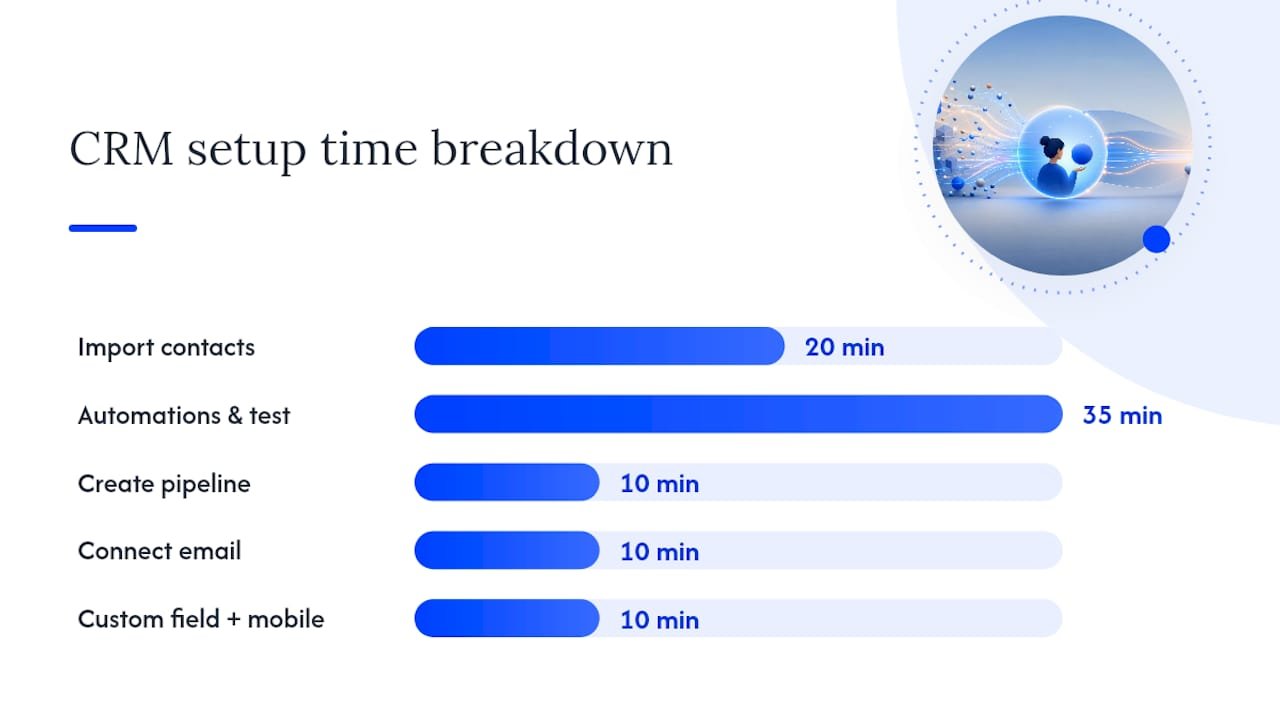
- Export and import your contacts (20 minutes). Pull a CSV from your email or spreadsheet and import it. Expect a few duplicates; plan to clean them after, not before.
- Create one pipeline (10 minutes). Three or four stages max: New Lead, In Conversation, Proposal Sent, Client. Resist the urge to build more.
- Set two automations (20 minutes). One follow-up reminder, one invoice reminder. That’s enough for week one.
- Connect your email (10 minutes). Native email sync means you stop manually logging every conversation.
- Add one custom field (5 minutes). Something specific to your business, like lead source or campaign name, so you can personalize later.
- Sync the mobile app (5 minutes). Log in on your phone and confirm contacts appear.
- Test one automation end-to-end (15 minutes). Send yourself a test lead and confirm the reminder actually fires.
Total time: under 90 minutes if you don’t get distracted customizing things nobody asked for. Vendor testing on tools like Bigin shows contact creation can happen in under a minute once the account is live, which is the kind of pace that makes a single-afternoon setup realistic rather than aspirational.
Before you call it done, check three things: the test automation actually fired, a sample invoice generates with the correct client details pulled in automatically, and your mobile app shows the same contact count as your desktop view.
Common hiccups are predictable. CSV imports fail most often because of mismatched column headers, so check that “Email” in your spreadsheet matches the field name the CRM expects. Duplicate contacts usually come from importing the same list twice or syncing an email inbox that already had some of those contacts saved as drafts. Most CRMs have a merge tool. Use it before your list grows past the point where manual cleanup is realistic.
How Do You Use AI Without Losing Your Own Voice?
The mistake I see solopreneurs make with AI-assisted outreach isn’t using it too much. It’s using it without teaching it anything first.
Training an AI assistant on your own past wins works better than starting from a generic prompt. Feed it the three or four emails that actually got replies, the proposal language that closed deals, the tone you use with long-term clients versus brand-new leads. Custom fields tracking source and campaign metadata make this sharper still, since you can prompt the AI differently for a cold lead from a webinar versus a warm referral.
Run small tests before trusting any of it. Send an AI-drafted follow-up to five contacts and compare reply rates against your own manually written version from the previous month. If the numbers hold up, expand. If they don’t, the AI needs more training data, not more prompting.
The gap between a generic AI email and one that sounds like you comes down entirely to what you feed the model beforehand. Most solopreneurs skip that step and then blame the tool when the output feels hollow.
I’ll be adding specific before-and-after examples and client results here as that data comes in.
— Will
What Integrations Does a Solopreneur CRM Actually Need?
Three integrations do almost all the heavy lifting: email, calendar, and invoicing or payment.
Email integration matters most because it eliminates the single biggest time sink in solo CRM use: manually logging conversations. When your inbox syncs natively, every reply, every sent proposal, and every client question shows up automatically on the contact record. You stop copy-pasting.
Calendar integration closes the loop on follow-through. When a client books a call, that appointment should show up automatically tied to their contact record, not live separately in Google Calendar with no connection back to your CRM notes.
Invoicing and payment integration is where a lot of time actually gets saved, because it removes duplicate data entry entirely. If your CRM already has the client’s name, rate, and project details, generating an invoice should take seconds, not a re-typed form in a separate app. Browser extension tools, like lead clippers that pull contact details directly from a webpage, add another layer of speed here. OnePageCRM’s lead clipper is a good example of how a small utility shaves minutes off every new contact you capture.
The pattern across all three: the fewer times you retype the same information, the more the CRM is actually working for you instead of adding a new chore.

Does It Work Well on Your Phone, and Does It Stay Low-Maintenance?
If you can’t check a client’s history from your phone between meetings, the CRM isn’t built for how solopreneurs actually work. A lot of your client contact happens in transit, not at a desk.
A usable mobile app means a few specific things: contact records load fast, you can add a note or log a call in under 30 seconds, and automations you set on desktop still fire when you’re not logged in. Some CRMs technically have a mobile app that’s really just a stripped-down browser wrapper. Test this before committing; open the app, pull up a contact, and try adding a note while standing up, not sitting at your desk.
Low-maintenance workflows come down to defaults, not features. A CRM that requires you to manually update a pipeline stage after every single client interaction will get abandoned within a month. The better setups update status automatically based on triggers, like an invoice being paid moving a contact from “Proposal Sent” to “Client” without you touching anything.
The test for low maintenance is simple: if you stopped opening the CRM for two weeks, would it still have accurate data when you came back? If the answer is no, the workflow depends too much on manual updates, and it will fall apart the first time you get busy with actual client work.
How Should Solopreneurs Handle Privacy and Security?
You’re the only line of defense for client data, and that’s a different risk profile than a company with an IT department managing access controls.
A few things matter more than the rest. Two-factor authentication should be non-negotiable, since a compromised password is the single most common way small-business accounts get breached. Check where the CRM actually stores data and whether it complies with regulations relevant to your clients, particularly if you work with clients in the EU, where GDPR obligations apply regardless of how small your business is.
Export capability matters for a different reason: if a vendor shuts down or raises prices past what you can justify, you need to be able to pull your client data out cleanly and move it elsewhere. Confirm CSV export works before you commit, not after you’ve built two years of history in a platform.
Be specific about what you’re storing. Client payment details, in particular, should route through a payment processor with its own compliance standards rather than sitting as plain text in a CRM note field. If a CRM’s invoicing integration handles payment collection directly, check that it’s using a compliant processor on the back end rather than storing card numbers itself.
What Trips Up Solopreneurs Using a CRM, and How Do You Fix It?
The most common failure isn’t picking the wrong CRM. It’s picking the right one and then not using it consistently.
Three patterns show up again and again. First, the “set it and forget it” trap, where someone sets up automations in week one, gets busy, and stops adding new leads to the system for a month. Fix: block 10 minutes at the end of each day to add anything new, rather than batching it weekly when you’ll forget half of it.
Second, over-customization before you’ve used the tool long enough to know what you need. Solopreneurs sometimes spend three hours building custom fields and pipeline stages before entering a single real contact. Fix: use the default setup for the first two weeks, then customize based on what you actually found missing.
Third, treating the CRM as a data dump instead of a working tool, entering information but never using it to trigger action. A note that says “follow up next week” only has value if the system actually reminds you next week. Fix: every note or task you create should have a scheduled follow-up date attached, not just sit as a passive record.
How Do You Keep CRM Data Clean as Your Client List Grows?
Clutter builds quietly. One duplicate contact here, one stale lead from eight months ago there, and eventually your CRM becomes as unreliable as the spreadsheet it replaced.
Set a recurring 15-minute review, monthly is usually enough for a solo operator, where you merge duplicates, archive dead leads that haven’t responded in 90 days, and check that custom fields are actually being filled in consistently rather than left blank half the time.
Standardize how you enter data from day one. If you sometimes write “John Smith” and other times “J. Smith,” your CRM will treat them as two different people, and your automations will misfire because they’re only tracking half the actual history. Pick a format for names, company names, and phone numbers, and stick to it.
Archive instead of delete. A dead lead from a year ago might come back, and deleting the record erases the context you’d need to pick the conversation back up naturally. Most CRMs let you mark a contact as inactive without losing the history attached to it.
Watch for automation-generated clutter specifically. If your lead capture routing pulls in every newsletter signup as a full contact record, your CRM fills up with people who were never actually sales prospects. Filter those at the point of capture, not after your contact count has already ballooned past the point where cleanup feels manageable.
How Do You Scale a CRM Setup Without Starting Over?
The setup that works at 10 clients won’t automatically work at 100, but you don’t need to rebuild from scratch if you plan the transition points in advance.
The first scaling signal is usually needing a second pipeline. A solopreneur who starts offering a second service line, coaching alongside consulting, for example, benefits from separating those into distinct pipelines rather than cramming every deal into one generic flow.
The second signal is adding help. Even a part-time virtual assistant changes what you need from a CRM, since you’re now managing permissions and making sure someone else’s updates don’t create duplicate entries or overwrite your notes. Flat-pricing tools sometimes cap at one user, so check that upgrade path before you actually need it.
The third signal is outgrowing your automation logic. What worked as two simple sequences at 15 clients might need branching logic at 75, where different lead sources trigger different follow-up sequences instead of one generic path for everyone.
The core principle: add complexity only when a specific pain point demands it, not because a bigger business “should” have a more complex system. A CRM that scales well lets you add pipelines, users, and automation branches incrementally, without forcing a full migration to a different platform every time your business grows.
What the Data Actually Tells Solopreneurs to Prioritize
Most CRM advice online is written for teams and then awkwardly retrofitted for solo operators with a paragraph about “simplifying” enterprise features. That’s backwards. The research on what actually works for one-person businesses points somewhere more specific: start minimal, automate one thing at a time, and resist the pull toward feature-rich platforms that assume you have a team behind you.
The conventional wisdom oversells customization. Vendors love to demo advanced pipeline logic and scoring models because it looks impressive, but for a solo operator, every hour spent configuring an unused feature is an hour not spent on client work. Prioritize speed to value: can you import contacts and get one automation running within an afternoon? If not, the tool is wrong for your stage, regardless of how many features it lists.
What the reader should do first is small and specific. Pick a flat-rate tool, import a sample list, turn on exactly one automation, and judge the platform on that single result before committing further.
— Will
A Faster Path if You Want Someone Else to Handle Setup
Everything above works if you’re willing to spend an afternoon building it yourself, and plenty of solopreneurs will do exactly that. But if your afternoon is already booked with client calls, there’s a shorter path.
Willbuckley’s coaching includes hands-on help choosing the right CRM for your specific business, then walking through the same one-afternoon setup this article describes, except with someone doing it alongside you instead of you troubleshooting a CSV import alone at 9pm.

The service covers CRM selection based on how you actually work, not a generic feature checklist, plus setup of pipelines, automations, and AI templates trained on your own past messaging rather than generic prompts. It’s built specifically for affiliate marketers and solopreneurs who understand the value of automation but don’t have spare hours to figure out the configuration themselves.
If that sounds like a better use of your time than another afternoon of trial and error, you can get started with Willbuckley’s coaching and have your CRM running with a trained AI assistant behind it before the week is out. You can also browse the blog for more AI-driven workflow examples if you want to see the approach in action first.