

The highest-leverage moves in AI YouTube SEO are cleaning up your transcript, adding real chapters, and rewriting your description into a direct-answer summary. These three fixes improve both traditional YouTube rankings and your odds of getting cited by AI search tools. AI can draft all three fast, but you still have to check every word before you publish.
TL;DR:
- Correcting and uploading accurate transcripts significantly improves both YouTube rankings and AI citation likelihood by providing clearer, more indexable content.
- Adding descriptive chapters with meaningful titles increases the chances of being quoted by AI tools, especially in long-form videos with timestamps.
- Rewriting the initial video description into a concise, direct-answer summary can enhance search visibility and make your content more appealing to AI answer engines.
- Small, prioritized updates to a batch of videos, focusing on transcripts and chapters, yield gradual but meaningful improvements in both search and AI citation over time.
- AI tools can assist with these optimizations, but human review and editing remain essential for accuracy, effective headlines, and compliance with platform policies.
Table of Contents
- The 30-Minute Checklist to Fix an Existing Video Today
- How AI Citation and YouTube SEO Overlap
- A Step-by-Step Workflow to Optimize Your Back Catalog
- Which AI Tools Fit Which Task
- How to Measure Whether Any of This Worked
- Why This Advice Holds Up
- An Editorial Take on Where to Spend Your Time
- Want This Done Faster? Here’s the Shortcut
- Sources
- FAQ
The 30-Minute Checklist to Fix an Existing Video Today
You don’t need to rebuild your channel to see movement. Pick one underperforming video and work through this sequence.
- Download the auto-captions, correct every misheard word and missing punctuation mark, and re-upload as a clean SRT or VTT file.
- Add timestamped chapters with descriptive titles, not “Intro” or “Part 2.” Treat each chapter title like a mini headline.
- Rewrite the first 200 to 300 words of your description into a direct-answer summary that states your video’s core conclusion up front.
- Add a short call to action and, if you have a blog or site, embed the video there with a matching write-up.
- Check your thumbnail and title last, and only touch them if your click-through rate is genuinely underperforming for your niche.
That whole sequence takes somewhere between 30 and 90 minutes per video, depending on how messy the original captions are.
How AI Citation and YouTube SEO Overlap
YouTube’s own ranking guidance still centers on watch time, click-through rate, and viewer satisfaction, not raw view counts. That has not changed. What’s changed is that a second audience is now reading your video: AI answer engines that pull from transcripts and descriptions instead of watching the footage.
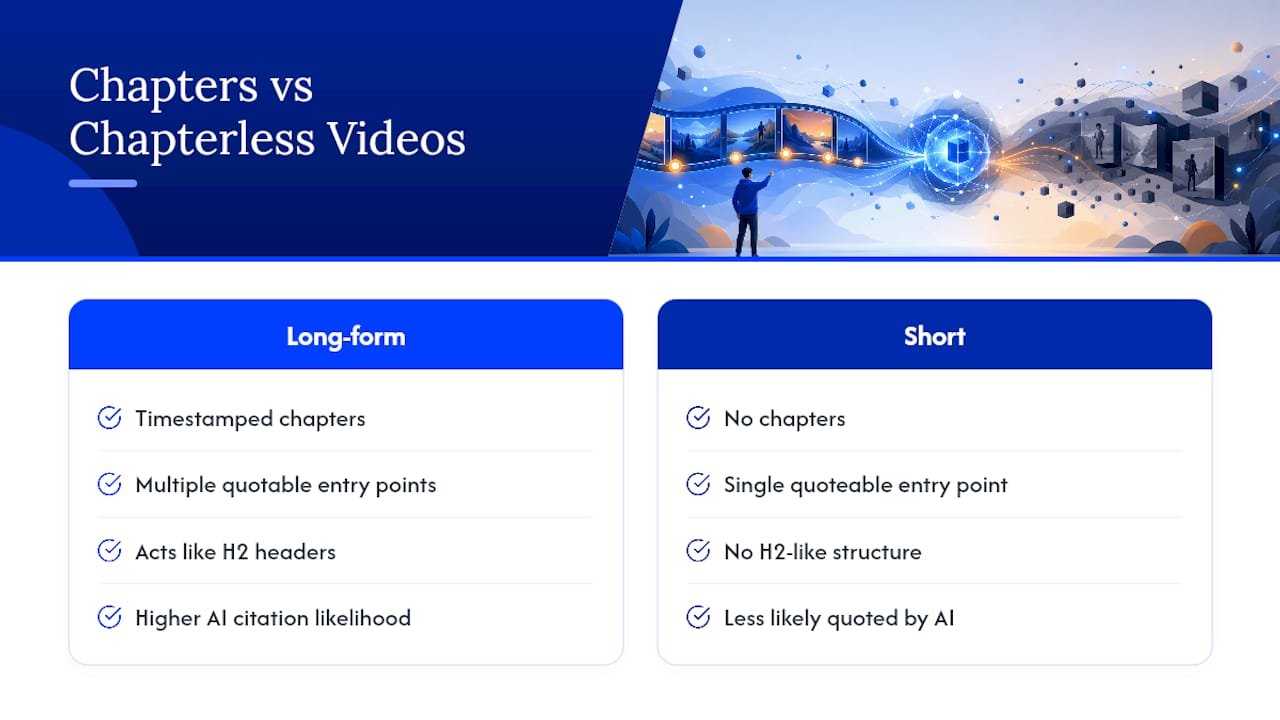
Similarweb’s analysis found that description length and chapter structure show a modest correlation with AI citations, with long-form, timestamped videos far more likely to get quoted by AI tools than short, chapterless ones. Chapters do double duty here. They act like H2 headers inside your video, and they multiply the number of quotable entry points an AI system can cite from a single upload.
The practical takeaway: fix your transcript and chapters before you chase another thousand views. A messy, uncorrected caption file confuses both YouTube’s indexing and any AI system trying to extract a clean answer from your content. Clarity at the transcript level pays off twice.
A Step-by-Step Workflow to Optimize Your Back Catalog
Don’t try to fix every video at once. Work through this order on a small batch first.
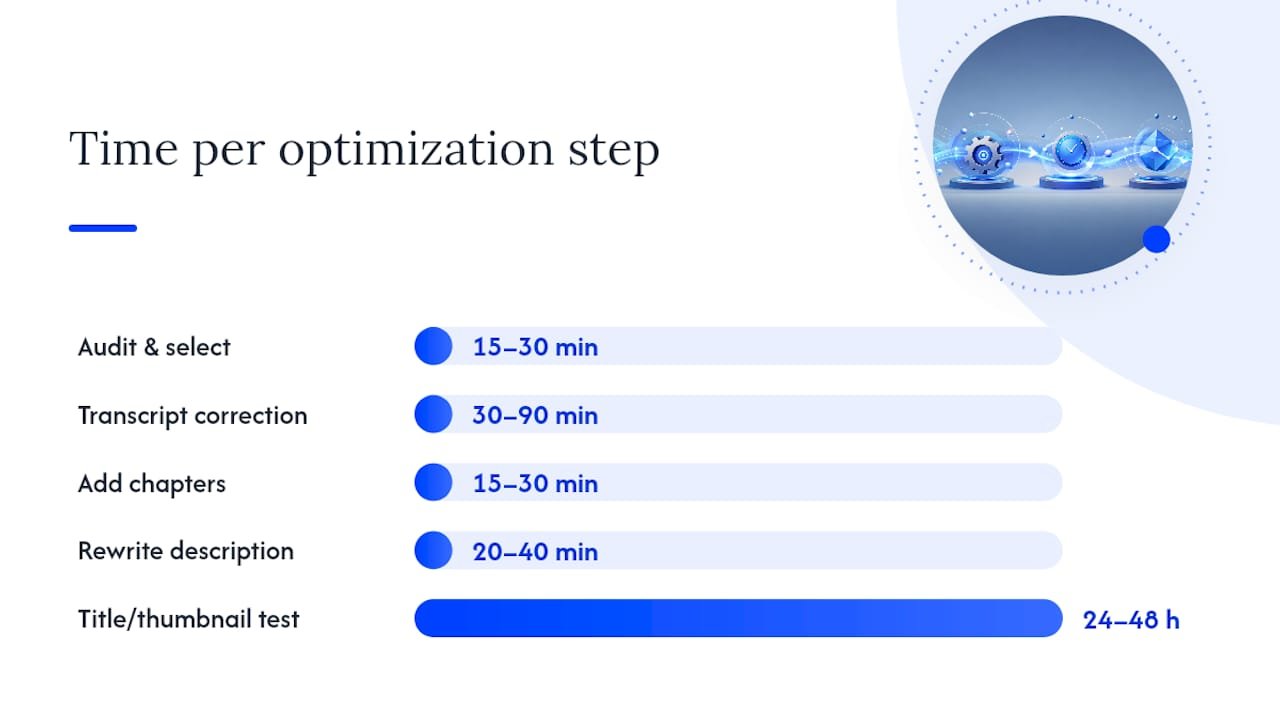
- Audit and select 5 to 10 priority videos (15 to 30 minutes). Pick videos with decent watch time but weak search visibility. Export their captions.
- Correct the transcript (30 to 90 minutes per video). Replace auto-generated captions with a cleaned SRT or VTT file, fixing names, numbers, and jargon the auto-captioner mangles.
- Add descriptive chapters (15 to 30 minutes). Write timestamp titles that describe what’s actually said, not generic labels.
- Rewrite the description (20 to 40 minutes). Lead with a 200 to 300 word direct-answer summary before any links or hashtags.
- Test small title or thumbnail changes during the 24 to 48 hour audition window, when YouTube weighs new videos most heavily for initial distribution, then track CTR and retention.
- Decide: refresh or republish. Minor metadata fixes rarely need a new upload. Reserve republishing for videos where the core content itself is outdated.
Pro Tip: A title swap mostly affects your audition-window CTR. If you’re short on time, skip the title test and put that hour into transcript correction instead. It moves both YouTube and AI citation signals at once.
If you want a faster path through keyword selection before you even start filming, Willbuckley’s AI keyword research workflow is worth reading alongside this checklist.
Which AI Tools Fit Which Task
Match the tool to the job instead of expecting one app to handle everything.
- Transcript editors with human review: mandatory, not optional. YouTube’s own optimization guidance treats accurate captions as an accessibility requirement, and accessibility and AI-citation quality run on the same track.
- Title and description generators: useful for a first draft. Keep the prompt short and specific, then edit every claim yourself for accuracy and for a hook that actually earns the click.
- Chapter and timestamp assistants: good at drafting a rough outline of your chapters from a transcript. Refine the wording so each title reads like a real headline, not a placeholder.
- Schema and automation scripts: if you embed videos on your own site, a VideoObject schema script helps Google index the watch page properly, which matters far less for pure YouTube-hosted uploads.
- AI-visibility analytics: newer category, still maturing. Expect slower, noisier signal than YouTube Studio gives you.
Pro Tip: If you already have teleprompter-style scripts for shorter videos, Willbuckley’s AI script templates can shortcut the chapter-drafting step, since a well-structured script often maps directly onto chapter breaks.
For a broader look at using AI across the SEO stack beyond video, AmmarAI’s guide on responsible AI use for SEO covers ground this article doesn’t.
How to Measure Whether Any of This Worked
Track two separate scoreboards, because they move on different timelines.
For YouTube performance, watch impressions, CTR, average view duration, watch time, session starts, and the retention graph shape. For AI visibility, monitor citation mentions directly or use a dedicated AI-visibility tool, and expect that signal to lag well behind your YouTube metrics.
- Run experiments in fixed windows: check at 24 to 48 hours, again at 7 days, and again at 30 days.
- Keep a small control group of untouched videos to compare against.
- Expect modest, not dramatic, movement in the first 30 days on most channels.
Chrome Cactus Studio’s notes on AI search optimization are a useful second opinion if you want to sanity-check your measurement setup against another agency’s approach.
Why This Advice Holds Up
Small channels aren’t shut out of this. Similarweb’s data found roughly 41% of AI-cited videos had fewer than 1,000 views at the time they got cited, with almost no correlation between subscriber count and citation frequency. Structure beats scale here.
The coaching described is built around exactly this kind of workflow: practical, AI-assisted, but never hands-off. His YouTube affiliate marketing guide shows how these SEO fixes tie directly into monetization strategy rather than sitting off to the side as a technical checklist.
An Editorial Take on Where to Spend Your Time
Fix transcripts and chapters before anything else. Measure, then iterate with small updates that compound over months. If you want to move faster than a solo DIY pace allows, a structured playbook beats trial and error.
— Will
Want This Done Faster? Here’s the Shortcut
This service offers a practical alternative to piecing this workflow together video by video on your own. The AI Affiliate Workflows playbook gives you ready-to-run recipes for cleaning transcripts, drafting descriptions, and republishing at scale, so you’re not rebuilding the same prompts every time you sit down to edit.

If your channel leans toward automation and you want an end-to-end system rather than a video-by-video fix, the YouTube automation launch playbook walks through the setup from scratch. Either way, the path forward is the same: stop guessing at what needs fixing next, and start with the checklist above. Grab the playbook that matches where your channel is right now and work through your priority batch of five to ten videos this week.
Sources
For deeper reading beyond this article, check YouTube’s own performance guidance, Similarweb’s AI search optimization research, and Neil Patel’s YouTube SEO breakdown.
- How to Optimize Your YouTube Videos for AI Search | Similarweb
- YouTube performance FAQ & Troubleshooting – YouTube Help
FAQ
How many views do I need to make $10,000 a month on YouTube?
There’s no fixed number. YouTube earnings depend heavily on CPM, niche, and viewer geography, so two channels with identical view counts can earn very different amounts.
What is the 7 second rule on YouTube?
It refers to the idea that viewers decide whether to keep watching within the first few seconds, which is why a strong hook at the start of your video matters as much as your title or thumbnail.
Does AI get monetized on YouTube?
Yes. YouTube monetizes AI-generated content as long as it follows Community Guidelines and originality policies, since the platform prioritizes viewer satisfaction over how the content was produced.
Does SEO really work on YouTube?
Yes, but not through keyword stuffing. YouTube SEO works mainly through watch time, CTR, and channel authority, with metadata acting as supporting context rather than the primary ranking driver.
Can AI tools handle YouTube SEO on their own?
No. AI tools speed up drafting titles, descriptions, and chapters, but a human still needs to verify accuracy and check every draft against YouTube’s Community Guidelines before it goes live.