

AI workflow automation uses AI models and orchestration logic to run your marketing tasks automatically, adapting in real time instead of following a fixed script. The single best first step? Pick one repetitive task you do every week, write down its inputs and outputs, and map it before you touch a single tool.
Here are three micro-steps to get started today:
- Identify the task. Choose content idea generation, a landing page A/B test, or an email sequence — something you repeat at least weekly.
- Define inputs and outputs. What data goes in (clicks, keywords, open rates)? What comes out (a draft, a variant, a send)?
- Choose a model layer. The OpenAI GPT API or ChatGPT is the most accessible starting point for most affiliates.
Pro Tip: Never treat an AI workflow as “set and forget.” Models drift, offers change, and affiliate compliance rules shift. Build a review checkpoint into every workflow from day one.
Table of Contents
- How does AI workflow automation differ from rule-based automation?
- What are the core components of an AI-driven marketing workflow?
- Which use cases move the revenue needle for affiliate marketers?
- How do you design, test, and deploy your first AI workflow?
- Which tools should you consider, and how do you choose?
- How do you keep AI workflows safe and on-brand?
- What does an MVP actually cost, and how long does it take?
- A real example: automating an affiliate content workflow
- Your implementation checklist and ready-to-copy templates
- Key Takeaways
- What most affiliates get wrong about AI automation
- Willbuckley helps you build your first AI workflow faster
- Useful sources
How does AI workflow automation differ from rule-based automation?
Rule-based systems follow a fixed map: if X happens, do Y. You write every path manually, and when the market shifts, you rewrite the rules. Learning-based automation adapts automatically, reading customer behavior in real time and adjusting messaging, timing, and creative without you touching the logic.
For affiliate marketers, that difference is significant. A rule-based system sends the same email to everyone who clicks a link. A learning-based system notices that mobile visitors convert better on short-form copy at 7 PM and adjusts the next send accordingly. AI marketing automation can optimize across message, channel, timing, creative, and incentive simultaneously at the individual level.
Here is a quick contrast:
- Rule-based: Manually enumerated paths, static logic, requires human updates when conditions change.
- Learning-based: Adapts from behavior signals, continuous tuning, surfaces patterns you would never manually code.
The practical requirement: you need first-party behavior data (clicks, conversions, scroll depth) and real-time feeds to get the best results from a learning-based system.
What are the core components of an AI-driven marketing workflow?
Every reliable AI workflow shares six building blocks. Audit your current setup against this list before you build anything new.

| Component | What it does | Example tech |
|---|---|---|
| Data sources | Feeds behavior and context into the workflow | Click events, CRM data, ad platform APIs |
| Event triggers | Fires the workflow when a condition is met | Conversion pixel, form submit, time-based cron |
| Orchestrator/engine | Routes tasks between tools and models | No-code orchestration (Make, Zapier, n8n) |
| Model layer | Generates or decides (copy, classification, scoring) | LLM model layer (OpenAI GPT API) |
| Action connectors | Pushes output to the right destination | Ad platform connector, email API, CMS webhook |
| Monitoring & audit logs | Tracks outputs, flags drift, stores history | Logging service, dashboard, alert rules |
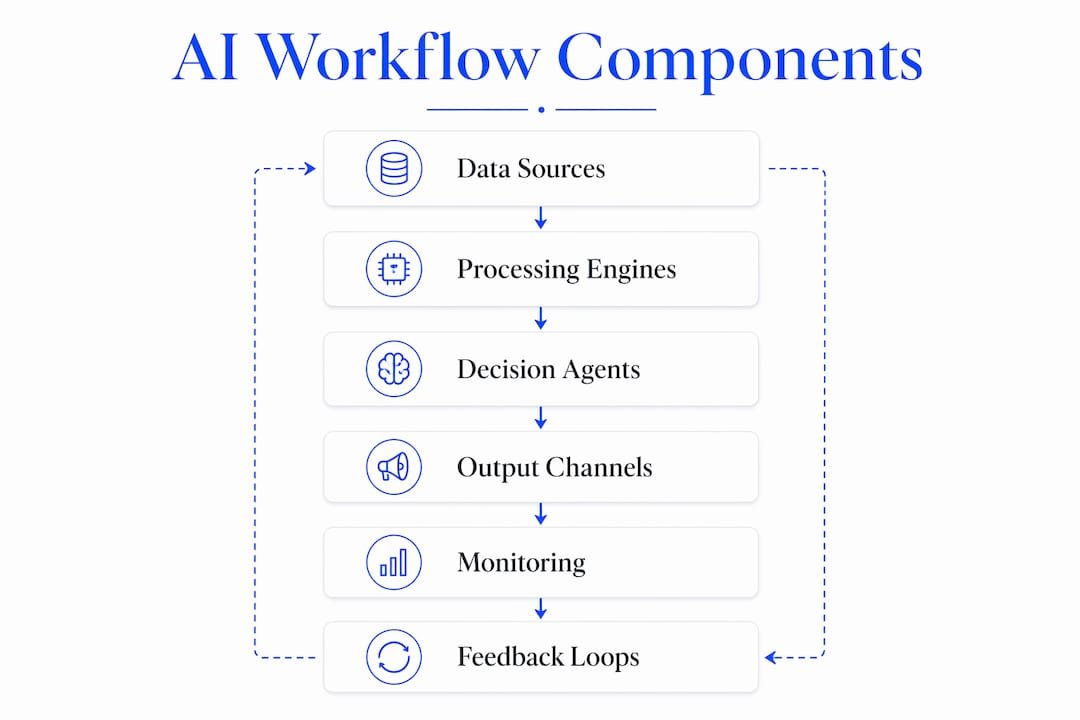
Agentic workflows, where a single AI with persistent memory reasons across tools, often outperform brittle trigger chains for complex multi-step tasks. Interoperability matters too: confirm API key access, data privacy checkpoints, and connector availability before you commit to a platform.
Which use cases move the revenue needle for affiliate marketers?
Start with the use cases that tie directly to CTR, conversion rate, or revenue per click.
- Content ideation at scale: Feed your top-performing URLs into the GPT API and generate 20 angle variations in minutes.
- Dynamic ad-copy and landing page testing: Let the model generate variants; route traffic splits automatically based on conversion signals.
- Email sequence personalization: Score subscribers by behavior, then branch sequences based on engagement tier.
- Audience segmentation and lookalike seeding: Cluster converters by behavior pattern and push segments to ad platforms via API.
- Outreach and relationship follow-ups: Trigger personalized follow-up drafts when a partner goes quiet for 14 days.
- Bid optimization triggers: Fire bid adjustments when conversion rate drops below a threshold, without manual platform checks.
Here is a simple input → decision → action example for ad-copy testing:
Input: Product page URL + top 5 converting keywords. AI decision: GPT API generates three headline variants scored by predicted CTR. Action: Winning variant pushed to the ad platform via connector; losing variants archived with performance notes.
Pro Tip: Track revenue per click alongside CTR. A headline with a higher CTR but lower average order value can quietly drain your commissions. Always tie copy tests to the metric that actually pays you.
How do you design, test, and deploy your first AI workflow?
Follow this sequence to go from idea to a live MVP without overbuilding.
- Map the task. Write the trigger, inputs, expected output, and success metric on one page.
- Choose your platform. Pick a no-code orchestrator (Make, Zapier, or n8n) plus an LLM API.
- Define data contracts. Agree on field names, formats, and privacy rules before connecting anything.
- Build prompts and models. Write prompt templates with clear role, context, task, and format instructions.
- Sandbox test. Run the workflow on synthetic or historical data. Check outputs manually.
- Pilot with a small segment. Send 10–15% of real traffic through the new workflow; hold the rest as a control.
- Promote to production. Once the pilot shows positive lift, expand and set monitoring alerts.
- Monitor and iterate. Review audit logs weekly; update prompts when output quality dips.
Human review is required at three points: creative approval before any ad goes live, financial changes above a set spend threshold, and affiliate compliance checks when copy references regulated claims.
Pro Tip: Always run a holdout group — a slice of traffic that never sees the automated workflow. Without a true control, you cannot measure actual lift. Even a 10% holdout gives you clean before/after data.
Which tools should you consider, and how do you choose?
The simplest stack for most affiliates: a no-code orchestrator + LLM API + analytics sink. Here is how common tools fit that picture.
Zapier connects hundreds of SaaS apps with minimal setup. It is the fastest path to a basic trigger-action workflow and works well for routing data between platforms. Make (make.com) offers a visual canvas with more complex branching logic and over 3,000 integrations, making it strong for multi-step affiliate workflows. n8n is open-source and self-hostable, which matters if data privacy is a concern. OpenAI’s GPT API is the most widely used model layer for copy generation, scoring, and classification. Jasper.ai and Copy.ai are purpose-built for marketing copy and come with templates that non-technical users can adapt quickly, though they sit on top of underlying LLMs rather than giving you raw model access.
Use these criteria when shortlisting:
- Ease of setup: Can you build a working prototype in a day without a developer?
- Integrations: Does it connect to your ad platforms, CRM, and email tool natively?
- Cost shape: Is pricing per task, per seat, or per token? Model it against your expected volume.
- Scale/throughput: Does it handle real-time triggers or only batch runs?
- Model access: Can you swap models or fine-tune, or are you locked into one provider?
- Privacy/hosting: Where does your data go? Self-hosted (n8n) vs. cloud matters for affiliate data.
No-code AI platforms can cut development time by up to 90% compared with custom builds, which makes them the practical default for solo affiliates and small teams.
How do you keep AI workflows safe and on-brand?
Governance is not optional. The most common failure mode is not a bad model — it is a team that never defined who owns what. Set these guardrails before you go live.
- Block PII from entering model inputs using input filtering rules.
- Set rate limits and daily action quotas to cap runaway spend.
- Require human approval for any creative that changes ad spend by more than a defined threshold.
- Log every model output with a timestamp, input hash, and output score.
- Set drift alerts: if conversion rate drops more than a set percentage versus the control, pause the workflow and review.
Audit logs and performance data should be the operational backbone of every live workflow. Review them on a fixed schedule, not only when something breaks.
Pro Tip: Design your human handoff points around financial exposure, not just creative quality. A copy change that lifts CTR but violates an affiliate network’s terms can get your account banned. Build a compliance checklist into every approval gate.
What does an MVP actually cost, and how long does it take?
| Tier | Typical monthly cost | Time to MVP |
|---|---|---|
| No-code + GPT API prototype | — | 1–3 days |
| Mid-tier subscription (Make, Zapier paid) | $20 | 1–2 weeks |
| Agentic platform (full orchestration) | — | 2–8 weeks |
Budget for three recurring cost categories: model usage (token or action-based), platform seats, and monitoring/ops time. The token costs for a content ideation workflow running daily are usually under $20/month at typical affiliate volumes.
A real example: automating an affiliate content workflow
The workflow: A trigger fires when a target keyword drops below position 8 in organic rankings. The GPT API receives the keyword, top-performing URL, and competitor angle as inputs. It returns three new headline and intro variants scored by estimated engagement. A human reviewer approves one variant. The approved copy is pushed to the CMS via webhook. The workflow logs the output, the reviewer’s choice, and the post-publish CTR for model feedback.
Here is the step-by-step flow used in this example:
- Keyword rank monitor fires trigger (daily batch).
- Orchestrator pulls page data and competitor snippet.
- GPT API generates three variants with scoring rationale.
- Human approval gate: reviewer picks the best variant.
- Approved copy pushed to CMS; old version archived.
- CTR tracked over 14 days; result fed back into prompt notes.
Your implementation checklist and ready-to-copy templates
Work through this checklist before you launch any workflow:
- Map the task: trigger, inputs, outputs, success metric.
- Confirm data sources are accessible and privacy-compliant.
- Write a prompt template with role, context, task, and format.
- Define output scoring criteria (what makes a good output?).
- Build in sandbox; test on 20+ historical examples.
- Set a pilot segment (10–15% of traffic).
- Define holdout group for lift measurement.
- Set monitoring alerts (conversion delta, error rate, spend cap).
- Schedule weekly audit log reviews.
- Document rollback plan: how to revert to manual in under 30 minutes.
- Build components as reusable modules — modular components reduce maintenance overhead across multiple workflows.
- Review affiliate network compliance rules before any copy goes live.
Prompt template — content ideation:
“You are a direct-response copywriter. Given the keyword [KEYWORD] and the top-performing URL [URL], generate five blog post angles for an affiliate audience. For each angle, write a headline and a two-sentence hook. Format as a numbered list.”
Prompt template — subject line generator:
“You are an email strategist. Write five subject lines for an email promoting [OFFER]. The audience is [AUDIENCE DESCRIPTION]. Optimize for open rate. Each subject line must be under 50 characters.”
Prompt template — landing page headline tester:
“You are a conversion copywriter. Given the product [PRODUCT] and the primary benefit [BENEFIT], write three headline variants. For each, note the psychological trigger used (curiosity, urgency, social proof).”
Rollback rule template: If conversion rate drops more than 15% versus the holdout over 72 hours, pause the workflow, revert to the last approved manual version, and flag for prompt review.
Pro Tip: Save every prompt that works as a named template in a shared doc. The biggest time sink in AI workflow maintenance is rewriting prompts from scratch because no one saved the version that was actually performing.
Key Takeaways
AI workflow automation pays off fastest when you start with one mapped task, use a staged rollout, and keep humans in the loop at every financial and compliance checkpoint.
| Point | Details |
|---|---|
| Start with one task | Map a single repeatable task before choosing any tool or platform. |
| Use staged rollout | Move sandbox → pilot → production; always run a holdout group to measure true lift. |
| Maintain human oversight | Require human approval for creative changes and any action above a spend threshold. |
| Measure what pays | Track revenue per click and conversion rate, not just CTR, to confirm real impact. |
| Willbuckley coaching | Willbuckley offers templates, coaching, and step-by-step guidance to help affiliates build and launch their first AI workflow. |
What most affiliates get wrong about AI automation
The conventional wisdom says “automate everything as fast as possible.” That advice causes more account bans and wasted ad spend than almost any other mistake in affiliate marketing. The real leverage is not in automating the most tasks — it is in automating the right task with clean data and a human checkpoint at every point where money or compliance is on the line.
Most affiliates who struggle with AI workflows have the same problem: they picked a tool before they mapped a task. The tool becomes the strategy, and the strategy becomes a mess of disconnected zaps and triggers that nobody fully understands six weeks later. The affiliates who get consistent results build modular, documented workflows they can explain in plain language. They also treat prompt quality as seriously as ad copy quality, because a vague prompt produces vague output at scale.
One thing that often gets overlooked: your affiliate network’s terms of service. Automated copy generation can produce compliant-sounding language that still violates specific network rules around claims, disclosures, or prohibited phrases. Build a compliance filter into every workflow that touches outward-facing copy. That single guardrail has saved more than a few accounts.
Willbuckley helps you build your first AI workflow faster
Knowing the framework is one thing. Having someone walk you through your specific stack, your offers, and your data is where the real progress happens. Willbuckley gives affiliate marketers practical coaching, ready-to-use prompt templates, and step-by-step video tutorials designed for people who want results without a developer on call.

Whether you want a one-on-one session to map your first workflow, a template library to skip the blank-page problem, or an email course that walks you through the full process, Willbuckley has a format that fits where you are right now. The AI marketing resources on the site are built specifically for affiliate marketers who are ready to move from manual promotion to intelligent, automated workflows. Head over and take the next step today.
Useful sources
- What Is AI Marketing Automation? | Braze — Covers learning-based vs. rule-based automation and real-time decisioning for marketers.
- AI Marketing Automation | Atlassian — Explains human-AI handoff points and organizational bottlenecks in automation rollouts.
- Zapier Automation Platform — Practical guidance on monitoring, audit logs, and avoiding model drift in live workflows.
- No-Code AI Automation Tools | Arahi AI — Reviews no-code platforms and agentic workflow approaches for non-technical users.
- No-Code AI Workflow Tools Guide | Vellum.ai — Compares orchestration platforms including Make and Zapier and their roles in a stack.
- Modular Automation Best Practices | Stepper — Practitioner advice on building reusable, maintainable workflow components.
- AI Marketing Automation Course | Coursera — Structured course covering automation fundamentals, LLM tools, and email workflow design.
- No-Code Automation Explained | UiPath — Defines no-code automation and explains drag-and-drop, prompt-based, and template-based build approaches.
- Willbuckley — AI Affiliate Marketing Blog — Practical tutorials and strategy posts on using AI in affiliate promotion workflows.
Pingback: Pilot Affiliate Marketing Automation in 2 to 4 Weeks by Fixing Links First – The Mindset Motivator
Pingback: 3 Quick Google Sheets Automations for Affiliates: No Code vs Script – The Mindset Motivator