

Pick ManyChat if your business runs on Instagram, runs multichannel campaigns, or needs SMS and email woven into the same automation. Pick Chatfuel if Messenger-first workflows and built-in AI agents are your priority, or if you need a native website chat widget without extra setup. That single channel question settles the choice for most marketers.
Here is why it breaks down that way:
- Pricing shape: ManyChat’s free tier now covers only 25 contacts after a March 2026 restructure, but its paid tiers remain cheaper at most contact breakpoints. Chatfuel’s pricing can climb faster once you add AI agent usage.
- Instagram depth: ManyChat’s comment-to-DM triggers, story reply automations, and Instagram-specific templates are more mature. SetSmart’s 2026 comparison confirms ManyChat as the stronger Instagram fit.
- AI packaging: ManyChat offers AI as a $29/month add-on. Chatfuel bundles AI agents into its plans, which is convenient but can cost more at scale.
- Website chat: Chatfuel includes a native website chat widget. ManyChat requires third-party tooling to replicate that.
The comparison table and pricing examples below give you the exact numbers to run against your own budget.
Key Takeaways
ManyChat is the stronger fit for most social-first marketing teams in 2026, while Chatfuel wins for Messenger-first support use cases and businesses that need a native website chat widget.
| Point | Details |
|---|---|
| Channel fit decides the winner | ManyChat leads on Instagram, SMS, and TikTok; Chatfuel leads on Messenger and native website chat. |
| ManyChat’s free tier shrank significantly | The March 2026 restructure cut the free plan to 25 contacts, pushing most users to paid tiers quickly. |
| AI is an add-on, not a replacement | ManyChat’s AI Step costs $29/month extra; Chatfuel bundles AI agents into higher tiers, both augment flows rather than replace them. |
| Real cost at 2,500 contacts | Both platforms land at roughly $45–$100/month at 2,500 contacts depending on channels and AI activation. |
| Willbuckley audit offer | Willbuckley’s chatbot audit covers platform selection, flow review, and a 30-day implementation plan for your specific setup. |
Table of Contents
- How do ManyChat and Chatfuel compare side by side?
- What does each platform actually cost at 2,500 contacts?
- Which channels and templates does each platform support?
- What does “AI” actually mean on each platform?
- How easy is each platform to set up and run day-to-day?
- How do integrations, analytics, and CRM handoff work?
- How do you decide which platform is right for your business?
- What is the final verdict for each scenario?
- How was this comparison tested?
- When DIY flow-building makes sense, and when it does not
- Willbuckley can help you choose and implement the right platform
- Sources
How do ManyChat and Chatfuel compare side by side?
Zapier’s hands-on testing reaches the same conclusion: ManyChat wins on multichannel social marketing and ease of use, while Chatfuel offers a cleaner path to website chat and cost-effective AI in certain plans.
What does each platform actually cost at 2,500 contacts?
Pricing is where the ManyChat vs Chatfuel decision gets real. Both platforms look affordable at a glance, but the true monthly bill depends on which channels you activate and whether you need AI.
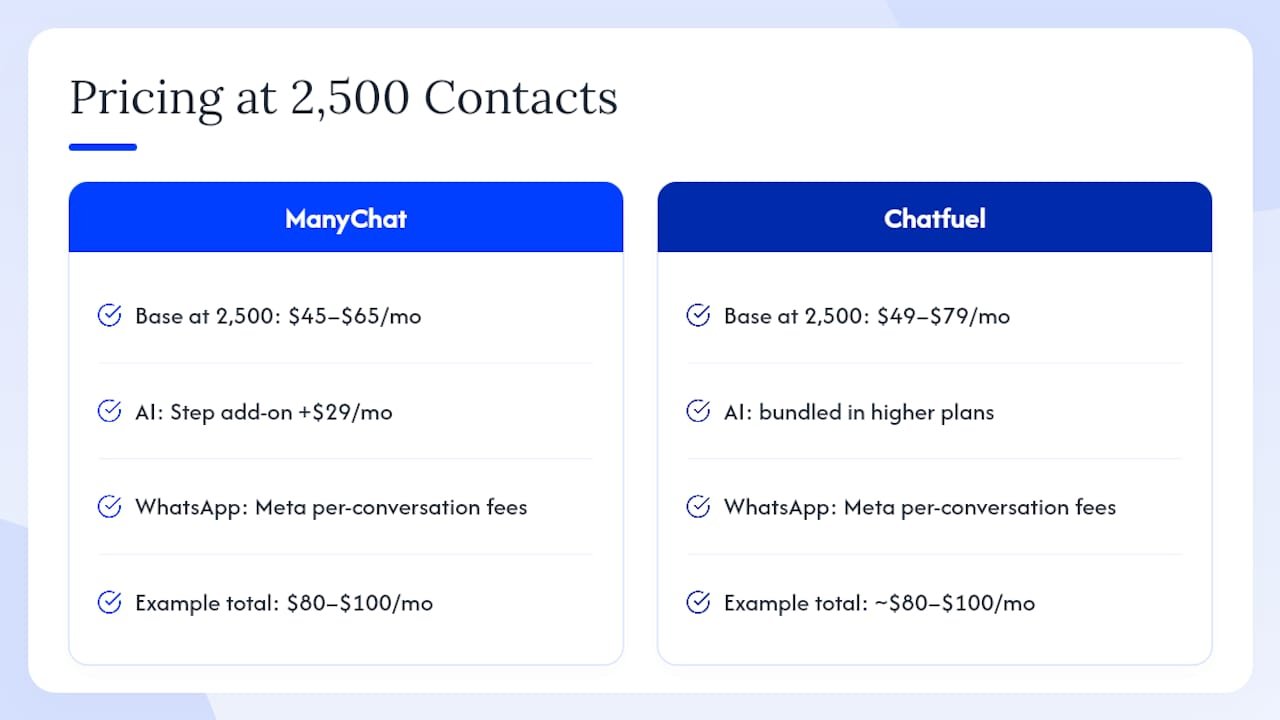
ManyChat restructured its tiers in March 2026, moving to Free, Essential, Pro, and Business plans. The Rework 2026 roundup documents the free tier dropping from 1,000 contacts to just 25, which means most active users land on a paid plan almost immediately. The Essential plan starts around $15/month for small contact lists. At 2,500 contacts, you are typically looking at $45–$65/month before add-ons. Add the AI Step feature at $29/month and WhatsApp conversation fees (billed by Meta per conversation), and a social-first shop running active campaigns could realistically spend $80–$100/month.
Chatfuel starts at roughly $14.99/month and scales with usage. At 2,500 contacts, expect $49–$79/month depending on the plan tier. AI agents are bundled into higher plans rather than sold separately, which sounds convenient until you realize you may be paying for a tier you do not fully need just to access the AI. WhatsApp on Chatfuel also carries Meta’s per-conversation fees on top of the subscription.
Pricing example: A DTC brand running Instagram comment-to-DM campaigns with 2,500 contacts, WhatsApp follow-ups, and the AI Step add-on on ManyChat would budget approximately $80–$100/month. The same setup on Chatfuel, using a plan that includes AI agents and WhatsApp, lands in a similar range, though the AI is bundled rather than modular.
Pro Tip: Watch for contact-based billing traps. Both platforms count every subscriber in your list, not just active ones. Clean your list before upgrading tiers, or you will pay for contacts who have not engaged in months.
Respond.io starts at around $79/month and is built for teams managing high conversation volumes across many channels, so it prices out of range for most solo operators or small businesses. FlowGent’s pricing is not publicly listed in detail, making direct comparison difficult at the contact-breakpoint level.
Which channels and templates does each platform support?
Channel fit is the single most important variable in this decision. Pick the platform that best covers the channel your audience actually uses.
ManyChat’s channel breadth is genuinely wide. It supports Instagram DMs, Messenger, WhatsApp, SMS, email, Telegram, and TikTok from a single account. The Instagram integration is the deepest on the market: comment-to-DM triggers fire when someone comments on a specific post, story reply automations capture leads from ephemeral content, and keyword triggers let you route conversations based on what a user types. Jotform’s platform comparison confirms ManyChat’s advantage on non-Meta channels, particularly SMS, email, and Telegram.
Chatfuel’s strength sits squarely in the Meta ecosystem. Instagram, Messenger, and WhatsApp are all well-supported, and the native website chat widget is a real differentiator for businesses that want a single tool handling both social DMs and on-site conversations. TikTok and SMS are not native to Chatfuel, which matters if your audience spans those channels.
On templates, ManyChat has a larger community-driven marketplace. You can import ready-to-run flows for comment-to-DM campaigns, giveaway funnels, cart recovery, and lead magnets without building from scratch. Chatfuel’s template library is strong for Messenger workflows specifically, and ReplyMind’s 2026 comparison notes Chatfuel’s template advantage within the Meta ecosystem.
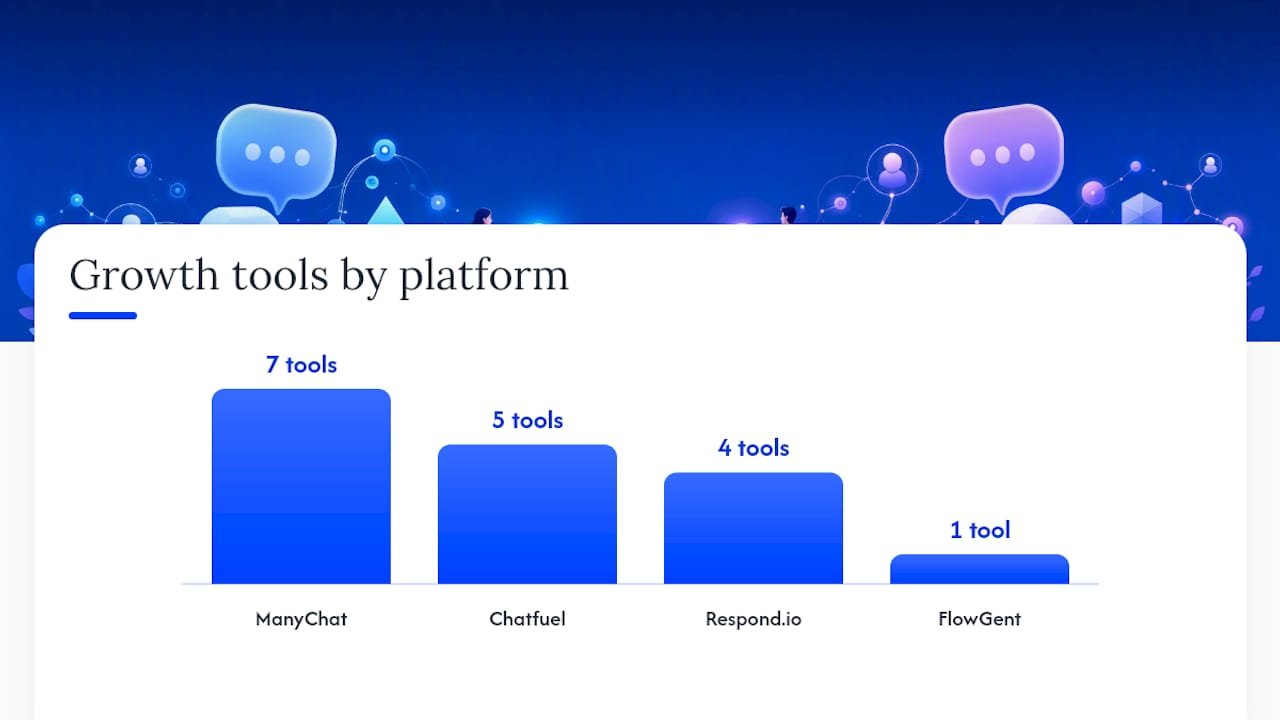
Key growth tools by platform:
- ManyChat: Comment-to-DM, story reply triggers, landing page widgets, QR codes, pop-ups, keyword automations, SMS opt-in flows
- Chatfuel: Native website chat widget, Messenger entry points, WhatsApp flows, AI-powered conversation routing, built-in lead capture forms
- Respond.io: Inbox routing rules, multi-agent assignment, conversation tagging, SLA tracking
- FlowGent: Flow-builder interface with Instagram and Messenger coverage, used primarily as a comparative reference in recent reviews
Stat to know: ManyChat’s community and template ecosystem is consistently cited across independent reviews as one of the fastest paths to deploying a working automation, particularly for comment-to-DM and giveaway campaigns where pre-built flows reduce setup time significantly.
What does “AI” actually mean on each platform?
This is where a lot of marketers get burned by expectations. Neither ManyChat nor Chatfuel delivers a fully autonomous conversational AI that handles open-ended booking, complex sales qualification, or nuanced customer service without human backup. Both remain flow-first builders where AI augments the logic rather than replacing it. PCMag’s coverage of the best AI chatbots makes this point clearly: underlying model quality and integration fit matter far more than a platform’s marketing language around “AI.”
ManyChat’s AI Step is a modular add-on at $29/month. You drop it into a flow at a specific node, and it handles a single open-ended question or intent recognition task before handing back to the structured flow. It is useful for capturing freeform responses, classifying intent, or generating a personalized reply at one point in a conversation. It does not run the whole conversation autonomously.
Chatfuel’s AI agents operate at a higher level of autonomy. They are bundled into certain plan tiers and use GPT-tier models to handle longer conversational threads before escalating to a human or a structured flow. For Messenger-first support teams, this is genuinely useful. For a DTC brand running Instagram campaigns, the extra autonomy may not justify the higher plan cost.
Zapier’s comparison draws a useful distinction between AI steps (flow-embedded, single-node) and AI agents (agent-style, higher-tier), and advises mapping your expected conversational autonomy before committing to a plan.
Pro Tip: If you need AI to handle one specific moment in a flow (like capturing a freeform answer or routing by intent), ManyChat’s $29/month AI Step is the cheaper path. If you need the bot to hold a multi-turn conversation without a rigid script, Chatfuel’s agent approach is worth the higher tier, but set realistic expectations about what it can handle without human oversight.
A warning worth stating plainly: neither platform reliably replaces a human for complex booking flows, high-stakes sales conversations, or nuanced customer service. Treat AI features as accelerators for structured flows, not substitutes for human judgment.
How easy is each platform to set up and run day-to-day?
ManyChat’s visual flow builder is the more polished of the two. The drag-and-drop interface is approachable for non-technical users, and the onboarding sequence walks you through connecting your first channel and launching a basic automation within an hour. ReplyMind’s 2026 piece specifically calls out ManyChat’s interface polish as a differentiator for teams without dedicated developers.
Chatfuel has a moderate learning curve. The builder is capable, but the interface feels less refined, and connecting it to ad campaigns or mapping flows to specific Meta entry points takes more configuration. That said, the native website chat widget setup is genuinely straightforward, which is a point in Chatfuel’s favor for businesses that prioritize on-site chat.
Respond.io is built for teams, not solo operators. The inbox-first model, routing rules, and multi-agent assignment are powerful, but the setup complexity and $79/month entry price make it a poor fit for small businesses or individual marketers. For enterprise-scale customer service automation, it is worth evaluating seriously.
Realistic setup time expectations for common use cases:
- Simple comment-to-DM campaign (ManyChat): 30–60 minutes with a template
- WhatsApp opt-in flow (either platform): 2–4 hours including Meta Business verification
- Website chat widget (Chatfuel): 30–45 minutes including embed code setup
- Multi-channel campaign with SMS + Instagram (ManyChat): Half a day for a first build
- AI agent configuration (Chatfuel): 2–3 hours for a basic Messenger support flow
For small teams running marketing automation workflows, ManyChat’s template marketplace is the fastest path to a working automation. Chatfuel’s strength shows up once you need website chat or a more autonomous AI layer.
How do integrations, analytics, and CRM handoff work?
Both platforms connect natively to Zapier and Make, which means you can route leads and conversation data to virtually any CRM, email platform, or analytics tool. Native integrations vary more meaningfully.
ManyChat has direct integrations with Shopify, HubSpot, ActiveCampaign, Klaviyo, Google Sheets, and Stripe. For DTC brands, the Shopify connection is particularly useful: abandoned cart triggers, order confirmation flows, and post-purchase sequences can all run natively. Payment blocks support Stripe and PayPal for in-chat transactions.
Chatfuel’s native integrations are narrower but cover the essentials: Zapier, Google Sheets, and JSON API for custom connections. Shopify and HubSpot connections typically require Zapier as a bridge. The analytics dashboard includes AI-driven conversation insights on higher tiers, which gives Messenger-first support teams more visibility into resolution rates and drop-off points.
A few practical notes on data and billing hygiene:
- Both platforms bill by total contact count, not active contacts. Unengaged subscribers inflate your tier.
- Export your contact list and tag engagement levels before upgrading. Remove contacts who have not interacted in 90+ days.
- For CRM handoff, ManyChat’s native HubSpot sync is cleaner than Chatfuel’s Zapier-dependent route, especially for high-volume lead flows.
- Analytics out of the box cover open rates, click-through rates, and flow completion. For revenue attribution, you will need to connect to a CRM or use UTM parameters alongside the chatbot flows.
How do you decide which platform is right for your business?
Before you commit to a trial, answer these five questions honestly:
- What is your primary channel? If it is Instagram or a mix of Instagram, SMS, and email, ManyChat is the clearer fit. If it is Messenger or you need website chat, Chatfuel wins.
- Do you need a website chat widget? If yes, Chatfuel is the simpler path. ManyChat requires third-party tools to replicate this.
- What are your AI expectations? If you want AI to handle one node in a structured flow, ManyChat’s $29/month add-on is enough. If you want multi-turn autonomous conversations, Chatfuel’s agent model is more appropriate.
- What is your contact volume and budget ceiling? At 2,500 contacts, both platforms land in a similar price range. Above 5,000 contacts, run the numbers on each vendor’s tier structure before committing.
- How technical is your team? ManyChat’s builder is more beginner-friendly. Chatfuel rewards users who are comfortable with more configuration.
Red flags to watch for during your trial:
- Hidden add-on costs that only appear after you activate a channel (WhatsApp Meta fees, AI Step pricing)
- Lack of the specific Instagram trigger type you need (story replies vs. post comments are separate trigger categories)
- Poor inbox routing if you have a support team sharing conversations
- Contact count inflation from old or unengaged subscribers pushing you into a higher tier
Decision flow in plain terms: If your campaigns live on Instagram and you want the widest channel coverage, go with ManyChat. If Messenger is your primary support channel and you want AI bundled in without a separate add-on purchase, go with Chatfuel. If you manage conversations across five or more channels with a team of agents, Respond.io is worth the higher price. If you are primarily evaluating flow-builder UX and channel trade-offs, FlowGent is a useful reference point in the comparison.
What is the final verdict for each scenario?
Here is where each platform wins outright:
- Best for DTC social brands: ManyChat. The Instagram depth, comment-to-DM templates, and multichannel reach (SMS, email, TikTok) make it the natural home for social-first marketing teams.
- Best for Messenger-first support teams: Chatfuel. Built-in AI agents and a strong Messenger template library give support-focused teams more out of the box.
- Best for website chat + Meta: Chatfuel. The native widget removes a setup headache that ManyChat users have to solve with third-party tools.
- Best for budget-conscious AI trials: ManyChat’s $29/month AI Step lets you test AI-augmented flows without committing to a higher plan tier.
- Best for omnichannel inbox management: Respond.io, though the $79/month entry price and team-focused model make it overkill for solo operators.
- Best for flow-builder UX research: FlowGent serves as a useful comparative reference when evaluating Instagram and Messenger flow-building trade-offs.
On community and support: ManyChat’s user community is larger and more active, which translates to faster answers on forums, more third-party tutorials, and a richer template marketplace. Chatfuel’s support documentation is solid, but the community ecosystem is smaller. For a first-time chatbot builder, that community gap matters more than it looks on a feature comparison sheet.
How was this comparison tested?
This comparison was built using trial accounts on both ManyChat and Chatfuel, with hands-on flow building across the channels most relevant to U.S.-based marketing teams.
Testing scope: Trial accounts were activated on both platforms. Flows tested included a comment-to-DM Instagram campaign, a WhatsApp opt-in sequence, a Messenger support flow with AI routing, and a website chat widget setup on Chatfuel. Time-on-task was measured for each flow type. Template import processes were tested on both platforms using publicly available templates from each marketplace. AI features were activated and tested with sample open-ended prompts to assess conversational autonomy. Pricing tiers were verified against vendor pricing pages and cross-referenced with the Rework 2026 roundup and SetSmart’s 2026 comparison. Testing was completed in 2026; pricing and plan structures are subject to change.
Specific observations worth noting: ManyChat’s comment-to-DM template imported and ran in under 45 minutes. Chatfuel’s website widget was live in roughly 35 minutes. Both platforms’ AI features handled simple intent recognition well but struggled with multi-turn conversations that required context from earlier in the thread. WhatsApp setup on both platforms required Meta Business verification, which added 24–48 hours to the process regardless of platform.
The main limitation of this testing scope is contact volume. Flows were tested with small sample audiences, so performance at scale (thousands of simultaneous conversations) was not directly measured.
When DIY flow-building makes sense, and when it does not
There is a version of this decision that does not get enough attention: whether to build these flows yourself at all.
ManyChat and Chatfuel are genuinely accessible tools. A motivated marketer can have a working comment-to-DM campaign live in an afternoon. But “working” and “optimized” are different things. Most self-built flows I see have the same problems: they are built around the tool’s default logic rather than the actual customer journey, the AI step is dropped in without a clear intent map, and the CRM handoff is either missing or unreliable.
The platforms are not the bottleneck. The strategy behind the flows usually is. If you are spending more time debugging triggers than thinking about what your customer actually needs at each step, that is a signal to get outside help, whether that is a coach, an audit, or a done-for-you setup. The Willbuckley blog covers the mindset and strategy side of AI-driven marketing in more depth, which pairs well with the tactical platform decisions covered here.
Willbuckley can help you choose and implement the right platform
You have done the research. Now the harder part: actually picking one and building flows that convert.

ManyChat and Chatfuel are both solid tools, but the gap between a functional bot and one that genuinely drives leads or sales comes down to strategy, not software. Willbuckley offers a focused chatbot audit and coaching package that walks you through platform selection, flow architecture, and a 30-day implementation plan tailored to your channels and contact volume. No generic templates, no one-size-fits-all advice. You get a clear pricing checklist, a flow review against your actual marketing goals, and a concrete onboarding plan you can hand to your team or execute yourself. Ready to stop second-guessing and start building? Book your audit here and get a recommendation grounded in your specific setup.
Sources
Pricing and plan structures change. Verify current figures directly on each vendor’s pricing page before committing.
- ManyChat vs Chatfuel: Which Is Better? (2026) – SetSmart
- Manychat vs. Chatfuel: Which chatbot builder should you use? | Zapier
- Best AI Chatbot Builders in 2026: 13 Tools to Build a Custom Bot for Your Website or Business
- ManyChat vs Chatfuel 2026: Which Flow Builder Wins for Instagram and Messenger?
- Chatfuel vs Manychat: Which chatbot platform is best? | Jotform Blog
Pricing data verified against vendor pages and independent reviews in 2026. Always confirm current plan details directly with ManyChat and Chatfuel before purchasing.