

For most people, the fastest path to natural-sounding AI writing runs through one of three browser-based tools. Quillbot is the best pick if you already use it for paraphrasing and want humanization built into a familiar editor. SuperHumanizer wins on pure speed: paste, click, done, no account needed. Humanize AI gives you the most control over tone and audience voice when you need the output to actually sound like you.
A few honest caveats before you dive in. These tools work best on shorter passages, typically a few hundred words at a time. None of them guarantee that a detector will ignore your text, and any tool that promises a guaranteed bypass is overselling. Undetectable takes a more transparent approach: it scans your text first, flags the sentences most likely to be detected, and then proposes rewrites, which is a more honest workflow than a one-click “pass any detector” button. Finally, avoid pasting anything confidential into a free web tool. Most free tiers do not publish clear data-retention policies, so treat them like a public form.
Humanizing AI content well means improving how it reads for people, not gaming a classifier. Storytelling, sentence variation, and a genuine voice are what create real engagement — and they happen to reduce detection signals as a side effect.
Key takeaways
The strongest humanization comes from combining a good tool with deliberate manual editing, not from relying on either alone.
| Point | Details |
|---|---|
| Match the tool to your need | Quillbot for integrated editing, SuperHumanizer for speed, Humanize AI for tone control. |
| Protect sensitive content | Avoid pasting confidential text into free web tools with unclear data-retention policies. |
| Prioritize burstiness in edits | Mix short and long sentences deliberately; this variation is what both readers and detectors respond to. |
| Manual editing is non-negotiable | Add one concrete detail or personal observation per paragraph that only you would write. |
| Willbuckley for scale | Coaching and workflow frameworks at Willbuckley help affiliate marketers build consistent, human-sounding content systems. |
Table of Contents
- How do the top AI humanizer tools actually compare?
- How do you humanize AI-generated text step by step?
- How do you choose the right AI humanizer for your needs?
- What techniques actually make AI writing feel human?
- Before-and-after examples of humanized AI text
- A practical note from Will on humanizing content at scale
- Willbuckley: a different path to human-sounding content
- Sources
How do the top AI humanizer tools actually compare?
The table below covers the dimensions that matter most when you’re choosing a tool: what it’s best for, what you get free, how much text it handles, and what it says about your data.
| Dimension | Quillbot | SuperHumanizer | Humanize AI |
|---|---|---|---|
| Best for / use case | Integrated rewriting inside a full writing assistant | Fast, no-login humanization of short passages | Tone-specific humanization with voice and audience controls |
| Free tier & paid features | Free tier with word limits; paid plans unlock longer inputs and more modes | Free browser-based use; premium features not publicly detailed | Free tier available; paid plans for higher volume and advanced tone options |
| Input / word limits | Free tier capped; paid expands significantly | Optimized for shorter passages; limits not publicly listed | Moderate free limits; paid tiers increase capacity |
| Tone controls & customization | Multiple preset rewriting modes (formal, simple, creative, etc.) | Minimal controls; emphasis on instant output | Tone templates, empathy settings, and audience-targeting options |
| Integrations | Browser extension, Google Docs add-on | Browser-based only | Browser-based; integrations not publicly listed |
| Languages supported | Multiple languages | English-focused | English-focused; additional languages not publicly listed |
| Privacy / data handling | Privacy policy published; review before pasting sensitive content | Policy not prominently disclosed; avoid sensitive content | Privacy policy available on site; review terms before use |
| Detector-avoidance claims | Does not make explicit bypass claims | Promotes natural-sounding output; no specific detector claims | Promotes human-like phrasing; no guaranteed bypass claims |
Quillbot stands out for anyone who already lives inside a writing workflow. The preset modes (formal, fluency, creative, simple) let you match register quickly, and the Google Docs integration means you never have to leave your draft. The trade-off is that the free tier word cap hits fast if you’re processing longer articles.
SuperHumanizer is genuinely the fastest option for a quick fix. There’s no account, no settings to configure, and the interface is about as minimal as it gets. That simplicity is also its ceiling: you get one mode, limited customization, and a privacy policy that isn’t prominently surfaced. Use it for short, non-sensitive passages when speed is everything.
Humanize AI earns its place when you care about how the text sounds, not just whether it passes a scan. The tone templates and empathy controls make it the right tool for content that needs to connect with a specific audience, like a product review, a coaching email, or a personal blog post.
Statistic callout: Coursera’s guidance on humanizing AI content notes that the goal should be authentic engagement through storytelling and voice, not detector evasion. Tools that prioritize voice controls tend to produce outputs that read better and score lower on detection metrics, because genuine stylistic variation is what both readers and detectors respond to.
How do you humanize AI-generated text step by step?
The workflow is short. Five steps, and you’re done.
- Run an optional detector scan first. Paste your draft into Undetectable or a similar tool to see which sentences are flagging. This tells you where to focus your edits rather than rewriting everything blindly.
- Paste into your chosen humanizer and set the tone. If you’re using Quillbot, pick the mode that matches your target register. In Humanize AI, select the tone template closest to your audience. In SuperHumanizer, just paste and run.
- Click humanize and read the output immediately. Don’t accept it wholesale. Read it the way a reader would, not the way an editor would.
- Edit manually for voice and specifics. This step is where the real work happens. Swap generic phrases for concrete details. Add a sentence that only you would write. Microsoft’s guidance on natural AI writing recommends reading the text aloud and running a readability check, both of which catch awkward phrasing that a tool misses.
- Final quality check: read aloud, verify facts. If a sentence trips you up when you say it out loud, rewrite it. Check any statistics or claims the humanizer may have subtly altered.
Turnaround time is fast for short inputs: most tools process a few hundred words in under ten seconds. Longer passages may take more time on paid tiers, and free tiers often require breaking content into smaller chunks.
Pro Tip: During manual editing, prioritize sentence rhythm over word choice. One very short sentence followed by a longer, more complex one creates the kind of “burstiness” that both readers and detectors associate with human writing. Add one concrete sensory detail or personal observation per paragraph, and the output shifts noticeably.

How do you choose the right AI humanizer for your needs?
The marketing copy for most humanizers sounds identical. Here’s what to actually look at.
Fidelity to original meaning is the first filter. Run a before-and-after comparison on a paragraph you know well. If the humanized version changes a fact or loses a key nuance, that tool is not safe for anything important.
Voice controls matter more than most people expect. A tool with preset tones (formal, conversational, empathetic) gives you a starting point. A tool with custom voice profiles, like Grammarly’s Humanizer, which supports custom voice samples and multiple languages, gives you a repeatable result across a content library.
Privacy and data handling deserve a direct question before you paste anything. Ask: does this tool store my input? For how long? Is there a way to opt out of training data use? If the privacy policy is vague or buried, that’s your answer.
Red flags to watch for: Any tool that claims to “guarantee” a detector bypass is making a promise it cannot keep. Detectors update constantly, and open-source humanization pipelines confirm that even multi-pass restructuring only reduces detection signals, it does not eliminate them. Also watch for tools with no free transparency features, no visible support channel, and no clear export options.
One more thing worth saying plainly: hiding AI use in academic submissions or professional contexts where disclosure is required is an ethical and often policy violation. These tools are for improving readability and authenticity, not for misrepresentation.
What techniques actually make AI writing feel human?
One-click humanizers get you partway there. The techniques below take you the rest of the way.
Controlled stylistic entropy is the concept that matters most. Practitioner research on humanization pipelines explains that AI detectors measure two things: perplexity (how predictable the word choices are) and burstiness (how much sentence length varies). Human writing scores high on both. AI writing tends to score low on both, because it optimizes for smooth, consistent output.
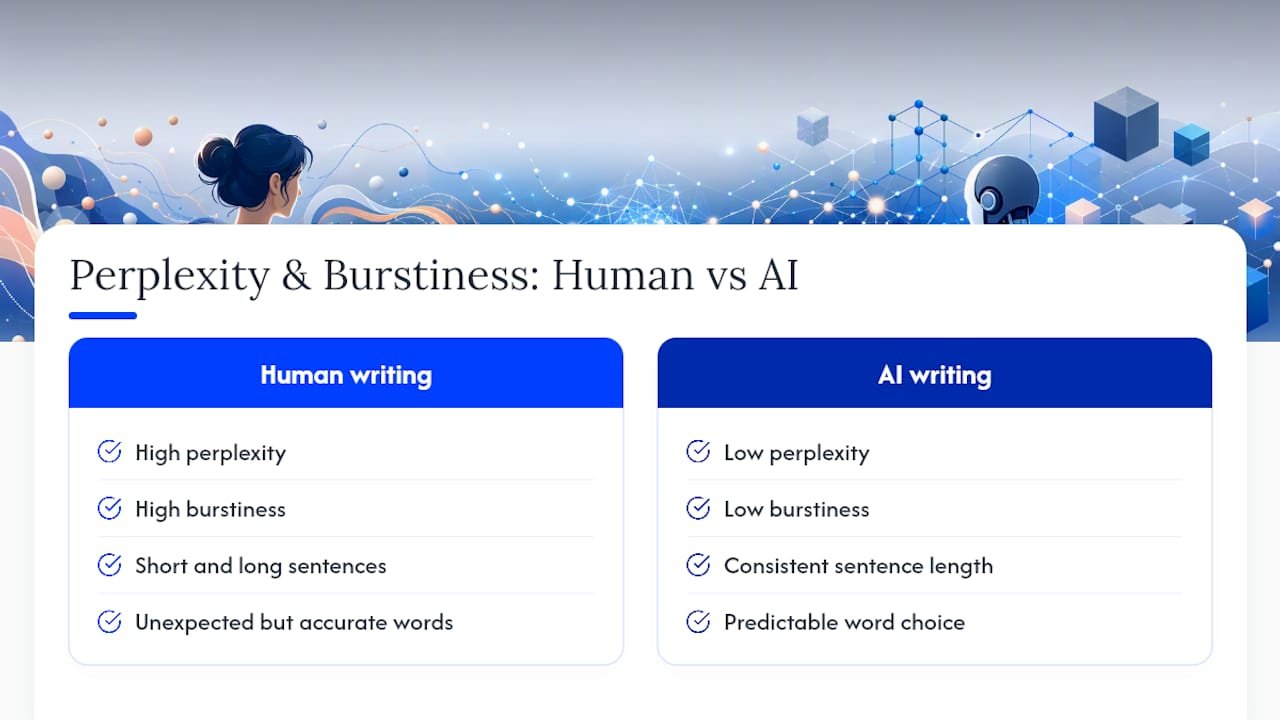
The fix is deliberate variation. Write one sentence of five words. Follow it with one that runs to twenty-five, with a subordinate clause and a concrete example tucked inside. Swap a predictable word (“important”) for an unexpected but accurate one (“load-bearing”). These aren’t tricks; they’re what good writers do naturally.
Micro-edit exercise: Take any AI-generated fact list and convert it into a single paragraph told from a specific point of view. Instead of “AI humanizers improve readability, reduce detection risk, and save editing time,” try: “The first time you run a draft through a humanizer and read the output aloud, you’ll notice something: the sentences stop landing in the same rhythm. That variation is what makes it readable.” The second version carries the same information but reads like a person wrote it.
Writing that engages readers tends to contain more stylistic variation and genuine insight than writing optimized for a detector score. As Coursera’s content authenticity guidance puts it, the goal is audience engagement through storytelling and tailored voice, not classifier evasion.
Before-and-after examples of humanized AI text
Seeing the difference is more useful than describing it.
Example 1: Blog introduction
Before (AI-generated): “Artificial intelligence has become an important tool for content creators. It offers many benefits, including increased efficiency and improved output quality. However, AI-generated content can sometimes lack the personal touch that readers expect.”
After (humanized): “If you’ve ever published an AI draft and felt like something was slightly off, you’re not imagining it. The information is there, but the voice isn’t. That gap is exactly what humanization tools are designed to close.”
Example 2: Product description
Before: “This supplement supports energy levels and cognitive function. It contains natural ingredients that have been shown to be effective.”
After: “Two capsules in the morning and most people notice the difference by mid-afternoon. The formula uses natural ingredients, and the research behind the key compounds is solid.”
The pattern is consistent across both examples: the humanized version uses a specific point of view, concrete timing or detail, and a sentence rhythm that varies. Microsoft’s recommendation to read text aloud is the fastest way to catch which version sounds like a person and which sounds like a report.
A practical note from Will on humanizing content at scale
Here’s my honest take: the detector question is a distraction for most content creators. If your writing genuinely serves your reader, it will read as human, because human writing is defined by specificity, rhythm, and a real point of view. The tools in this guide are useful shortcuts, but they’re not a substitute for knowing your audience and having something worth saying.
For affiliate marketers specifically, the workflow I’d recommend is: draft with AI, humanize with a tool like Quillbot or Humanize AI, then spend five minutes on manual edits that add your voice and a concrete detail only you would know. That last step is what separates content that converts from content that just exists. If you want to build that workflow at scale, the Willbuckley blog covers AI-assisted content strategies in depth, and the coaching resources there are built around exactly this kind of practical, repeatable process.
Willbuckley: a different path to human-sounding content
The tools compared above are self-serve: you paste, you click, you edit. That works well for one-off pieces. For affiliate marketers who need a consistent voice across dozens of posts, a different approach tends to produce better results.

Willbuckley offers coaching, tutorials, and workflow frameworks built specifically for affiliate marketers using AI. Rather than running each draft through a humanizer alone, you learn to build a content system where your voice is embedded from the first prompt, not retrofitted at the end. That means less editing, more consistency, and content that actually sounds like you at scale.
If you’re ready to move from one-off fixes to a repeatable content workflow, explore the coaching resources at Willbuckley and see how AI-assisted marketing can work as a system, not just a shortcut.
Sources
- How to Humanize AI Content: Strategies for Authentic Engagement | Coursera
- How to Humanize AI Text for Natural Writing | Microsoft 365 Copilot
- Humanize AI Text: Free AI Humanizer | Grammarly
- Undetectable AI: Detect AI, Humanize, & Improve Content (Free)
- GitHub – ViryaZheng/ai-humanizer: README
Quick test protocol: Run your humanized output through a detector, read it aloud once, then compare a paragraph to a sample of your own writing. If the rhythm and word choices feel foreign, go back to manual edits before publishing.