

Yes, AI can reliably surface internal linking opportunities, but only when you pair it with a site audit and human review. Run a crawl this week, pick 5 to 10 priority pages, and test one AI internal linking tool against them before you touch the rest of your site.
- Audit first, automate second — always
- Cap AI-suggested links at 3 to 5 per article, per Yoast’s guidance
- Track results for 2 to 4 weeks before scaling
Pro Tip: Treat every AI-generated link suggestion as a draft, not a decision. The Search Engine Land guide to internal linking recommends monitoring crawl rate and click-through data before you call any batch a success.
Key Takeaways
AI speeds up internal-link discovery, but only a paired audit and human review process turns that speed into safe, measurable SEO gains.
| Point | Details |
|---|---|
| Audit before automating | Map orphaned pages, pillar content, and crawl depth issues before any AI tool touches your site. |
| Cap links per page | Keep AI-suggested links to 3 to 5 per article, favoring contextual body placement over navigation drops. |
| Test in small batches | Run 5 to 10 pages first, review anchors by hand, and monitor for 2 to 4 weeks before scaling. |
| Protect conversion funnels | Exclude affiliate blocks and checkout pages from automatic anchor replacement. |
| Get guided setup | Willbuckley’s coaching helps affiliate marketers build audit checklists and anchor rules before scaling automation. |
Table of Contents
- What Do AI Internal Linking Tools Actually Do?
- How Do You Audit Your Site Before Automating Links?
- What Is the Step-by-Step Automated Linking Workflow?
- What Guardrails Keep Automated Linking Safe?
- Which Internal Linking Tools Are Worth Testing?
- How Would You Test This on an Affiliate Site?
- Why Does Internal Linking Still Matter for SEO?
- How Do AI Linking Tools Fit Into Your Existing CMS?
- What Should Affiliate Marketers Actually Prioritize Here?
- Get Hands-On Help Setting Up Your Linking Workflow
- Sources
What Do AI Internal Linking Tools Actually Do?
Most tools work one of two ways. Some match content by focus keyword, scanning your site for pages that share a target phrase and suggesting a link between them. Others use semantic similarity, comparing the meaning of two pages through embeddings rather than exact word matches. The second method catches connections a keyword scanner misses, like linking a post about “affiliate disclosure rules” to one about “FTC compliance” even without shared vocabulary.
Beyond discovery, these tools differ in what they do with a suggestion:
- Anchor generation: some propose exact-match anchors, others vary phrasing to sound natural
- Placement logic: contextual in-text links versus generic nav or footer drops
- Deployment mode: single-page manual runs versus bulk generation across hundreds of URLs
- Staging support: preview changes before they go live, or push straight to production
Costs scale with token usage on API-based tools, and false positives climb fast when a plugin runs unsupervised across a large site. Over-linking is the most common failure mode, and it is almost always the result of skipping the audit step.
How Do You Audit Your Site Before Automating Links?
A messy content structure produces messy AI suggestions. Clean up the foundation first.
- Run a full crawl to flag orphaned pages, redirect chains, and any page carrying an excessive number of outgoing links.
- Choose 3 to 10 pillar pages that should receive priority linking, and write down why each one earns that spot.
- Build an exclusion list covering noindex pages, login screens, and checkout or opt-in funnels.
- Set a per-page link quota so no single article becomes a dumping ground for suggestions.
- Back up the site and turn on staging or logging before any automated tool touches live content.
Pro Tip: Document your pillar pages in a spreadsheet with their target keyword and current internal-link count. This single reference file will save you from re-auditing every time you run a new batch.
Skipping this step is why experts recommend treating AI suggestions as first drafts rather than final placements. A tool can only respect a hierarchy it can see, and an unaudited site has no visible hierarchy.

What Is the Step-by-Step Automated Linking Workflow?
Once your audit is done, the actual automation follows four repeatable steps.
- Crawl and prioritize. Identify which pages need links most, based on impressions, click-through rate, and crawl frequency in Search Console.
- Generate candidates. Run your chosen AI tool or plugin across the prioritized pages and export the suggestions to a spreadsheet or staging area rather than publishing directly.
- Review by hand. Check each suggestion against a short list before approving anything:
- Is the linked page actually relevant to the surrounding paragraph?
- Does the anchor text read naturally, or does it sound stuffed?
- Is the link placed in the body copy, not bolted onto a sidebar or footer?
- Deploy and monitor. Push the approved links to staging or to a small live batch of 5 to 10 pages, then watch indexing and engagement for 2 to 4 weeks.
Watch for rollback triggers during that window:
- A spike in 404 errors traced back to the new links
- A jump in crawl errors reported in Search Console
- A noticeable drop in engagement or rankings on the pages you just edited
If any of those show up, pull the batch back to staging and figure out what went wrong before trying again. This is exactly the kind of human-in-the-loop process that separates a useful automation run from a mess you have to clean up later.
What Guardrails Keep Automated Linking Safe?
Speed is not the goal here. Control is.
- Favor contextual body links over navigation or footer placements every time.
- Cap links per page at 3 to 5, which lines up with the practical ceiling most WordPress internal-linking plugins build into their default settings.
- Rotate anchor phrasing instead of repeating the same exact-match text across every link, since anchor diversity reads more naturally to both readers and search engines.
- Exclude transactional pages, checkout flows, and lead-capture forms from any automatic anchor replacement.
- Require human approval before any AI-generated batch touches a high-traffic or high-conversion page.
Pro Tip: Keep a running log of every batch you deploy, including the date, the pages affected, and who approved it. When something breaks two weeks later, that log is the only way to trace it back fast.
SEO specialists caution against chasing link quantity over quality, and that advice matters even more once a machine can generate hundreds of suggestions in minutes. The bottleneck should always be your review process, not the tool’s output speed.
Which Internal Linking Tools Are Worth Testing?
You will run into a handful of names repeatedly once you start researching this category, and each one solves the problem a little differently.
- AI Internal Links (a WordPress plugin) offers one-click generation and focus-keyword matching, making it a fast entry point for smaller sites.
- Automatic Internal Links for SEO by Pagup gives you a choice between free manual syncing and a paid continuous auto-sync mode, which matters if you want background automation versus periodic control.
- Surfer’s automated internal linking tool connects to a broader content audit and integrates with Google Search Console for semantic, context-aware suggestions.
- SmartLinker leans on embeddings to judge semantic distance between pages, which its own documentation frames as a way to produce more natural anchor variety across large catalogs.
Before committing to any of these, check for staging mode, anchor control settings, exclusion lists, and whether pricing runs on a flat fee or per-token API cost. Bulk deployment without those controls is where most sites get into trouble.
How Would You Test This on an Affiliate Site?
Here is a small-batch test any affiliate marketer can run without touching their whole site at once.
- Pick a small batch of pillar and supporting pages that already drive traffic.
- Generate AI link suggestions for all 10, then have two people review them independently before anything goes live.
- Exclude any page containing an affiliate link block or product comparison table from automatic anchor replacement, and route links to informational pages that feed the funnel instead.
- Monitor the batch for four weeks using UTM-tagged links and Search Console impressions.
Small-batch tests like this reveal whether links actually move organic clicks and conversions, not just whether they were technically inserted correctly.
The goal is not perfect automation on day one. It is a controlled experiment that tells you whether the tool understands your site well enough to trust with a bigger batch.
Why Does Internal Linking Still Matter for SEO?
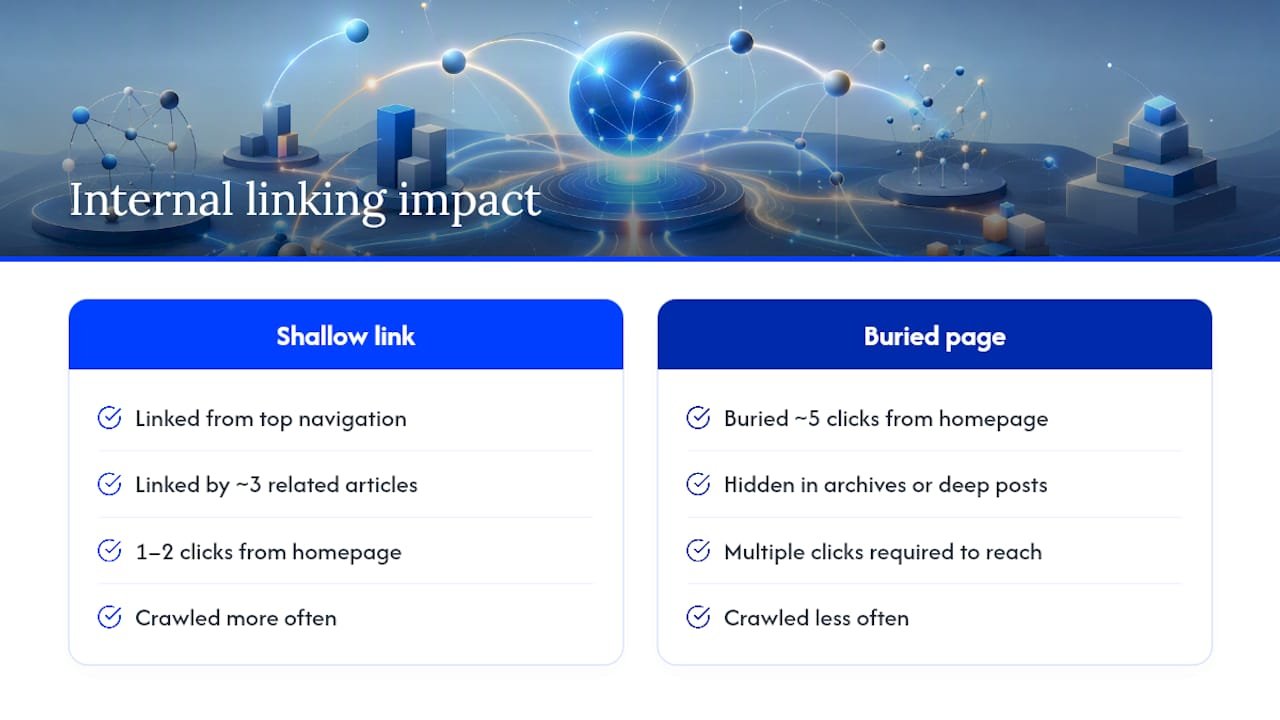
Search engines discover and rank pages by following links, and internal linking directly shapes how deep a crawler has to dig to find your most important content. A pillar page buried five clicks from your homepage gets crawled less often than one linked from your top navigation and three related articles. That crawl depth problem compounds on larger affiliate sites, where hundreds of posts can bury your highest-converting pages under years of blog archives.
Link equity works the same way. Every internal link passes some authority from the linking page to the linked page, and a site with a deliberate linking structure distributes that authority toward the pages you actually want to rank. Random or absent internal linking means your homepage’s authority never reaches the review post that’s three clicks deep, no matter how good that post is.
There’s a newer layer to this too. Generative AI systems use internal linking signals to understand topical relationships across a site, which affects whether your content gets pulled into AI-generated answers at all. A site with clear, consistent internal links between related topics reads as more authoritative to these systems than one where every page exists in isolation.
None of this is new advice, but it explains why skipping the audit step before automating links is such an expensive mistake. You’re not just risking a broken user experience. You’re risking the crawl signals and topical clarity that both traditional search and AI systems rely on to trust your site.
How Do AI Linking Tools Fit Into Your Existing CMS?
Most AI internal linking tools plug into WordPress through a plugin architecture, which means they read your existing post and page database directly rather than requiring a separate content export. That’s true of both AI Internal Links and Automatic Internal Links for SEO, and it’s the main reason WordPress dominates this tool category. If your site runs on a different CMS, look for a tool with an API or a Search Console integration instead, since that’s how platform-level options like Surfer’s automated linking feature connect to sites outside WordPress.
Integration usually happens at three points. First, the tool needs read access to your content to identify link opportunities, which is either a database connection or a crawl. Second, it needs a way to surface suggestions, either inside your CMS editor directly or in an external dashboard you review before copying changes over. Third, deployment: some tools insert links automatically once approved, while others generate a list you paste in manually.
The safest setup for most affiliate sites keeps generation and deployment as separate steps, even if the tool supports full automation. That gap gives you room to run the review checklist covered earlier without a plugin pushing changes the moment a scan finishes. If you’re already running Search Console and a content audit workflow, prioritize a tool that reads from those existing systems instead of building a new, parallel data source you have to maintain separately.
What Should Affiliate Marketers Actually Prioritize Here?
The conventional advice on internal linking treats it like a checklist item: install a plugin, let it run, move on. That approach undersells how much damage a poorly audited automation run can do to an affiliate site specifically, where a single bad link into a conversion funnel costs you real revenue, not just a ranking dip.
What the evidence here actually supports is a narrower, more disciplined approach. Audit before you automate. Test on 10 pages before you touch 100. Protect your funnel pages with exclusion lists rather than trusting a tool to recognize them on its own. Semantic matching genuinely outperforms keyword matching for catching non-obvious connections, but it also makes more confident mistakes, which is exactly why human review can’t be optional.
If you take one thing from this, prioritize the review checklist over the tool itself. The best internal linking AI on the market still needs someone who understands your content hierarchy checking its work. That’s not a limitation of the technology. It’s just how editorial judgment and automation are supposed to work together.
— Will
Get Hands-On Help Setting Up Your Linking Workflow
Running this workflow alone takes real time, even with the right tools. Willbuckley’s coaching walks you through the audit, sets up your review templates, and builds anchor rules that protect your affiliate links before any automation touches your site.

A first session typically starts with a walkthrough of your current site structure: pillar pages, orphaned content, and where your conversion funnels sit. From there, Will helps you set the exclusion lists and link quotas covered earlier, so you’re not guessing at what’s safe to automate and what needs to stay hands-off. You leave with a working checklist you can run yourself on future content, not just a one-time fix.
If you’d rather have a second set of eyes on your setup before you scale to a full-site rollout, book a consult through the coaching page and bring your crawl data with you.
Sources
- Internal linking for SEO: Why and how | Yoast
- Internal linking for SEO: Types, strategies & tools | Search Engine Land
- AI Internal Links — WordPress plugin
- Automated Internal Linking Tool | Surfer