

The fastest, highest-return automation for affiliate marketing is fixing your link management and unifying your tracking into one dashboard. Do that before anything with AI or content. Once your links stop breaking and your data stops lying to you, layer in behavior-triggered email sequences, then content and social automation. This order matters more than which tool you pick: fewer lost conversions, a clear read on ROAS, and hours back in your week.
TL;DR:
- Prioritize fixing link management and unified tracking systems before automating email or content to avoid lost revenue and confusing data.
- Use tools like Pretty Links or ThirstyAffiliates for URL cloaking and redirect management, and connect GA4 with platforms like Affilimate or Hyros for accurate attribution.
- Start automation with no-code platforms such as Zapier or Make, and only incorporate custom scripts for complex data merging or attribution modeling when necessary.
- Conduct a comprehensive data audit before launching automation to ensure click and conversion data align, and measure 2 to 4 weeks to evaluate initial pilot success.
- Automate reporting for metrics like ROAS and EPC, but review high-value relationships manually, and include disclosure templates in all automated content to maintain compliance.
Table of Contents
- Why Automation for Affiliate Marketing Starts With Links, Not Content
- Core Workflows Mapped to Tool Categories
- No-Code Platforms or Custom Scripts: Which Fits Your Setup?
- A 6-Step Rollout You Can Pilot in 2 to 4 Weeks
- Which Metrics Should You Automate Versus Review by Hand?
- Fixing Automation Failures Before They Cost You Money
- Ensuring Compliance and Ethical Considerations in Automation
- Scaling Affiliate Marketing Automation Without Breaking It
- Personalization Tactics That Make Automated Sequences Convert
- Coordinating Automation Across Social, Email, and Paid Channels
- Security Practices to Protect Your Affiliate Accounts and Data
- Will Buckley’s Starter Workflows and Coaching Notes
- Deploy Your First Automated Workflow This Week
- Sources
Why Automation for Affiliate Marketing Starts With Links, Not Content
Most affiliate marketers reach for a content generator first. That’s backward. Digistore24’s own guidance on affiliate marketing automation recommends starting with link management, moving to email sequences, and only then adding performance tracking on top, warning specifically against automating everything at once. Here’s the priority order that actually protects revenue:
- Link management and auto-updating. Broken or expired affiliate links quietly kill conversions before you ever notice a dip in your numbers. A centralized redirect system with cloaking catches dead links before customers hit them.
- Unified tracking and attribution. Connect GA4 with an aggregator like Affilimate, Scaleo, or Hyros so click ID, order value, refunds, and lifetime value live in one place instead of five spreadsheets.
- High-impact email automation. Welcome sequences, click-abandon triggers, and reengagement flows recover revenue that would otherwise vanish after a single visit.
- Content generation and social publishing. Once your foundation holds, automate the repetitive creative work.
- Partner payouts. Automate this last. It’s the lowest-risk, lowest-urgency layer, and errors here are easy to catch after the fact.
Skipping straight to step four because it looks flashy is how affiliates end up automating a broken process faster.
Core Workflows Mapped to Tool Categories
Every repeatable affiliate task falls into a category, and each category has a tool doing the heavy lifting. Link management is the foundation because it touches every other layer downstream. Tools like Pretty Links and ThirstyAffiliates let you cloak URLs, redirect in bulk when a merchant changes their link structure, and run monthly health checks instead of discovering dead links from a drop in commissions.
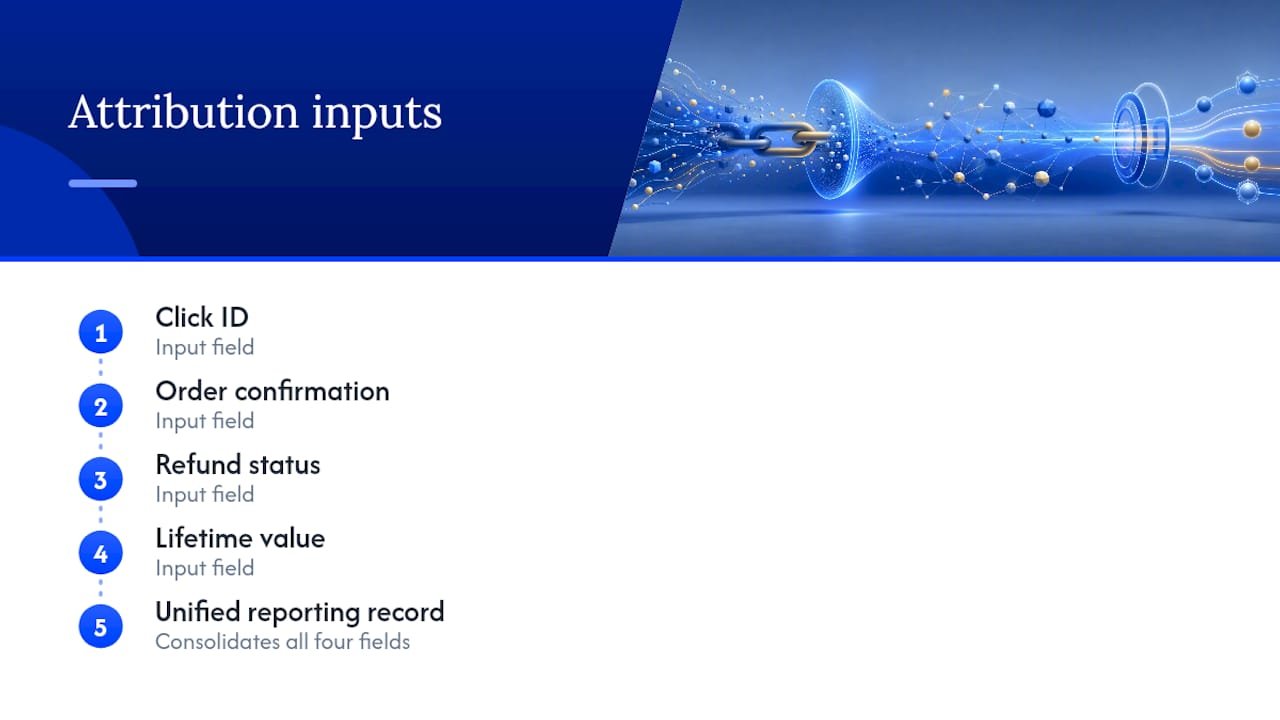
Tracking and attribution needs a specific set of fields unified before it means anything: click ID, order confirmation, refund status, and lifetime value per customer. Hostinger’s rundown of affiliate marketing tools groups these into clear categories, pairing platforms like GetResponse for email with dedicated tracking software so you’re not stitching together mismatched exports by hand.
Email automation works best with a short list of proven triggers: a welcome sequence for new subscribers, a click-abandon flow for anyone who clicked an offer but didn’t convert, and a reengagement sequence for subscribers who’ve gone quiet for 30 to 60 days. ActiveCampaign and GetResponse both handle this kind of behavior-triggered logic without custom code.
AI content tools like ChatGPT and Claude speed up drafting, but they need a human review pass before publishing. Skipping that step is how factual errors and off-brand tone slip into affiliate content at scale. Surfer SEO adds a layer of on-page optimization once a draft exists, aligning it against ranking pages before it goes live.
Social publishing follows a simple pattern: a spreadsheet of products feeds an AI caption generator, which feeds a scheduling tool. An n8n workflow for Amazon affiliate automation shows exactly this: pulling product data, generating captions and images, then posting on a schedule without manual intervention.
Pro Tip: Don’t let AI touch your top five partner relationships. Personal outreach to your best-performing partners drives revenue that automation can’t replicate. Save the automation for your mid- and long-tail partners.
No-Code Platforms or Custom Scripts: Which Fits Your Setup?
ClickBank’s framework for automating an affiliate business breaks the decision into four tiers: marketing platform workflows, custom AI agents, no-code automations, and Python scripts, each suited to a different level of complexity, according to ClickBank’s automation strategies. Most affiliates should start with no-code.
- No-code first. Platforms like n8n, Make (formerly Integromat), and Zapier connect your link manager, ESP, and tracking dashboard without writing a line of code. Start with one recipe: new sale in your affiliate network triggers a Slack notification and a row in a tracking sheet.
- Python when the joins get complex. Custom scripts earn their keep for advanced attribution modeling, merging data across multiple networks, or rotating ad creative based on performance thresholds no off-the-shelf tool handles cleanly.
- Authentication basics. Most integrations fail on expired API keys or rate limits, not logic errors. Build in a retry step and an alert for failed connections from day one.
Pro Tip: Try one no-code recipe this weekend: link click triggers a row in a spreadsheet with UTM source, then a second recipe where a new email subscriber gets tagged and dropped into a welcome sequence automatically.
A 6-Step Rollout You Can Pilot in 2 to 4 Weeks
Before automating anything, run a four-point data audit: confirm clicks match conversions, deduplicate affiliate IDs, standardize your UTM parameters, and spot-check currency conversions across networks, a process detailed in Zeely AI’s six-step automation framework. Skipping this step means automating on top of bad data, which just breaks things faster.
- Audit your data using the four-point check above.
- Pick one pilot. Link auto-updating or a click-abandon email sequence, not both.
- Set two or three KPIs before you launch, not after.
- Run the pilot for 2 to 4 weeks with weekly checkpoints, since well-scoped pilots typically show measurable wins in that window.
- Review weekly metrics and adjust triggers or thresholds as needed.
- Scale the next layer only after the first one is stable.
This sequencing avoids the integration debt that piles up when affiliates stand up five tools simultaneously and can’t tell which one is causing the problem when something breaks.
Which Metrics Should You Automate Versus Review by Hand?
Automate the reporting, not the judgment calls. Track ROAS, earnings per click (EPC), refund rate, LTV to CAC ratio, and conversion rate by channel in a single dashboard. Set guardrails that act without you: pause a campaign automatically if cost per acquisition rises more than 10%, and route anomaly alerts to Slack so you catch problems within hours instead of at month-end.
- Enable fraud detection tools once your traffic volume justifies the cost, typically after you’re running paid channels alongside organic.
- Schedule a short weekly manual scan of top-performing partners and campaigns.
- Never fully automate communication with your highest-value partners, since personal outreach on those relationships drives outsized returns automation can’t replicate.
One in five affiliates who automate reporting without setting alert thresholds first end up finding revenue drops days after they happened instead of hours, simply because nobody was watching the dashboard until the weekly review.
Fixing Automation Failures Before They Cost You Money
Broken links, mismatched attribution, and bad auto-posts share one root cause: an upstream data problem nobody caught in time.
- Broken or expired links: run a monthly link health check and route dead links through a redirect table instead of hardcoded URLs.
- Mismatched attribution: if click counts and conversion counts diverge, check for duplicate affiliate IDs or UTM inconsistencies first.
- Bad auto-posts: if an AI caption references outdated pricing or a discontinued product, pause the feed and add a manual approval step before re-enabling it.
Pro Tip: When an automation misfires, roll back to the last manual checkpoint rather than debugging live. Fix it in a test environment, then redeploy.
Ensuring Compliance and Ethical Considerations in Automation
Automating your affiliate business doesn’t automate away your legal obligations. FTC disclosure rules apply whether a human or a script published the content, and automated posting makes it easier to accidentally skip the disclosure entirely.
Build disclosure into the template itself, not into a step someone remembers to add later. If your social publishing workflow pulls product data and generates a caption automatically, the disclosure line (“This post contains affiliate links” or equivalent) needs to be baked into that caption template so it’s impossible to publish without it. The same applies to email sequences promoting affiliate offers: disclosure belongs in the footer template every automated send pulls from.
AI-generated content raises a second compliance concern. If an AI writing tool drafts a product review and the review makes a claim about results or effectiveness that isn’t accurate, you’re liable for that claim even though a human didn’t write the sentence. This is exactly why the human review step matters more with automation, not less. A person needs to read every AI-drafted piece before it goes live, checking not just for tone but for claims that could get you in regulatory trouble.
Automate the distribution. Never automate away the review checkpoint. The tools save you drafting time, not accountability.
Scaling Affiliate Marketing Automation Without Breaking It
Scaling automation successfully means adding layers in the same order you built the pilot, not adding five new tools because a new quarter started. If your link management and tracking foundation held steady through your first pilot, the next layer is usually expanding email automation to more segments, not jumping straight to a full AI content pipeline.
The mistake most affiliates make when scaling is treating automation like a checklist to complete rather than a system to grow deliberately. A workflow that works for 50 clicks a day can fall apart at 5,000 clicks a day if the underlying tracking wasn’t built to handle volume. Before scaling any single automation, ask whether the tool tier you chose during the pilot still fits. A no-code platform that handled your initial volume affordably might need to hand off to a custom Python script once you’re processing attribution data across four or five affiliate networks simultaneously.
Scaling also means expanding to new partners and channels without diluting the personal touch on your highest-value relationships. Add mid-tier and long-tail partners to your automated payout and reporting systems first. Keep your top earners on a manual, high-touch relationship even as everything around them scales.
Budget for a periodic system review, quarterly at minimum, where you check whether your original KPIs still make sense at your current volume. What counted as a good EPC at 1,000 monthly clicks might be a red flag at 10,000.
Personalization Tactics That Make Automated Sequences Convert
Generic automated emails convert worse than personalized ones, and the gap widens as your list grows. The fix isn’t writing more emails by hand. It’s building segmentation into your automation from the start so the system personalizes for you.
Segment your list by behavior, not just demographics. A subscriber who clicked a specific product link but didn’t buy needs a different follow-up than one who opened three emails but never clicked anything. ActiveCampaign and GetResponse both support this kind of behavior-based branching, where the automated sequence changes based on what the subscriber actually did rather than sending everyone the same three-email drip.
Dynamic content blocks take this further. Instead of one email going to your entire list, the same automated send can swap in different product recommendations based on past purchase category or browsing behavior, without you writing five separate campaigns.
On the content side, AI tools like ChatGPT and Claude can generate multiple caption or subject-line variants for the same offer, letting you test which angle resonates with which segment. The personalization isn’t the AI writing something creative. It’s the system routing the right variant to the right person automatically, based on data you’re already collecting through your tracking layer.
The limit here matters: personalization works when it’s based on real behavioral data feeding the automation. Fake personalization, like inserting a first name into a template and calling it personalized, does little for conversion. Real segmentation, built on the click and purchase data your tracking system already unifies, is what moves the needle.
Coordinating Automation Across Social, Email, and Paid Channels
Multi-channel automation fails most often not because any single channel is broken, but because the channels aren’t talking to each other. A customer who clicks a paid ad, then gets a retargeting email with a completely different offer than the one they clicked, experiences a disjointed automated system instead of a coordinated one.
The fix is routing all channel data through the same tracking backbone you built in your first automation layer. When your unified tracking system knows a visitor came from a specific ad campaign, that same visitor’s behavior can inform which email sequence they land in and which social retargeting audience they get added to. Without that shared data layer, you’re running three separate automated systems that happen to target overlapping people.

Practically, this means sequencing matters across channels too. If a lead clicks a social post, automate the email follow-up to reference that specific offer, not a generic newsletter. If a paid ad drives someone to a landing page, the retargeting sequence on social should reflect what they viewed, not a blanket campaign. A multichannel follow-up framework built around this kind of sequential handoff keeps messaging consistent instead of contradictory.
Timing coordination matters as much as message coordination. Sending a promotional email at the same moment a retargeting ad hits the same person’s feed can feel like overload rather than reinforcement. Stagger automated sends across channels by a few hours at minimum, and build exclusion rules so someone who already converted through one channel doesn’t keep getting hit by ads or emails for the same offer.
Security Practices to Protect Your Affiliate Accounts and Data
Automation multiplies your attack surface. Every tool you connect to your affiliate accounts, tracking dashboard, and email platform is another set of credentials that could be compromised, and a breach in one connected tool can cascade into your entire stack.
Start with unique, strong passwords for every platform, stored in a password manager rather than reused across your affiliate network logins, email service provider, and automation tools. Enable two-factor authentication everywhere it’s offered, especially on your affiliate network accounts where a compromised login can lead directly to redirected commissions.
When connecting tools through platforms like Zapier or Make, review the permission scopes each integration requests. A workflow that only needs to read your email list doesn’t need write access to your entire CRM. Over-permissioned integrations are a common way a single compromised tool exposes far more data than necessary.
Audit your connected apps quarterly. Affiliate marketers accumulate integrations over time, and a tool you stopped using six months ago but never disconnected is still a live credential sitting in someone else’s system. Revoke access for anything you’re no longer actively using.
Back up your tracking and attribution data independently of whatever platform hosts it. If Affilimate, Scaleo, or Hyros ever has an outage or you need to migrate, having your own export means you’re not starting from zero.
Will Buckley’s Starter Workflows and Coaching Notes
Two workflows I recommend to nearly every affiliate starting out: a link auto-update recipe that redirects dead URLs within minutes, and a click-abandon email that fires when someone clicks an offer but doesn’t convert within 24 hours. In week one, I watch for setup errors, mismatched fields, broken triggers. By week four, I’m watching the numbers: did EPC move, did refund rate stay flat, did the pilot save real time. If those three hold steady, it’s time to layer the next automation.
— Will
Deploy Your First Automated Workflow This Week
There are other paths into this: hiring a freelancer to wire up your tools, or working with an agency that builds custom automation stacks at a recurring monthly cost. Both work, but both mean paying someone else to run the sequencing decisions covered in this article. Willbuckley takes a different route: ready-to-run AI workflow automation recipes built specifically for affiliate marketers, so you’re implementing the exact link, tracking, and email sequences above without hiring anyone or learning to code.
If you want the templates rather than building from scratch, the AI affiliate workflow recipes walk through setup step by step, and most readers get a first pilot workflow live in under an hour. Start with the link and tracking layer this week, then come back for the email sequence templates once that foundation holds.
Sources
- How to Automate Your Affiliate Marketing Business: 4 Powerful Strategies | ClickBank
- Affiliate Marketing Automation: Tools, Tips &… | Digistore24 Blog
- Affiliate marketing tools | Hostinger tutorial
- Affiliate marketing automation with AI: A 6-step guide | Zeely AI
- Amazon affiliate marketing automation | n8n workflow