

A prompt library for marketers is a governed collection of reusable AI prompts, each paired with brand context, example outputs, and usage rules, stored in a shared repository. The real win is consistency at scale: your team stops reinventing prompts from scratch and starts editing proven ones. The single best next step is to build a small starter kit using a framework like PACE, store it in one central repo with basic metadata, and expand from there.
TL;DR:
- A prompt library must include not only reusable prompts but also brand context, output examples, known risks, and clear usage guardrails for reliability.
- Organizing prompts by marketing function and layering cross-cutting tags enhances searchability, with strict version control and ownership ensuring ongoing usefulness.
- Implementing frameworks like PACE for daily tasks and MARKET for strategic prompts improves consistency and accuracy, especially when supplemented with a dedicated context library.
- Building a small, owned, tested set of prompts within 30 days establishes a practical foundation, emphasizing ongoing governance, review, and prompt refinement.
- Legal, ethical, and privacy guardrails must be embedded in each prompt entry to prevent liabilities, especially in regulated industries or sensitive data handling.
Table of Contents
- What Goes Into a Prompt Library for Marketers
- Organizing a Prompt Library by Marketing Function
- Frameworks That Make Marketing Prompts Reliable
- A Starter Kit of Marketing Prompts You Can Copy Today
- Testing and Improving Your Prompts Over Time
- Where to Store and Govern a Growing Prompt Library
- Why the Evidence Backs Structured Prompt Libraries
- What Successful Prompt Library Rollouts Tend to Look Like
- Legal and Ethical Guardrails for Marketing Prompt Libraries
- A 30-Day Plan to Build Your First Prompt Library
- Ready to Put This Into Practice
- Sources
- FAQ
What Goes Into a Prompt Library for Marketers
A prompt library isn’t just a spreadsheet of clever phrases. It’s a working system, and the difference between a folder of good ideas and an actual library comes down to what surrounds the prompt itself.
Practitioner guidance from the University of St. Thomas describes the strongest prompt libraries as packages that combine the prompt text with intended use cases, example outputs, known risks, and clear rules for when a human needs to step in. Strip any one of those pieces away and the prompt becomes a lot less useful to anyone who didn’t write it.
Here’s what a marketer-grade entry actually needs:
- The template itself — the reusable instruction, written with placeholders for variables like product name, audience, or campaign goal.
- A context block — brand voice notes, product facts, audience details, and anything the model needs to sound like you instead of a generic assistant.
- Execution instructions — the exact steps, format, and constraints (word count, tone, structure) the output must follow.
- A sample output — a real, approved example so a new team member can see the target quality before running it themselves.
- Metadata fields — owner, tags, model compatibility, version number, and last-updated date.
- Guardrails — a short note on where the prompt tends to go wrong, plus a flag for when a human must review before publishing.
That metadata layer sounds bureaucratic, but it’s what keeps a library alive past the first three months. Without an owner field, nobody fixes a broken prompt. Without a “last updated” date, people run stale versions built for a model that’s since been replaced. This lines up with the National Institute of Standards and Technology’s generative AI risk guidance, which recommends organizations keep inventories of their AI assets with provenance metadata and assigned human oversight roles. That’s built for enterprise AI risk management, but the underlying logic scales down neatly: know what you have, know who owns it, know when a person needs to check the output.
Guardrails deserve special attention because most marketing teams skip them. A prompt that generates ad copy for a regulated industry (finance, health, legal) needs a flag saying so, right in the entry, not buried in a separate compliance doc nobody opens. A prompt for competitor comparisons needs a note about fact-checking claims before anything ships. This is also where the “when to call a human” rule earns its place: some outputs are fine to publish straight from the model, and some need a second set of eyes before they go anywhere near a live campaign.
The teams that get the most mileage out of a prompt library treat each entry the way a developer treats a reusable code snippet. It’s not a one-time trick. It’s an asset someone owns, tests, and updates.
Organizing a Prompt Library by Marketing Function
The fastest way to kill a prompt library is to dump every prompt into one giant, unsorted doc. Within a month, nobody can find anything, and people start writing prompts from scratch again out of frustration. A working taxonomy solves that before it starts.
- Sort by marketing function first. Content, SEO, paid media, social, analytics, and research each get their own folder or tag. A blog outline prompt and a paid ad variant prompt solve different problems and shouldn’t live in the same bucket.
- Layer in cross-cutting tags. Function alone isn’t enough. Add tags for campaign name, funnel stage (top, middle, bottom), audience persona, and language. A single ad copy prompt might carry tags like
paid,bottom-funnel,persona-smb-owner,english. - Map each prompt to a deliverable type. Tie every entry to the actual output it produces (blog outline, meta description, email subject line, ad headline set) so people can search by what they need to hand in, not just by department.
- Attach the workflow step. Note where in the production process the prompt fits (ideation, first draft, editing pass, QA) so it slots naturally into existing tools instead of sitting outside them.
- Version the taxonomy itself. Naming conventions drift as teams grow. Revisit folder names and tags quarterly so the system doesn’t calcify around an old campaign structure nobody remembers.
A workable naming pattern looks like this: function_deliverable_funnelstage_v2. For example, seo_metadescription_mid_v3 tells you everything at a glance: SEO function, meta description output, middle-funnel intent, third revision. That kind of naming discipline sounds fussy until the library hits fifty prompts and someone new joins the team mid-quarter.
This structure also makes onboarding dramatically faster. A new hire doesn’t need a thirty-minute walkthrough of “how we do prompts here” when the folder names already tell the story. If you’re building out brief templates alongside your prompts, pairing this taxonomy with structured content brief workflows keeps deliverables and prompts speaking the same language.
Frameworks That Make Marketing Prompts Reliable
Most bad prompts fail for one reason: they skip context. Structured frameworks fix that by forcing you to fill in the details a model actually needs before it can produce something usable, and this is consistently the piece marketers under-specify. Two frameworks cover most everyday marketing use cases.
PACE stands for Persona, Action, Context, Execution. You tell the model who it’s acting as (a senior copywriter, a technical SEO strategist), what action to take (write, audit, summarize, brainstorm), what context surrounds the task (brand voice, audience, product facts, competitive landscape), and exactly how to execute (format, length, tone, constraints). Context tends to be the piece that makes or breaks output quality, since a model with rich brand and audience detail produces something usable on the first try far more often than one working from a bare instruction.
MARKET goes further for strategic work: Mission, Audience, Requirements, Knowledge, Evaluation, Testing. It’s built specifically for marketing prompt engineering, and it forces you to define success criteria (Evaluation) and a testing loop (Testing) as part of the prompt itself, not as an afterthought. The Marketing Prompt Optimizer Framework from ISB pairs MARKET with a diagnostic rubric so you’re not just writing prompts, you’re scoring them.
Here’s how PACE looks in practice for three common tasks:
- Persona-driven blog outline: “Act as a content strategist for [brand]. Write a five-section blog outline on [topic] for [audience persona], using our brand voice notes below. Each section needs a one-sentence summary and a suggested H2.”
- Ad copy variants: “Act as a direct-response copywriter. Write five headline variants for [product] targeting [audience], each under 30 characters, testing a different angle (urgency, social proof, curiosity, benefit, price).”
- Campaign brief: “Act as a campaign strategist. Draft a one-page brief for [campaign name] including objective, audience, key message, channels, and success metrics, based on the product facts and goals below.”
Pro Tip: Keep a “context library” separate from your prompt library, a short doc of brand voice notes, audience personas, and product facts you paste into the context section of any prompt. It cuts setup time on every single prompt you run.
Adapting these across models takes small adjustments. Longer context windows on newer models tolerate more background detail before output quality drops. On models with a system message field, put persona and brand voice there instead of repeating it in every prompt. Use lower temperature settings (when available) for factual or compliance-sensitive outputs, and raise it slightly for brainstorming and headline variants where you want more variety.
A Starter Kit of Marketing Prompts You Can Copy Today
You don’t need fifty prompts to start. You need a dozen or so that cover the tasks your team runs every week, built well enough that people trust them without rewriting the whole thing.
- Brand persona definition. “Summarize our brand voice in five adjectives and three sentences, based on this sample of past content: [paste 2 to 3 examples].” Use once, then paste the result into every other prompt’s context block.
- Audience persona snapshot. “Create a one-paragraph persona for [target customer type], including their main pain point, what they’ve already tried, and what objection stops them from buying.” Required context: existing customer research or survey notes.
- Blog outline generator. “Write a six-section outline for a blog post on [topic] aimed at [persona], including a working title and one SEO-friendly H2 per section.” Expected output: numbered list with title and subheadings.
- Long-form article draft. “Using this outline [paste outline] and this brand voice [paste voice notes], write a full draft of section 2 in 300 to 400 words.” Keep sections separate; drafting one section at a time avoids generic filler.
- Meta description writer. “Write three meta description options under 155 characters for a page about [topic], each emphasizing a different benefit.” Expected output: three labeled options.
- On-page SEO audit prompt. “Review this page copy [paste text] and flag missing keyword variants, thin sections, and any claim that needs a citation.” Required context: target keyword and page URL.
- Internal link suggestion. “Given this article about [topic] and this list of existing pages [paste titles/URLs], suggest three natural internal link opportunities with anchor text ideas.”
- Ad headline set. “Write eight headline variants for [product] under 30 characters, covering four angles: urgency, benefit, social proof, and curiosity.” Expected output: table with angle and headline columns.
- Ad copy body variants. “Write three 90-character body copy options for [product] targeting [persona], each testing a different emotional hook.”
- Landing page hero section. “Write a headline, subheadline, and CTA button text for a landing page selling [product] to [persona], focused on [main benefit].”
- Social hook generator. “Write five scroll-stopping opening lines for a social post about [topic], each under 15 words, in a [tone] voice.”
- Caption and hashtag set. “Write a 60-word Instagram caption for this image concept [describe image] plus eight relevant hashtags, avoiding banned or shadowbanned tags.”
- Email subject line tester. “Write six subject line variants for an email about [offer], testing curiosity, urgency, and directness, each under 50 characters.”
- Newsletter summary block. “Summarize this article [paste link or text] into a 60-word newsletter blurb with a one-line hook and a CTA.”
- Competitor comparison outline. “Create a fair, fact-based comparison outline between [our product] and [competitor], listing three genuine differentiators without overstating claims.” Flag for human fact-check before publishing.
- Customer testimonial rewrite. “Clean up this raw customer quote [paste quote] for grammar and clarity without changing the meaning or adding claims the customer didn’t make.”
- Analytics brief summarizer. “Summarize this campaign performance data [paste metrics] into a three-bullet executive summary highlighting the biggest win, the biggest miss, and one recommended next step.”
- A/B test hypothesis writer. “Given this underperforming page element [describe], write two testable hypotheses for why it’s underperforming and one variant to test each.”
- Video script hook. “Write three 8-second opening lines for a short-form video about [topic], each designed to stop a scroll on [platform].”
- FAQ generator. “Write five FAQ questions and two-sentence answers for a page about [topic], based on this list of common customer questions [paste list].”
Each of these needs the context block from your persona and brand voice docs pasted in before running, and each should carry a note on expected output format so results come back structured, not as a wall of text. On models with shorter context windows, trim the brand voice notes to two or three sentences rather than a full paragraph, or the prompt will eat your token budget before it reaches the actual task. If you want a broader set built specifically around affiliate funnels, a funnel-mapped prompt collection extends several of these into audit-ready checklists.
Testing and Improving Your Prompts Over Time
A prompt that worked well in March can quietly degrade by June, whether because the underlying model changed or because your brand voice shifted and nobody updated the context block. Testing isn’t a one-time setup step. It’s ongoing.
The ISB technical note behind the MARKET framework pairs it with an evaluation rubric called MPES, which scores prompts across a set of attributes rather than judging output on gut feel alone. A 25-attribute diagnostic like this pushes you to check things you’d otherwise skip, tone accuracy, factual grounding, format compliance, brand safety, and clarity of instruction among them.
You don’t need all 25 attributes to start. A workable lightweight rubric covers:
- Accuracy — did the output match the facts in the context block?
- Brand voice fit — does it sound like your brand, not a generic assistant?
- Format compliance — did it follow the length, structure, and formatting instructions?
- Editing time — how many minutes did a human need to make it publish-ready?
- Reusability — would a different team member get a similar-quality result running the same prompt?
Tie those scores to real KPIs, not just internal satisfaction. Track editing time saved per piece against your pre-prompt-library baseline. Track click-through rate lift on ad variants generated from your library versus prior manual copy. Track how many pieces needed a full rewrite versus a light edit. These numbers turn “the prompt library feels helpful” into a number you can defend in a budget meeting.
Academic research on generative AI in advertising frames prompting itself as a communication skill that improves with deliberate practice and iterative refinement, not something you get right on the first attempt. Treat every low-scoring prompt as a draft, not a failure, and log the fix.
Every test needs a paper trail. Log the prompt version, the date tested, the score, and who approved the change before it replaces the old version in the shared repo. Skip this step and you’ll be debugging “why did this suddenly get worse” with zero history to check against.
Where to Store and Govern a Growing Prompt Library
Storage choice matters less than the discipline you apply to it. Consider using free online tools for storage and prompt-sharing that can help teams manage lightweight governance and prompt collaboration. A shared doc works fine for a five-person team. A dedicated prompt-management tool or a version-controlled repository makes more sense once you’re past twenty or thirty active prompts with multiple owners touching them.
Whichever you choose, the same governance basics apply:
- Assign an owner to every prompt, not just the folder, so someone is accountable when a prompt starts producing weak output.
- Enforce version control with a simple numbering system, so nobody accidentally runs a deprecated prompt built for an old campaign or a retired model.
- Set access rules distinguishing who can edit versus who can only run existing prompts, especially for anything touching regulated claims or legal language.
- Keep an audit trail logging who changed what and when, which matters more than it sounds like until someone asks why an ad claim changed overnight.
- Retire prompts on a schedule. Quarterly reviews catch prompts nobody’s used in months and prompts tied to a model version you no longer run.
- Build onboarding into the system itself, so a new hire can self-serve from the metadata and examples instead of needing a live walkthrough every time.
This mirrors NIST’s generative AI risk guidance on maintaining inventories, provenance metadata, and assigned human oversight, scaled down to fit a marketing team instead of an enterprise risk function. Practitioner reporting on scaling generative AI responsibly makes a similar point: treating prompts as governed assets with version control cuts down what’s sometimes called “prompt debt,” the accumulated mess of untracked, outdated prompts nobody wants to touch. If you’re already running structured prompt workflows, a prompt engineering system built for affiliate teams shows what this looks like once it’s fully operational.
Why the Evidence Backs Structured Prompt Libraries
None of this is guesswork dressed up as best practice. The case for structure comes from two directions that rarely get cited together: formal risk-management guidance and academic research on marketing communication.
NIST’s generative AI risk framework doesn’t mention marketing specifically, but its core recommendation, maintain inventories with provenance metadata and assigned human oversight, applies directly to any team running AI-generated content through a repeatable process. A prompt library with owner fields and version numbers is, functionally, exactly that inventory.
On the academic side, research published in the California Management Review makes a sharper claim:
Prompting functions as a foundational communication skill in marketing, one that demands rhetorical precision, domain expertise, and continuous refinement rather than one-off trial and error.
That reframes the whole conversation. A prompt library isn’t a convenience folder. It’s the training ground where that skill gets practiced, documented, and passed between team members instead of trapped in one person’s head.
Practitioner guidance closes the loop between the two. The ISB technical note behind the MARKET framework and MPES rubric recommends marketers treat prompts as products, versioned, scored, and iterated, not one-time outputs. University of St. Thomas reporting on scaling generative AI responsibly backs the same conclusion from a different angle: libraries that pair templates with example outputs and risk notes move teams from scattered experimentation to something that actually holds up in production.
Put those three sources side by side and a pattern emerges. Risk management, academic theory, and hands-on practitioner advice all point the same direction: structure isn’t bureaucracy for its own sake. It’s what separates a prompt library that survives six months from one that quietly dies in a shared drive.
What Successful Prompt Library Rollouts Tend to Look Like
The teams that get real value from a prompt library share a pattern, even when their industries have nothing in common. They don’t start with fifty prompts covering every possible task. They start with the handful of tasks eating the most hours, usually first-draft content, ad variant generation, and campaign brief writing, and they build one strong, tested prompt for each before expanding.
A content team drowning in blog production typically sees the fastest win from a single persona-driven outline prompt, paired with a brand voice context block, cutting outline time from an hour of staring at a blank doc to a fifteen-minute editing pass. A paid media team running constant A/B tests benefits most from a headline variant generator that produces eight angle-tested options in one prompt run instead of five separate manual attempts.
What connects these wins isn’t the specific prompt. It’s the discipline behind it: someone owns the prompt, someone tracks whether the output actually performed, and someone updates it when it stops working. Teams that skip that discipline tend to get a burst of initial enthusiasm followed by a slow drift back to writing everything from scratch, because nobody trusted the aging, unowned prompts sitting in a folder from three quarters ago.
The lesson scales down to any size team: a small, governed library beats a large, abandoned one every time.
Legal and Ethical Guardrails for Marketing Prompt Libraries
Copyright and data privacy questions don’t disappear just because a prompt is well organized. If anything, a shared library makes these risks easier to spread across an entire team if nobody flags them.
Two issues come up constantly. First, output ownership and originality: AI-generated copy can echo phrasing from training data in ways that create real risk for claims of originality, especially in taglines or distinctive brand language. Treat AI output as a draft that needs human review for originality before it ships as final creative, not as finished copy.
Second, data privacy: never paste customer personal information, unpublished financial data, or anything covered by a confidentiality agreement into a prompt running on a third-party model, unless your organization has a specific enterprise agreement covering data handling. This is exactly the kind of risk the guardrail field in each library entry should flag explicitly, not leave to individual judgment in the moment.
Regulated industries carry extra weight here. Prompts generating claims about health outcomes, financial returns, or legal guarantees need a mandatory human review step before publishing, no exceptions, and that rule should live in the prompt’s guardrail note, not in a compliance policy nobody rereads. The same logic applies to competitor comparisons and testimonials: unverified claims generated by a model can create real liability once they’re live.
None of this means avoiding AI prompts for sensitive categories. It means building the review checkpoint into the prompt library itself, so the safeguard travels with the prompt instead of depending on whoever happens to remember it that week.
A 30-Day Plan to Build Your First Prompt Library
You don’t need a quarter-long initiative to get a working prompt library off the ground. I’ve found the fastest path is four tight weeks, each with one clear job.
Week one: discover. Pull the ten tasks eating the most hours on your team right now, blog outlines, ad variants, campaign briefs, whatever they are. Write one PACE-structured prompt for each.
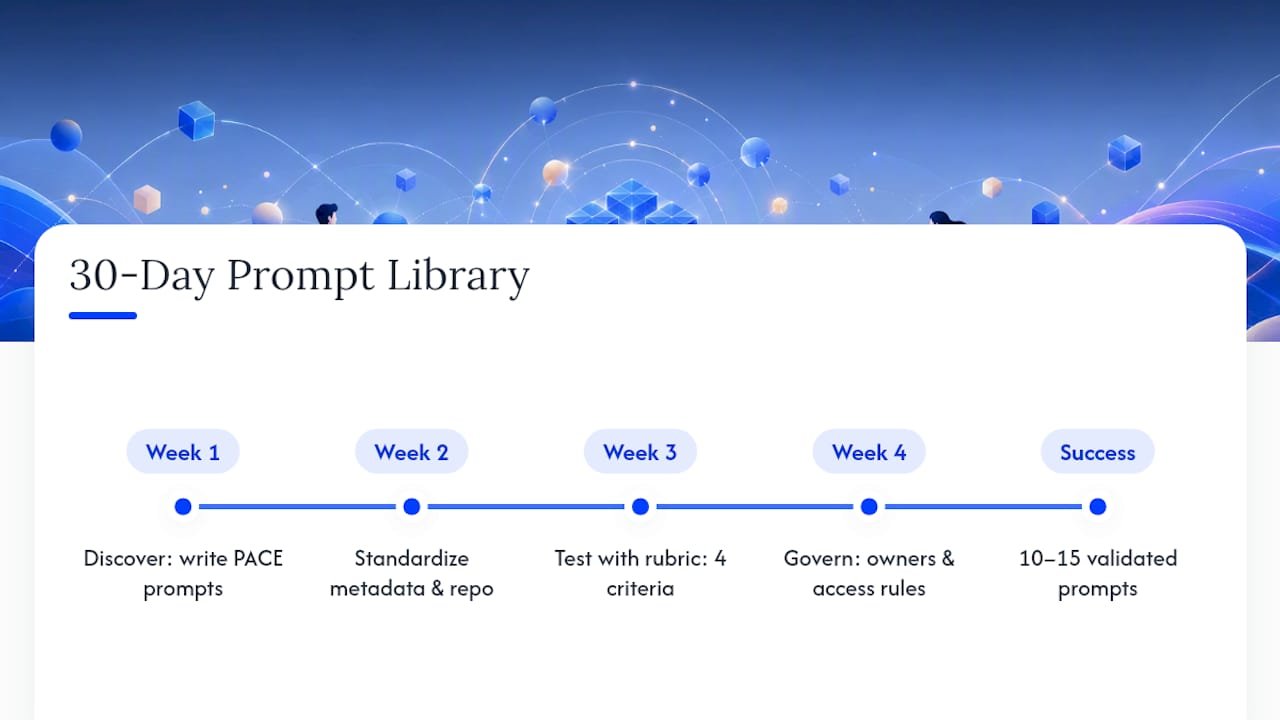
Week two: standardize. Add the metadata fields, owner, tags, model compatibility, version number, and a context block for each prompt. Store everything in one shared repo, even a well-organized doc counts at this stage.
Week three: test. Run each prompt against real tasks, score them against a lightweight rubric (accuracy, brand fit, format, editing time), and fix or cut anything scoring poorly.
Week four: govern. Assign owners, set a quarterly review date, and write one page of access rules for who can edit versus who can only run prompts.
Success after 30 days looks like this: ten to fifteen validated prompts, a central repo with metadata, and named owners for each category. That’s a real foundation, not a pilot that quietly dies. For a longer view once this is running, a 90-day content rollout picks up exactly where this leaves off.
— Will
Ready to Put This Into Practice
Most marketers trying to build a prompt library end up piecing it together from scattered blog posts, a downloaded template here, a YouTube tutorial there, with no single system tying it all together. This site takes a different approach: practical, AI-driven guidance built from real affiliate marketing experience, not theory borrowed from enterprise AI teams that have never run a campaign on a budget.

If you’re ready to move past the starter kit in this guide, the prompt engineering workflow course walks through building and organizing prompts specifically for affiliate and campaign work, step by step. Pair it with the AI brief templates and workflows if your team needs the deliverable side mapped out alongside the prompts themselves. And if you want to see what a full rollout looks like once the prompts are running campaigns for real, the affiliate marketing case study breakdown shows the actual numbers behind a working setup. Start with the workflow course, apply it to one campaign this month, and measure what changes.
Sources
- NIST AI 600-1 Generative AI Profile
- The prompt imperative: how generative AI is rewriting the rules of advertising — California Management Review
- Building prompt libraries to scale generative AI responsibly — University of St. Thomas
- Marketing Prompt Optimizer Framework: A Strategic Model for Prompt Engineering in Marketing — ISB cases
FAQ
What Is a Prompt Library for Marketers?
A prompt library is a governed collection of reusable AI prompts paired with brand context, example outputs, and usage guardrails, stored in a shared repository. It lets marketing teams produce consistent, on-brand output faster than writing prompts from scratch each time.
Which Framework Should I Use First, PACE or MARKET?
Start with PACE for everyday tasks like outlines and ad copy since it’s simpler to apply. Move to the MARKET framework once you’re building strategic prompts that need defined success criteria and a testing loop built in.
How Many Prompts Should a Starter Library Contain?
Ten to twenty prompts covering your highest-volume tasks is enough to start. A small, well-maintained library with clear owners consistently outperforms a large, abandoned one.
Where Should I Store a Prompt Library?
A shared document works for small teams; a dedicated prompt-management tool or version-controlled repository fits better once you have multiple owners and dozens of active prompts. Either way, metadata, ownership, and version numbers matter more than the tool itself.
How Often Should Prompts Be Reviewed or Retired?
Review prompts on a quarterly cadence, checking for outdated brand voice references, deprecated model compatibility, and declining performance scores. Retire anything nobody has run in months or that was built around a model version you no longer use.
Can I Use a Prompt Library Across Different AI Models?
Yes, but context and system message placement need small adjustments per model, longer context windows tolerate more background detail, and system fields can hold persona instructions separately from the task itself. Test any prompt on a new model before trusting its output for a live campaign.