

Yes, you can absolutely use Notion for affiliate marketing, and it works better than most creators expect. The fastest way to start is with three linked databases: Affiliate Programs, Affiliate Links (with a Final Link/UTM formula), and a Revenue Ledger, plus a content calendar view layered on top. That four-part schema gives you attribution from click to commission without paying for a dedicated platform.
Before you publish a single link, grab an Affiliate Tracker template from Notion Marketplace and add a Final Link formula to the Links database. That one step alone closes the attribution gap most creators never fix.
- Start with Programs and Links databases only — add Revenue Ledger after your first week of logging.
- Add a content calendar view so every piece of content ties back to the links it promotes.
- Log your FTC disclosure status as a checkbox field on every content record from day one.
Pro Tip: Copy the Affiliate Tracker template from Notion Marketplace, duplicate it into your workspace, and add a “Final Link” formula property before you touch anything else. That formula is the backbone of clean UTM tracking.
Key Takeaways
Notion works as a complete affiliate marketing workspace when you build it around five linked databases and a Final Link UTM formula — the schema is copyable in under an hour.
| Point | Details |
|---|---|
| Start with two databases | Build Programs and Links first; add Content and Revenue Ledger after two weeks of real use. |
| Final Link formula is essential | The UTM formula in the Links database generates clean, consistent tracking URLs automatically. |
| FTC disclosure is non-negotiable | Add a “Disclosure present” checkbox to every Content record and place disclosures prominently near links. |
| PartnerStack for official data | Use PartnerStack dashboards for live click and conversion counts; log summaries into Notion weekly. |
| Willbuckley accelerates setup | Coaching covers workspace audits, template customization, and automation design for affiliate creators. |
Table of Contents
- Why Notion works so well for affiliate marketing
- Which Notion templates should you start with?
- How to set up your Notion affiliate schema step by step
- How do you track clicks and conversions inside Notion?
- What is Notion’s affiliate program and how do you apply?
- Best practices and FTC compliance for U.S. creators
- AI-driven Notion workflows that save you real time
- A copyable Notion database blueprint
- When is Notion the right choice, and when should you switch?
- Willbuckley can help you build this faster
- Sources
Why Notion works so well for affiliate marketing
Notion’s linked database system is the real reason it fits affiliate work so naturally. You can connect a Programs database to a Links database, then roll both up into a Revenue Ledger, and suddenly you have a live picture of which programs are paying and which are dead weight. Most spreadsheet setups break the moment you try to do that across tabs.
Custom views are the second big win. The same data can display as a table for auditing links, a calendar for scheduling content, a board for tracking program status, and a timeline for campaign planning. You are not switching tools — you are switching lenses on the same workspace.
Templates from Notion Marketplace cut setup time significantly. Ready-made Affiliate Tracker, Affiliate Marketing Page, and Content Calendar templates give you a working schema in minutes rather than hours. Notion’s own marketing team guides confirm that consolidating tasks, docs, and calendars in one place reduces tool sprawl and keeps small teams moving faster.
The honest cost tradeoff: Notion requires manual data entry for clicks and conversions unless you wire up a lightweight automation. For a solopreneur managing five to fifteen programs, that manual logging is a ten-minute weekly habit, not a burden. For someone running fifty programs with daily payout reconciliation, a dedicated affiliate platform makes more sense.
- Linked databases map Programs → Links → Content → Revenue for automatic rollups.
- Calendar, board, table, and timeline views let you shift between pipeline and schedule without leaving Notion.
- Marketplace templates speed setup; Notion recommends starting minimal and iterating.
- Manual logging is the tradeoff; automation via Zapier or Pabbly can reduce it at scale.
Which Notion templates should you start with?
Three templates from Notion Marketplace cover the core needs of most affiliate creators. Each solves a different problem, so pick the one that matches your biggest gap right now.
Affiliate Tracker
The Affiliate Tracker template is the right starting point for solo operators who need a clean link library. It comes pre-built with properties for commission rate, base URL, program status, and dashboard links. You can add UTM fields and a Final Link formula on top of the existing schema without rebuilding from scratch. Best for: a single creator managing up to twenty programs who wants one place to see every link’s status.
Affiliate Marketing Management template
The Affiliate Marketing Management template goes a step further, covering program tracking, payout status, and operational notes. Where the Affiliate Tracker is a link library, this one functions more like a program CRM. If you are negotiating rates, tracking approval timelines, or managing multiple brand contacts, this template fits better than the simpler tracker.
Affiliate Marketing Page
The Affiliate Marketing Page template is built for consolidating promo assets and links into a shareable page, either for your own reference or as a public partner resource. It is less about tracking and more about presentation. Use it when you want a clean, organized page to hand off to a brand partner or to keep your promo materials in one place.
Content Calendar
Notion’s Content Calendar template is where affiliate attribution meets publishing. You can tag each content record with the affiliate links it promotes, then filter by publish date, channel, or program. The calendar and board views make it easy to see gaps in your schedule at a glance.
When choosing between templates, check these dimensions before committing:
- Best for: solo creator vs. small team (most free templates are built for solo use).
- Ease of setup: free templates are simpler; paid marketplace templates often include more pre-built views and formulas.
- Tracking features: look for UTM support and revenue rollup fields, not just a link list.
- Cost: most core affiliate templates are free; advanced versions with automation guides run $10–$30.
- Integrations: check whether the template includes fields for PartnerStack IDs, analytics tags, or link shortener URLs.
Marketplace ratings and recent update dates are your best quality signals. Prefer templates with reviews from the past six months and a creator who responds to questions — that signals the schema is maintained and compatible with current Notion features.
How to set up your Notion affiliate schema step by step
Build in this order: Programs → Links → Content → Revenue Ledger → Dashboard. Each database depends on the one before it, so adding them out of sequence means rebuilding relations later.
| Database | Purpose | Required fields |
|---|---|---|
| Affiliate Programs | Master record for each program | Name, Commission type, Cookie window, Dashboard URL, Status |
| Affiliate Links | Individual tracked URLs | Base URL, Final Link (formula), UTM Source, UTM Medium, UTM Campaign, Status, Relation to Program |
| Content | Blog posts, videos, social content | Title, Channel, Publish date, Related Links (relation), Status |
| Revenue Ledger | Commission records | Sale ID, Date, Amount, Program (relation), Link (relation), Payout date |
| Dashboard | Rollup views | Rollups from Programs and Revenue Ledger; filtered views by date and status |
The Final Link formula is the most important field in the Links database. The logic works like this: take the Base URL, check whether it already contains a “?” character, then append either “?” or “&” followed by your UTM parameters. A working pattern looks like this:
prop("Base URL") + (contains(prop("Base URL"), "?") ? "&" : "?") + "utm_source=" + prop("UTM Source") + "&utm_medium=" + prop("UTM Medium") + "&utm_campaign=" + prop("UTM Campaign")
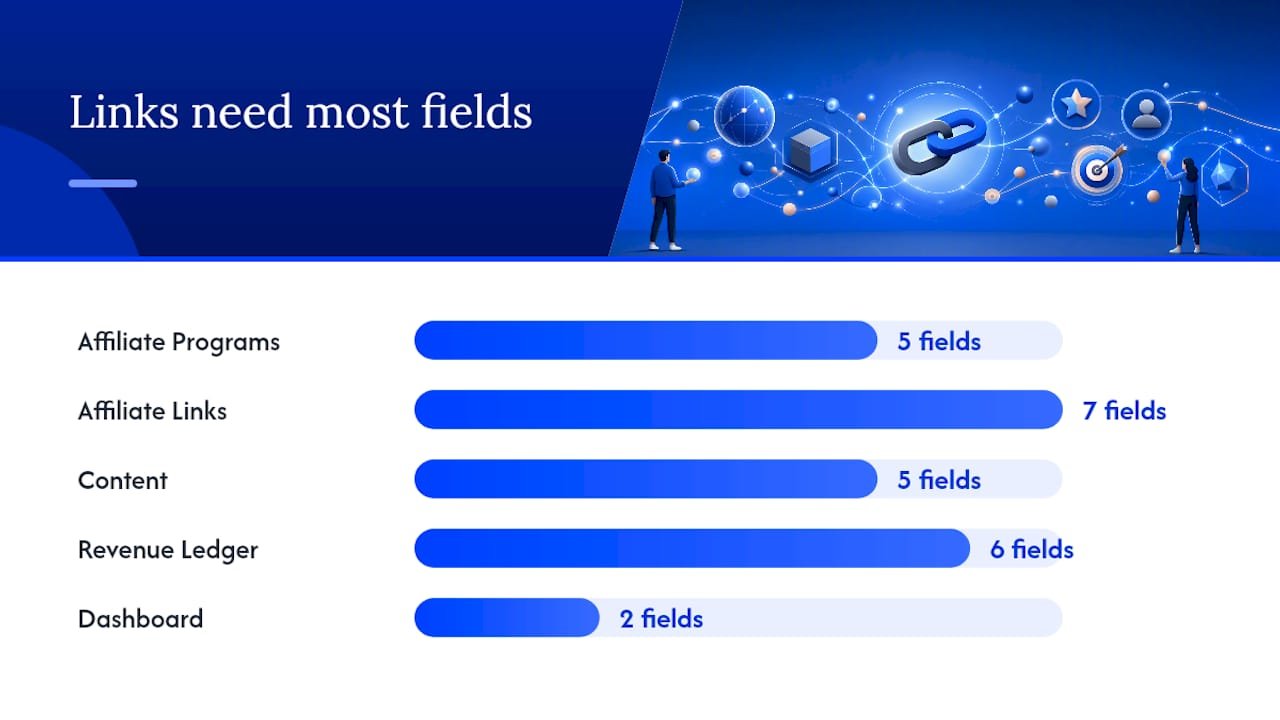
Independent Notion guides confirm this five-database architecture and Final Link formula as the most reliable way to generate clean, consistent UTM-tagged URLs directly inside Notion. You copy the Final Link value into your content, and every click that comes through carries the right attribution data.
When migrating from a marketplace template, map the template’s existing properties to the field names above before adding relations. It takes fifteen minutes and saves hours of confusion later.
- Programs: add “Cookie window” and “Dashboard URL” if the template omits them.
- Links: the Final Link formula is rarely pre-built — add it manually.
- Content: relate each record to at least one Link record before publishing.
- Revenue Ledger: start logging after your first confirmed commission, not before.
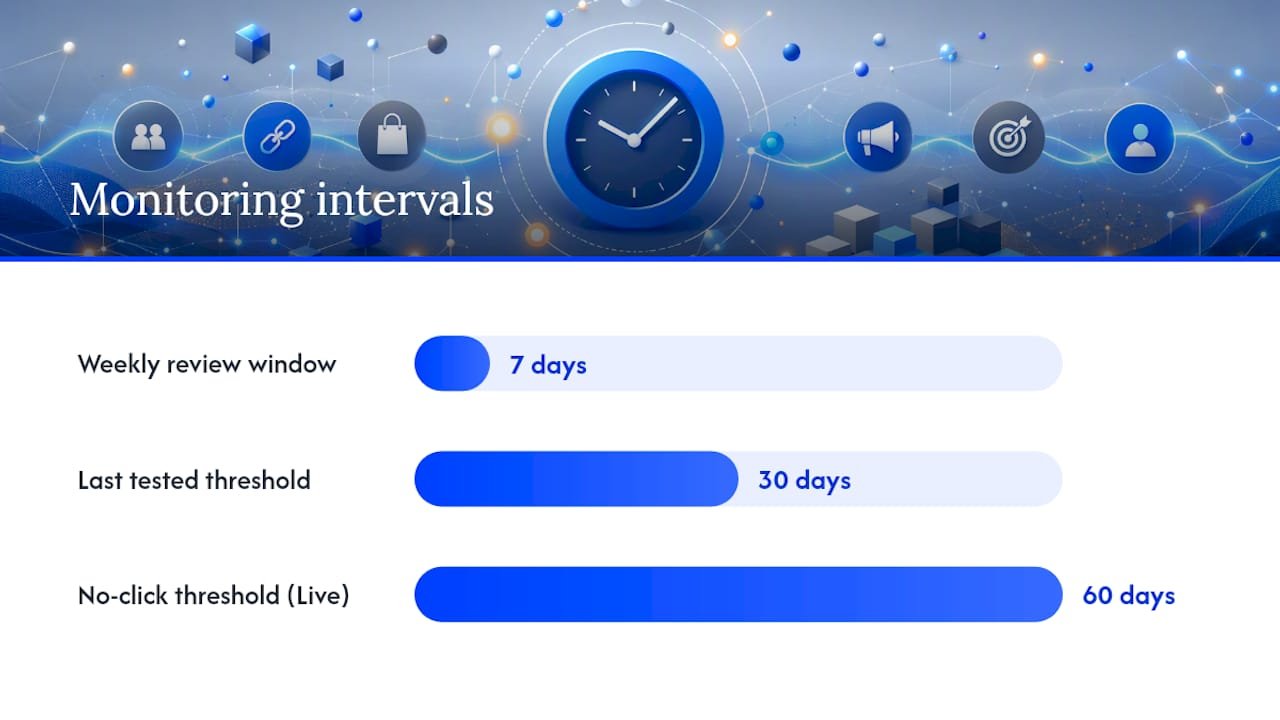
Pro Tip: Add “Created time” and “Last edited time” as system properties to every database. They cost nothing, and during your weekly review you can instantly spot records that haven’t been touched in thirty days — a reliable signal of stale links or abandoned programs.
How do you track clicks and conversions inside Notion?
Notion does not capture click data on its own. You need to pair it with external tools and then bring the data back in, either manually or through a lightweight automation.
PartnerStack is the most direct integration for programs that use it. Notion’s own affiliate program runs through PartnerStack, and many SaaS affiliate programs do the same. When a program you promote uses PartnerStack, log into the PartnerStack dashboard for official click and conversion counts, then copy the totals into your Revenue Ledger weekly. Do not try to replicate PartnerStack’s reporting inside Notion — use Notion to store the summary and PartnerStack for the live numbers.
UTM strategy is where Notion adds the most value. Standardize three fields across every link: utm_source (your site or channel name), utm_medium (organic, email, social), and utm_campaign (the specific program or promotion). The Final Link formula enforces this naming automatically, so you never publish a link with inconsistent parameters.
Link shorteners like Bitly or your own domain redirects are fine for aesthetics, but keep the unmodified Base URL in Notion. If a redirect breaks, you need the original URL to troubleshoot — a shortened link alone tells you nothing.
For analytics stitching, pull click data from Google Analytics or Plausible into Notion via manual weekly entry or a Zapier/Pabbly flow. A simple Zap that creates a Revenue Ledger row when an affiliate payout email arrives in Gmail takes about twenty minutes to build and saves that manual step every month.
- Use PartnerStack dashboards for official click and conversion data when available.
- Standardize UTM naming with the Final Link formula to enforce consistency.
- Keep the Base URL unmodified in Notion; use shorteners only for the published link.
- Pull analytics data manually or via Zapier/Pabbly into the Revenue Ledger.
Pro Tip: Add a “Tracking ID” or sub-ID field to your Links database. Many affiliate platforms support sub-IDs appended to your tracking link, which lets you tie a specific commission back to the exact content piece that drove it — far more useful than program-level totals alone.
What is Notion’s affiliate program and how do you apply?
Notion runs its own affiliate program through PartnerStack. The official affiliate landing page describes the program structure, promotional details, and application steps. You apply directly through that page, which routes you into the PartnerStack-managed flow for approval and dashboard access.
The application asks for your website or content channel, your audience size, and how you plan to promote Notion. Approval timelines vary — some creators hear back within a few days, others wait a week or two. Once approved, your PartnerStack dashboard shows clicks, conversions, and commission totals in real time.
Practical steps to apply:
- Visit notion.com/affiliates and click the application link.
- Fill in your content channel URL, audience details, and promotion method.
- Connect your PartnerStack account (or create one during the flow).
- Wait for approval confirmation, then grab your unique referral link from the PartnerStack dashboard.
- Add your Notion referral link as a record in your Affiliate Links database with the Final Link formula applied.
One thing worth noting: Notion’s affiliate program is designed for creators who actively recommend Notion to their audience, not for mass-link publishers. Applications that show a clear, relevant audience tend to move faster.
Best practices and FTC compliance for U.S. creators
The FTC requires that creators disclose material connections clearly and conspicuously, placed near the endorsement itself — not buried in a footer or hidden behind a “more” link. For U.S.-based affiliate marketers, this is not optional. A disclosure that a reader has to hunt for does not meet the standard.
Practically, that means your disclosure appears at the top of a blog post, in the first few seconds of a video, or directly above an affiliate link in a social post. Phrases like “This post contains affiliate links. I may earn a commission if you buy through them” satisfy the requirement when placed prominently.
Inside Notion, build compliance into your workflow:
- Add a “Disclosure present” checkbox to every Content record.
- Store a screenshot of the live disclosure in a Files & Media field on the same record.
- Keep a “Disclosure checklist” page in your workspace that lists the exact language approved for each channel.
Operational hygiene matters just as much as legal compliance. Update your Revenue Ledger weekly, archive links that return 404 errors, and run a monthly audit of your top programs by revenue. Programs that generated strong commissions three months ago sometimes quietly change their terms or reduce rates — you want to catch that in a monthly review, not when your payout drops unexpectedly.
Pro Tip: Create a recurring “Weekly Review” template in Notion with three checkboxes: commissions logged, stale links flagged, and disclosures confirmed. It takes five minutes and keeps your workspace from drifting into chaos.
AI-driven Notion workflows that save you real time
The most practical AI use inside a Notion affiliate workflow is UTM naming consistency. Feed a simple prompt to ChatGPT or Claude — something like “Generate a utm_campaign name for a blog post promoting [Program] targeting [audience], using lowercase and hyphens” — and you get a consistent naming convention without thinking about it each time. Paste the output directly into the UTM Campaign field in your Links database.
Automation examples that actually work at the creator scale:
- A Zapier flow that watches your Gmail for payout notification emails and creates a Revenue Ledger row with the amount, date, and program name pre-filled.
- A Pabbly sequence that checks your Links database for records with a “Last tested” date older than thirty days and flags them as “Needs review.”
- A weekly Notion template that auto-populates with the current date and pulls a filtered view of commissions logged in the past seven days.
For a weekly review agent, check three things in order: commissions logged against expected payouts, links with a status of “Live” that haven’t been clicked in sixty days (high-CTR, low-EPC signals worth investigating), and content records missing the “Disclosure present” checkbox.
Keep the workspace simple. AI is most useful for populating fields and generating consistent naming, not for redesigning your schema every week. The creators who get the most out of Notion are the ones who lock in a schema and let AI handle the repetitive fill-in work.
Pro Tip: Write a reusable prompt template for content summaries: “Summarize this post in one sentence for a Notion database description field: [paste post intro].” Store the prompt in a Notion page so any team member or AI assistant can use it consistently.
A copyable Notion database blueprint
Here is the compact schema you can replicate in under an hour.
Two rollups to build first: “Total commission per Program” (sum of Amount in Revenue Ledger, grouped by Program relation) and “Revenue per Content piece” (sum of Amount, grouped by Content relation). Those two views answer the questions that matter most: which programs pay, and which content earns.
A short checklist to copy into Notion when you start:
- Create “Affiliate Programs” database and add five to ten program records.
- Create “Affiliate Links” database, add the Final Link formula, and relate each link to a Program.
- Add the “Disclosure present” checkbox to your Content database.
- Create the Revenue Ledger and log your first commission row.
- Build the Dashboard page with rollup views from Programs and Revenue Ledger.
Pro Tip: Start with Programs and Links only. Run them for two weeks before adding Content and Revenue Ledger. That two-week window shows you whether your naming conventions actually work before you build rollups on top of them.
When is Notion the right choice, and when should you switch?
Notion is the right workspace for creators who value flexibility and are willing to log data manually or run a handful of lightweight automations. If you are managing ten to twenty programs, writing your own content, and reviewing performance weekly, Notion gives you everything you need at a fraction of the cost of a dedicated affiliate platform.
The calculus changes at scale. If you need automated click-to-payout reconciliation, fraud detection, or merchant-side program management, a specialist platform handles those requirements in ways Notion cannot replicate without significant engineering effort.
The practical decision rule: if your monthly payout reconciliation takes more than thirty minutes of manual work, or if you are managing programs on behalf of clients rather than yourself, the time cost of Notion’s manual logging exceeds the cost of a paid tool. Until that threshold, Notion is the leaner, more flexible choice.
Willbuckley can help you build this faster
Most creators spend more time building their Notion workspace than using it. Willbuckley’s coaching cuts that setup time down sharply, with workspace audits, template customization, UTM and automation setup, and weekly-review agent design tailored to your specific programs and content channels.

If you are scaling from occasional affiliate income to consistent part-time or full-time revenue, the gap is usually not effort — it is systems. Willbuckley works with creators at exactly that inflection point, helping you move from a scattered link list to a workspace where every commission traces back to the content that earned it. You can explore the full coaching offer and available templates at Willbuckley, or browse the Willbuckley blog for free Notion workflow guides and AI marketing tactics you can apply today.
Sources
These are the primary URLs to save as you build your Notion affiliate workspace.
Official Notion affiliate program:
- Disclosures 101 for social media influencers | Federal Trade Commission
- Affiliate Tracker Template | Notion Marketplace
- Affiliate Marketing in Notion: Track Links, UTMs, and Revenue in One Workspace (2026) | Fayed – Fayedtion
Notion Marketplace templates:
Compliance:
Independent setup guides: