

Yes, YouTube automation can build a real affiliate income stream, and it can start paying before your channel ever qualifies for AdSense. With a clear niche, a functioning affiliate stack, and an AI pipeline running through tools like OpenRouter, Edge TTS, and Pexels, you can publish a video today that starts earning commissions this week. That’s the strategic edge this model has over traditional YouTube growth: affiliate links don’t care about your subscriber count or watch hours. They just need clicks.
Before you commit a weekend to building this out, run through a quick self-check:
- Niche fit: Is there a product category with steady search volume, decent commissions, and enough evergreen appeal to justify dozens of videos?
- Basic tech stack: Can you get comfortable with an API key, a text editor, and at minimum FFmpeg running on your machine?
- Affiliate programs: Have you been accepted (or can you quickly get accepted) into at least one program relevant to your niche?
- Content cadence: Can you commit to publishing at least two to three videos a week for the first two months?
If you checked all four, expect your first affiliate click within days of publishing and your first commission within a few weeks, depending on your niche’s price point and buying cycle. If you can’t check all four yet, that’s your to-do list. Nothing below will work without those basics in place.
Key Takeaways
Automated YouTube channels can generate affiliate income before they ever qualify for AdSense, provided the affiliate stack, script conversion focus, and compliance basics are in place from video one.
| Point | Details |
|---|---|
| Affiliate income activates immediately | Unlike AdSense, affiliate links pay regardless of subscriber count or watch-hour thresholds. |
| Build a three-layer affiliate stack | Combine core, adjacent, and evergreen recommendations across Amazon, SaaS, and direct programs. |
| Follow the agent-role pipeline | Assign research, script, voice, visuals, editing, and publishing to distinct tools or roles. |
| Start with a free-tier stack | Edge TTS, Pexels, OpenRouter, and FFmpeg let you launch at zero cost before upgrading. |
| Get expert setup support | Willbuckley offers workflow templates and coaching to shorten the path from pipeline to first commission. |
Table of Contents
- What Is YouTube Automation Affiliate Marketing?
- Why Affiliate Marketing Pairs So Well With Automated Channels
- The AI Pipeline: Agent Roles That Run a Faceless Channel
- Which Tools Should You Actually Use, and What Will They Cost?
- How Do You Set Up and Publish Your First Automated Affiliate Video?
- How Do You Build an Affiliate Stack That Actually Converts?
- What Timeline and Income Should You Realistically Expect?
- What Policy and Copyright Risks Should You Watch For?
- How Do You Scale an Automated Affiliate Channel Like a Business?
- What Actually Moves the Needle: An Editorial Perspective
- Why I Teach an Automation-First Affiliate Approach
- How Will Buckley Can Help You Build This
- Frequently Asked Questions
- Sources
What Is YouTube Automation Affiliate Marketing?
YouTube automation affiliate marketing is the practice of using AI tools and scripted workflows, instead of a human host, to research, script, voice, edit, and publish videos that drive viewers toward affiliate offers. The “automation” part refers to the production pipeline. The “affiliate marketing” part refers to the monetization model layered on top of it. Put those together and you get a faceless channel that behaves less like a YouTube creator’s hobby and more like a small content factory pointed at a specific buying decision.
Why Affiliate Marketing Pairs So Well With Automated Channels
Here’s the part most beginners get backward. They chase AdSense eligibility first, then wonder why the channel feels dead for months. Affiliate marketing on YouTube flips that priority. You don’t need 1,000 subscribers or 4,000 watch hours to earn a commission. You need one viewer who clicks a link and buys.
That distinction is the entire reason automation and affiliate marketing fit together so cleanly. AI can produce video volume fast, but volume without a way to monetize immediately is just wasted compute. An affiliate stack, a layered set of products and programs baked into every video’s description and pinned comment, gives your channel income from day one while it waits out AdSense thresholds in the background. Clippie describes this exact three-layer structure, and it’s become the standard playbook for a reason: it works with search intent, not against it.
Picture a viewer searching “best budget espresso machine.” They land on your automated review video, watch 90 seconds of comparison footage, then click the top link in your description labeled “Check Current Price.” That’s the whole conversion loop. No subscribe button required, no algorithm favor needed. Just a relevant video sitting in front of a buying decision.
The viewer isn’t subscribing to your channel. They’re solving a problem. Affiliate marketing on YouTube works precisely because it meets that problem at the moment it’s most urgent.
Pro Tip: Don’t wait for a “big” niche. A narrow, high-intent niche (like “espresso machines under $200”) converts better on autopilot than a broad one, because every viewer arrives already close to buying.
The AI Pipeline: Agent Roles That Run a Faceless Channel
Automated channels succeed or fail based on how clearly you define responsibilities in the pipeline. Think of your channel as a small production studio where each “agent” (a script, a tool, or a person) owns one job and hands off to the next.
The standard architecture, documented in open-source projects like darkzogx’s youtube-automation-agent, breaks the workflow into roughly eight roles. Each one needs to output something specific enough that the next role can act on it without guesswork, and several of those handoffs are where affiliate conversions actually get decided, not left to chance in the edit.
| Agent Role | What It Does | Example Tools / Free-Tier Options |
|---|---|---|
| Trend & keyword research | Finds search demand and competition gaps in your niche | Google Gemini, YouTube Data API, manual keyword tools |
| Content strategy | Decides video angle, target keyword, and affiliate offer to feature | OpenAI or Gemini prompting, human oversight |
| Script writer | Drafts a conversion-focused script with CTA placement and timestamps | OpenAI, OpenRouter (free-tier models available) |
| Voice (TTS) | Converts script to natural-sounding narration | Edge TTS (free), ElevenLabs (paid, higher fidelity) |
| Visual/stock assets | Sources B-roll, images, and clips matching the script | Pexels (free), Pollinations.ai or HuggingFace FLUX for AI images |
| Editor/renderer | Assembles voice, visuals, and captions into a finished video | FFmpeg (free, local rendering) |
| Thumbnail designer | Creates a click-worthy thumbnail with clear value proposition | Pollinations.ai, HuggingFace FLUX, Canva |
| Publisher & analytics | Uploads, schedules, and tracks performance over time | YouTube Data API, YouTube Studio analytics |
Every role above must know it’s serving a conversion goal, not just producing content. The script writer isn’t just writing words. It’s deciding exactly where the affiliate link gets mentioned and how the CTA gets timed against viewer drop-off points. Get that role wrong and the rest of the pipeline, no matter how polished, ships videos nobody clicks through.
Which Tools Should You Actually Use, and What Will They Cost?
The tool list looks intimidating until you realize most of it has a workable free tier. ConvoCore’s guide to AI YouTube automation lays out a practical stack that mixes free and paid pieces depending on how much polish you need, and that’s really the decision every beginner faces: speed and cost versus voice quality and visual finish.
For scripting, you’re choosing between OpenAI’s GPT models, Google Gemini, or routing through OpenRouter, which lets you access multiple models (including free-tier options) through one API key. For narration, Edge TTS from Microsoft is free and surprisingly natural for a no-cost tool, while ElevenLabs charges for its more human-sounding voices but delivers noticeably better retention on longer videos. Stock footage comes from Pexels at no charge, and AI-generated visuals can come from Pollinations.ai or HuggingFace’s FLUX models, both of which offer usable free tiers. Rendering happens locally through FFmpeg, which costs nothing but electricity and a bit of patience the first time you configure it.
Before you touch any of this, sort your checklist into three buckets. Some pieces need API keys (OpenAI, Gemini, OpenRouter, ElevenLabs). Some run entirely on your own machine with no account required (FFmpeg, Edge TTS). And one piece needs a full OAuth handshake, not just a key: the YouTube Data API, which requires Google Cloud project setup before it will let your pipeline publish on your behalf.
How Do You Set Up and Publish Your First Automated Affiliate Video?
Getting from zero to a published video is a sequence, not a single leap. Skip a step and the pipeline breaks somewhere you won’t notice until upload fails.
- Set up your local environment. Install Python or Node (depending on which open-source agent you’re using) and confirm FFmpeg runs from your command line.
- Generate your API keys. Create accounts and grab keys for your chosen LLM (OpenAI, Gemini, or OpenRouter) and your TTS provider (Edge TTS needs no key; ElevenLabs does).
- Complete YouTube OAuth setup. Create a Google Cloud project, enable the YouTube Data API, and generate OAuth credentials so your pipeline can upload directly. TubeAssistant’s setup documentation walks through exactly where these credentials go.
- Configure your agent roles. Point each role (script, voice, visuals, render) at its respective tool and test each stage in isolation before chaining them together.
- Draft your first script with a conversion template. Follow a proven structure: hook, problem, comparison, recommendation, CTA. OutlierKit’s affiliate video playbook provides tested script templates built specifically for product-review conversions.
- Run a full pipeline test on one video. Watch the entire output before scheduling anything, checking for mismatched visuals, awkward TTS pacing, and broken affiliate links.
- Add your disclosure and publish. Include a clear affiliate disclosure in your description before the video goes live, not after.
Two non-negotiables sit inside that sequence. First, your affiliate disclosure isn’t optional. It’s an FTC requirement, and it needs to appear in the description, not buried in a comment. Second, never let stock footage or AI-generated images slip through without checking their licensing terms, especially for thumbnails, where a copyright claim can quietly demonetize an otherwise strong video.
How Do You Build an Affiliate Stack That Actually Converts?
An affiliate stack works in three layers. The core layer is your primary product recommendation, the one the whole video is built around. The adjacent layer covers complementary products a buyer of the core item would also want, like accessories or alternative models at different price points. The evergreen layer is a recurring recommendation, often a tool or service (SaaS subscriptions from programs like Impact or ShareASale tend to pay recurring commissions here) that shows up across many videos regardless of niche specifics.

Amazon Associates remains the easiest entry point for physical products because approval is fast and the catalog is enormous, even though commission rates run lower than SaaS affiliate programs. If your niche touches software or subscription services, a SaaS affiliate program through Impact or a direct partner program usually pays better long-term because commissions recur monthly instead of paying out once.
| Stack Layer | Example | Typical Network |
|---|---|---|
| Core | Primary product being reviewed | Amazon Associates |
| Adjacent | Accessories, alternative models | Amazon Associates, direct retailer programs |
| Evergreen | Recurring SaaS tool relevant to the niche | Impact, ShareASale, direct SaaS programs |
Your description block should follow a consistent template every time: a one-line summary of the video, then a labeled “Resources” section listing each affiliate link with a short descriptor (“Espresso Machine Featured: [link]”). Pin a comment that repeats your top link. Pinned comments tend to out-perform description-only placement for click-through, likely because they sit visibly under the video without requiring a click to “show more.” Mention your top recommendation verbally near the video’s midpoint too, and use an end screen pointing back to your channel’s other reviews.
Track everything with UTM parameters or a link shortener tied to an affiliate dashboard. Without that, you’re optimizing blind, guessing which videos actually drive clicks instead of knowing.
What Timeline and Income Should You Realistically Expect?
Set your expectations by milestone, not by month. The first milestone is your first affiliate click, which can happen within days if your video ranks for even a moderately competitive keyword. The second is your first commission, typically two to six weeks in, depending on your niche’s average purchase cycle. The third is YouTube Partner Program eligibility, which runs on its own separate timeline of subscriber and watch-hour thresholds, unrelated to your affiliate income. The fourth, and the one that actually changes your life, is steady monthly affiliate income once your catalog reaches a critical mass of videos still generating search traffic.
Watch three numbers as your channel grows:
- Views per video relative to your niche’s typical search volume.
- Click-through rate to your description or pinned link, not just watch time.
- Click-to-conversion percentage, which tells you whether your traffic is qualified or just curious.
A conservative scenario: ten published videos, modest search traffic, a 2 to 3% click rate on affiliate links, and a handful of monthly conversions worth a few dollars each in commission. That’s beer money for month one, but it compounds. vidIQ’s coverage of automated channel growth frames this correctly: operators who treat their catalog as a growing portfolio, rather than judging performance video by video, see revenue compound as older videos keep ranking while new ones get published. An optimistic scenario, with fifty or more videos live and a higher-ticket niche like software or premium electronics, can turn steady affiliate income into a meaningful side business, sometimes eclipsing AdSense revenue entirely.
What Policy and Copyright Risks Should You Watch For?
Automated channels get flagged for a small, predictable set of mistakes, and almost all of them are avoidable if you build the safeguard in early rather than fixing it after a strike.
The biggest red flag is reused content, stock footage or clips pulled from sources without proper licensing, which triggers copyright claims and can quietly demonetize a video before you even notice. The fix is simple: stick to properly licensed sources like Pexels for footage and document where your thumbnail images and B-roll came from, especially anything generated through Pollinations.ai or HuggingFace’s FLUX models, so you have a paper trail if a claim ever comes through.
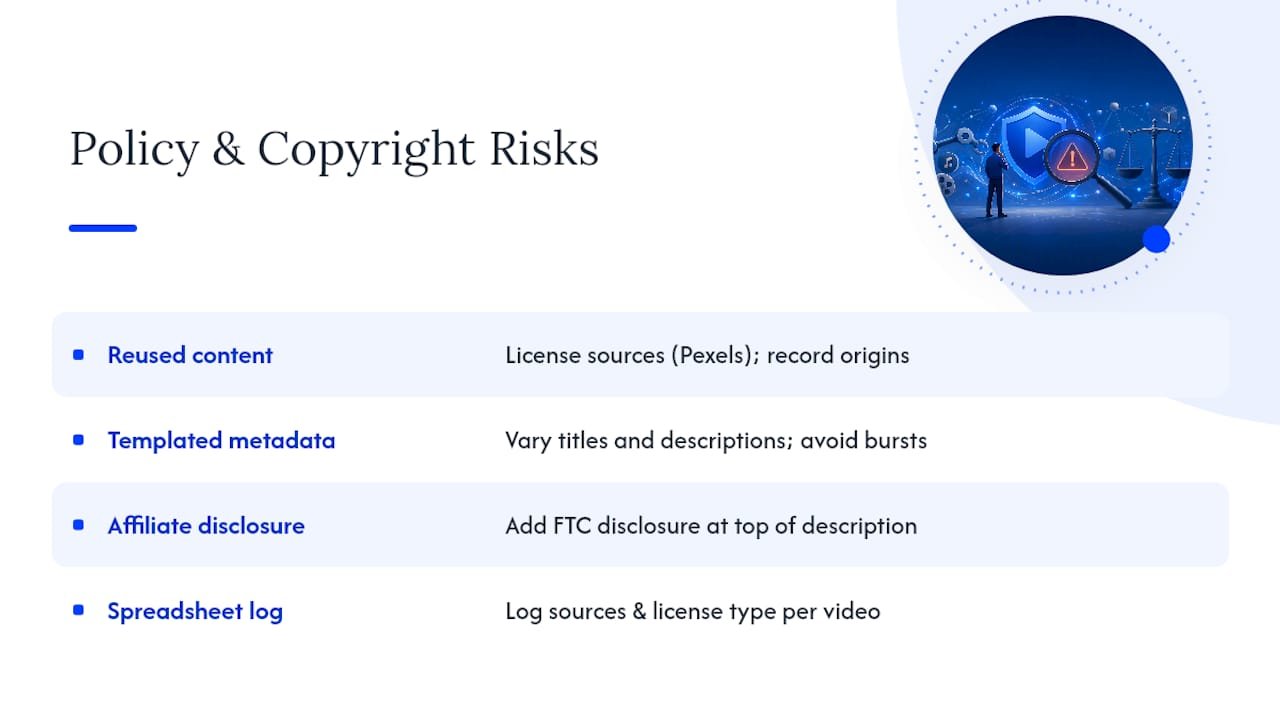
The second red flag is inaccurate or repetitive metadata, titles and descriptions that look automated because they follow an obvious template across every video. YouTube’s spam systems are tuned to catch exactly this pattern. Vary your titles, write descriptions that actually describe the specific video, and avoid publishing dozens of videos in a single burst that all look machine-generated at a glance.
The third is FTC disclosure. Every video with an affiliate link needs a clear statement, something as simple as “This video contains affiliate links; I may earn a commission from qualifying purchases,” placed at the top of your description, not buried below the fold.
Compliance isn’t the boring part of this business. It’s the part that keeps the business running long enough to matter.
Pro Tip: Keep a simple spreadsheet logging where every thumbnail image and video clip came from, including the license type. It takes five minutes per video and saves you hours if YouTube ever flags one for review.
How Do You Scale an Automated Affiliate Channel Like a Business?
Once your first handful of videos are live and converting, the job shifts from “build the pipeline” to “run the operation.” That means batching production instead of publishing one video at a time, keeping a content calendar so your niche coverage doesn’t accidentally repeat itself, and building in human quality-assurance gates before anything goes live, especially fact-checking product claims your script agent generated.
- Batch production weekly. Generate five scripts, record five voiceovers, and render five videos in one sitting rather than working video by video.
- Run a human QA gate before publishing. Spot-check every script for factual accuracy and every video for broken links or mismatched visuals.
- Review analytics on a fixed cadence. Weekly for click-through and conversion trends, monthly for overall catalog performance.
- Know when to hire. Bring in a thumbnail specialist once click-through rate plateaus, or a conversions analyst once your catalog passes fifty videos and manual tracking becomes unmanageable.
- A/B test thumbnails on your best-performing videos. Small changes in thumbnail text or imagery can shift click-through more than script changes ever will.
The operators who make this durable, not just a quick burst of videos that fizzles, are the ones who keep a human in the loop for strategy while letting AI handle the repetitive production grind. That division of labor isn’t a limitation of the automation. It’s what makes the automation trustworthy enough to scale.
What Actually Moves the Needle: An Editorial Perspective
Most guides to automated affiliate channels spend all their energy on the tech stack and almost none on the decision that actually determines whether the channel makes money: niche selection. A technically flawless pipeline pointed at a low-intent, low-commission niche will underperform a clumsy, half-automated channel sitting on a high-intent buying keyword. The tools are replaceable. The niche decision isn’t.
The second underrated lever is conversion-first scripting. Most beginners write scripts the way a hobbyist YouTuber would, entertaining, meandering, building suspense before the recommendation. That works for a personality-driven channel with loyal subscribers. It works against you on a faceless automated channel where the viewer arrived from search with a specific question. Front-load the answer, then justify it. Every sentence after your recommendation should either build trust in that choice or address an objection, not stall for watch time.
The third is affiliate program selection, and this is where I see the most avoidable mistakes. New automated channel operators default to Amazon Associates for everything because approval is easy, then wonder why their income plateaus. Diversify into SaaS and service-based programs early, even in a physical-product niche, because the recurring commission structure compounds in a way one-time Amazon payouts never will.
A concrete test for your first 30 days: publish ten videos in a single niche, but make sure at least two of them recommend a recurring-commission product, not just a one-time purchase. Compare your commission totals from those two against the other eight after 60 days. The gap usually tells you everything about where to point your next ten videos.
The channel that wins isn’t the one with the smoothest pipeline. It’s the one whose operator understood the buying decision before writing a single script.
— Will
Why I Teach an Automation-First Affiliate Approach
I’ve spent years coaching affiliate marketers, and the pattern I keep seeing is people treating AI tools as a shortcut instead of as infrastructure. A shortcut gets you one video. Infrastructure gets you a catalog that keeps earning while you sleep. That shift in mindset, from “make a video” to “build a digital asset,” is the entire premise behind the coaching and workflow templates I put together for marketers ready to scale past their first few automated videos.
If you want the deeper frameworks behind niche selection and human-in-the-loop workflows, the Willbuckley blog has tutorials that go further into the operational side of this than any single article can cover.
How Will Buckley Can Help You Build This
You’ve now got the full picture: the pipeline, the tools, the affiliate stack, the timeline. What most people struggle with isn’t understanding the model. It’s the implementation gap between reading a playbook and actually shipping a working pipeline without wasting weeks on trial and error.

That gap is exactly where coaching earns its cost back fast. Working with Willbuckley means getting workflow templates built specifically for the agent-role pipeline described above, a review of your niche and affiliate program choices before you sink hours into scripts that won’t convert, and implementation support when your FFmpeg render fails at 11pm and you need a second set of eyes. Rather than reverse-engineering someone else’s open-source repo alone, you get a structured path built around conversion-first scripting and the affiliate stack model this entire article is built on.
If you’re ready to stop piecing this together from scattered tutorials, visit the services and coaching page to see how a guided setup could shorten your path to your first affiliate commission.
Frequently Asked Questions
Can you really make money with YouTube automation and affiliate marketing?
Yes. Affiliate links generate commissions independent of AdSense eligibility, so a well-targeted automated channel can earn from its very first published video, provided the niche has real buying intent behind it.
Do I need to show my face to run an automated affiliate channel?
No. Most automated affiliate channels are faceless, relying on AI narration through tools like Edge TTS or ElevenLabs paired with stock or AI-generated visuals instead of an on-camera host.
How much does it cost to start a YouTube automation affiliate channel?
A fully free stack using OpenRouter’s free tier, Edge TTS, Pexels, and local FFmpeg rendering costs $0 to start. A low-cost mixed stack with better voice quality typically runs $20 to $60 a month.
How long until I get my first affiliate sale?
Expect your first affiliate click within days of publishing a well-targeted video, and your first commission typically within two to six weeks, depending on your niche’s buying cycle.
Is YouTube automation against YouTube’s policies?
No, automation itself isn’t banned, but reused or unlicensed content, spammy repetitive metadata, and missing FTC disclosures are common violations that can trigger strikes or demonetization. Sourcing footage properly and disclosing affiliate links protects your channel.
Sources
A handful of resources cover most of what you need for a hands-on launch, and knowing which ones fit a free build versus a paid build saves you from over-provisioning tools you don’t need yet.
- Clippie
- How to Make Money with AI YouTube Automation | ConvoCore
- metiu1 / tube-assistant (GitHub)
- darkzogx / youtube-automation-agent (GitHub)
- AI Video Making for Affiliate Marketing: Complete YouTube Playbook | OutlierKit Resources