

Choose a generative short-form video AI tool if you need fast, faceless ad creatives or brand-new content from a script or prompt. Choose a repurposing or clipping tool if you already have long-form video and just need it turned into consistent, platform-ready shorts. Both categories now produce vertical 9:16 output with automatic captions and hook-first editing, so the real decision is about your starting material, not the technology.
TL;DR:
- Generative AI tools excel at creating short videos from prompts or scripts, best suited for ad variants or faceless multilingual reels.
- Repurposing tools automate highlight detection and framing, ideal for turning long-form videos into platform-ready shorts swiftly.
- Platform-specific export presets and speed of rendering are critical factors; most tools deliver clips in under two minutes once properly configured.
- A structured, repeatable workflow involves batch processing of source material and testing multiple versions to identify high-retention creative elements.
- Combining AI tools with coaching on strategy and testing practices increases campaign effectiveness and shortens the feedback cycle.
Table of Contents
- What Is Short Form Video AI and Which Category Do You Need?
- How Do AI Short-Form Video Tools Actually Work?
- Which Features Should You Prioritize When Choosing a Tool?
- What Does a Repeatable Short-Form AI Workflow Look Like?
- What Should You Budget for Pricing and Render Speed?
- How Should Affiliate Marketers Actually Use Short-Form AI?
- How Were These Short-Form AI Tools Evaluated?
- When Do You Need Coaching Instead of Just More Tools?
- Want Faster Test Cycles Than Tools Alone Can Give You?
- Sources
What Is Short Form Video AI and Which Category Do You Need?
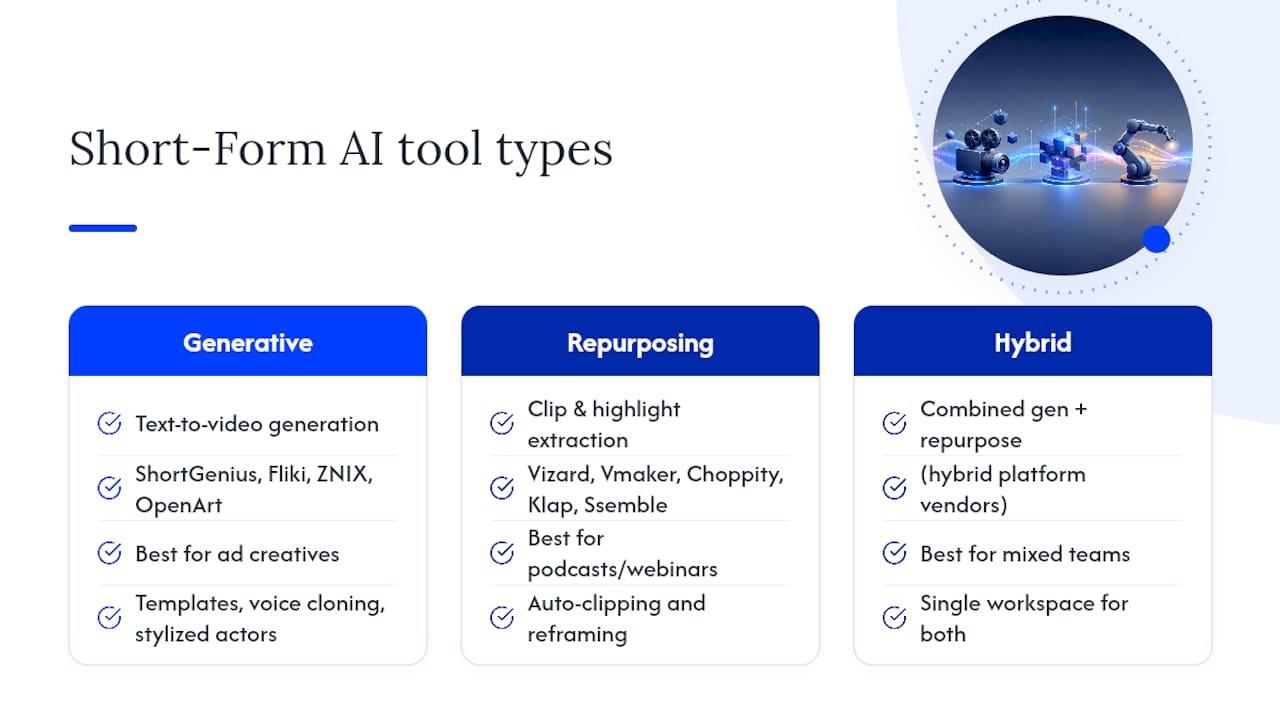
Short form video AI splits into two distinct workflows, and mixing them up wastes more time than any other mistake creators make when picking a tool. One camp generates video from a text prompt, a URL, or a script. The other camp takes footage you already have, whether that’s a podcast recording, a webinar, or a raw camera clip, and finds the moments worth turning into a short.
You’ll see this called “text-to-video” versus “repurposing” or “clipping” in most vendor documentation, and the distinction actually maps to two very different jobs. Generative and repurposing tools work best as complementary systems, not competitors: generative AI covers ad creatives and quick faceless content, while repurposing tools keep a posting calendar full from footage you’ve already recorded.
A third category, hybrid platforms, tries to do both in one workspace. These suit teams juggling ad production and organic content without wanting two separate subscriptions.
Generative makers work when you have an idea but no footage. ShortGenius builds shorts from a prompt or URL using hook-first templates and per-platform safe-zone presets, which makes it a strong fit if you’re producing ad variants at volume. Fliki leans into faceless, multi-language reels with voice cloning and a choice of visual rendering models, useful if you’re testing scripts across markets without hiring voice talent. ZNIX.ai focuses on tuned exports across many short-form platforms from a single render, cutting down on manual reformatting. OpenArt AI brings story-mode templates and stylized AI actors for narrative shorts that need a distinct visual identity rather than a talking-head look.
Repurposing and clipping tools work when you already have the raw material. Vizard specializes in highlight detection and reframing, a natural pick for podcasters converting hour-long episodes into a week’s worth of clips. Vmaker targets long-video conversion specifically, aimed at educators and webinar hosts. Choppity finds strong moments automatically and applies caption styles without much manual trimming. Klap adds a viral-potential score to each generated clip, helping creators triage which cuts to prioritize when they can’t post everything. Ssemble rounds out the category with auto-clipping paired with scheduled posting, so clips move from raw footage to a live TikTok or Reel with minimal manual handoff.
When you’re comparing tools, four dimensions matter more than feature lists: what the tool actually does best, how it prices access, how fast it renders, and which platforms it exports natively. Everything else is secondary.
How Do AI Short-Form Video Tools Actually Work?
Generative tools run on a text-to-video pipeline. You feed in a script, prompt, or brief. The model selects a visual style, generates a voiceover (often with cloned or licensed voices), and assembles scenes according to a template you choose. Fliki and similar generators offer multiple visual models, and your choice of model directly affects both render time and how polished the final clip looks. A quick, stylized draft renders faster than a high-fidelity cinematic render.
Repurposing tools run a different pipeline entirely. The AI ingests a long video, transcribes it, and scores segments for engagement signals: emotional peaks, pauses, laughter, question-and-answer moments. It then reframes the selected segment from horizontal to vertical, tracking faces so the subject stays centered as the crop shifts.
Both pipelines feed into a pacing engine tuned to your target platform. This matters more than most creators realize: TikTok rewards cuts every one to two seconds, Instagram Reels does better with a slightly slower two to three second rhythm, and YouTube Shorts performs best with a clear hook-payoff structure rather than rapid-fire cutting. A tool that exports one generic cut for every platform often reduces retention because it does not optimize pacing per platform.
Expect some rough edges regardless of which pipeline you use:
- Generative models occasionally produce visual artifacts in faces, hands, or fast motion.
- Cloned voices can sound flat on emotional or comedic lines, even when they nail neutral narration.
- Trending audio inside a tool doesn’t guarantee you have commercial licensing rights for every platform.
- Auto-detected highlights sometimes miss context, cutting a joke’s setup while keeping the punchline.
Pro Tip: Before you commit to a subscription, render the same source clip or prompt on your two finalist tools and watch both outputs back to back, full screen, sound on. Editing decisions that look fine in a preview window often fall apart at actual viewing size.
Which Features Should You Prioritize When Choosing a Tool?
Not every feature on a pricing page deserves equal weight. Run through these in order when you’re evaluating a demo or free trial:
- Hook generation quality. The first one to two seconds decide whether anyone keeps watching, and hook strength strongly influences early retention. Look for tools that generate multiple hook variants per clip so you can test rather than guess.
- Captioning accuracy and placement. Check whether captions burn into the video permanently or stay editable text, and confirm they avoid platform UI elements like the TikTok comment icon or Reels share button.
- Platform presets and safe zones. A tool that exports natively for 9:16 at 1080×1920 with duration targets suited to each platform saves you from manual reformatting on every single post.
- Audio handling. Check whether trending audio comes pre-licensed, and if voice cloning is available, listen for how it handles tone shifts, not just clean narration.
- Reframing and face tracking. For repurposing tools specifically, test this on footage with two speakers or a lot of movement, since that’s where reframing tends to fail.
- Batching and scheduling. If you’re posting daily, a tool without batch export or direct scheduling adds a manual step you’ll eventually resent.
Speed matters more than most buyers expect going in. Many short-form AI tools now report end-to-end generation or clipping times under two minutes per short, though batching multiple clips and choosing higher-fidelity video models both extend that window. If a tool’s demo takes ten minutes to produce one output, ask what happens at scale before you sign an annual plan.
Platform-optimized exports aren’t a nice-to-have feature buried in the settings menu. Getting the safe zone and caption placement right the first time is what actually saves hours across a week of posting, compared to fixing cropped captions after the fact.
What Does a Repeatable Short-Form AI Workflow Look Like?
The fastest creators aren’t necessarily using the fanciest tool. They’re running the same five-step process every time so nothing gets reinvented mid-week.
For repurposing long video into shorts:
- Upload the source video (podcast, webinar, livestream replay).
- Let the AI auto-detect and score highlight segments.
- Pick the strongest hook-worthy moment from the suggested clips.
- Edit captions and trim the clip to the platform’s ideal duration.
- Export with platform presets and schedule the post.
For generative text-to-video:
- Write a short creative brief: audience, offer, tone.
- Choose a template or visual style that matches your brand.
- Generate two or three variants from the same brief.
- Adjust the voiceover and caption timing on your favorite variant.
- Export and post, or push straight into an ad account.
Pro Tip: Batch five briefs or five source videos in one sitting instead of producing one short at a time. Most render queues process faster in a batch than one-off requests, and you’ll walk away with a week of content instead of a single post.
Run simple A/B tests as you go: same clip, two different hooks, or the same script with two different voice styles. Three-second retention will tell you which version to scale within a day or two, not a month.
What Should You Budget for Pricing and Render Speed?
Most tools in this category price on tiered subscriptions with a free tier or trial that caps monthly minutes, exports, or resolution. Expect the free tier to be enough for testing a tool’s fit, not for running a real content calendar.
Render speed varies by model choice and clip length, but sub-two-minute turnaround for a single short is common across the category when you’re not pushing for maximum resolution. Batch jobs of ten or more clips take proportionally longer and are where throughput differences between tools actually show up.
Rough budget tiers to think in:
- Casual creator: a free tier or a low-cost starter plan covers occasional posts and testing which tool class fits your workflow.
- Consistent poster: a mid-tier paid plan supports daily or near-daily output with enough render minutes to batch a week at once.
- Agency or scale operation: higher tiers or API access matter more here than any single render’s quality, since volume creators value batching and connectivity over polish on any one clip.
Test free tiers first on your actual source material, not a demo clip the vendor provides. Upgrade once you know a tool handles your specific footage or brief style well.
How Should Affiliate Marketers Actually Use Short-Form AI?
Affiliate marketers get the most mileage out of running both workflows in parallel rather than picking one and ignoring the other. Generative tools produce ad creative variants fast enough to test five hooks in the time it used to take to film one. Repurposing tools turn a single long-form training video or webinar into a week of organic posts without extra filming.
Track three numbers when you’re testing: three-second retention, click-through rate, and conversion lift against your baseline creative. Run each test for at least three to five days before judging it, since early spikes from a small audience segment can mislead you.
A generative ad variant that wins on hook retention but underperforms on conversion is telling you the hook attracted the wrong audience, not that the whole creative failed. Read those two metrics together, not in isolation.
Willbuckley’s blog covers more of these campaign-specific testing frameworks for affiliate marketers building out a short-form ad funnel.
How Were These Short-Form AI Tools Evaluated?
Every tool named in this guide got weighed against the same criteria: what workflow it’s actually built for, how fast it renders a representative clip, what platforms it exports natively, and how its pricing tier compares to what a solo creator or small team would realistically pay.
Render speed claims came from each vendor’s own published documentation and cross-referenced against general reporting on the category, where sub-two-minute turnaround for a single short is standard for most tools once you account for model choice and resolution. That figure moves depending on whether you’re rendering a quick draft or a higher-fidelity version, so treat any single benchmark as a starting point for your own test, not a guarantee.
Feature comparisons focused on what each tool’s own product pages and documentation state about hook generation, captioning, reframing, and export presets, rather than marketing claims that don’t specify a mechanism. Review platforms like G2 added context on how existing users across different use cases, from solo creators to agencies, actually experience tools like Vizard in daily production.
No tool on this list got a live performance test with proprietary numbers attached. If you’re deciding between two finalists, run your own source material through both and compare the actual output, since render times and quality both shift depending on your specific footage, script style, and chosen resolution.
When Do You Need Coaching Instead of Just More Tools?
Tools solve production speed. They don’t solve a weak creative brief, a testing cadence that never gets followed, or a funnel that converts clicks into nothing. That gap is where coaching earns its keep, specifically around campaign design and deciding what to test next instead of guessing.
If you’re already posting consistently but conversion lift has stalled, that’s usually a strategy problem, not a tool problem. I built my approach around pairing short-form AI output with a disciplined testing cadence, because the fastest render in the world doesn’t fix a hook that’s answering the wrong question for your audience.
— Will
Want Faster Test Cycles Than Tools Alone Can Give You?
Willbuckley’s coaching exists for the gap between “I have a tool” and “I have a system.” A short engagement gets you working script templates, creative briefs built around your actual offer, and a testing cadence you’ll actually stick to instead of abandoning after week two.

This fits best if you’re an affiliate marketer scaling ad spend and burning through creative faster than you can test it, or a solo creator who wants consistent organic output without reinventing your process every Monday. Short-form AI tools handle the render. Coaching handles the decisions around what to render and why, which is usually where campaigns actually stall out.
If you want a sense of how this pairs with your current tool stack, start with Will’s coaching program and bring your next campaign brief to the first session.
Sources
- AI tools for video editing — No Film School
- AI Short-Form Video Generator — ShortGenius
- Free AI reel generator: Instagram, TikTok, Shorts in minutes — Fliki
- How to make scroll-stopping TikToks and Instagram Reels — Click