

Try Rewind or Free first. Both output hooks, chapter timestamps, and bracketed B-roll notes for free. Generate a draft, humanize the wording so it sounds like you, then map it to your target runtime before you touch a camera. Free tiers cap daily usage, so expect to pay once you’re producing at volume.
TL;DR:
- Scripts that include timestamped chapters, [B-ROLL] cues, and voice tone controls are essential for producing ready-to-filmed YouTube content.
- API access and batch processing capabilities are critical for creators managing multiple channels or producing videos frequently at scale.
- Effective tools should offer transparent pricing, daily usage caps, and export options compatible with teleprompters and editing software.
- Using specific prompts with clear details about audience, tone, and length leads to more usable scripts tailored to different content niches.
- AI-generated scripts work best when used for structure and pacing, while human editing focuses on voice, authenticity, and brand personality.
Table of Contents
- What Makes a YouTube Scripts AI Tool Actually Useful?
- How Do You Choose the Right AI Script Tool?
- What’s the Best Prompt Template for AI Video Scripts?
- How Do Will Buckley’s AI Playbooks Fit Into This?
- What Do Real Users Say About AI Script Tools?
- Can AI Scripts Handle Batch Production at Scale?
- Which AI Script Tools Work Best for Different Content Niches?
- Is It Safe to Use AI Script Tools With Your Content Ideas?
- Can You Try These Tools Before Committing to a Paid Plan?
- When Should You Trust the AI Draft, and When Should You Rewrite It?
- A Faster Path Than Testing Six Tools Yourself
- Quick Links to Test Tools and Learn More
- Sources
What Makes a YouTube Scripts AI Tool Actually Useful?
Most people searching “youtube scripts ai” don’t want a brainstorming buddy. They want a script they can drop straight into a teleprompter and start filming. That distinction matters more than it sounds. A tool that spits out three paragraphs of generic advice is not the same category as one that hands you timestamped chapters, bracketed [B-ROLL] cues, and a hook engineered to survive YouTube’s first-five-seconds drop-off.
Here’s the shortlist worth your time, ranked by what they’re actually built for rather than how loud their marketing is.
Rewind.ai YouTube Script Writer leads with duration presets from one to twenty minutes, tone controls, and bracketed delivery notes like [CUT] and [B-ROLL] baked into the output. It also ships chapter timestamps automatically, and it offers an API for creators running scripts at scale. Free use comes with daily token limits, with paid top-ups once you outgrow them. If you’re building a faceless channel or a series that needs five scripts a week, the API is the feature that earns it a top spot.
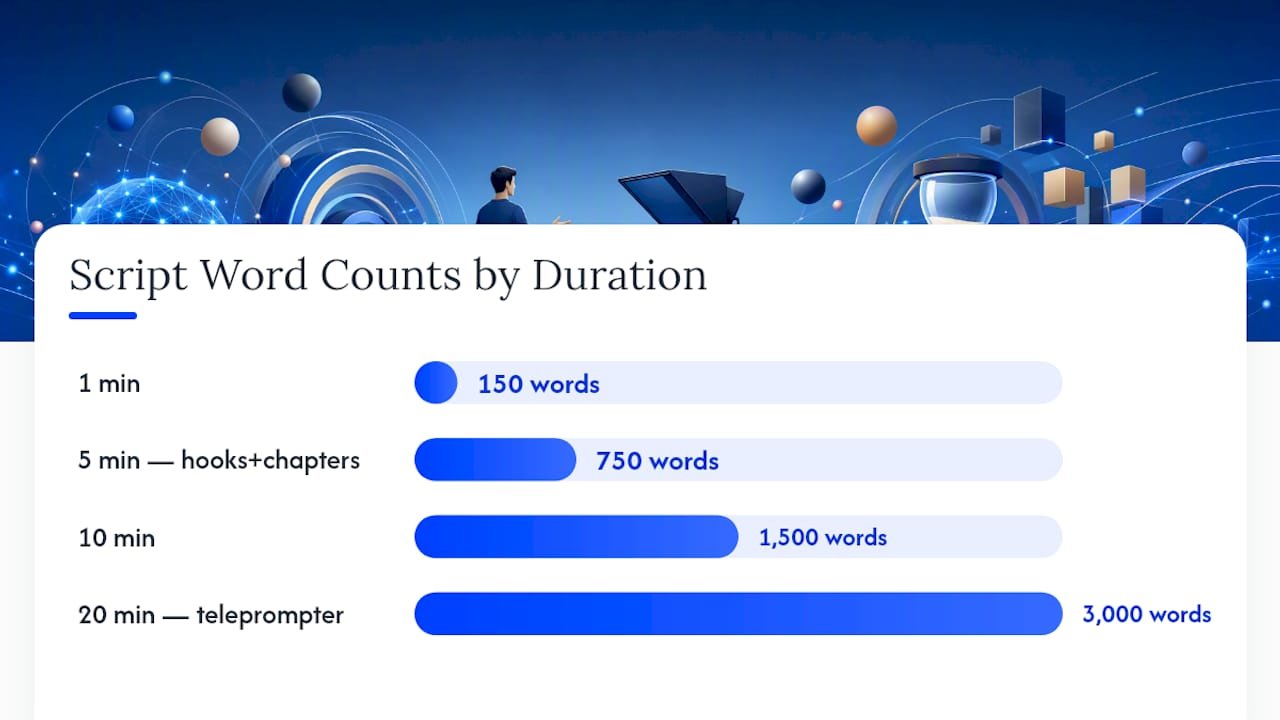
Free.ai YouTube Script Writer does something clever with its free tier: it maps your requested duration to word count using a roughly 150-words-per-minute speaking pace, so a five-minute video request comes back close to publishable length instead of needing a rewrite. It outputs first-five-second hooks, chapter markers, and a teleprompter view across seven video styles. No signup required to start, which makes it the fastest way to test whether AI scripting fits your workflow at all.
Restream AI YouTube Script Generator is built for one specific workflow: creators who record inside Restream Studio. Its tone presets and customizable script fields feed directly into the studio environment, so the value here isn’t the script quality alone, it’s the fact you never leave the recording tool to get one.
vidIQ AI script generator leans hard into retention mechanics. Its hook and transition templates are built around what keeps YouTube viewers from clicking away, which fits creators already using vidIQ for keyword and thumbnail research.
VEED AI script generator and InVideo AI script generator both bundle scripting with video production. VEED pushes your script straight into a script-to-video pipeline with TTS and avatar options. InVideo does the same through its scene and template library, so the script becomes the first step in an automated edit rather than a standalone document.
- Quick uploads on a deadline: Free.ai’s no-signup draft
- Faceless or batch channels: Rewind.ai’s API
- Recording inside a studio app: Restream
- Growth-focused hooks: vidIQ
- Full script-to-video automation: VEED or InVideo
How Do You Choose the Right AI Script Tool?
Five criteria separate a tool worth keeping from one you’ll abandon after a week.
- Production-ready output. Does it generate bracketed [B-ROLL] and [CUT] notes, or just paragraph text you’ll have to mark up yourself?
- Duration and word-count mapping. A tool that maps your target runtime to word count using a speaking-pace guideline saves you a full editing pass.
- Export and teleprompter compatibility. Can you pull the script into a teleprompter app or your editor without reformatting it?
- Tone and customization controls. Vague prompts produce vague scripts. Tools with real audience, tone, and hook-style fields perform better than a blank text box.
- Pricing transparency and automation. Token limits, daily caps, and API access should be stated up front, not buried after signup.
Watch for two red flags in particular: a “free” tool with no visible daily cap until you hit a paywall mid-script, and a generator with zero export options beyond copy-paste. Both waste time that a five-minute test session should have caught.
Pro Tip: Run the same prompt through two tools before committing to either. The gap between a generic draft and a production-ready one usually shows up in the first thirty seconds of output, not the last.
What’s the Best Prompt Template for AI Video Scripts?
A vague prompt gets a vague script. A briefing-style prompt with the right fields gets something closer to a final draft. Use this template as your starting point:
- Topic: the specific angle, not the broad subject
- Audience: who watches this channel and why
- Length: target runtime in minutes
- Tone: conversational, authoritative, comedic, etc.
- Hook style: question, bold claim, or cold open
- Retention toggle: whether you want pattern interrupts flagged in the script
Map runtime to word count using a natural speech pace; for example, a 10-minute video typically corresponds to about one thousand five hundred words. Ask the tool to insert [B-ROLL], [CUT], and [ON-SCREEN TEXT] cues at the points where pacing needs a visual break, since a script without those cues is a document, not a shot list.
Once you have the draft, run this checklist before you film:
- Humanize the voice so it doesn’t read like a script generator wrote it
- Cut filler phrases the AI tends to default to
- Read it out loud on a teleprompter to catch awkward phrasing
- Confirm chapter timestamps and the CTA actually match your video’s structure
How Do Will Buckley’s AI Playbooks Fit Into This?
Generating a script is the easy part. Turning a steady stream of scripts into a channel that actually monetizes is where most creators stall. Willbuckley’s YouTube Automation Affiliate Marketing playbook walks through the full pipeline, scripting through publishing through monetization, so the AI draft isn’t an isolated step.
Pair that with the humanize-AI-content workflow for the editing pass, and the 5-step short-form video workflow if you’re repurposing long-form scripts into Reels or TikTok cuts. Creators using these together typically report faster turnaround per video and a more consistent voice across a whole upload schedule, not just one lucky script.
What Do Real Users Say About AI Script Tools?
Reviews across creator forums and tool comparison sites tend to split along one line: people praise the speed, and they criticize the sameness. A script generator that nails structure in ten seconds often produces phrasing that sounds like every other AI-written video if you skip the humanizing step.
The recurring pros mentioned by creators are consistent: faster first drafts, fewer blank-page days, and better-organized chapters than most people write unassisted. The recurring cons are just as consistent: generic transition phrases, CTAs that feel bolted on, and hooks that need a rewrite to sound like an actual person talking. None of that is a reason to skip AI scripting. It’s a reason to treat the AI draft as raw material, not a finished product.
Can AI Scripts Handle Batch Production at Scale?
This is where the API question stops being a nice-to-have. A single creator writing one script a week doesn’t need automation. A channel publishing daily, or an agency managing multiple faceless channels, absolutely does.
Tools with API access, like Rewind.ai, let you queue up dozens of topic briefs and generate scripts in batches rather than one browser tab at a time. That’s the difference between scripting being your bottleneck and scripting being background infrastructure. Creators often undervalue this until they hit a wall around video ten or fifteen of a series, when manual scripting starts eating the hours they need for editing and thumbnails instead.

Speed without structure is a trap, though. A tool that generates fast but skips chapter timestamps or B-roll cues just shifts the bottleneck downstream to your editor. The tools worth scaling with are the ones that stay production-ready at volume, not just fast in a demo.
Which AI Script Tools Work Best for Different Content Niches?
Tutorials, vlogs, and product reviews each need something different from a script generator, and most tools aren’t equally strong at all three.
Tutorials benefit most from tools with strong chapter-timestamp support, since step-by-step content lives or dies on viewers being able to jump to the part they need. Rewind.ai and Free.ai both handle this well out of the box.
Vlogs need less rigid structure and more voice, which makes them the hardest content type to fully automate. A generator can outline the beats of a day-in-the-life video, but the personality has to come from your humanizing pass, not the draft.
Reviews and comparisons benefit from tone presets that support a confident, opinionated voice, since hedge-everything AI phrasing kills a review’s credibility fast. vidIQ’s hook-focused templates work well here since review videos live or die on the first line convincing someone to keep watching.
Is It Safe to Use AI Script Tools With Your Content Ideas?
Most script generators process your prompt on their servers to produce the draft, which means your unreleased video ideas pass through a third party before you ever hit record. That’s a reasonable trade for speed, but it’s worth knowing what each tool actually does with that input.
Free, no-signup tools like Free.ai are convenient precisely because there’s no account tying your prompts to an identity, though that also means you have less visibility into how long your inputs are retained. Tools requiring an account, like Rewind.ai’s API tier, typically offer more transparency around data handling since you’re operating under a paid relationship rather than an anonymous session.
The practical rule: avoid feeding a script generator anything genuinely confidential, like unreleased sponsorship terms or unannounced product details, until you’ve read the specific tool’s privacy policy. For ordinary video topics and outlines, the risk is low. For anything sensitive, treat the prompt box the same way you’d treat a shared document.
Can You Try These Tools Before Committing to a Paid Plan?
Every tool on this list offers some form of no-cost entry point, which is unusual for a category that could easily gatekeep behind a paywall. Free.ai and Rewind.ai both let you generate scripts without a signup, capped by daily token limits rather than a credit card. That’s enough to run the test suggested earlier: same prompt, two tools, compare the output quality directly.
VEED and InVideo tend to offer free tiers scoped to their broader video platforms rather than the script generator alone, so you’re often trialing the full production suite, not just the writing feature. Restream and vidIQ generally fold their script tools into existing platform subscriptions, meaning the “trial” is really a trial of the platform itself.
The smart approach is testing with your actual next video’s topic, not a throwaway prompt. A generic test prompt hides the weaknesses that show up on real, specific content, like niche terminology or a nonstandard video structure.
When Should You Trust the AI Draft, and When Should You Rewrite It?
Use AI for structure and pacing. It’s genuinely good at organizing a hook, three body beats, and a CTA faster than you’d draft it cold. Humanize anything voice-heavy or brand-critical, since that’s where generic phrasing costs you trust. AI-first workflows scale beautifully for series content and repurposed clips. For a launch video or anything defining your channel’s personality, write it yourself and let AI handle the outline only. The time saved on volume content is real, but it’s not free on the videos that carry your brand.
— Will
A Faster Path Than Testing Six Tools Yourself
Willbuckley exists because testing six script generators one by one, then figuring out how to turn that output into an actual monetized channel, is a slower path than most creators realize. Rather than hunting for the right tool combination on your own, Some playbooks hand you the workflow already built.

The YouTube Automation Affiliate Marketing playbook walks through scripting, publishing, and monetization as one connected system, so you’re not stitching together five different tool subscriptions to get one working channel. Pair it with the AI Affiliate Workflows guide if you want ready-to-run templates rather than building your prompt library from scratch, and use the humanize-AI-content workflow to keep every script sounding like you instead of a generator. Starting with such a playbook can help reduce the scripting bottleneck in your workflow.
Quick Links to Test Tools and Learn More
Test Rewind.ai or Free.ai directly. For the full production workflow, read Willbuckley’s YouTube Automation playbook and the best AI writing tools roundup.