

If you want a high-converting newsletter without spending weeks figuring out tech and strategy, Willbuckley’s coaching and done-for-you support is the recommended starting point. For everyone else, the right platform depends on one thing: your primary goal.
Here’s a quick shortlist to match your goal to a tool:
- Willbuckley (Sample Page – The Mindset Motivator): Best for entrepreneurs and affiliate marketers who want strategy, setup, and conversion optimization handled with them, not just a tool handed to them.
- beehiiv: Best for creators who want owned-audience growth, referral mechanics, and no revenue share eating into paid subscriptions.
- Ghost: Best for publishers who want full ownership, self-hosting, and strong SEO control over their content.
- Kit (ConvertKit): Best for creators who sell digital products and need reliable automation and segmentation.
- Substack: Best for writers who want the simplest possible setup and organic discovery through a built-in network.
- MailerLite: Best for budget-conscious small teams who need decent automation without a steep learning curve.
- HubSpot Marketing Hub: Best for B2B teams that need CRM-driven campaigns and enterprise-level reporting.
What follows is a side-by-side comparison table, detailed platform profiles with pros, cons, and pricing snapshots, a buyer checklist with red flags, and practical AI workflow tips for creators and affiliate marketers.
Key Takeaways
The most important decision in newsletter platform selection is matching your primary goal (discovery, ownership, automation, or conversion) to the right platform category before comparing features.
| Point | Details |
|---|---|
| Match goal to platform type | Discovery needs Substack or beehiiv; ownership needs Ghost; automation needs Kit or ActiveCampaign; conversion needs coaching + strategy. |
| Watch the revenue share | Substack takes 10% of paid subscription revenue; beehiiv and Ghost charge none, which compounds significantly at scale. |
| Test deliverability during trials | Run a Mail-Tester or GlockApps check before committing; inbox placement matters more than any feature comparison. |
| Pricing scales fast | Most platforms cost $0–$15/month at 1,000 subscribers and $25–$100/month at 10,000; flat-rate options like Flodesk can be cheaper at scale. |
| Willbuckley for conversion-first creators | Willbuckley’s done-for-you coaching covers strategy, setup, and optimization for affiliate marketers who want results, not just a tool. |
Table of Contents
- How the best newsletter platforms compare at a glance
- Platform-by-platform breakdowns
- How to choose the right newsletter platform for your goals
- AI-powered newsletter workflows that actually work for creators
- What Will actually recommends and why
- Skip the setup struggle with Willbuckley’s done-for-you newsletter support
- Sources
How the best newsletter platforms compare at a glance
The table below covers the dimensions that actually move the needle when you’re choosing: use case fit, pricing shape, ease of onboarding, deliverability, automation depth, integrations, and monetization support. Pricing reflects publicly listed tiers; costs at scale vary by list size and plan.
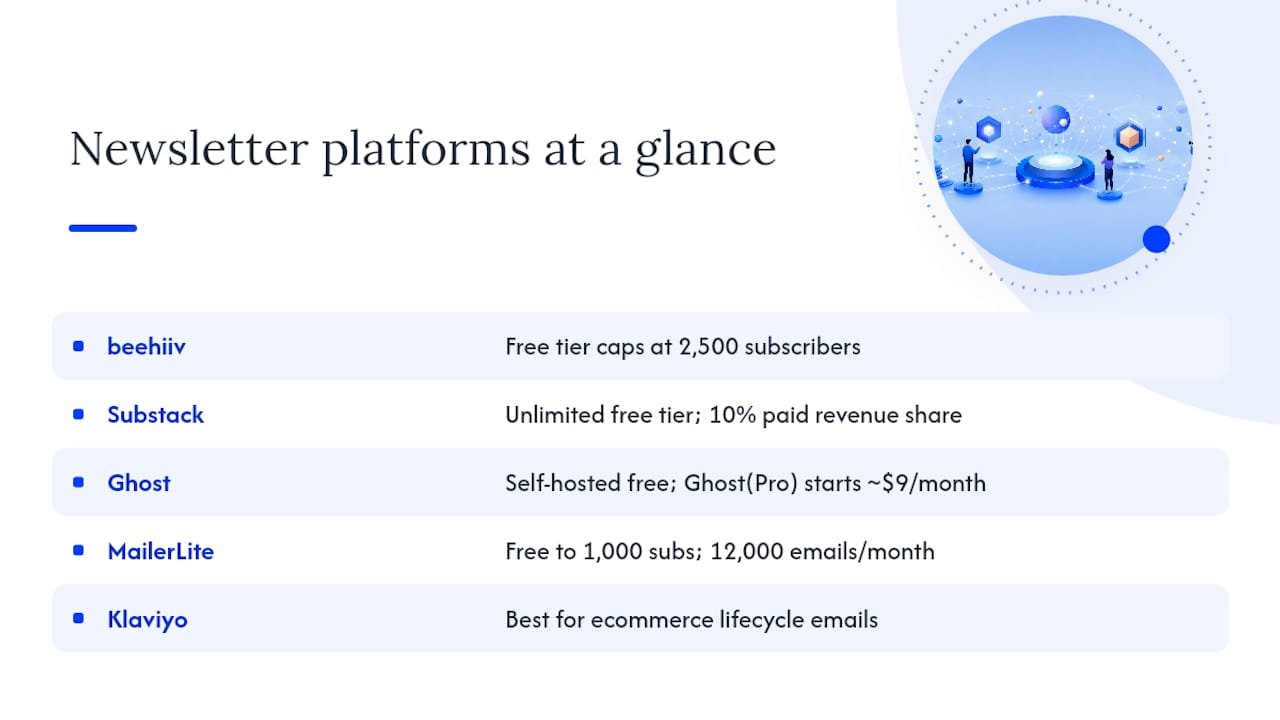
A few pricing notes worth flagging. beehiiv’s free tier caps at 2,500 subscribers, which is generous for a new creator. Substack’s free tier is unlimited, but the 10% revenue share on paid subscriptions adds up fast once you scale. Ghost’s self-hosted option is free to run if you manage your own server; Ghost(Pro) starts around $9/month. MailerLite’s free plan allows up to 1,000 subscribers and 12,000 emails per month, which G2 reviewers consistently flag as one of the most usable free tiers available.
The “best for” column is intentionally narrow. A platform that excels at ecommerce lifecycle emails (Klaviyo) is a poor fit for a solo writer who just wants to publish and get paid. Matching your primary goal to the right tool category saves you more time than any feature comparison.
Platform-by-platform breakdowns
Willbuckley — Sample Page: The Mindset Motivator
Best for: Entrepreneurs and affiliate marketers who want a high-converting newsletter built with them, not just a tool to figure out alone.
The core difference here is that you’re not choosing a platform and hoping for the best. Willbuckley’s coaching and done-for-you support covers strategy, copy templates, deliverability checks, and migration assistance. For affiliate marketers in particular, where the gap between a newsletter that converts and one that just sends emails is enormous, that guided approach matters.
Pros:
- Strategy-led: you build a newsletter designed to convert from day one, not after months of trial and error.
- Deliverability checks are built into the process, not an afterthought.
- Migration support means switching from an existing platform doesn’t have to be painful.
- Conversion optimization is ongoing, not a one-time setup.
Cons:
- Not a self-service SaaS tool; requires engagement with the coaching process.
- Best suited for creators who are ready to invest in results, not just software.
Setup timeline: Varies by scope; typically days to a couple of weeks for full setup and strategy alignment.
beehiiv
Best for: Creators who want owned-audience growth, referral mechanics, and no platform taking a cut of paid subscriptions.
G2 reviewers highlight beehiiv’s growth tooling as genuinely distinct, particularly its referral program and built-in subscriber acquisition features. The platform was built by the team behind Morning Brew, which explains why growth mechanics are baked in rather than bolted on. There’s no revenue share on paid subscriptions, which Tabular’s analysis of Substack alternatives identifies as a meaningful financial advantage for creators who expect to scale.
Pros:
- No revenue share on paid subscriptions.
- Built-in referral and growth tools.
- Clean analytics dashboard.
- Free tier up to 2,500 subscribers.
Cons:
- Automation is more limited than ActiveCampaign or Kit.
- Fewer third-party integrations than Mailchimp.
- Paid plans jump in price as your list grows.
Pricing snapshot: Free up to 2,500 subscribers; paid plans start around $42/month.
Deliverability: Strong, with dedicated sending infrastructure.
Setup timeline: Under an hour for most creators.
Substack
Best for: Writers who want the simplest possible setup and organic discovery through a built-in reader network.
Substack’s strength is its network effect. Readers discover writers through the platform itself, which removes the cold-start problem for new newsletters. The tradeoff is a 10% revenue share on paid subscriptions, which becomes significant at scale. Automation is minimal, and you have limited control over design. If discovery and simplicity are your priorities, it works well. If you’re building a monetization-first newsletter, the revenue share is a real cost.
Pros:
- Zero setup friction.
- Built-in discovery and reader community.
- Free to start; no monthly platform fee.
Cons:
- 10% revenue share on paid subscriptions.
- No meaningful automation or segmentation.
- Limited design flexibility.
- You don’t fully own your audience relationship.
Pricing snapshot: Free to start; platform takes a percentage cut of paid subscription revenue.
Setup timeline: Under 30 minutes.
Ghost
Best for: Publishers who want full content ownership, strong SEO, and the option to self-host.
Storyflow’s testing of Substack alternatives places Ghost firmly in the self-hosted CMS camp, separate from growth platforms and automation tools. That framing is accurate. Ghost gives you a clean publishing experience, native membership and paid subscription support without revenue share, and SEO capabilities that newsletter-only platforms can’t match. The tradeoff is that you’re managing more infrastructure, especially on the self-hosted path.
Pros:
- Full content ownership and self-hosting option.
- Strong SEO and CMS features.
- Native memberships with no revenue share.
- Open-source and developer-friendly.
Cons:
- Self-hosting requires technical comfort.
- Ghost(Pro) managed hosting adds cost.
- Smaller ecosystem of native integrations.
- Automation is basic compared to ActiveCampaign or Kit.
Pricing snapshot: Free to self-host; Ghost(Pro) managed hosting starts at a modest monthly price.
Setup timeline: A few hours for self-hosted; under an hour on Ghost(Pro).
Kit (ConvertKit)
Best for: Creators who sell digital products and need reliable automation, tagging, and segmentation.
EmailToolTester’s creator-focused comparison ranks Kit highly for creators who need to manage product launches, segment audiences by behavior, and automate sequences. The free tier is unusually generous at up to 10,000 subscribers, which makes it a low-risk starting point. The platform’s tagging system is one of the cleaner implementations in this category.
Pros:
- Free up to 10,000 subscribers.
- Strong tagging and segmentation.
- Built-in commerce for digital products.
- Clean, creator-focused interface.
Cons:
- Design flexibility is limited compared to Flodesk or Mailchimp.
- Reporting is functional but not enterprise-grade.
- Can feel constrained for ecommerce brands needing deep behavioral flows.
Pricing snapshot: Free tier available for small lists; paid plans start at reasonable monthly rates.
Setup timeline: A few hours to configure automations properly.
MailerLite
Best for: Budget-conscious small teams and creators who want solid automation without a steep learning curve.
Capterra’s MailerLite listing reflects consistent user sentiment: the interface is approachable, the templates are clean, and the price-to-feature ratio is hard to beat at the small-list level. The free plan covers up to 1,000 subscribers and 12,000 emails per month, which is enough to run a real newsletter before you need to upgrade. Automation is solid for the price point, though it won’t satisfy marketers who need complex behavioral triggers.
Pros:
- Generous free tier (1,000 subscribers, 12,000 emails/month).
- Clean templates and drag-and-drop editor.
- Simple automation builder.
- Good deliverability for the price.
Cons:
- Advanced automation is limited compared to ActiveCampaign.
- Reporting lacks depth for enterprise users.
- Some features are locked behind higher-tier plans.
Pricing snapshot: Free tier offered for small lists; paid plans start at modest monthly prices.
Setup timeline: Under an hour.
Mailchimp
Best for: Small businesses that need an all-in-one marketing stack with broad integrations and established deliverability.
PCMag’s Editors’ Choice roundup consistently includes Mailchimp among top picks for SMBs, citing its reporting depth and integration breadth. The platform connects to hundreds of tools, which matters if you’re running a multi-channel marketing operation. The free tier is limited to 500 contacts, and pricing scales quickly, so it’s less attractive for solo creators than for small marketing teams.
Pros:
- Extensive third-party integrations.
- Strong reporting and analytics.
- Established deliverability infrastructure.
- Large template library.
Cons:
- Free tier caps at 500 contacts.
- Pricing grows steeply with list size.
- Interface has become more complex over time.
- Limited native monetization for paid newsletters.
Pricing snapshot: Free tier with limited contacts; paid plans start at moderate monthly pricing.
Setup timeline: A few hours for full setup.
ActiveCampaign
Best for: Marketers who need deep automation, behavior-triggered flows, and lifecycle campaign orchestration.
ActiveCampaign is the automation benchmark in this category. Its visual automation builder handles complex multi-step sequences that most other platforms can’t replicate. The tradeoff is a steeper onboarding curve and no free tier. If your newsletter is part of a larger marketing funnel with lead scoring, CRM integration, and multi-step nurture sequences, ActiveCampaign is worth the investment. For a simple creator newsletter, it’s more than you need. Automated follow-up sequences are where the platform genuinely earns its price.
Pros:
- Best-in-class automation and behavior triggers.
- Built-in CRM and lead scoring.
- Strong deliverability.
- Extensive integrations.
Cons:
- No free tier.
- Steeper learning curve than most platforms.
- Can feel over-engineered for simple newsletters.
Pricing snapshot: No free tier; paid from approximately $15/month.
Setup timeline: Several hours to days for complex automations.
Klaviyo
Best for: Ecommerce brands, particularly those on Shopify, that need behavior-driven personalization and revenue attribution.
Klaviyo’s integration with Shopify is tight enough that it can trigger emails based on specific purchase behaviors, abandoned carts, and product views. Revenue attribution reporting is a genuine differentiator: you can see exactly which email sequences drove sales. For a pure newsletter creator, it’s overkill. For an ecommerce brand treating email as a revenue channel, it’s purpose-built.
Pros:
- Deep Shopify and WooCommerce integration.
- Revenue attribution reporting.
- Strong behavioral segmentation.
- Good deliverability.
Cons:
- Free tier limited to 250 contacts.
- Pricing scales quickly with list size.
- Not designed for content-first newsletters.
Pricing snapshot: Free tier with limited contacts; paid plans start at moderate monthly prices.
Setup timeline: A few hours; longer for complex ecommerce flows.
Brevo (formerly Sendinblue)
Best for: SMBs that need email plus SMS, transactional email, and multi-channel messaging in one platform.
Brevo’s pricing model is based on email volume rather than contact count, which can be a meaningful advantage if you have a large list but send infrequently. The free tier allows up to 300 emails per day. Multi-channel support (email, SMS, WhatsApp) makes it useful for businesses running coordinated campaigns across channels. PCMag’s roundup includes Brevo among its Editors’ Choice picks for this multi-channel capability.
Pros:
- Pricing based on email volume, not contact count.
- Multi-channel: email, SMS, WhatsApp.
- Transactional email support.
- Good deliverability.
Cons:
- Automation is less sophisticated than ActiveCampaign.
- Template design is functional but not beautiful.
- Limited native monetization.
Pricing snapshot: Free up to 300 emails/day; paid from approximately $25/month.
Setup timeline: A few hours.
Flodesk
Best for: Visual-first creators who prioritize beautiful email design over automation depth.
Flodesk’s flat monthly pricing (around $38/month regardless of list size) is its headline feature. The template library is genuinely attractive, and the editor is one of the easiest to use in the category. Automation is basic, and integrations are limited, so it’s a poor fit for marketers who need complex flows. For a creator who sends a beautiful weekly newsletter and doesn’t need much else, it’s a clean choice.
Pros:
- Flat pricing regardless of list size.
- Beautiful templates and easy editor.
- Simple, low-friction onboarding.
Cons:
- Basic automation.
- Limited integrations.
- No meaningful analytics depth.
Pricing snapshot: No free tier; pricing is a flat monthly fee regardless of list size.
Setup timeline: Under an hour.
Omnisend
Best for: Ecommerce brands that need omnichannel campaigns across email, SMS, and push notifications.
Omnisend sits in a similar space to Klaviyo but with a stronger emphasis on multi-channel coordination. Its automation workflows cover email, SMS, and push in a single sequence, which is useful for ecommerce brands running promotional campaigns. The free tier allows up to 500 emails per month.
Pros:
- Omnichannel automation (email, SMS, push).
- Strong ecommerce integrations.
- Good pre-built automation templates.
Cons:
- Not designed for content-first newsletters.
- Free tier is limited.
- Less powerful than Klaviyo for revenue attribution.
Pricing snapshot: Free up to 500 emails/month; paid from approximately $16/month.
GetResponse
Best for: Creators and small businesses that want email, landing pages, webinars, and funnels in one platform.
GetResponse bundles more features than most: email, landing pages, webinar hosting, and basic funnel building. That breadth makes it appealing for solopreneurs who want to consolidate tools. The automation is solid, and paid newsletter support is available. The tradeoff is that no single feature is best-in-class.
Pros:
- All-in-one: email, landing pages, webinars, funnels.
- Solid automation.
- Free tier up to 500 contacts.
Cons:
- No single feature leads its category.
- Interface can feel cluttered.
Pricing snapshot: Free tier available with contact limits; paid plans begin at a moderate monthly rate.
Remaining platforms: quick profiles
Moosend suits budget-conscious teams that need solid automation without paying Mailchimp prices. Paid plans start around $9/month after a free trial period.
AWeber is a reliable, beginner-friendly choice for small businesses and solo creators. Its free tier covers up to 500 subscribers, and it’s been around long enough to have strong deliverability infrastructure.
Constant Contact targets small businesses and nonprofits with a very simple interface. No free tier, starting around $12/month, and automation is basic. It’s a reasonable choice if simplicity and phone support matter more than feature depth.
Campaign Monitor is worth considering for design-focused teams that need professional templates and reliable deliverability. No free tier; plans start around $9/month.
Drip is purpose-built for ecommerce personalization with strong behavioral segmentation. No free tier; starts around $39/month. A good Klaviyo alternative for brands not on Shopify.
EmailOctopus is a budget option that routes through Amazon SES, keeping costs low. Free up to 2,500 subscribers; paid from approximately $8/month. Automation is basic, but deliverability through SES is solid.
Sender offers a generous free tier (2,500 subscribers, 15,000 emails/month) with decent automation for the price. A reasonable starting point for small teams.
Zoho Campaigns integrates tightly with the Zoho ecosystem. If you’re already using Zoho CRM, it’s the natural choice. Paid plans start around $3/month, making it one of the most affordable options for Zoho users.
Mailmodo focuses on interactive AMP emails, which allow recipients to fill out forms, take surveys, or complete actions directly inside the email. A niche but genuinely useful capability for marketers running engagement-heavy campaigns.
HubSpot (standalone) offers a free email marketing tier within its CRM platform. For teams already in the HubSpot ecosystem, it’s the obvious choice. The free tier is functional; advanced features require Marketing Hub paid plans.
How to choose the right newsletter platform for your goals
The single most useful question to ask yourself first: what is the primary job this newsletter needs to do? Discovery, conversion, ownership, or automation? Your answer narrows the field faster than any feature checklist.
A numbered buying checklist
- Define your primary goal. Discovery (Substack, beehiiv), full ownership (Ghost), creator automation (Kit), ecommerce revenue (Klaviyo, Drip, Omnisend), all-in-one SMB (Mailchimp, Brevo), or enterprise CRM (HubSpot, ActiveCampaign).
- Check the free tier limits. How many subscribers and emails does the free plan cover? Will you hit that ceiling within six months?
- Run a deliverability test. Send a test campaign through tools like Mail-Tester or GlockApps during your trial. A platform with poor inbox placement costs you revenue regardless of its other features.
- Test the automation builder. Build one simple three-step sequence during the trial. If it takes more than an hour to set up a basic welcome sequence, the platform’s UX will slow you down at scale.
- Check API and integration connectivity. Does it connect to your existing tools (CRM, ecommerce platform, payment processor)? Zapier can bridge gaps, but native integrations are more reliable.
- Test the paid subscription or monetization flow. If you plan to charge subscribers, complete the full signup flow as a test subscriber. Revenue share, payout schedules, and payment processor fees vary significantly.
- Verify list portability. Can you export your full subscriber list (including tags and custom fields) in a standard format? Poor export options are a red flag that the platform is designed to keep you locked in.
Red flags to watch for
- Revenue share on paid subscriptions. Substack takes 10%. At $10/month with 1,000 paid subscribers, that’s $1,000/month going to the platform. Platforms like beehiiv and Ghost charge no revenue share.
- Hidden subscriber limits. Some platforms count unsubscribed contacts toward your billing tier. Always ask how they count contacts.
- Weak or missing API. If you plan to build custom integrations or connect to a CRM, a limited API will block you.
- No list export. Any platform that makes it difficult to export your subscriber list is a platform you’re renting, not owning.
- Vague deliverability reporting. If a platform can’t show you open rates, bounce rates, and spam complaint rates clearly, you’re flying blind.
Five questions to ask during signup or a trial demo
- How do you handle spam complaints, and what’s your threshold before account suspension?
- What does list export include (tags, custom fields, engagement history)?
- Is there a revenue share on paid subscriptions, and what are the payment processor fees?
- What’s the realistic cost at 10,000 subscribers on the plan I’d use?
- What migration support do you offer if I’m moving from another platform?
For a rough pricing sanity check: at 1,000 subscribers, most platforms cost $0 to $15/month. At 10,000 subscribers, expect $25 to $100/month depending on features. Platforms with flat pricing (Flodesk) or volume-based pricing (Brevo) can be cheaper at scale if your sending frequency is moderate. EmailToolTester’s creator comparison maps these trade-offs by goal type, which is worth bookmarking for your evaluation.
AI-powered newsletter workflows that actually work for creators
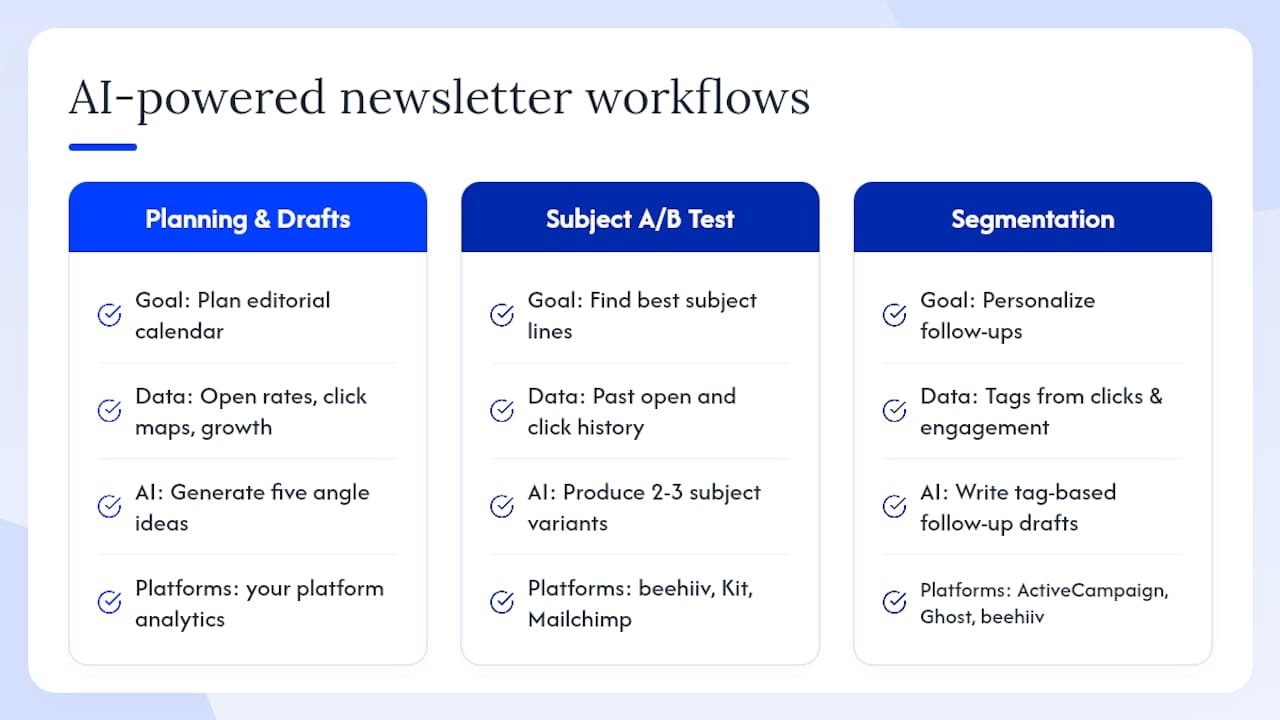
AI accelerates newsletter planning and personalization, but it needs to be guided by your actual audience data to produce results worth sending.
Here are three concrete workflows that combine platform features with AI assistance:
Workflow 1: Planning and draft generation. Use your platform’s analytics (open rates, click maps, subscriber growth by source) to identify your highest-performing content topics. Feed that data into a prompt for a tool like ChatGPT or Claude: “My top three performing newsletter topics last quarter were X, Y, Z. Generate five angle ideas for next month’s editorial calendar.” This keeps AI output grounded in what your audience has already responded to, rather than generic suggestions.
Workflow 2: Subject line A/B testing. Write two to three subject line variants using AI, then use your platform’s A/B testing feature (available on beehiiv, Kit, Mailchimp, ActiveCampaign, and most paid tiers) to test them against a portion of your list before full send. Over time, the winning patterns teach you what your specific audience responds to, which makes future AI prompts more accurate.
Workflow 3: Segmentation and personalized delivery. Automation-first platforms like ActiveCampaign and Kit let you tag subscribers based on link clicks and engagement behavior. Use those tags to feed AI-assisted content personalization: “Subscribers tagged ‘affiliate marketing’ clicked this link. Write a follow-up email that goes deeper on that topic.” Owned-audience growth platforms like beehiiv support this at a simpler level; self-hosted options like Ghost require more manual setup.
Pro Tip: Always run AI-generated content through a human-in-the-loop check before sending. Read it aloud. If it doesn’t sound like you, rewrite the parts that don’t. Your subscribers signed up for your voice, not a generic AI output.
Pro Tip: Feed your platform’s analytics back into your AI prompts regularly. “My last five emails had an average open rate of X% and a click rate of Y%. What subject line patterns and content formats should I test next?” This closes the loop between data and content.
One compliance note: permission-based sending is non-negotiable for US deliverability. Only email subscribers who have explicitly opted in, and honor unsubscribes immediately. For cookieless analytics approaches that respect subscriber privacy while still giving you useful engagement data, first-party platform analytics are your most reliable signal.
What Will actually recommends and why
For most affiliate marketers and creators I work with, the platform question is actually the second question, not the first. The first question is: what does your newsletter need to do to generate revenue for your business? Once that’s clear, the platform choice follows naturally.
For a solo creator whose primary goal is organic discovery and a simple paid subscription, Substack or beehiiv make sense. Substack if you want the network effect and don’t mind the revenue share; beehiiv if you want to own the economics as you scale.
For an affiliate marketer building a newsletter as a conversion asset, the platform matters less than the strategy behind it. A well-structured welcome sequence, a content calendar built around affiliate offers, and a deliverability-first setup will outperform any platform choice made in isolation. That’s the case for working with a coaching or done-for-you approach rather than just picking a tool and hoping the strategy figures itself out.
Switching costs are real but manageable. Most major platforms support CSV import, and some (like Ghost and Buttondown, which markets itself specifically on concierge migration) offer hands-on migration support. The time to switch is before your list grows past 5,000 subscribers, not after. Migration gets more complex as engagement history and tags accumulate.
Skip the setup struggle with Willbuckley’s done-for-you newsletter support
Choosing a platform is the easy part. Building a newsletter that actually converts, stays out of spam folders, and grows your affiliate revenue is where most creators stall.

Willbuckley’s coaching and done-for-you newsletter support gives you a faster path to a high-converting newsletter without the months of trial and error. Here’s what the process covers:
- Strategy: A content and monetization plan built around your specific affiliate offers and audience.
- Setup: Platform configuration, deliverability checks, and technical setup handled with you.
- Copy templates: Welcome sequences, promotional emails, and re-engagement flows written to convert.
- Migration assistance: Moving from an existing platform without losing subscribers or engagement history.
- Ongoing optimization: Conversion-focused feedback as your newsletter grows.
If you’re ready to stop guessing which platform to use and start building a newsletter that works, explore the Mindset Motivator coaching page to see how the process works and what it includes.
Sources
- PCMag — The Best Email Marketing Software
- The 12 Best Substack Alternatives in 2026 (We Tested Them All) | Storyflow
- G2
- Capterra
- 10 Substack Alternatives That Will Increase Your Revenue Today
- The 6 Best Newsletter Platforms for Creators in 2026
- Buttondown