

Pick ChatGPT if you need a broad all-in-one AI toolkit with images, voice, and web agents built in. Pick Claude if your work centers on careful writing, long-document reasoning, or high-trust code reviews. That single trade-off, breadth versus depth, drives almost every decision in the ChatGPT vs Claude comparison.
- ChatGPT wins on breadth: native image generation via DALL·E, live voice mode, GPTs, web browsing agents, and a plugin ecosystem that handles tasks Claude simply cannot do natively.
- Claude wins on depth: more natural, less templated prose, a reported context window up to 1M tokens on paid tiers, and a tendency to ask clarifying questions before producing a draft that needs fewer rewrites.
- Practical next step: run one real task on each tool this week. If you write long-form content or review code, start with Claude. If you need images, quick web research, or tool chaining, start with ChatGPT. Both individual paid tiers sit at $20/month, so the cost of testing is low.
Key Takeaways
Claude wins on depth and prose quality; ChatGPT wins on breadth, images, and ecosystem, and the most productive users run both tools together rather than committing to one.
| Point | Details |
|---|---|
| Core trade-off | ChatGPT offers breadth (images, voice, agents); Claude offers depth (prose, long context, careful code). |
| Context window advantage | Claude reports up to 1M tokens on paid tiers, making it the stronger choice for long documents. |
| Privacy defaults differ | Claude does not retrain on interactions by default; ChatGPT retrains by default with an opt-out option. |
| Caps drive upgrades | Hard stops (Claude) and quiet model downgrades (ChatGPT) affect daily workflows more than raw quality differences. |
| Two-tool strategy works | Using Claude for drafts and ChatGPT for images and automation covers more ground than either tool alone at $20/month each. |
Verify current pricing and usage caps directly on OpenAI’s and Anthropic’s pricing pages before upgrading, since both companies adjust tiers regularly.
Table of Contents
- How do ChatGPT and Claude compare at a glance?
- Feature-by-feature: reasoning, output quality, and behavior
- Developer tools and agentic capabilities
- Context windows, multimodal support, and file handling
- Pricing tiers, usage caps, and practical cost examples
- Privacy defaults, training opt-in/out, and enterprise controls
- Who should use which tool?
- How this comparison was produced
- A quick checklist before you choose or pay
- Sources
How do ChatGPT and Claude compare at a glance?
Zapier frames the difference as “toolbox vs partner,” and that framing holds up across every dimension worth measuring. ChatGPT is the toolbox: it does more things out of the box. Claude is the partner: it thinks harder before it answers.
| Dimension | ChatGPT | Claude |
|---|---|---|
| Best for | Generalist tasks, images, voice, automation | Writing, long documents, careful code |
| Strengths | Speed, ecosystem breadth, multimodality | Prose quality, large context, judgment |
| Free tier | Available with GPT-4o access | Available with limited usage |
| Paid individual tier | $20/month (Plus) | $20/month (Pro entry) |
| Power/Pro tier | $100/month or more | Higher tiers available |
| Context window | Documented API windows vary by model | Up to 1M tokens on paid tiers (reported) |
| Image generation | Yes, native via DALL·E | No native text-to-image |
| Image understanding | Yes | Yes |
| Voice support | Yes, native Advanced Voice Mode | Limited |
| Agent/developer tooling | Codex, Agent mode, GPTs, terminal | Claude Code, Cowork, Artifacts, Projects |
| Privacy default | Trains on data by default; opt-out available | Does not retrain by default; opt-in required |
The single strongest advantage of each: ChatGPT’s image generation plus ecosystem depth is genuinely hard to replicate elsewhere. Claude’s natural prose and large context window on paid tiers make it the better choice for anyone processing long documents or writing content that needs to sound human.
One practical note on caps: both tools enforce usage limits, but they do it differently. Claude tends to hit hard stops; ChatGPT tends to quietly downgrade to a less capable model. Neither is ideal, but knowing which behavior to expect changes how you plan your workday.
Feature-by-feature: reasoning, output quality, and behavior
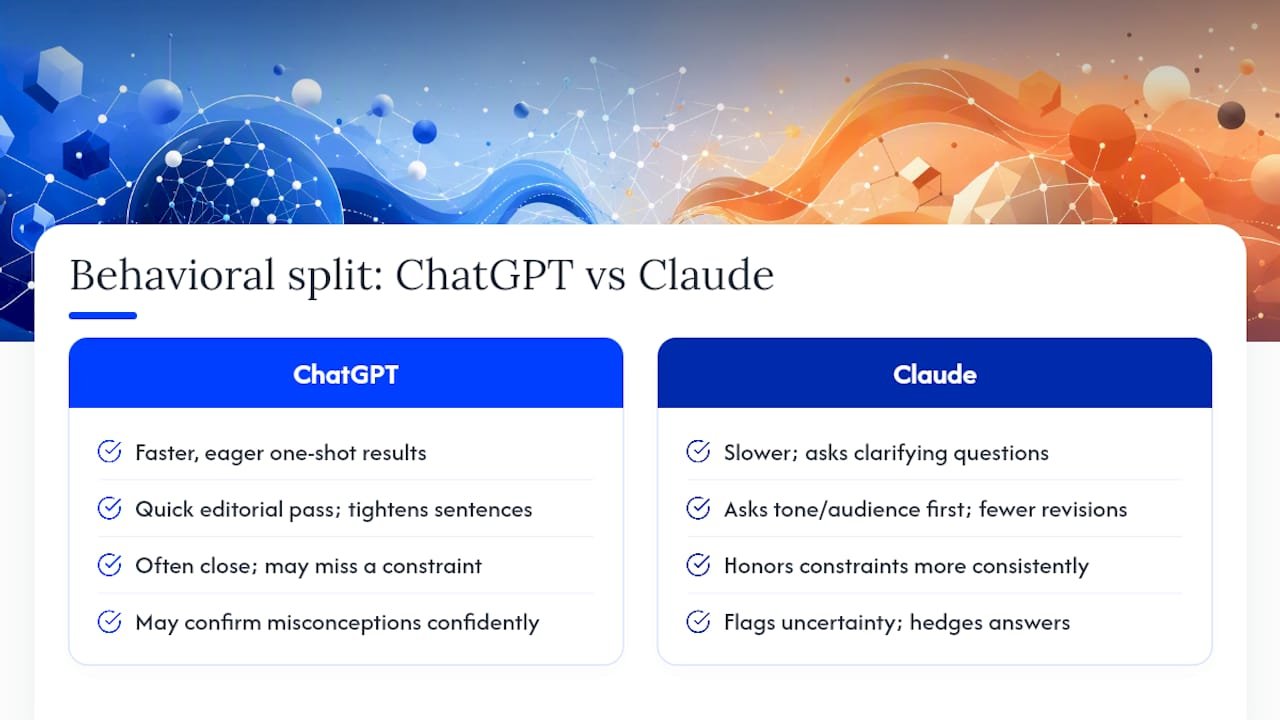
The behavioral split is the most useful thing to understand before you spend a dollar on either tool. A week-long hands-on test by Grain found that ChatGPT is faster and more eager to produce a one-shot result, while Claude is slower, asks clarifying questions, and produces more considered drafts. That is not a flaw in Claude; it is a design choice.
Consider three types of tasks that reveal the difference clearly.
Long-form editorial rewrite. Give both tools a 2,000-word draft and ask for a full editorial pass. ChatGPT returns a revised version quickly, often tightening sentences and fixing obvious errors. Claude tends to ask what tone you want, who the audience is, and what the piece is trying to accomplish before it touches a word. The Claude output usually requires fewer revision cycles because the clarifying questions front-load the alignment work.
Multi-constraint brief. Ask both tools to write a product description that is under 150 words, avoids three specific phrases, matches a brand voice guide you paste in, and ends with a soft call to action. ChatGPT often produces something close on the first pass but misses one constraint. Claude tends to honor all constraints more consistently, though it may ask you to confirm the brand voice before proceeding.
Critical reasoning question. Pose a question with a plausible but wrong common answer (a classic misconception in your field). ChatGPT sometimes confirms the misconception confidently. Claude more often flags the uncertainty, hedges its answer, or explicitly notes where the evidence is thin. That difference matters a lot when you are using AI output in professional or client-facing work.
On hallucinations: neither model is immune, but Claude tends to signal uncertainty more explicitly. ChatGPT can sound authoritative even when it is guessing. XDA Developers found that Claude produced more humanlike long-form writing and handled file-based project edits more consistently, while ChatGPT excelled at quick summaries and embedding images in finished outputs.
Pro Tip: Ask Claude to “outline first, then draft” on any piece longer than 500 words. You will spend less time on rewrites because the structure is agreed before the prose begins. For ChatGPT, specify the model version in your prompt (e.g., “use GPT-5.6”) and add “use long-context mode” when you need tool use alongside a large document.
Developer tools and agentic capabilities
Developers face a more nuanced choice. Benchmarks show a genuine split: Claude models tend to lead on deep-reasoning and repository-centered tests like SWE-Bench Pro, while ChatGPT’s GPT-5.6 family leads on terminal and agent benchmarks and some coding automation indices. Neither dominates across the board.
Claude’s agentic coding workflow centers on Claude Code, which handles multi-file edits with a compaction mechanism that keeps context coherent across long sessions. Multi-instance agent teams let you run parallel Claude agents on different parts of a codebase simultaneously. This setup works well for repo refactors, careful multi-file edits where correctness matters more than speed, and code reviews where you want the model to reason about side effects before making a change.
ChatGPT’s agent ecosystem is built around Codex-style tools, Agent mode, and terminal automation. It handles web browsing agents, tool chaining across external APIs, and quick automation scripts more naturally than Claude does today. If your workflow involves browsing the web, calling multiple tools in sequence, or running shell commands, ChatGPT’s agent infrastructure is more mature.
Practical developer trade-offs worth knowing:
- Debugging: Claude tends to explain why a bug exists before suggesting a fix; ChatGPT tends to patch and move on.
- Terminal automation: ChatGPT’s Agent mode handles shell-level tasks more reliably.
- Long-running loops: Claude’s compaction helps maintain coherence; ChatGPT may lose thread in very long agentic sessions.
- Recovery from failed steps: Claude is more likely to stop and ask for guidance; ChatGPT may attempt to self-recover, which can compound errors.
- Mid-task steering: Both support it, but Claude’s clarifying-question habit makes course corrections easier to initiate.
If you want to test this yourself, pick one real repo task, set an acceptance criterion (e.g., “all existing tests pass after the refactor”), and run it on both tools. Track completion without human interruption, correctness on the first attempt, and how each tool handles a failed step.
Context windows, multimodal support, and file handling
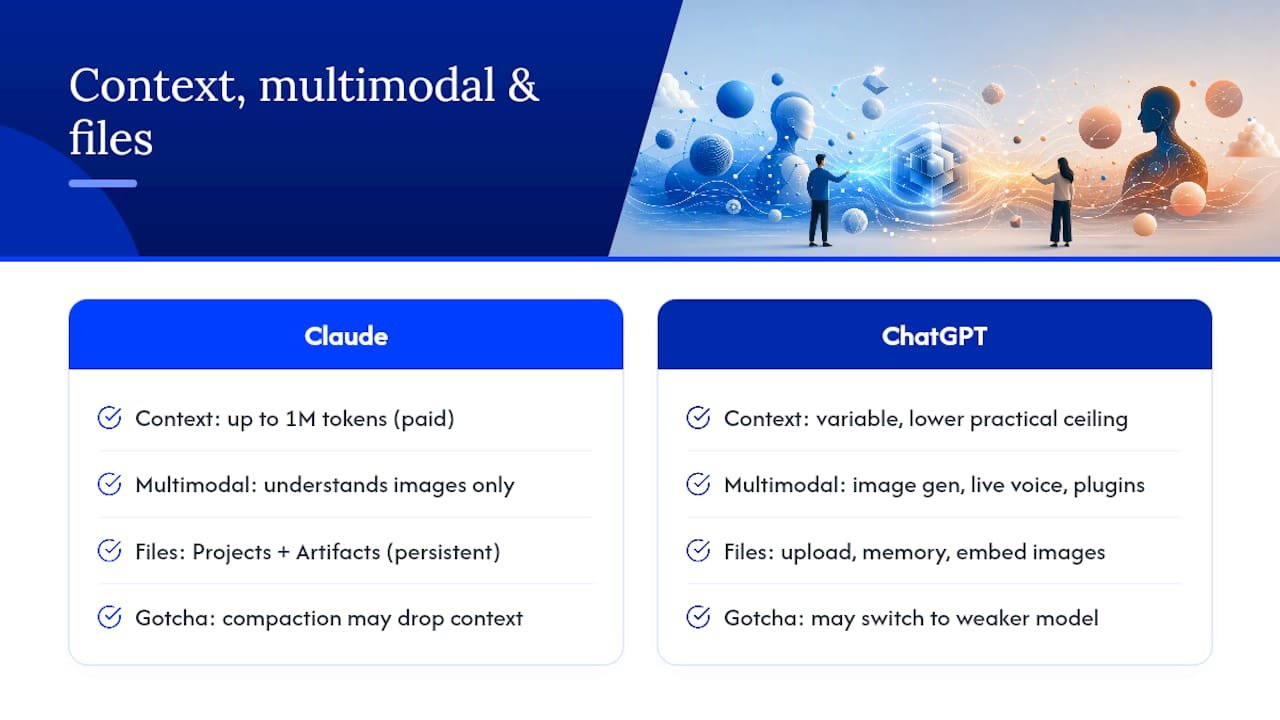
Claude’s model family (Fable/Opus/Sonnet) reports context windows up to 1M tokens on paid tiers, which is a meaningful practical advantage for anyone working with long legal documents, large codebases, or research papers. ChatGPT’s documented API windows vary by model and tier; the practical ceiling for most users is lower than Claude’s top-tier claim. When this matters: if you need to paste an entire book, a full codebase, or a lengthy research corpus into a single chat session, Claude’s paid tier is the more capable option today.
Multimodality is where ChatGPT pulls ahead. ChatGPT combines the GPT-5.6 family with built-in image generation, live voice, and a broad ecosystem that includes GPTs, plugins, and agents. Claude understands images and can analyze charts or screenshots, but it does not generate images natively. If your workflow requires producing visual assets, ChatGPT is the only choice of the two.
On file handling, both tools have made real progress. Claude’s Projects feature lets you store files, instructions, and context that persist across sessions. Artifacts lets Claude produce self-contained outputs (code, documents, data) that you can iterate on without re-prompting from scratch. ChatGPT has its own file upload and memory features, plus the ability to embed generated images directly into outputs.
A common gotcha with long-document work: session compaction in Claude can silently drop earlier context when a session grows very long. ChatGPT can quietly switch to a less capable model under load. Both behaviors can degrade output quality without an obvious warning.
Pro Tip: For long-document work, use a chunk-and-index pattern: break the document into sections, process each section separately, then ask the model to synthesize. Use Projects or Artifacts to store intermediate outputs. Validate quality with spot-check prompts (“What did section 3 argue?”) before trusting a final synthesis.
Pricing tiers, usage caps, and practical cost examples
Both tools offer a free tier and a $20/month individual paid tier. Beyond that, the pricing ladders diverge, and the caps matter more than the raw price. User reports and pricing summaries confirm that hard caps and pooled allowances on Claude versus quiet model downgrades on ChatGPT change how and when users upgrade to $100+ tiers. Always verify current pricing on the vendor’s own page before committing, since both companies adjust tiers regularly.
How caps work in practice: Claude enforces pooled allowances that can trigger a hard stop mid-session. ChatGPT tends to downgrade to a less capable model rather than stopping you outright. The hard stop is more disruptive but more honest; the quiet downgrade is smoother but can produce worse outputs without you realizing it.
Three common user scenarios:
- Hobbyist who writes occasionally: The free tier on either tool is likely sufficient. If you hit limits, the $20 tier on Claude is the better upgrade for writing quality.
- Developer running long agentic jobs: You will hit caps on the $20 tier quickly. Budget for the higher power tier ($100+) or use the API directly with token-based billing, which gives more predictable cost control.
- Power content creator processing long documents: Claude’s paid tier with its larger context window is the primary choice; supplement with ChatGPT for any image or voice needs.
| User type | Likely tier | Primary limits to watch |
|---|---|---|
| Occasional writer | Free or $20 | Message caps per session |
| Developer (agentic jobs) | $100+ or API | Token limits, session length, hard stops |
| Content creator (long docs) | $20 Claude paid | Context window, file upload size |
| Team / enterprise | Enterprise tier | Data residency, admin controls, SLA |
Privacy defaults, training opt-in/out, and enterprise controls
This is the area where the two companies differ most clearly in philosophy. TechTarget’s feature comparison summarizes the core difference: Anthropic does not use interactions to retrain models by default, and some interactions require explicit opt-in. OpenAI retrains on user data by default but provides opt-out options and project-level features.
For individual users, the practical implication is straightforward: if you are pasting sensitive client data, proprietary code, or confidential business information into a chat, Claude’s default is safer out of the box. With ChatGPT, you need to actively disable chat history or submit a privacy request to prevent that data from being used in training.
For enterprise teams, both vendors offer private deployments, data residency options, and admin controls. Claude’s Projects and Artifacts provide project-level controls for shared knowledge. ChatGPT’s enterprise tier includes similar admin features plus integrations with tools like Microsoft 365.
Before you paste anything sensitive into either tool, check the vendor’s current privacy and terms pages. Policies change, and the article-level summary here is a starting point, not a binding legal description. For enterprise procurement, review the vendor’s Data Processing Agreement directly with your legal and security teams.
Steps worth taking now: disable chat history in ChatGPT settings if you are on a consumer plan and handle sensitive material. On Claude, confirm your account’s training preferences in settings. On either platform, never paste API keys, passwords, or personally identifiable information into a prompt.
Pro Tip: If your work involves client data or regulated information (HIPAA, GDPR, financial records), use the enterprise tier of whichever tool you choose and confirm data residency settings before your first session. The $20 consumer tier does not carry the same contractual protections.
Who should use which tool?
The right answer depends almost entirely on what you spend most of your time doing. Built In’s reporting on migration patterns found that portability and workflow retention, specifically the ability to transfer chats, prompts, and working context, are real factors in why some teams shift toward Claude. That is a workflow consideration, not a quality one.
Here is a quick persona grid:
- Writer/editor: Claude. More natural prose, fewer templated phrases, better at honoring multi-constraint briefs.
- Indie developer: Depends on the task. Claude for repo refactors and careful multi-file edits; ChatGPT for terminal automation and tool chaining.
- Data analyst: ChatGPT, for its code interpreter, data visualization, and ability to embed chart outputs directly in responses.
- Product manager: Claude for long-document synthesis (PRDs, research reports, competitive analysis); ChatGPT for quick summaries and slide-ready outputs.
- Solo entrepreneur / affiliate marketer: Both, used together. Claude drafts and refines content; ChatGPT handles image creation, quick research, and automation. Explore AI-driven marketing workflows to see how this two-tool approach plays out in practice.
The two-tool strategy is more common than most people admit. Zapier’s analysis describes it directly: use Claude for in-depth drafts and code reviews, and ChatGPT for images, quick web research, and tool-based automation. Running both at $20/month each costs less than a single enterprise seat and covers more ground than either tool alone.
To run a short A/B test: pick one real task you do every week, set a clear acceptance criterion (e.g., “publishable with fewer than two revision rounds”), run it on both tools, and track time-to-satisfactory output and revision count. Two weeks of that data will tell you more than any benchmark.
How this comparison was produced
The evaluation behind this article used four representative test categories: long-form editorial rewriting, repository refactor tasks, browsing-plus-citation research, and agentic automation sequences. Success criteria for each were set before running the tests: prose quality judged against a style guide, code correctness verified by test suite, citation accuracy checked against source URLs, and automation completion measured by task completion without human interruption.
Model versions matter. The ChatGPT results reflect the GPT-5.6 family; Claude results reflect the Opus and Fable variants in the current model family. Both companies update models frequently, sometimes without a version bump in the UI, so a test result from three months ago may not reflect current behavior.
Readers are encouraged to reproduce these tests using their own prompts and acceptance criteria. The most reliable comparison is the one you run on your own highest-value task, not a generic benchmark. Model behavior changes with every update, so treat any published comparison, including this one, as a starting point rather than a final verdict.
Transparent limitations: pricing and caps change without notice, sample sizes in hands-on tests are small by research standards, and model behavior varies by prompt phrasing. The goal here is a practical decision framework, not a controlled academic study.
A quick checklist before you choose or pay
Run through these six questions before committing to a paid tier or switching tools:
- What is my highest-value task? Writing and long documents favor Claude; images, voice, and tool chaining favor ChatGPT.
- Do I need image generation? If yes, ChatGPT is the only option of the two with native DALL·E support.
- Do I need a very large context window in a single session? If you regularly work with documents longer than 100,000 words or large codebases, Claude’s paid tier is the stronger choice.
- Do I need autonomous agents that act on my machine or the web? ChatGPT’s Agent mode and terminal tooling are more mature for this use case today.
- What are my privacy constraints? If you handle sensitive or regulated data, Claude’s default opt-in training policy is safer on consumer plans; both vendors offer enterprise controls for serious compliance needs.
- How often do I hit usage caps? If you are hitting hard stops or model downgrades daily, the $20 tier is not enough. Move to the power tier or switch to API billing.
Red flags that should push you to act: frequent hard-stop lockouts mid-session mean you need a higher Claude tier or the API. Required image generation means ChatGPT is non-negotiable. Strict non-training data requirements mean you need an enterprise plan on either platform, not a consumer subscription.
For a two-week trial, track four metrics: successful outputs (met your acceptance criterion), revision count per output, time spent per task, and cost per successful output. Those four numbers will give you a clear picture of which tool earns its place in your stack.
The honest take on ChatGPT vs Claude
Testing both tools across real writing, coding, and automation tasks, the pattern that keeps showing up is this: Claude makes you feel like you are working with someone, while ChatGPT makes you feel like you are operating a very capable machine. Neither feeling is wrong. They reflect genuine design differences.
For creators and affiliate marketers who spend most of their time on content, Claude tends to produce drafts that need less cleanup. For developers who need to automate, browse, or generate images, ChatGPT’s ecosystem is hard to beat. The honest answer for most people is that both tools earn a spot in the workflow, and the $40/month combined cost is a reasonable investment if you are serious about using AI to grow a business.
The one thing worth pushing back on: the idea that you need to pick one and stick with it. The most productive users run both, use each for what it does best, and treat the choice as a workflow question rather than a loyalty decision.
Sources
These are the primary sources used in this comparison, each worth bookmarking for ongoing updates:
- Claude vs ChatGPT — Zapier
- ChatGPT vs Claude: What We Found After a Week of Real Tests (2026) | Grain
- Claude vs ChatGPT (2026): The Ultimate Comparison 2026 | LLM-Stats
- Claude vs ChatGPT: Which AI Is Better in 2026? | FelloAI
- Claude vs ChatGPT (2026): Caps Decide It, Not Quality — Christopher Alarcon
- Why Are Millions of Users Leaving ChatGPT for Claude? — Built In
- I ditched ChatGPT for Claude, and it changed how I study — XDA Developers
Model versions change frequently and without announcement. Before running a large agentic job or making a purchasing decision, check the vendor’s release notes page to confirm which model version your tier is actually using.