

For most social media managers, AI social scheduling comes down to four names: Hootsuite for enterprise teams that need listening and approval chains, PostAI for growth-focused solo operators who want AI agents doing the heavy lifting, Postra for visual-first creators who live and die by a clean content calendar, and Buffer for anyone who just wants a simple queue with a light AI assist. Start with whichever one matches your actual bottleneck, run its free trial, and judge it against the checklist further down.
TL;DR:
- AI social schedulers vary in complexity, from simple caption generation to full campaign automation, so choose one that matches your workflow needs.
- Smaller teams and solo creators should prioritize ease of use and low cost, while larger organizations need approval workflows and social listening features.
- Testing should include connecting all relevant platforms, evaluating AI content quality, approval processes, bulk scheduling, and analytics accuracy during a minimum two-week trial.
- Data privacy concerns involve checking content training practices, retention policies, and security features such as two-factor authentication and role-based permissions.
- Scaling up requires a platform with granular permissions and multi-client support; for small teams, combining niche tools may outperform all-in-one solutions.
Table of Contents
- What Is AI Social Scheduling, Exactly?
- How Do the Top AI Scheduling Platforms Compare?
- Which AI Scheduler Fits Your Specific Workflow?
- How Do You Choose the Right AI Scheduler for Your Team?
- How We Evaluated These AI Scheduling Tools
- Why Trust This Comparison?
- What Data Privacy Questions Should You Ask Before Signing Up?
- What Do Real Results Look Like With AI Scheduling?
- What Should You Expect From Support and Onboarding?
- Can These Tools Scale as Your Business Grows?
- When Should You Skip an All-in-One Scheduler Entirely?
- Alternative: AI Workflow Playbooks and Short Courses
- Practical Trade-Offs to Weigh Before You Decide
- Sources
What Is AI Social Scheduling, Exactly?
AI social scheduling means using software that doesn’t just queue posts at set times. It drafts captions, recommends posting windows based on your audience’s actual behavior, and in some cases runs entire content campaigns with minimal human input. That’s a meaningful step up from “automated social media posting” in the old sense, where a tool just fired off a pre-written post at 9 a.m. because you told it to.
The distinction matters because vendors use “AI-powered” loosely. Some tools generate a caption draft and call it a day. Others, like PostAI, build AI writers trained on your voice plus growth modes for platforms that adjust posting cadence automatically. Hootsuite goes further still, pairing AI caption generation with best-time suggestions and social listening inside one enterprise-grade dashboard. Knowing which layer of “AI” a tool actually offers is the first filter you should apply before comparing price tags.
How Do the Top AI Scheduling Platforms Compare?
Here’s the side-by-side breakdown across the dimensions that actually change your day-to-day workflow.
A solo creator or one-person affiliate operation usually does fine with Buffer, Postra, or PostAI, since none of them demand a big learning curve. Small in-house teams tend to land on Sintra AI or ContentStudio, where automation and content discovery share space. Multi-client agencies and enterprise marketing departments lean toward Hootsuite, Sprout Social, or Planable, because approval workflows and reputation tools matter more than raw AI horsepower once you’re managing several brand voices at once.
Pricing shape changes what you should test in a trial, too. A flat per-workspace tool like PostAI rewards teams that publish a high volume from one brand account, while per-seat pricing on Hootsuite or Sprout Social gets expensive fast if you add reviewers who don’t post but need visibility. Testing across schedulers shows that feature priorities shift with team size: small teams want ease and low cost, larger organizations want approval chains and reputation monitoring.
Which AI Scheduler Fits Your Specific Workflow?
Every platform in this space claims to save time. The real differences show up in the details of how each one drafts content, schedules it, and hands it off to a team.
Sintra AI builds its pitch around AI employees that handle scheduling and broader marketing automation, not just posting. Its best-for case is a small team that wants one AI layer running both content scheduling and adjacent tasks like reporting or customer replies, based on its app store presence and integration claims. The standout is that it treats scheduling as one function inside a wider automation suite rather than the whole product. In a trial, test whether its automations actually trigger reliably across a full week of mixed content, not just a single demo post.
PostAI is built for growth-minded operators who want an AI agent doing more than drafting captions. It advertises flat per-workspace pricing starting at a low monthly rate, paired with an AI writer trained on your voice, growth modes tuned for X and LinkedIn, and an AI video studio for short-form clips. The best-for case is a solo marketer or small team chasing follower growth who wants the AI to suggest and execute a posting cadence, not just fill a calendar. That kind of AI agent needs guardrails, though: growth-oriented automation that posts on your behalf without a review step can drift off-brand quickly if you’re not checking in weekly.
Postra leans into visual planning. Its smart queue and auto-scheduling features mean you can drop a batch of content in and let the platform figure out timing, while the visual calendar and platform previews keep you from posting a badly cropped image to Instagram. It’s best for creators and small teams who publish visually heavy content and want to see exactly how a grid will look before anything goes live. During a trial, load a week’s worth of mixed image and video content and check whether the previews match what actually renders on each platform.
Hootsuite sits at the enterprise end. It combines scheduling with AI caption generation, best-time suggestions, and social listening inside a single dashboard built for teams that need real approval chains. The best-for case is a marketing department managing multiple brand accounts where legal, brand, and social teams all need sign-off before anything posts. Its standout is the listening layer, which lets you track brand mentions and sentiment alongside your publishing calendar. Test the approval workflow specifically: create a mock post, route it through two reviewer roles, and time how long the hand-off takes.
Sprout Social competes for the same enterprise audience but leans harder into reporting and reputation management. Teams that need to prove ROI to leadership, or that handle a lot of inbound customer service through social, tend to prefer it over Hootsuite for its analytics depth. Test its reporting exports directly against whatever format your leadership team actually reads.
Buffer remains the simplest entry point. Its clean interface and affordable tiers make it the best-for choice for beginners or very small teams who don’t need approval workflows at all, just a reliable queue with a basic AI assist for captions. If you’re testing Buffer, the real question is whether its “basic” AI assistant produces captions good enough that you’re editing less than you would writing from scratch.
Later built its reputation on visual-first scheduling, especially for Instagram-heavy brands that care about grid aesthetics. It’s best for creators and small brands where feed layout is part of the brand identity itself. Test whether its feed preview actually reflects real-time changes when you reorder scheduled posts.
Planable is the agency and team-collaboration specialist. Its approval workflow is built for situations where a client needs to see and sign off on content before it goes anywhere near “publish.” It’s best for agencies managing multiple client accounts who need a clean, visual review process rather than a maze of email threads. Test the client-facing review link specifically, since that’s the feature agencies pay for.
Predis.ai pushes further into content generation than most schedulers, aiming to handle everything from initial post creation to scheduling inside one flow. Roundups consistently name it for marketers who want the AI doing first-draft creative work, not just caption polish. Test how much manual editing its generated posts actually need before they’re publish-ready.
FeedHive specializes in content recycling and conditional posting rules, which makes it the best-for pick for creators sitting on a large library of evergreen content who want it resurfaced automatically rather than manually re-queued. Test its conditional rules by setting up one recycling rule and watching whether it respects the conditions you set (engagement thresholds, time gaps) over a full cycle.
ContentStudio blends AI-assisted post creation with content discovery, meaning it helps you find what to post about, not just when. It’s best for teams that run out of content ideas faster than they run out of scheduling slots. Test the discovery feed against your actual niche to see if the suggestions are usable or generic.
Pro Tip: During any trial, schedule at least one post per supported platform (Instagram, X, LinkedIn, TikTok, Facebook, YouTube, Threads) in the same session. Tools that handle five platforms cleanly sometimes choke on the sixth, and you won’t find that out from a demo video.
How Do You Choose the Right AI Scheduler for Your Team?
Start by mapping the tool’s features to your actual workflow, not a wish list. If you’re a solo operator, per-seat pricing and deep approval chains are wasted money. If you manage five client accounts, a tool without role-based permissions will cost you more in Slack messages than it saves in scheduling time.
A few criteria matter more than the marketing copy suggests:
- Platform support depth, not just logos. Check whether Threads and TikTok get the same feature parity as Instagram and X, or whether they’re bolted on as an afterthought.
- Per-channel customization, since a caption that works on LinkedIn rarely works unedited on X.
- Approval flow granularity, especially if more than two people touch content before it publishes.
- Bulk publish and CSV import, which matters if you’re migrating months of planned content from a spreadsheet.
- Analytics latency, meaning how fast the tool reports real engagement versus estimated reach.
- API access or export options, in case you ever need to pull data into a separate reporting tool or CRM.
Run this checklist during your trial window, which should be at least seven days and ideally fourteen:
- Connect every platform you actually use, not just your primary one.
- Schedule a mixed batch: one image post, one video, one link post, one carousel.
- Test the AI caption or post generator on a real topic from your content calendar, not a generic prompt.
- Route one post through your full approval chain, timing how long it takes.
- Check the best-time recommendation against your own analytics from a previous platform, if you have historical data.
- Try bulk uploading at least ten posts from a spreadsheet or CSV.
- Pull a report and compare its numbers against the native platform’s own analytics dashboard.
- Cancel or downgrade mid-trial to see how transparent the billing and support process actually is.
Watch for a few red flags along the way. A tool that hides its pricing until you’ve entered a credit card is a bad sign. So is an AI writer that produces captions clearly optimized for the tool’s own demo rather than your voice. If best-time suggestions never change regardless of what data you feed the platform, the “AI” is probably a static lookup table, not a live model. And if support only responds through a chatbot with no path to a human during your trial, that’s a preview of what happens when something breaks in production.
Pro Tip: To measure time saved objectively, log the minutes it takes to draft, schedule, and get approval on five posts using your current process before the trial starts. Repeat the same five-post exercise inside the new tool. The difference, not the vendor’s claimed “hours saved per week,” is your real number.
How We Evaluated These AI Scheduling Tools
Every platform on this list was assessed across six axes: usability, AI output quality, platform coverage, team workflow depth, pricing transparency, and reporting or analytics accuracy.
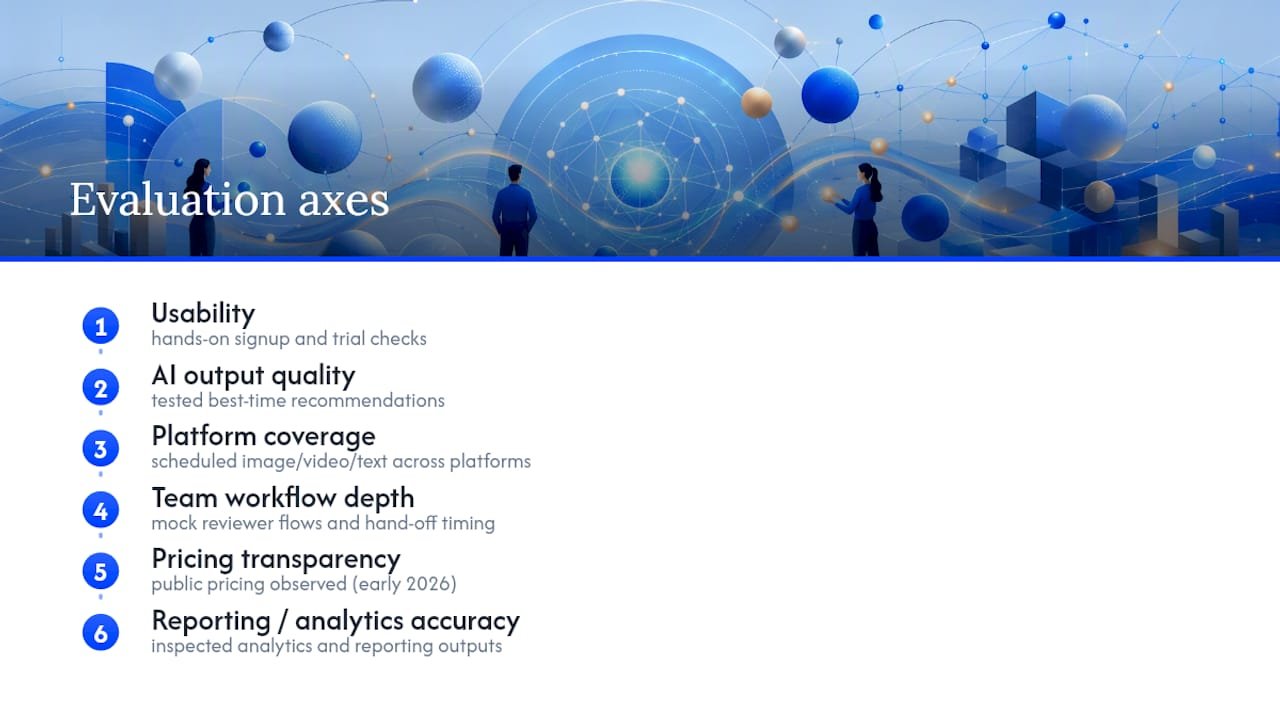
Hands-on checks included signing up for available trials, scheduling a mixed batch of image, video, and text posts across supported platforms, and inspecting how much per-channel customization each tool actually allowed before publishing. Best-time recommendations were tested against known posting patterns where historical data was available, and team approval flows were run with mock reviewer roles to time hand-offs.
A few limitations apply. Pricing and feature sets shift often in this category, and some vendors, including newer AI-first entrants, update their AI capabilities faster than review cycles can track. This evaluation reflects tool behavior and public pricing as observed in early 2026, and readers should re-confirm current tiers directly with each vendor before committing to an annual plan.
Why Trust This Comparison?
Will Buckley has spent years coaching affiliate marketers on building AI into their day-to-day marketing operations, from content generation to campaign automation. That background shapes how this comparison was built: less focus on flashy AI demos, more focus on whether a tool’s automation actually holds up across a real posting week.
For readers who want to go deeper, Will’s guide to AI content strategy walks through building a 90-day posting cadence using performance data, and the AI workflow automation piece covers automation guardrails relevant to any AI agent feature you turn on inside a scheduler.
— Will
What Data Privacy Questions Should You Ask Before Signing Up?
AI schedulers touch more of your business than a typical SaaS tool, because they often connect directly to your social accounts, read historical post performance, and in some cases draft content using your brand’s past posts as training material. That last part deserves scrutiny: ask any vendor whether content you input, or your account’s historical data, gets used to train models beyond your own workspace.
Check each platform’s stated data retention policy for disconnected accounts. If you cancel or switch tools, does the vendor delete your scheduled content and analytics history, or retain it indefinitely? Also confirm whether the tool supports two-factor authentication and role-based access controls, since a scheduler with admin-level access to your brand’s social accounts is a real target if credentials leak.
Finally, AI drafts still need a human review step before anything publishes, both for accuracy and for brand voice. Treat AI-generated captions the same way you’d treat a junior copywriter’s first draft: useful, but not something you publish unread. That habit doubles as a privacy safeguard, since a quick review often catches when an AI tool accidentally pulls in a detail it shouldn’t have surfaced.
What Do Real Results Look Like With AI Scheduling?
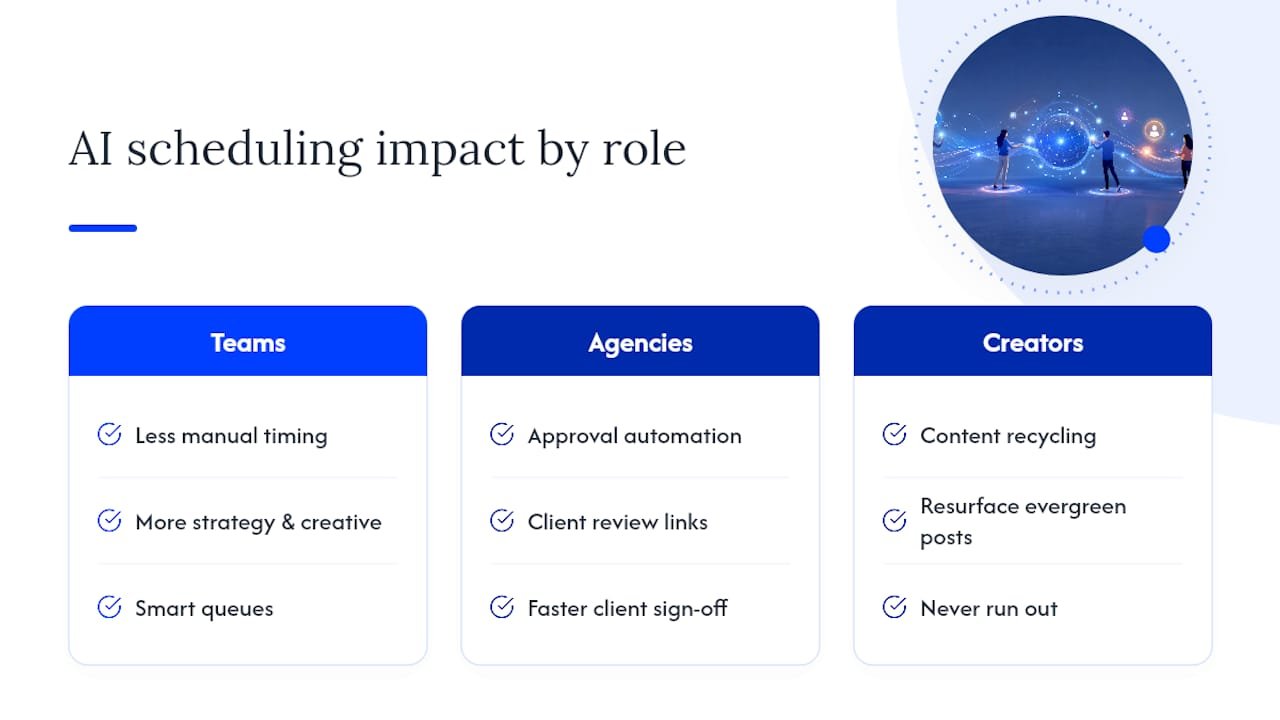
The clearest pattern across teams that adopt AI scheduling isn’t a single dramatic before-and-after story. It’s a shift in where time gets spent. Teams that used to spend hours each week manually finding optimal posting times report that time moving toward content strategy and creative work instead, once best-time suggestions and smart queues take over the scheduling math.
Agencies managing multiple client accounts see the biggest workflow change from approval automation specifically. A tool like Planable, built around client-facing review links, turns what used to be an email chain spanning days into a single link a client can approve from their phone. That’s not an AI feature in the strict sense, but it’s often the change that makes a scheduler worth paying for.
Creators leaning on content recycling, through tools like FeedHive, describe the impact less as “saving time” and more as “never running out of things to post.” Evergreen content that would otherwise sit unused gets resurfaced automatically, which matters most for accounts with a large content library and limited bandwidth to plan fresh posts every week.
The honest caveat: AI scheduling tools amplify whatever process you already have. A messy content calendar automated with AI is still a messy content calendar, just faster.
What Should You Expect From Support and Onboarding?
Onboarding quality varies more than most comparisons admit. Simpler tools like Buffer and Postra tend to get you scheduling your first post within minutes, since the interface mirrors a basic calendar app. Enterprise platforms like Hootsuite and Sprout Social have more setup involved, particularly around connecting multiple brand accounts and configuring approval roles, but they typically offer guided onboarding calls for paid tiers.
AI-first newer entrants like PostAI and Predis.ai lean on in-app tutorials and quick-start templates rather than live onboarding calls, which suits solo operators who want to move fast without scheduling a demo. Support responsiveness during a trial is itself a useful signal. If a live chat or email response takes more than a day during your trial period, budget for that same delay once you’re a paying customer and something breaks during a launch week.
Can These Tools Scale as Your Business Grows?
A tool that works for a solo creator often buckles the moment a second person joins the account. Buffer and Postra scale comfortably from one person to a small team, but their approval workflows stay lightweight, which becomes a limitation once you’re managing more than two or three reviewers.
Sintra AI and PostAI sit in the middle, handling a small team’s automation needs well but lacking the deep permission structures that agencies eventually need. Hootsuite, Sprout Social, and Planable are built with scale in mind from the start, supporting dozens of team members, multiple client accounts, and granular role permissions.
The practical advice: don’t overbuy for a scale you haven’t hit yet. A solo operator paying for enterprise-tier approval chains is wasting money on features nobody uses. But if you’re an agency planning to onboard three new clients this quarter, choosing a scheduler now that can’t add approval roles without a costly tier jump will cost you a painful migration later.
When Should You Skip an All-in-One Scheduler Entirely?
Convenience and control pull in opposite directions. An all-in-one platform like Hootsuite saves you from juggling five logins, but you inherit whatever limitations its weakest feature has. Assembling niche tools, say Postra for visual scheduling plus a separate analytics tool, costs more setup time but lets each piece be genuinely excellent at one job.
Cost tells a similar story. A single subscription looks cheaper on paper than three specialist tools, until you factor in the integration work needed to make separate tools talk to each other, or the workarounds required when the all-in-one’s weakest feature becomes your bottleneck.
Picture a five-person agency running content for photography clients. They might do better pairing Later’s visual planning with Planable’s client approval flow than forcing both jobs onto one platform that does neither exceptionally well.
The real trade-off isn’t features versus price. It’s whether your team has the patience to manage two tools well or the tolerance to accept one tool doing everything adequately.
Alternative: AI Workflow Playbooks and Short Courses
Switching platforms solves a tooling problem. It doesn’t teach your team how to build repeatable AI workflows that outlast whatever scheduler you’re using this year. That’s the gap educational content is built to close, particularly for marketing managers who want in-house capability rather than another subscription to manage.

The AI Affiliate Workflows playbook walks through ready-to-run recipes for using AI across content production and campaign automation, built for marketers who’d rather understand the underlying process than depend on any single vendor’s roadmap. Paired with the site’s guide to AI writing tools for marketers, it gives a social media manager the skills to train AI on brand voice regardless of which scheduler they eventually pick. If you’re evaluating schedulers this month, start with the AI Affiliate Workflows playbook and see how the recipes apply to your current content calendar before your next tool renewal comes up.