
An AI B-roll generator gives you cutaway footage without a camera, a stock subscription or a reshoot. Some tools write the clip from a text prompt. Others read your script and pull matching footage into your timeline. The right choice depends on whether you need footage that exists or footage that has never been filmed. This guide shows you how to tell them apart, build clips that fit your narration, review them before you publish, and avoid the rights and labeling mistakes that trip up affiliate marketers.
TL;DR
- There are two kinds of AI B-roll tools: generators that create new clips from prompts, and assistants that find and place existing footage against your script. Pick by the job, not by the hype.
- Write one prompt per shot, expect to run several generations per keeper, and budget that time before you promise a delivery date.
- Review every clip for odd motion, warped details, text errors and anything that contradicts your voiceover. Evaluation research says automated scores are a weak stand-in for human eyes.
- Check licensing, copyright and ad-platform labeling before a clip goes into a paid ad or an affiliate promotion.
- Keep B-roll in service of the message. If a clip does not help the viewer understand the line you are saying, cut it.
Table of Contents
- What an AI B-roll generator actually does
- Which type fits which kind of video
- How to generate B-roll with AI from a script
- Making B-roll fit the narration and the style
- What affects realism, relevance and consistency
- How to review AI B-roll before you publish
- Costs, credits and the time you do not see
- Rights, licensing and labeling
- Using AI B-roll in short-form video without hurting the message
- Our perspective
- Put it into a workflow
- FAQ
- Sources
What an AI B-roll generator actually does
B-roll is the supporting footage you lay over your main shot: hands typing, a product in use, a city street while you talk about travel. It keeps viewers watching because the picture changes while your point continues.
The phrase “AI B-roll” covers two different workflows, and mixing them up is the most common reason people feel disappointed with these tools.
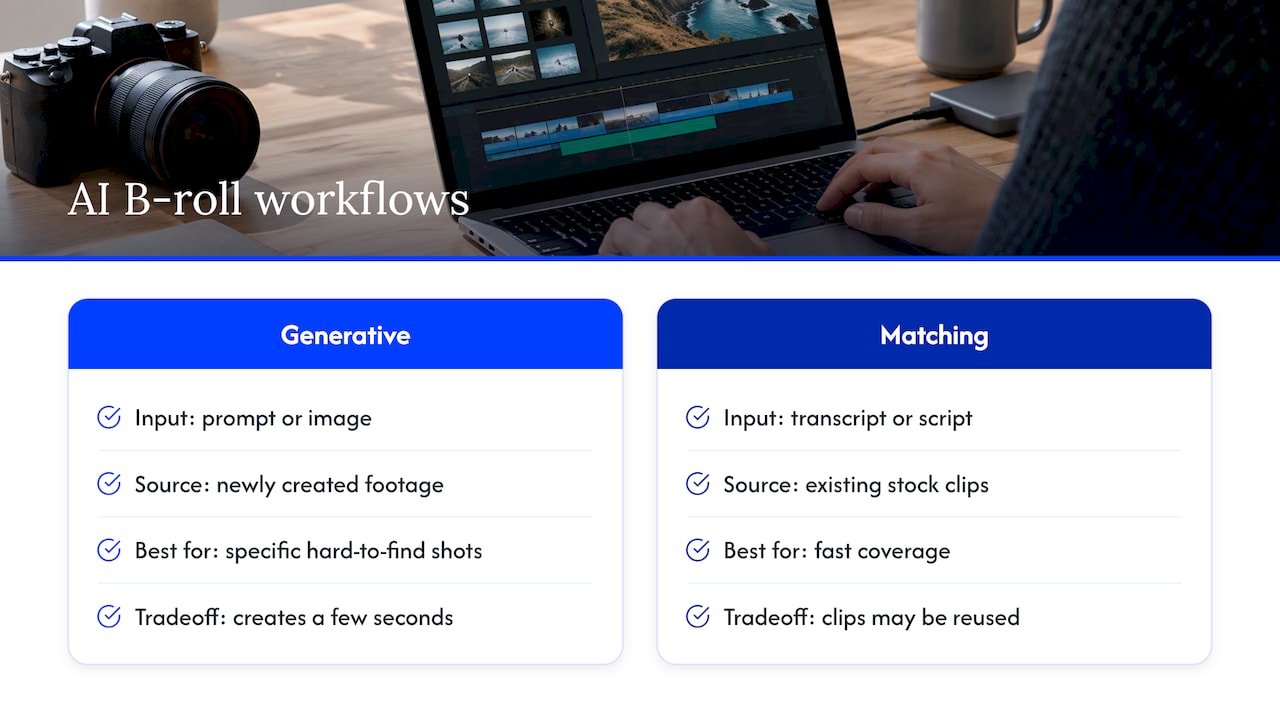
Generative tools create footage that did not exist before. You type a prompt, or upload an image, and the model produces a few seconds of video. That is useful when the shot you want is expensive, impossible or just not something you have lying around, like a slow push-in on a futuristic dashboard.
Matching tools read your transcript or script, work out what each sentence is about, and insert relevant stock clips or visuals into your editor. They are fast and the footage looks real because it was filmed by someone. The tradeoff is that you only get what already exists, and other creators may use the same clips.
Some products now do both. If you are not sure which one you need, ask yourself a simple question: do I need the right idea on screen quickly, or do I need one very specific shot? The first leans toward matching. The second leans toward generation.
Which type fits which kind of video
Have you ever sat with a finished voiceover and no idea what to put over it? That is the moment to choose a type. Here is how we think about it.
| Situation | Better fit | Why |
|---|---|---|
| Talking-head explainer with many abstract points | Matching tool | Quick placement of relevant cutaways across a long script |
| Product or tool review where you need a specific scene | Generative tool | You control the subject, mood and camera move |
| Short-form video with a hook in the first seconds | Generative, then edit | A striking opening shot can earn the next three seconds of attention |
| Tutorial where accuracy matters (screens, interfaces) | Your own screen recordings | AI tends to invent interface details, so show the real thing |
| Ads for regulated or brand-sensitive offers | Tools with clear commercial terms | Licensing and indemnification matter more than style |
If you want a wider view of the tools that sit around this workflow, our roundup of the best AI video generators for creators and teams and our guide to the best AI video editors by use case cover the options by job.
How to generate B-roll with AI from a script
The process is simple. The skill is in the details. This is the routine we recommend.
Step 1: Mark the beats in your script
Read your script aloud and mark every place where the viewer would benefit from a new image. A good rule is one visual change every few seconds in short-form video, though your pacing may differ. Do not mark every sentence. Too many cutaways feel frantic, and a few well-chosen ones feel intentional.
If you are still writing the script, our guide to teleprompter-ready AI scripts helps you structure it so the visual beats are obvious from the start.
Step 2: Write one prompt per shot
A useful prompt names five things: the subject, the action, the setting, the camera move and the mood. “A freelance designer reviewing a spreadsheet at a bright kitchen table, slow push-in, warm morning light” gives a model far more to work with than “person working.”
Keep the shot simple. One subject and one action. Complex scenes with several people and fast movement are where models most often go wrong.
Step 3: Generate several versions and pick
Expect that your first output will not be the one. Many creators plan on several generations per shot, and one workflow guide for creators describes 5 to 10 generations per shot as a realistic planning range. Treat the extra runs as part of the job, not as failure. If you plan for them, you will not be caught short on time or credits.
Step 4: Generate from existing footage or images when you need consistency
If you want the same person, product or style across several clips, start from a reference image rather than a fresh prompt each time. Image-to-video keeps the look more stable than describing the subject again in words, which is where drift creeps in.
Step 5: Place, trim and match
Drop each clip over your voiceover and trim it to the sentence it supports. Match color and contrast to your main footage so the cut does not jolt the eye. Add a quick crossfade or a hard cut, whichever fits your pace, but be consistent. Then listen to the audio with the picture. If the clip draws the eye away from the line you most need remembered, shorten it or move it.
Making B-roll fit the narration and the style
Three habits separate B-roll that feels professional from B-roll that feels pasted on.
First, show what the narrator says, or what it feels like, not something merely adjacent. If you say “most affiliates lose hours to link checking,” a clip of a cluttered desk and a tired face works. A random sunset does not.
Second, choose a visual style and keep it. Mixing a glossy cinematic clip with a flat, cartoonish one makes viewers notice the seams. Decide on a look before you generate anything, and put that look in every prompt, for example the same lighting words and the same lens language.
Third, give your own footage the lead. B-roll supports your face and voice. For affiliate marketers, trust comes from you, so keep yourself on screen at the key claims and the call to action, and use generated cutaways for the connective tissue.
For a full short-form pipeline that ties script, visuals and editing together, see our 5-step short-form video AI workflow.
What affects realism, relevance and consistency
It helps to know where these models are weak, so you can steer around it.
Research surveying how generative video is evaluated finds that current frameworks often fail to capture consistency across space and time, and subtler meaning. The same survey notes that models show gaps in fine-grained alignment between prompt and picture, and in keeping a character consistent over longer stretches. In plain terms: the model may follow the gist of your prompt and miss a detail, and a person may look slightly different from one shot to the next.
What that means for your edit:
- Keep clips short. The longer a generated shot runs, the more chance for something to drift or warp.
- Avoid close-ups of hands, text and logos unless you will check them frame by frame.
- Do not rely on one character appearing across many shots unless your tool has a specific consistency feature, and even then, check each shot.
- Use specific prompts. Vague wording gives the model room to wander.
Some products also differ in emphasis. A review of video-creation tools notes that some lean toward scene comprehension and native audio, while others stress director-style controls such as motion brushes and timeline editing. If you are picky about camera movement, favor the control-heavy kind. If you want a finished-feeling clip from a short prompt, favor the comprehension-heavy kind.
How to review AI B-roll before you publish
The same research notes that traditional automated metrics are only loosely linked to how viewers rate quality, which supports a shift toward human review. That fits what working editors already do: they watch the clip. Here is a short checklist to run on every generated shot.
- Watch it three times. Once at full speed, once at half speed, once muted. Many flaws show only in slow motion.
- Check anatomy and objects. Count fingers. Look at how hands hold things. See whether objects melt into each other.
- Read any text on screen. Generated signs, labels and screens are often gibberish. Crop, blur or cut them.
- Match against the voiceover. Does the picture say the same thing as the line? Would a viewer be confused?
- Check the first and last frames. Odd flickers at the edges are common. Trim them.
- Ask a friend. Show the cut to someone who has not seen the prompt. If their first reaction is “that looks weird,” your audience will feel it too.
This review step is also where our AI ad creative workflow fits, since ads punish sloppy visuals faster than organic posts do.
Costs, credits and the time you do not see
Most generators charge by subscription tier, by credits per clip, or both. Pricing changes often, so check each provider’s current pricing page rather than relying on an article, including this one. What you can plan for is the shape of the cost.
The visible cost is the plan. The hidden cost is failed generations and editing time. If one keeper takes several runs, and each run uses credits, your real cost per usable clip is a multiple of the sticker price. Freelancers who sell this work are advised to price per deliverable or package and to account for failed generations and human editing labor. The same logic applies when you are the customer: work out cost per finished clip, not cost per run.
A simple way to estimate it: count the shots in your video, multiply by the number of generations you expect per shot, add the minutes you will spend reviewing and trimming, and put a value on your own time. If you are scoping a project for a client, a London production studio with transparent pricing is a handy reminder that real shoots also have clear line items, which makes a fair benchmark when you compare against generated footage.
Rights, licensing and labeling
This is the part many creators skip, and it is the part that can cost you an ad account.
Who owns the clip?
The U.S. Copyright Office has addressed the copyrightability of generative AI outputs in Part 2 of its report on copyright and AI, published on January 29, 2025. Practitioners summarize the practical effect this way: output with little human expressive input may not be independently copyrightable, so they assign rights based on the human-authored parts such as scripts, shot selection and editing. For you, that means the story, voiceover and edit are the parts you can most clearly call yours. Read the Copyright Office page itself for the current position, and speak with an attorney if a clip is central to a product or a contract.
Commercial terms and indemnification
Not every tool offers the same commercial terms. Some are trained on licensed material and offer enterprise-grade indemnification, which is why a comparison of video-creation companies says one such option is preferred for enterprise and regulated industries. If you produce ads for finance, health or other sensitive offers, read the commercial-use and indemnity terms before you generate anything.
Regional limits
Check where you can use the tool. Some providers offer plans that are not authorized in certain countries because of provider-country legal frameworks, with Japan given as one example. We write for readers worldwide, so verify availability in your own country before you subscribe.
Labels on ads and synthetic content
Platforms and regulators are moving toward labeling. One industry guide reports that Meta has begun using automated detection to find undisclosed AI content in ads and apply an “AI Info” label, and that EU AI Act Article 50 calls for machine-readable marks on synthetic content. If you run ads or sell into the EU, read the platform policy and the regulation text for your situation, and disclose AI use where required.
As an affiliate marketer you also have a separate duty: disclose your affiliate relationships clearly. Our affiliate disclosure examples show wording you can copy, and our guide on ethical AI marketing maps the wider rules.
Using AI B-roll in short-form video without hurting the message
Short-form video is where AI B-roll is most tempting and most easily overdone. A few guardrails help.
Lead with the point, not the effect. A dramatic generated opening shot is fine if it supports your hook. If it is just there to look impressive, viewers will scroll past once they realize it has nothing to do with them.
Do not fake proof. If you are reviewing a tool, show the real tool. Do not generate a fake dashboard, fake earnings or a fake customer. Beyond the ethical problem, it invites platform penalties and destroys the trust that makes affiliate recommendations work.
Keep the cutaways short. One to three seconds is plenty for most shots. Let the narration carry the meaning.
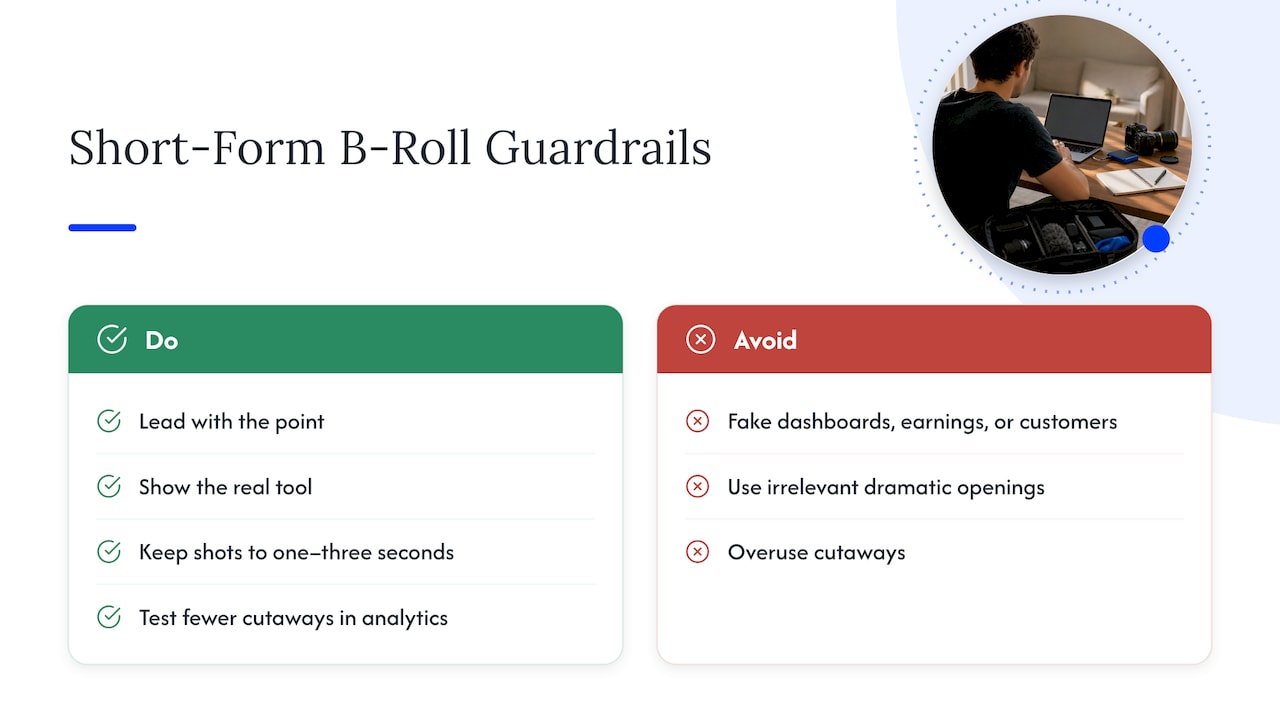
Test, then repeat what works. Try the same video with fewer cutaways, and see which one holds attention longer in your platform analytics. Your own numbers beat any rule of thumb. If you are building this into a bigger plan, our 90-day AI TikTok content rollout shows how to test and scale without burning out.
Our perspective
We have taught and coached for a long time, and the pattern repeats: people do not fail at video because the tools are weak. They stall because the process feels heavy, so they put it off, and procrastination quietly eats the week.
AI B-roll is useful because it takes away one of the heaviest parts of making a video: hunting for the right visual. When you can describe the shot and get something workable back in minutes, the whole project feels lighter, and lighter projects actually get published.
Our approach is practical and a little humble. Start with one video. Mark the beats, generate a few shots, review them honestly, and publish. Then build a repeatable workflow so you save time on every video after that. The goal is never more footage. The goal is a clearer message and more of your day back.
If you are an affiliate marketer, remember that your credibility is the asset. Use AI to make the picture better, and keep your voice, your real experience and your disclosures front and center.
Will
Put it into a workflow
If you want the whole chain, from script to cutaways to publishing and tracking links, start with our AI affiliate workflows, a set of ready-to-run recipes for affiliate marketers who want to save time without cutting corners.

If you are earlier in the journey, our beginner guide to AI affiliate marketing walks you through the first 30 days, and you can find more coaching, videos and tips on willbuckley.com.
FAQ
Is AI B-roll good enough to use in real marketing videos?
Yes, for many uses, as long as you review it. Short, simple clips with one subject tend to hold up best. Keep an eye out for warped hands, garbled text and details that contradict your narration, and cut anything that looks off.
Can I generate B-roll from my existing video or script?
Yes. Some tools read your script or transcript and place matching footage, while others turn a prompt or a still image into a short clip. Starting from a reference image helps keep the look consistent across several shots.
Can I use AI-generated B-roll in paid ads?
Often yes, but check the tool’s commercial-use terms, the ad platform’s AI labeling rules and any regulation that applies where your audience lives. Ads for sensitive offers deserve extra care, so read the terms before you generate.
Do I own AI-generated footage?
That is less clear than most people assume. The U.S. Copyright Office has published guidance on AI outputs, and the human-authored parts of your video, such as the script and the edit, are the clearest to claim. Ask an attorney if the footage is central to a deal.
Sources
- Generative AI Video Evaluation: Survey of Metrics, Benchmarks and Trustworthiness
- Copyright and Artificial Intelligence, U.S. Copyright Office
- AI Video Ads Freelancer: Pricing, Rights and Revisions
- Best AI Video Creation Companies in 2026, Compared
- AI Video Tools 2026 comparison