

You can turn a blog post into a video with AI in an afternoon: paste the article or its link into a video tool, let it draft a script and scenes, then edit the draft until it sounds like you. The part that decides whether the video earns anything is not the tool. It is which posts you pick, how you rewrite them for the ear, and how you check the result before it goes live. That is the routine below, written for affiliate marketers who want more from the content they already have.
TL;DR
- AI video tools read your article, pull out the strongest points and draft a script, scenes and voiceover. You still decide what stays and what goes.
- Do not shrink the post. Restructure it for spoken delivery, one idea per scene, with a visual for every beat.
- Before publishing, check names, figures, quotes, captions and image rights against the source post.
- Put the video on a page people can watch it on, with accurate metadata, so search engines can find it.
- Measure retention and clicks on your affiliate link, not just views.
Table of Contents
- What AI actually does when it turns a post into a video
- Pick the right posts first
- How to turn a blog post into a video with AI, step by step
- Review before you publish
- Adapt the same post for different platforms
- Publish so people and search engines can find it
- Measure what the video actually does
- Where we see this fitting into your week
- Build it into a workflow
- FAQ
- Sources
What AI actually does when it turns a post into a video
It helps to know what is happening under the hood, because it tells you where your own judgment has to step in. According to HeyGen’s developer documentation on content repurposing, the AI reads the written content, extracts its most compelling points, restructures them for video and then generates the video. One article can become several formats for different platforms.
Notice the word restructure. A good tool does not read your 1,800 words aloud over stock footage. It chooses, reorders and rephrases. That sounds wonderful, and it is, but the tool does not know which of your points leads a viewer toward your affiliate offer. You do. So think of the AI as a fast first-draft editor, and yourself as the producer.
Why bother at all? Some of your audience simply prefers to watch. A 2021 TechSmith viewer study found that 83% of respondents preferred video for instructional or informational content, with country results from 78% in France to 86% in Canada. That is a statement about preference, not a promise that every video will perform. Still, if you have a library of posts that already rank or already convert, a video version lets the same research reach people who would never have scrolled through the text.
Pick the right posts first
Have you ever made a video from a post you were only lukewarm about, then wondered why nobody watched? Most of us have. The fix is to choose better source material before you open any tool.
Start with posts that already show signs of life: steady search traffic, affiliate clicks, comments or email replies. These are proven topics, so the video is a second door into something people already want. Next, favor posts that are visual by nature. A step-by-step tutorial, a tool walkthrough or a before-and-after comparison turns into scenes easily. A long opinion essay does not.
Then think about the viewer’s question. A post titled around a how-to or a comparison usually maps to a single clear video promise. If you can state that promise in one sentence, the post is a good candidate. If you cannot, fix the post first.
One honest note on expectations. A 2026 Buffer analysis of more than 45 million social posts found that video often helps reach and discoverability, while carousels, images or text can produce deeper engagement on some platforms. So treat video as one strong format in your mix, and let your own numbers tell you where it earns its place.
How to turn a blog post into a video with AI, step by step
Here is the routine, in the order I would run it. If you want a tool comparison before you start, our guide to the best AI video generators for creators and teams covers what to look for, and our roundup of AI content repurposing tools shows how video fits into a wider repurposing system.
Step 1: Choose your source route
Most tools let you paste a URL, paste the text or upload a document. A URL is the quickest, because some tools fetch the page, read its structure and draft a scene-by-scene plan that cites back to your source, as Colossyan describes for its URL-to-video feature. Pasting text is better when your page has lots of clutter, such as comment threads, long affiliate disclosures or sidebars that a crawler might mistake for content.
Where it goes wrong: the tool reads everything on the page, including parts you never meant to narrate. Clean the source first.
Step 2: Cut the post down to spoken length
A rough rule many creators use is that a minute of speech runs about 130 to 150 words, so a 90-second video needs roughly 200 words, not 1,800. That figure is a common speaking-pace estimate rather than a hard standard, so read your draft aloud and time it.
This is where the “restructure, don’t compress” idea matters. The HeyGen documentation gives examples of adapting one source into a 90-second YouTube explainer, a 30-second TikTok or a 60-second LinkedIn post, each built around different points rather than a shorter copy of the same text. Decide the platform and duration before you generate anything, and tell the tool both.
If you want a script that reads cleanly on camera, our guide to teleprompter-ready AI scripts for 1 to 20 minute videos walks through the prompts.
Step 3: Open with the viewer’s problem, not your headline
Blog intros warm up. Video intros cannot. Your first sentence should name the problem the viewer has and promise the fix. Move your strongest point, usually the result or the one tip people screenshot, to the front, and save the affiliate mention for the moment it genuinely solves something you have just demonstrated.
Step 4: Pick a presenter and a voice
You will usually choose between an AI avatar, an AI voiceover over visuals, or your own voice recorded over the top. Any of these can work. The test is whether it sounds like the person your readers already know. If your blog is warm and conversational, a stiff, over-polished voice will feel off. Listen to the whole script read back before you commit, and adjust pronunciation of product names, since those are the words AI voices stumble on most.
Step 5: Review the scene plan and fix scenes one at a time
Good tools give you an editable plan rather than a finished render. You can edit narration, reorder scenes, reject a scene or regenerate just that one, then render with your voice and brand kit. Use that. Regenerating one weak scene costs seconds, while publishing a mediocre whole costs trust.
For each scene, ask what the viewer is looking at while they hear this line. Magickvid’s guidance on turning a post into a video rather than a slideshow recommends matching each script beat with a meaningful visual, using original screenshots or diagrams where they fit, and keeping branding consistent. Your own screen recordings of a tool in use beat generic stock almost every time. When you need filler footage between those moments, our piece on how to pick and use AI B-roll generators will help you keep it relevant.
Step 6: Add captions and export
Many people watch with the sound off, so captions are part of the video, not an extra. Choose a style that is easy to read, check the timing, and export an SRT caption file if your platform accepts one. That file also gives you a clean transcript to reuse.
Review before you publish
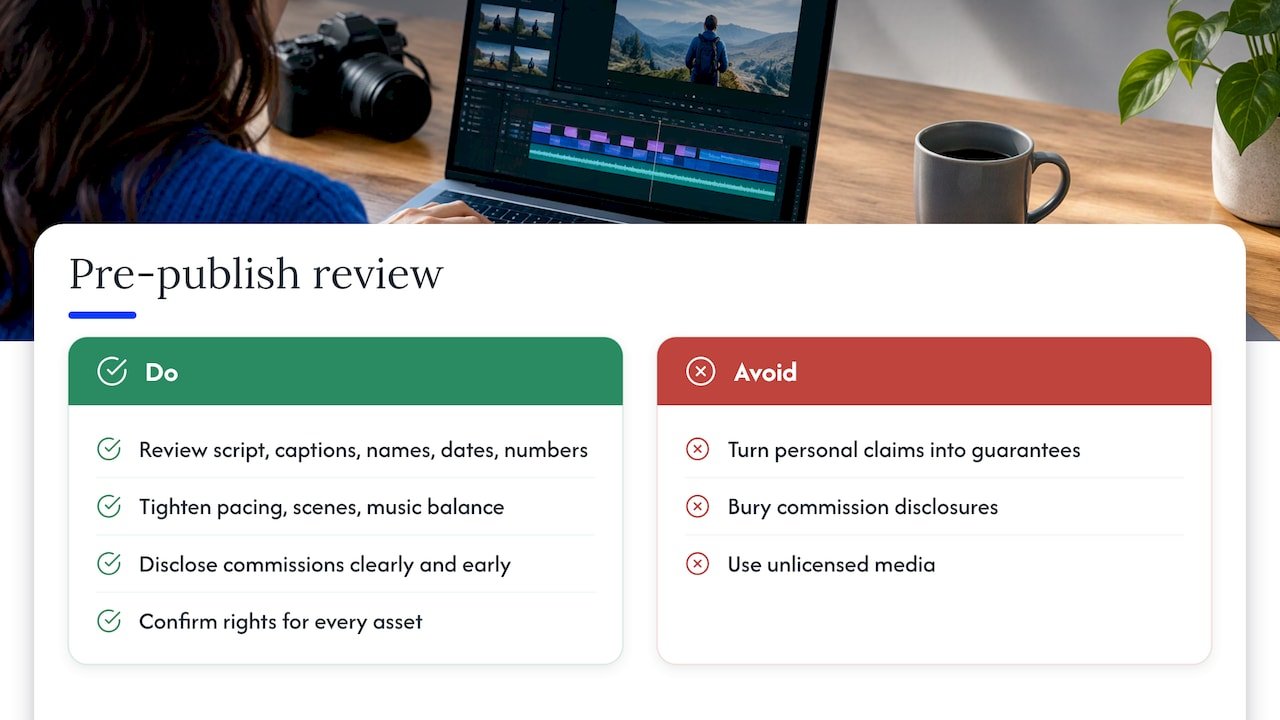
AI drafts are confident, and that is the danger. They will happily state a wrong figure in a lovely voice. Compare the script and captions line by line against your source, checking quotations, names, dates and numbers. Invideo’s own guidance suggests the same review: check the captions, tighten pacing and scene order, and balance narration with music before you export.
For affiliate content, add three more checks.
First, claims. If your post said a tool saved you time, make sure the video does not turn that into a guaranteed result. Keep the wording as personal experience.
Second, disclosure. Say clearly, out loud or on screen, that you may earn a commission, in the same way you do on the post. If you are in the United States, the FTC expects clear disclosure of material connections, so keep that wording visible and early rather than buried.
Third, rights. Confirm you can use every image, clip and music track. A stock clip that was fine in a draft may not be licensed for a monetized video.
Our article on why an evidence pack comes first for AI content goes deeper on keeping your claims grounded before anything is published.
Adapt the same post for different platforms
One post can feed several videos, and each should be its own edit. A long YouTube explainer can follow the post’s full structure, with chapters. A short vertical clip should take only the single most useful tip. A LinkedIn version might lead with the business result.
If you want to see how that looks in practice, the principles in this guide on how to repurpose content for different formats apply well beyond its own niche: start from the core message, then reshape it for each channel. And if short vertical video is your main target, our five-step short form video AI workflow and the TikTok-specific 90-day AI content plan lay out the process.
Publish so people and search engines can find it
Uploading to a platform is only half of distribution. If you also embed the video on your own site, Google’s guidance is plain: the video should sit on a publicly accessible page where people can watch it. Its video SEO announcement recommends high-quality thumbnails, accessible video files and, where useful, a video sitemap.
On the markup side, Google’s VideoObject documentation says eligible markup requires a name, a thumbnail URL and an upload date, and recommends adding a content or embed URL, a description and a duration. It also says the markup belongs on the page where the video can be watched. Its video best practices add that the structured data should match the actual video, with unique thumbnail, title and description information, not copy-pasted from the post.
That last point catches many bloggers. Give the video its own title and description, written for the video, and keep the blog post and video pointing to each other. For YouTube specifically, your transcript is a big lever, and our guide on AI YouTube SEO transcript fixes shows how to tidy it.
Measure what the video actually does
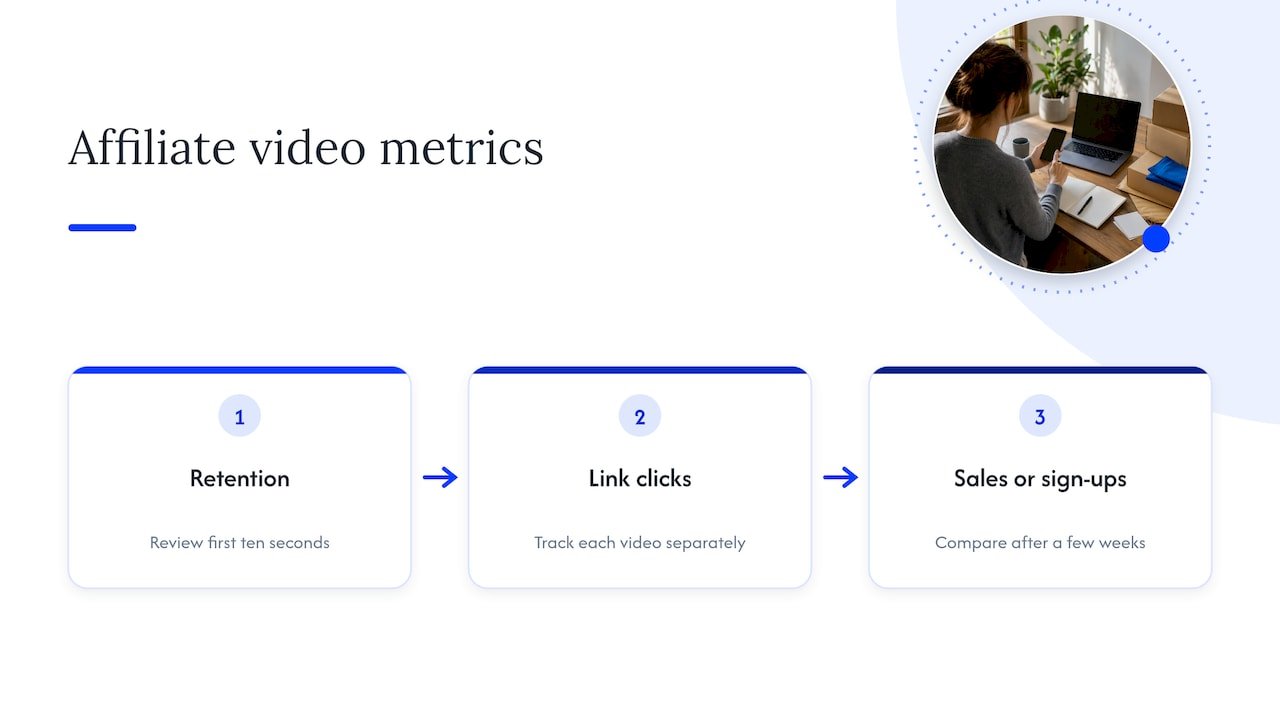
Views are the loudest number and the least useful. For affiliate work, look at three things in order.
Retention comes first. YouTube’s analytics offers per-video audience retention data, including a watch ratio and relative retention performance by point in the video. If viewers leave in the first ten seconds, rewrite the opening. If they leave right before your recommendation, the setup is too long.
Next, clicks on your link. Use a separate tracked link for each video, so you can tell which videos send people to the offer and which only collect views.
Last, sales or sign-ups from those clicks. Give each video a few weeks and compare it with the post it came from. If you want a framework for deciding which touchpoint deserves credit, see our guide to affiliate attribution models.
A caution on research here. A Maynooth University study of 757 Facebook brand posts found that richer media was associated with more engagement, but its authors noted the results came from one brand on one platform and should not be generalized. Your own audience is the only dataset that really counts, so test and keep notes.
Where we see this fitting into your week
Here is how I think about blog to video. Your posts are already your best research. The hard part, working out what your audience needs and why, is done. AI simply takes the next step off your plate: the first draft of the script, the scene plan, the captions.
What it cannot do is care whether the viewer gets a result. That is your job, and it is where my coaching background shapes everything we publish here. I would rather you make four careful videos from your strongest posts than forty rushed ones, because each video is a promise to someone with limited time.
So build a small, repeatable routine: pick the post, cut to spoken length, review the scenes, check every claim, publish, measure. Once it runs smoothly, the time you save goes into what only you can do, which is the personal story and the honest recommendation. That is the blend we teach: practical AI, human judgment, and steady improvement.
Will
Build it into a workflow
If you would like the whole chain mapped out, from choosing a post to publishing and tracking, our AI affiliate workflows with ready-to-run recipes turn routines like this one into repeatable steps you can follow at your own pace. They are written for affiliate marketers who want to save time without losing the personal voice that makes people trust their recommendations.

You can also start from the home page at willbuckley.com for the newsletter, videos and coaching content.
FAQ
Can AI turn any blog post into a good video?
It can turn any post into a draft, but the best results come from posts with a clear single promise, such as a tutorial or a comparison. Dense essays need rewriting before they become scenes. Treat the output as a first draft and edit it.
How long should a video made from a blog post be?
It depends on the platform. The HeyGen documentation gives examples of about 30 seconds for a short vertical clip, 60 seconds for LinkedIn and 90 seconds for a YouTube explainer. Start with the platform’s format, then cut the script to fit rather than squeezing the whole post in.
Do I need to show my face or record my voice?
No. Many tools offer avatars and AI voices, and screen recordings with narration work well for tutorials. Choose whichever sounds most like you, and listen to the full voiceover before publishing, especially for product names.
Will a video version help my blog post rank?
It can help people and search engines find your content when the video sits on a page where it can be watched, with accurate metadata and structured data, as Google’s documentation describes. It is not a guaranteed ranking boost, so track the post’s traffic before and after.
How do I know if the video is worth the effort?
Compare retention, tracked link clicks and conversions against the original post. A video with modest views but strong clicks is a winner for affiliate income, and one with many views but no clicks needs a better call to action.
Sources
- Content Repurposing (HeyGen developer documentation)
- Video Viewer Study 2021 (TechSmith)
- Best Content Format on Social Platforms in 2026 (Buffer)
- URL to Video AI (Colossyan)
- How to Turn a Blog Post Into a Video, Not a Slideshow (Magickvid)
- Convert blog to video (invideo)
- New resources for video SEO (Google Search Central Blog)
- Video SEO Best Practices (Google Search Central)
- Video structured data (Google Search Central)
- YouTube Analytics API sample requests
- Message content features and social media engagement (Maynooth University)