

Postback tracking is a way for the advertiser’s server to tell your tracker, directly and automatically, that a click turned into a sale or signup. No browser, cookie or thank-you-page pixel is involved. If you have ever watched clicks climb while the conversion column stayed stubbornly empty, a postback is often the missing piece. It all hangs on one small thing: a click ID that travels from your link to the sale and back again.
That can sound technical, and the good news is that it is really one idea with a few moving parts. This guide walks through what a postback is, how the round trip works, how to set one up, how to test it before you spend a dollar on traffic, and where your affiliate links should sit so the whole chain has something to track.
TL;DR
- A postback is a server-to-server message that reports a conversion using the click ID your link created.
- It does not depend on the visitor’s browser, so it survives ad blockers, closed tabs and failed page loads far better than a pixel.
- Setup comes down to three jobs: pass the click ID in your link, add the postback URL to the program, and test with a real click.
- Most failures are simple: a stripped parameter, an unresolved placeholder or a click ID that never reached the order.
- Link placement matters because a postback can only credit clicks that actually happen, so put links where readers decide.
Table of Contents
- What postback tracking means
- How the round trip works
- Postback versus pixel
- Setting up a postback in three jobs
- Testing before you send traffic
- Where to place affiliate links
- Using AI without trusting it blindly
- Sending conversions onward
- Our perspective
- Next step: turn clean tracking into a routine
- FAQ
- Sources
What postback tracking means
A postback, sometimes called a callback or S2S (server-to-server) tracking, is an HTTP request sent from one server to another when something happens. In affiliate marketing, that something is a conversion. Keitaro’s documentation describes it as a request from the advertiser’s server, whether that is the affiliate network or the advertiser’s own site, to the tracker, reporting a purchase or registration. The two pieces of information it must carry are the click ID and the conversion status.
Think of it as a phone call instead of a note left on a doorstep. A pixel is the note: it only works if the visitor’s browser loads the page and runs the script. A postback is the call: the advertiser’s system rings your tracker the moment the sale is recorded, whatever the visitor’s browser is doing.
The Voluum documentation puts the same idea in practical terms: a unique click ID is generated when the visitor clicks, the network returns it after the conversion is recorded, and that is how the platform matches the sale to the visit.
How the round trip works
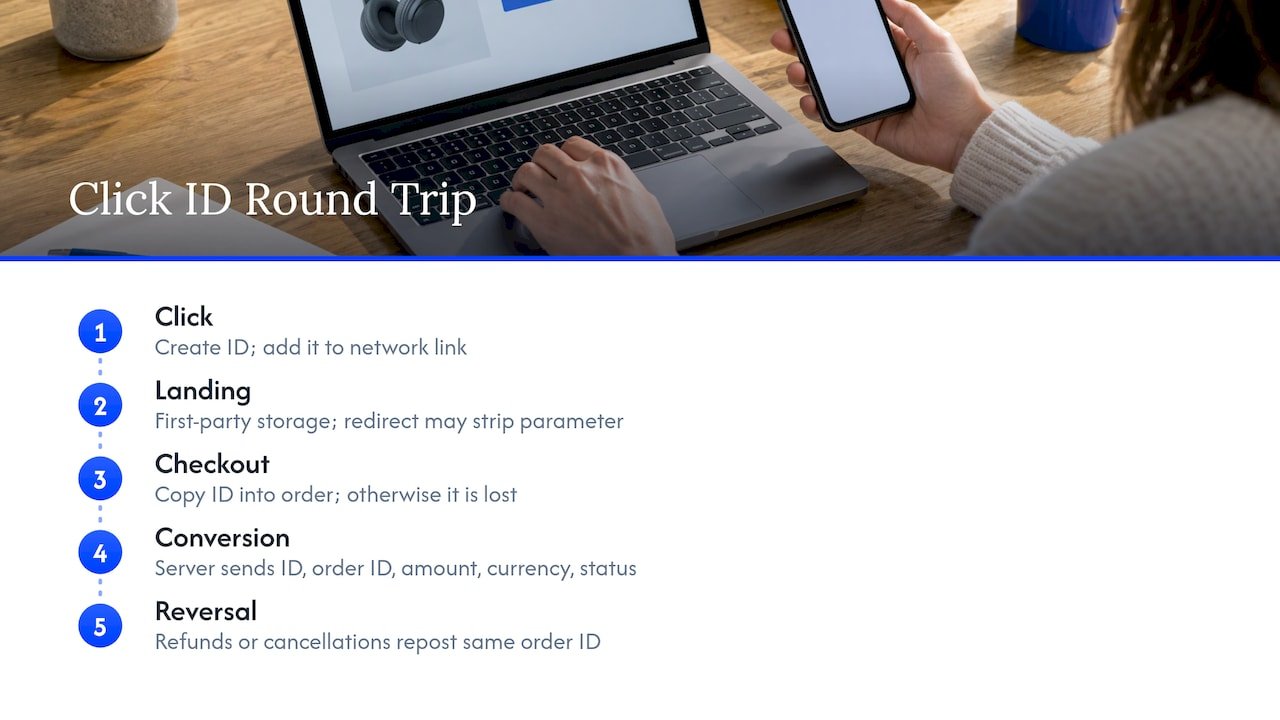
Everything rides on one token, the click ID. Theory Road’s setup guide describes it as a round trip with five stops, and I find that the easiest way to hold it in your head.
Click. Your tracker creates a unique click ID and puts it in the link you send to the network or advertiser, inside a parameter the network knows how to carry.
Landing. The advertiser’s site keeps that ID, ideally stored first-party for as long as the program’s attribution window lasts.
Checkout. The ID is written into the order record, so it is still attached when the person buys.
Conversion. The advertiser’s server calls your postback URL, sending the click ID plus details such as order ID, amount, currency and status.
Reversal. If the order is refunded or cancelled, the same order ID is posted again so your numbers stay honest.
The same source names the two most common breakages: the parameter getting stripped by a redirect, and the click ID never being copied into the order. Keep those two in mind, because they explain most of the “my postback does nothing” messages you will ever see.
What data a postback can carry
At minimum, the click ID and a status. Beyond that, a postback URL usually holds placeholders, which are slots the sending system fills with real values. Trackdesk’s help center shows the pattern: placeholders like the click ID and payout in the URL get replaced with the actual transaction values when the conversion fires. Typical extras include the sale amount, currency, event name and custom sub IDs for your own labels, such as which page or placement the click came from.
That last one is worth a pause. Sub IDs are how you learn which article, video or email earned the sale, not just that a sale happened. If you plan to improve performance, and not just count it, build them in from day one.
Click ID names differ by network
The parameter that carries the click ID is not universal. AnyTrack’s guide lists examples: tid on ClickBank, subId1 on Impact, sid on CJ Affiliate, sub1 on Everflow, and aff_sub on HasOffers and Tune. Always confirm the exact name in the program’s own documentation before you build your link, because a mismatch here fails silently.
Postback versus pixel
A browser pixel is a small image or script on the advertiser’s confirmation page. It fires only if that page loads, the script runs and nothing blocks it. Adtraxo’s comparison lists what can kill it: ad blockers, privacy browsers, cookie expiry, script errors and people closing the tab too soon. A server request does not care about any of that.
ClickBank’s support documentation says its postback approach gives more reliable and accurate data than its browser-based pixel, and that it offers realtime delivery plus built-in testing.
| Browser pixel | Server postback | |
|---|---|---|
| Where it runs | Visitor’s browser | Advertiser’s server |
| Hurt by ad blockers | Yes | Largely not |
| Needs the confirmation page to load | Yes | No |
| Setup effort | Low | Higher: click ID must be passed and stored |
| Best for | Quick, simple setups | Reliable conversion records |
A postback is not magic, though. TrackNow’s guide points out that it does not connect a desktop click to a mobile conversion by itself, does not prove a click is legitimate, and does not handle privacy compliance for you. Treat it as a strong foundation, then add the usual care around fraud checks and disclosure. And when a program lets you, Scaleo’s comparison suggests running both: a pixel for quick feedback, a postback to settle the ledger.
Setting up a postback in three jobs
The exact screens differ from platform to platform, but the order never does.
1. Pass the click ID in your link
Your tracker’s link needs a token that gets swapped for a unique ID on every click, placed in the parameter your network expects. In Voluum’s setup, that is a click ID token matched to a network parameter, and the same logic applies elsewhere. Open the program’s tracking documentation, find its sub ID or click ID field, and map your token to it.
If you route traffic through redirects, link shorteners or email click wrappers, check that the parameter survives every hop. Our piece on fixing redirect chains instead of links covers how those chains cause trouble, and it is the same culprit behind many lost IDs.
2. Add the postback URL to the program
Your tracker generates a postback URL for each conversion event, for example signup or sale. Routy’s documentation notes that most programs want one postback per event and will confirm the format of the click ID variable, which might look like %click_id% or ${click_id}. Paste your URL in, swap the placeholders for the network’s own, and save.
Some platforms offer two levels. Mobidea’s help center describes a global postback that applies to every offer, and per-offer postbacks that override it. A global one saves time when you run many offers with the same tracker.
3. Test with a real click
Do not skip this. Testing gets its own section below, because it is where most people save themselves a bad week.
Testing before you send traffic
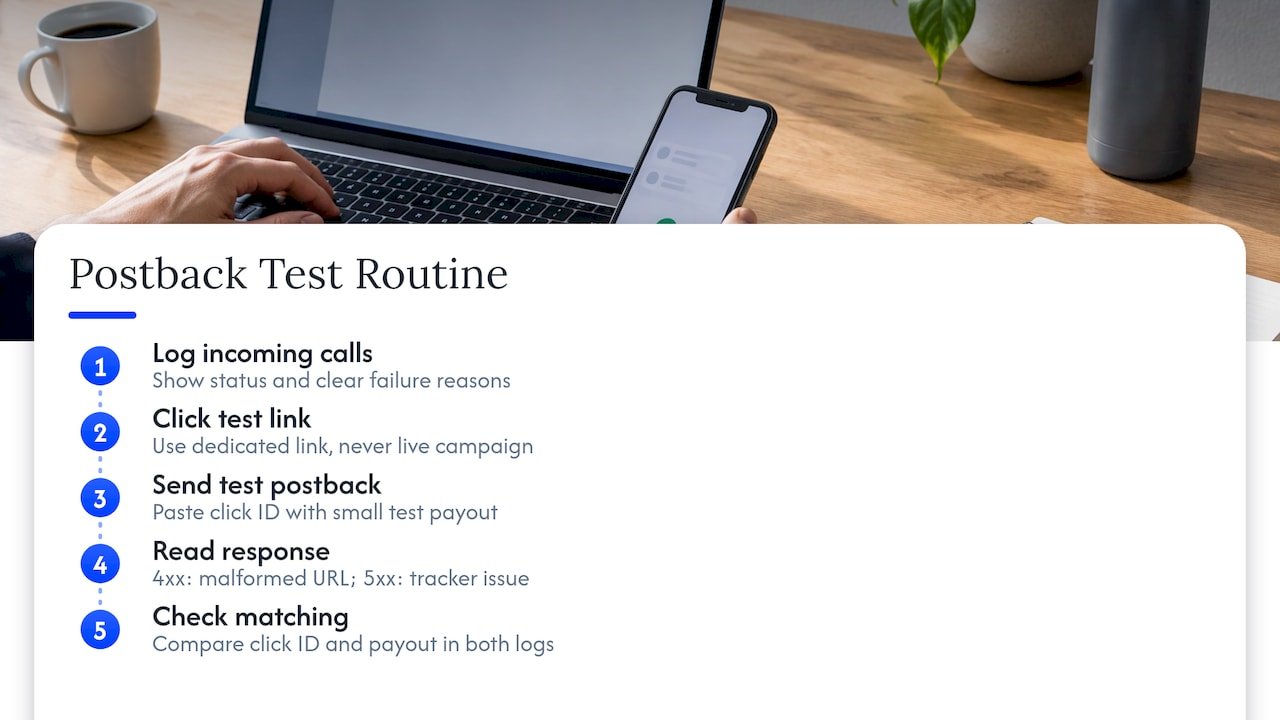
Because postbacks are server calls the public never sees, they are hard to watch. AnyTrack’s Laurent Malka describes the trap well: you end up tweaking parameters blind. The cure is a log on your receiving end where each incoming postback shows up with a status and, when it fails, a clear reason such as a missing click ID or no match found.
Here is a routine that works.
Click your own tracking link. Use a dedicated test link, never a live campaign link. CAKE’s help center warns that testing on live links can create false conversion records that affect payouts.
Copy the generated click ID. Then paste it into the postback URL with a small test payout and open it in your browser. Adtraxo’s testing guide describes this exact check: the conversion should appear attached to the right click.
Read the response. A 4xx error points to a malformed URL, and a 5xx to a problem on the tracker’s side, according to CAKE’s documentation. A postback that fires but records nothing often means an empty click ID or a placeholder that never got replaced.
Check the matching. The click ID and payout should be the same in the network’s postback log and in your tracker’s log. A conversion that arrives with a click ID your tracker has never seen, an orphan, usually means the parameter was truncated, encoded badly or rewritten along the way.
If you want a fuller pre-launch habit, a short checklist helps, and the same mindset applies to what readers click on. The guide to effective calls to action is a good companion once your tracking is clean and you want more of those clicks to convert.
Common problems, quickly
The click ID is not stored, so nothing can be matched later. The postback URL has a typo or the wrong placeholder format. The conversion arrives after the click ID expired. The conversion status is hidden in the program’s settings, which Trackdesk’s help center lists as a frequent reason a postback seems not to fire. Work through those four before you suspect anything exotic.
Where to place affiliate links
A postback can only report a conversion that started with a click, so link placement is the other half of tracking. A perfect S2S setup on a link nobody sees is a very accurate record of nothing.
Three principles hold up well in practice.
Put links where the decision happens. Readers click when the page has just answered the question they came with. A link right after you explain a problem and name the tool that solves it beats a link in a generic block at the bottom.
Keep the disclosure next to the recommendation. In the US, the FTC says you should disclose a financial relationship with a brand, and its Disclosures 101 guidance covers when that applies. Clear wording near the link, not buried, protects your readers and your reputation. Our affiliate disclosure examples give you copyable wording.
Label every placement with a sub ID. If the intro link, the comparison table link and the closing link each carry their own sub ID, your postback data tells you which spot earns. Without that, you are guessing.
Our AI link placement audit shows a ten-page pilot for finding weak or broken placements, and the cookieless link tracking setup walks through building a first-party setup in about an hour. If you track clicks on your own site, Google Tag Manager for affiliates pairs well with a postback, since the tag shows what readers clicked and the postback shows what they bought.
Using AI without trusting it blindly
AI is useful around postbacks in two ways: reading your data and drafting setup steps. For data, MarketUnlock’s tracking guide suggests exporting tracker data and asking specific questions with thresholds, such as top placements by ROI with a minimum click count, and treating any slice under about 50 clicks as not enough data. AI will happily find patterns in noise if you let it.
For setup, an AI assistant can explain a placeholder or draft a URL, but it cannot prove the chain works. Only one real test conversion, with the same click ID and payout in both logs, does that. Think of AI as the helper that saves you time on the analysis, and the test as the part you always do yourself.
Sending conversions onward
Once your tracker holds attributed conversions, you can relay them to the traffic source so its algorithms learn which campaigns actually sell. That is the idea behind the traffic source postback: the tracker acts as a hub and tells the ad platform which campaign converted. Zeustrack’s help center describes this second kind of postback. If you buy paid traffic, this feedback loop is where analytics and campaign optimization tools earn their keep, and it connects to what we cover in Google Ads for affiliate marketing.
Our perspective
Here is what I have noticed after years of teaching and coaching: most people do not struggle with the idea of tracking. They struggle with the first ten minutes, when a setup screen looks like a wall of brackets and they quietly decide to deal with it later.
Later is expensive. Every week without a clean click-to-sale chain is a week you cannot tell which article, video or email pays your bills. So we teach it as one small loop, not a technology project: pass the ID, add the URL, test with a real click, then fix links before you touch anything fancy.
That is also why we pair tracking with AI the practical way. Let AI do the heavy reading of your numbers and the first drafts of your workflows, and keep the verification, the one test conversion, in your own hands. It saves hours without asking you to trust a black box.
If you are just starting, be kind to yourself. You do not need every feature on day one. You need one link, one ID and one conversion you can see.
Will
Next step: turn clean tracking into a routine
Once your postbacks work, the next win is making the rest of your affiliate work repeatable. Our AI affiliate workflows page collects ready-to-run recipes for exactly that, so you spend your time on decisions, not busywork.

If you want to see how the pieces connect, start with AI workflow automation for affiliate marketers, or browse everything at willbuckley.com. For a clearer view of what credit each touchpoint deserves, our guide to affiliate attribution models is the natural follow-up.
FAQ
What is postback tracking in simple terms?
It is a server-to-server message that tells your tracker a conversion happened. Your link carries a unique click ID, the advertiser records the sale against it, and their server sends that ID back to you. No cookie or browser page is needed for the report to arrive.
Is a postback better than a pixel?
For reliability, generally yes, because it does not depend on the visitor’s browser loading a script. It does take more setup, since the click ID must be passed and stored. Some programs let you run both, using the pixel for quick feedback and the postback for the final record.
Why is my postback firing but recording no conversion?
The usual cause is an empty or malformed click ID, such as a placeholder that never got replaced. Check that the parameter survives any redirects and that the program’s click ID format matches what your tracker expects. Then repeat the test with a dedicated test link.
Do I need a developer to set up postback tracking?
Often not, if you use a tracker or network with built-in templates and a test tool. The setup is three jobs: pass the click ID, add the URL, test. Custom setups on your own site, where the ID must be saved into orders, are where technical help becomes more likely.
Where should affiliate links go in an article?
Place them right after the section that resolves the reader’s question, with the disclosure close by. Give each placement its own sub ID so your postback data shows which one converts.
Sources
- Postback documentation, Keitaro
- Server-to-server postback URL tracking, Voluum documentation
- Postback URL real example, parameters and testing, AnyTrack
- Affiliate postback URL setup, Theory Road
- Affiliate postbacks, Trackdesk Help Center
- Postback vs tracking pixel, Adtraxo
- Postback and pixels integration guide, ClickBank Support
- S2S postback tracking guide, TrackNow
- Pixel tracking and the future, Scaleo
- Postback tracking setup, Routy
- What is a postback, Mobidea Help Center
- Troubleshoot postback URLs, CAKE Help Center
- How to test a postback URL, Adtraxo
- Disclosures 101 for Social Media Influencers, FTC
- Click tracking for affiliate marketing, MarketUnlock
- Postback mechanism explained, Zeustrack Help Center