

Have you ever pasted the same long prompt into ChatGPT for the fifth time this week, then tweaked it because you forgot a rule? A custom GPT fixes exactly that. It is a version of ChatGPT set up once for one marketing job, with your instructions and reference files built in, so every new conversation starts where the last good one ended. In this guide we walk through what custom GPTs do for marketers, which tasks suit them, how to build one, and how to keep it accurate and safe. If you want the prompting foundations first, our guide to ChatGPT for affiliate marketing is a good companion.
TL;DR
- A custom GPT is a ChatGPT assistant configured for one repeatable job, with its own instructions and knowledge files, so you stop re-pasting prompts.
- The best marketing uses are repeatable and rule-based: briefs, email sequences, ad copy, social captions and reporting questions.
- Give each GPT one job, one audience and one output, and keep rules (Instructions) separate from facts (Knowledge).
- Never upload anything private to a GPT you share, and review every output before it goes live.
- Live ad or analytics data needs Actions or a connector; without one, the GPT only sees what you paste or upload.
Table of Contents
- What a custom GPT actually is
- Custom GPT use cases that earn their keep
- What the results look like in practice
- How to build a custom GPT for marketing
- Can a custom GPT use live marketing data?
- Using a custom GPT safely
- A simple first GPT to build this week
- Our perspective
- Take the next step
- FAQ
- Sources
What a custom GPT actually is
A custom GPT is a no-code assistant built inside ChatGPT for a repeatable task. Per one 2026 builder guide, it has a name, a description, conversation starters, custom instructions, uploaded knowledge files and selected capabilities, and sometimes external actions. Unlike a normal chat that forgets your setup unless you keep pasting the same prompt, it carries the setup forward.
There is a practical difference with files too. In a regular chat, uploaded files only serve that one prompt and have to be uploaded again next time. In a custom GPT, you upload documents once and they guide every future conversation. Each GPT also gets its own link you can share with colleagues, and the same guide notes that custom GPTs are available to paid ChatGPT users.
One more detail worth knowing: a custom GPT does not inherit your saved memory, personal custom instructions or past conversations. That is a feature. It behaves the same way for you on Monday as it does for a teammate on Friday.
So when should you use plain ChatGPT and when a custom GPT? Plain ChatGPT suits one-off projects and wide-ranging brainstorming. A custom GPT suits the work you do again and again and want done the same way each time.
Custom GPT use cases that earn their keep
The pattern behind every good marketing GPT is the same: a task you repeat, with rules you can write down. Here are the ones that tend to pay off first for affiliate marketers and small marketing teams.
Content briefs and blog drafts
A blog GPT loaded with your voice notes, style guide and SEO checklist can turn a keyword and a few facts into a structured first draft. The key word is first. Our piece on AI content briefs and templates shows how a strong brief does most of the work before the model writes a single sentence, and a custom GPT is the natural home for that brief.
Email sequences
Load a GPT with your best-performing emails and your campaign benchmarks, and ask it for a welcome sequence or a product launch series. If you want a ready structure to feed it, we cover AI email sequences with plug-and-play briefs.
Ad copy and social captions
Search Engine Land describes a campaign copy assistant: you enter one brief and get ad copy, email subject lines and social captions formatted by channel, with brand guidelines uploaded as the knowledge file. The article puts the time it replaces at 30 to 45 minutes of copy concepting per campaign. If your social workflow also involves scheduling and approvals, you can plan, create and publish social content in one place alongside the drafts your GPT produces.
Research and strategy notes
A strategy GPT loaded with market data and your planning frameworks can summarize a niche, compare offers, or turn a messy list of ideas into a one-page plan. It will not replace your judgment about which program deserves your audience’s trust, but it gets you to the decision faster.
Campaign analysis
If you upload a spreadsheet export, a GPT can answer questions about it. If you connect it to live data, it can pull the numbers itself. We cover that below.
What the results look like in practice
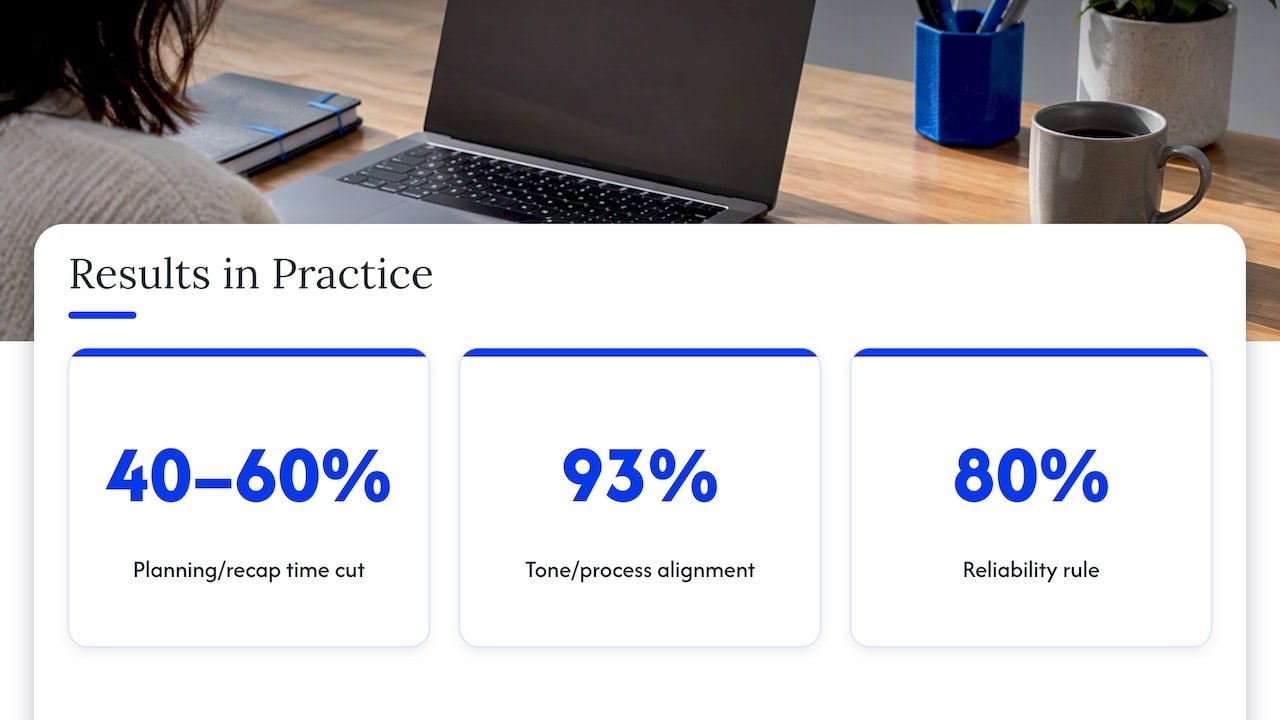
It helps to see real numbers, even from teams bigger than a solo affiliate. Allied Global Marketing built an internal assistant called Apex GPT on OpenAI’s foundation model, using prompt libraries, curated examples and instruction sets from its strategy, analytics and operations teams. After one month of iteration, teams reported cutting media planning and recap generation time by 40 to 60 percent, and an internal check found 93 percent alignment between prompts and outputs on tone and process.
The lesson the team took away is the one to copy: context beats capability. The GPT was useful because it was trained on the agency’s own systems, and it earned daily use because it stayed focused on one area, programmatic strategy and activation.
A university team tells a similar story. Kettering University’s marketers fed their GPT campaigns, speeches and leadership memos, then judged it with an “80% rule”: it became reliable once outputs needed refinement rather than full rewrites. They also noted that tone shifts between sensitive scenarios can still trip a GPT up, which is why a human read before publishing stays part of the routine.
That is a reassuring way to think about it. You are not chasing perfect output. You are aiming for a draft that needs a polish, not a rescue.
How to build a custom GPT for marketing
Building one takes an afternoon, and most of that is thinking, not clicking. Here is the sequence that works.
Step 1: Pick one job, one audience, one output
Resist the urge to build a “do-everything marketing GPT.” Guidance from one 2026 builder guide is to give a GPT one job, one audience and one output. “Turn a product brief into three email subject lines and a preview text for my newsletter subscribers” is a good job. “Help with marketing” is not.
Step 2: Write the Instructions
Instructions are the rules: role, tone, format, what to always do, what to never do. Write them the way you would brief a new freelancer. Include the structure you want back, for example a headline, a two-sentence hook and a call to action. Add an instruction for what the GPT should do when it lacks information: ask you, rather than guess. That one line prevents a lot of confident nonsense.
Step 3: Add Knowledge files
Knowledge is the reference material: brand voice guide, product one-pagers, your best examples, positioning notes. Per Search Engine Land’s March 2026 guide, plain text and Markdown files retrieve more accurately than PDFs, and you should never dump in a raw 500-page document because the model cannot efficiently parse messy formatting. Clean, short, well-labeled files win. The same builder guide notes the Knowledge area holds up to 20 files, so choose what earns a slot.
Keep the split clean: rules go in Instructions, facts go in Knowledge.
Step 4: Test with real tasks
Run the GPT on five jobs you have already done by hand and compare. Where does the tone drift? Where does it invent details? Fix the Instructions, not the single output, so the improvement sticks.
Step 5: Iterate on a schedule
Treat the GPT like software that needs upkeep, not a one-time build. When your offer, pricing or voice changes, update the files. A quick monthly review keeps it from quietly going stale.
If you want to sharpen the prompts that live inside your Instructions, our walkthrough on prompt engineering workflows for affiliates goes step by step. And if you are also thinking about showing up inside AI answers, these ways to optimize for ChatGPT include examples of specialized GPTs for common marketing functions.
Can a custom GPT use live marketing data?
Out of the box, no. Without a connector, ChatGPT only knows the ad data you paste or upload. That is fine for monthly reports from a CSV export. For live numbers you have two routes.
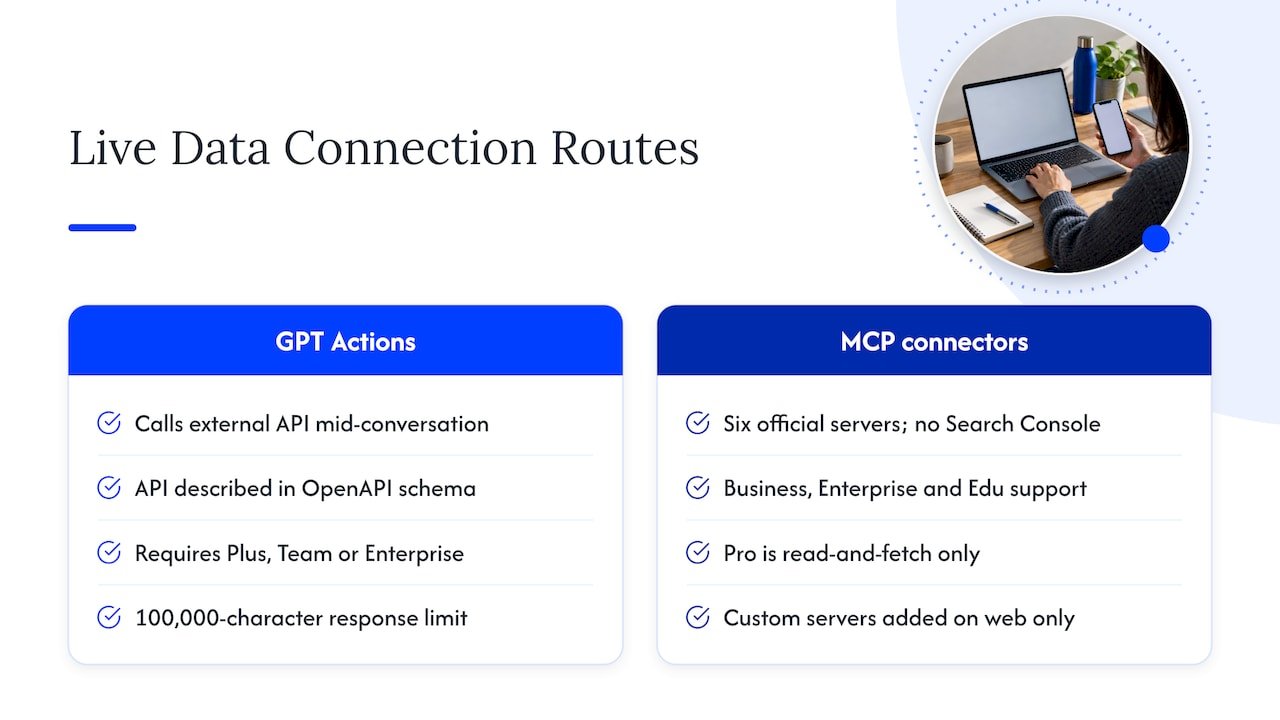
GPT Actions let the GPT call an external API in the middle of a conversation. You describe the API in an OpenAPI schema, and the model fills in the parameters and folds the response into its answer, with no code running on your side. Building GPTs with Actions requires a Plus, Team or Enterprise plan, and OpenAI’s production notes cite a 100,000-character response limit and a 45-second timeout per action call.
MCP connectors are the newer route. Trackingplan’s November 2026 guide says official MCP servers exist for Meta Ads, Google Ads, TikTok Ads, GA4, Adobe Analytics and BigQuery, while Search Console has none. In ChatGPT, custom MCP servers are supported on Business, Enterprise and Edu plans, Pro is read-and-fetch only, and they can be added on the web only.
Google’s own documentation says its Google Ads MCP server removes the need for custom code for authentication, resource fetching and data parsing. It supports read access and limited changes with propose-and-confirm validation, plus a read-only mode. Note that Google sunset developer tokens on September 9, 2026, so check that page for the access levels you need.
For a simple start, OpenAI’s action library shows a pattern where you connect Google Ads through an authorization step and ask plain questions, like how much you spent per campaign last month, and the data comes back as a file for analysis. If paid traffic is part of your affiliate plan, our Google Ads affiliate marketing guide shows what works.
Using a custom GPT safely
A GPT is only as safe as what you put in it. Two habits cover most of the risk.
First, treat uploaded files as shareable. Guidance citing MIT Sloan warns that once you share a GPT, anyone who can use it can generally download the files in its Knowledge. So client contracts, unreleased plans and personal data stay out. A good rule: never load a shared GPT with anything you would not hand to a stranger.
Second, keep credentials out of prompts and files. Keep them in the connection setup, and when you connect live data, pull only the fields you need for the decision. If a tool fails or rows are missing, make your Instructions tell the GPT to say so rather than fill the gap with a plausible guess.
Then there is disclosure. If a GPT helps you write affiliate content, the reader still deserves a clear note that you earn from links. Our affiliate disclosure examples and the EEAT steps for affiliate sites cover what to write. For the bigger picture on responsible use, see our map of ethical AI marketing frameworks.
A simple first GPT to build this week
If you are new to this, start small. Build an “offer brief to email” GPT. Upload two files: a half-page voice guide with five sample emails you are proud of, and a one-page cheat sheet for the program you promote (who it is for, the main benefit, the honest limits, your disclosure line). In Instructions, ask for three subject lines, a 150-word body and one call to action, and tell it to ask a question when the cheat sheet does not cover something.
Then run it on three offers you know well. If two of the three come back needing only a light edit, you have your 80 percent. If not, tighten the cheat sheet and try again. That small loop teaches you more about custom GPTs than any article, this one included.
Our perspective
Most affiliate marketers we talk with do not lack ideas. They lack hours. That is why we like custom GPTs: they turn the work you already know how to do into a routine you do not have to rebuild each morning.
The part that matters is not the tool, it is the thinking you put into it. A GPT that knows your voice, your audience and your rules will save you time. A GPT with a vague prompt will just produce average content faster. We would rather you build one small assistant well than ten sloppy ones.
Start with a single repeatable task, keep a human eye on every output, and let your own experience be the thing the GPT learns from. That is the practical, AI-driven approach we teach: smarter workflows that give your time back, without losing the personal touch your readers came for.
Will
Take the next step
If you are ready to turn this into a working system, our AI affiliate workflows page gives you ready-to-run recipes you can pair with your first custom GPT, and our newsletters and videos on the Will Buckley site keep the practical tips coming.

Want to go further? Our guide to AI workflow automation for affiliate marketers shows how to connect these assistants into a routine that saves hours every week.
FAQ
Do I need a paid plan to build a custom GPT?
Yes. Creating and editing GPTs is available on the web for paid ChatGPT users and managed workspace users with permission. Adding Actions requires a Plus, Team or Enterprise plan, so check your plan before you plan the build.
Is a custom GPT better than just saving a good prompt?
For repeat work, yes. A saved prompt holds one instruction, while a custom GPT also holds your knowledge files, tone rules and output format, and it starts every conversation with them. For a one-off task, a regular chat is enough.
Will a custom GPT write in my brand voice?
It can get close when you give it good examples and clear rules. Teams that succeed treat it as a consistency tool and judge it by whether outputs need refinement rather than full rewrites. Always read and edit before publishing.
Can I share my custom GPT with my team?
Yes, each GPT has its own link you can share or embed. Just remember that people with access can generally pull files out of its Knowledge, so keep private material out of anything you share.
Sources
- Build a Custom GPT: No-Code GPT Builder Guide
- The Accounting Marketer’s Guide to Custom GPTs
- What is a custom GPT?
- How to build a custom GPT for business
- Building Apex GPT
- Episode 114: From Brand Standards to Brand Systems
- Custom GPT: What It Is and How to Make One
- Custom GPT Actions API for Ad Research Setup Guide
- Connect Claude or ChatGPT to your marketing data
- How to Connect Facebook Ads to ChatGPT With Live Data
- Google Ads MCP server: Developer integration guide
- GPT Action Library: Google Ads