
You can make a strong YouTube thumbnail with AI in about the time it takes to brew a coffee, as long as you treat the AI as a fast sketch artist and keep the decisions for yourself. Let it produce options, backgrounds and variations. You choose the promise, fix the details, add the words and test the result. That split is what keeps thumbnails clear, on-brand and honest, and it is what protects the watch time your affiliate videos need to earn clicks on your links.
If you have ever stared at a blank canvas an hour before a publish deadline, this workflow is for you. It works whether you are launching your first review channel or running a dozen videos a month.
TL;DR
- Start with the video’s hook and one focal subject, then ask AI for many rough options and judge them at phone size.
- Add text yourself in an editor, keep it to three or four words, and check faces, hands and logos for errors.
- Export at 16:9 in JPG or PNG. YouTube recommends 3840 × 2160 pixels, with a 2 MB limit on mobile and 50 MB on desktop.
- Test two or three meaningfully different versions in YouTube Studio and judge them on watch time, not clicks alone.
- Never promise in the thumbnail what the video does not deliver.
Table of Contents
- What AI does well, and what stays with you
- How to create a YouTube thumbnail with AI, step by step
- Keep every thumbnail on brand
- Honest thumbnails earn better clicks
- How to test AI thumbnail variations
- Where affiliates go wrong with AI thumbnails
- Promo: build the whole workflow, not just the thumbnail
- Our perspective
- FAQ
- Sources
What AI does well, and what stays with you
AI is good at the parts of thumbnail design that used to eat your afternoon. According to an AI-for-creators course lesson from HSM University, it can generate thumbnail options, suggest color schemes, extend a photo to 16:9, remove or clean up backgrounds, and create backgrounds that would be costly to shoot.
The same lesson is clear about what you still own: the truthful promise, whether the image fits your channel and the video, which concept wins, and the final check of faces, details, text and layout. Think of it this way. The AI hands you ten drafts. You are the editor who decides which one goes out under your name.
That matters more for affiliate marketers than for most creators. Your video exists to move a viewer toward a product decision, so a thumbnail that attracts the wrong click, or a click that quickly turns into a back-button tap, does your channel no favors.

How to create a YouTube thumbnail with AI, step by step
Here is the routine we would hand a friend. It takes a little longer the first time and gets quick after that.
Step 1: Write the hook before you open any tool
One sentence is enough: what does the viewer get from this video? “A cheaper way to edit review videos” is a hook. “AI tools” is a topic. Prompts built on a topic give you generic images; prompts built on a hook give you something with a point.
Then choose one focal subject. A face, a product, a before-and-after object. If you cannot name the single thing the eye should land on, the image will not tell a story at thumbnail size.
We have a companion piece on AI headline writing for affiliate marketers that pairs well here, because the title and the thumbnail should make one promise together, not two.
Step 2: Prompt with specifics
A good thumbnail prompt reads like a short shot list. Include the subject, the action or expression, the framing (close-up, waist-up, over the shoulder), the lighting, the background, your color palette, the style, and a note to leave empty space where text will go. Ask for the aspect ratio your tool supports, 16:9 for standard videos.
A weak prompt: “a person excited about software.” A stronger one: “close-up of a surprised presenter looking at a laptop, soft window light, plain deep-blue background, warm orange accent, clean modern style, empty space on the left third.” Notice that the second one tells the tool nothing about text. That is deliberate, as you will see in step 4.
Step 3: Generate a batch and judge it small
Ask for six to twelve rough variations rather than polishing the first image you like. Then shrink them. Shrink them to roughly 320 pixels wide, or view them on your phone. Ask one question of each: can I tell what this is about in one second?
The winners tend to have a clear silhouette, one obvious focal point and strong contrast between subject and background. The losers are busy, dim or full of equally weighted objects. A course lesson on AI thumbnails recommends the same habit of checking at phone-sized scale.
Step 4: Fix, then add the words yourself
Pick one image and inspect it closely. Look at eyes, fingers, teeth, product edges, background objects and any stray logos or watermarks. Image models still produce small errors here, and a distorted hand on a thumbnail makes viewers wonder what else is off.
Then add your text in an editor, not in the image model. Generated lettering can come out misspelled or warped, and the same HSM lesson notes that generated text may be garbled. Keep the words to three or four at most, use a large bold font, and make sure they contrast with the background. A thin outline helps on busy images. Add your logo or channel colors at this stage so the thumbnail looks like it belongs with your others.
Step 5: Export to YouTube’s specs
This is the dull step that saves you an embarrassing rejected upload. The table below summarizes what YouTube Help lists for custom thumbnails.
| Item | Standard videos | Shorts |
|---|---|---|
| Recommended size | 3840 × 2160 px | 2160 × 3840 px |
| Minimum | 640 px wide | 640 px high |
| Aspect ratio | 16:9 | 9:16 |
| Format | JPG or PNG | JPG or PNG |
| File size limit | 2 MB on mobile, 50 MB on desktop | Same upload limits apply by device |
Two more details are worth knowing. Custom thumbnail uploads require a verified account, so confirm yours is verified before launch day. And if you publish a vertical video with a 16:9 custom thumbnail, YouTube notes that it may show an automatically generated 4:5 thumbnail on Home, Explore and subscriptions, while your custom version can still appear in the watch feed and watch history. If you make vertical content, design with that crop in mind.
The lower mobile limit is the one that catches people. If your file is large, export a compressed version at the highest quality that stays under 2 MB so the same file works from any device.
Keep every thumbnail on brand
The fastest way to make AI thumbnails look cheap is to let every one of them look different. Viewers start recognizing your videos by color, composition and type before they read a word.
Spend twenty minutes writing a one-page style sheet: your two or three palette colors, your font, where the text sits, how you frame faces or products, and the mood you want. Paste the key lines into every prompt, and compare each draft against your last few thumbnails before you approve it. The style sheet turns “generate something nice” into “generate something that is mine.”
This is also where a clear brand pays off beyond one video. If you are building a channel as an asset rather than a one-off, how to build a brand online with AI-driven strategies shows how consistent signals across platforms add up.
Honest thumbnails earn better clicks
A thumbnail makes a promise and the video has to keep it. YouTube has said so directly: in its Creator Blog, the team explained that thumbnail tests use watch time rather than click-through rate alone, because clickbait can raise clicks while hurting retention and performance.
For an affiliate channel, that is also just good business. A viewer who clicks because the thumbnail hinted at a product that never appears will leave in seconds, and they will not click your link. If you want to think this through with a wider lens, this guide on why YouTube ads should serve the real viewer experience makes a similar point about matching message to outcome.
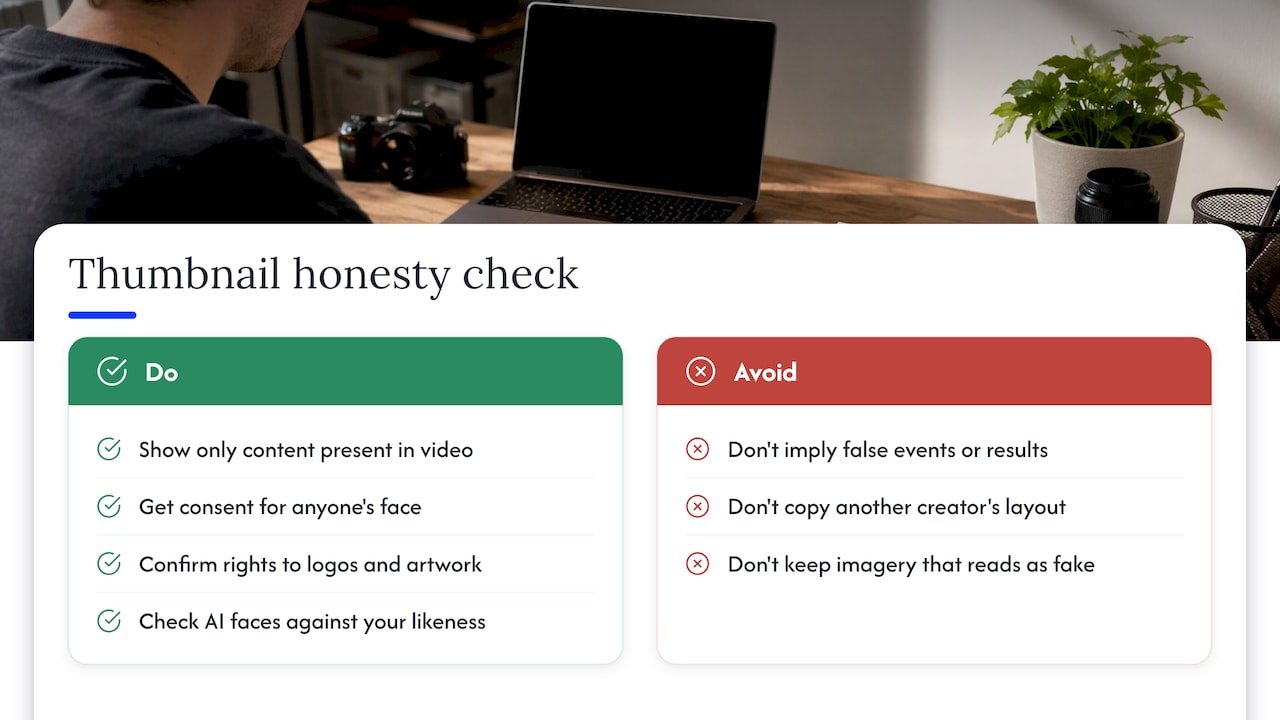
A quick honesty check before you export:
Does the image show something the video really contains? Does it imply an event, an endorsement or a result that did not happen? Did you use anyone’s face with their consent? If you used another brand’s logo, character or artwork, do you have the right to? And does the thumbnail avoid copying another creator’s layout so closely that viewers could mistake it for theirs?
YouTube also requires that all custom thumbnails comply with its Community Guidelines, and that applies whether a human or an AI made the image. If you are showing yourself, AI faces that drift from your real likeness are worth catching too, because viewers notice when the person on the thumbnail does not look like the person in the video.
One research note keeps this in perspective. A Columbia Business School team studying display advertising found that AI-generated images performed differently depending on how artificial they looked. That was ads, not YouTube thumbnails, so it is no promise of a result, but it supports the same habit: look closely at the image, and if it reads as fake, redo it.
How to test AI thumbnail variations
AI makes variations cheap, which makes testing practical. YouTube’s own A/B testing tool in Studio lets eligible channels with advanced features test up to three thumbnails, titles or combinations. It runs on desktop, and tests can take from a few days to about two weeks. YouTube picks results based on watch time and reports Winner, Performed Same or Inconclusive. Shorts, scheduled live streams, private videos, made-for-kids videos and mature-audience videos are not eligible.
A few habits make the results easier to read:
Make the versions meaningfully different. Three near-identical images will usually come back inconclusive, especially on a channel with modest impressions.
Change one thing at a time when you want to learn something. Keep the subject and expression the same and swap only the text or the background color, and you will know what made the difference.
Leave the test alone. Editing the video details midway muddies the answer.
Keep a simple log: the hook, the three versions, the result, and what you will try next. After ten videos you will have a house style backed by your own audience, which is worth more than any generic tip.
If you also run video ads and short-form clips around your affiliate offers, the same test-and-learn rhythm applies. Our five-step short-form video AI workflow shows how we think about it for ads, and the AI marketing video maker guide covers the video side of the creative stack.
Where affiliates go wrong with AI thumbnails
Most mistakes are small and easy to avoid once you know them. Prompting for text and trusting the spelling. Choosing the prettiest image instead of the clearest one. Judging a thumbnail on a big monitor and never checking it at phone size. Using a different look every week. Exporting too large for the mobile limit. And, the big one, promising a result in the image that the video only hints at.
None of these takes talent to fix. They take a short checklist and the habit of looking twice before you hit publish.
Promo: build the whole workflow, not just the thumbnail
A thumbnail is one piece of a channel that earns. On willbuckley.com we put together coaching, tips, video tutorials, tool recommendations and newsletters for affiliate marketers who want to use AI to promote their programs more effectively and save time. If you are still working out how the pieces fit, start with our beginner’s step-by-step guide to YouTube affiliate marketing, then see how the YouTube automation launch playbook puts a repeatable system around it.

For scripts that match your thumbnails, our guide to AI scripts for 1 to 20 minute YouTube videos is a good next read. You can find everything else at willbuckley.com.
Our perspective
We have a simple view on AI and creative work: it should save you time on the parts that drain you, so you have energy for the parts only you can do.
A thumbnail is a good example. The drafting, the background, the ten variations, those are perfect jobs for a machine. The promise, the honesty, the feel of your channel and the final call are yours. When you hold that line, AI makes you faster without making you generic.
That is the approach we teach at Willbuckley: practical, AI-driven methods for affiliate marketers, delivered in a friendly, real-life way. Start small, build a routine you can repeat, and let your results tell you what to do next. You do not need to be a designer to get this right. You need a process and a little patience with yourself.
Will
FAQ
Can AI really create a YouTube thumbnail from scratch?
Yes. You describe the subject, expression, setting, lighting and style, and the tool generates image options. Most creators then finish the job in an editor, adding text, brand elements and corrections, because that is where clarity and accuracy come from.
What size should an AI-generated YouTube thumbnail be?
YouTube Help recommends 3840 × 2160 pixels at 16:9 for standard videos, with a 640-pixel minimum width, in JPG or PNG. Uploads are limited to 2 MB on mobile and 50 MB on desktop. For Shorts the recommendation is 2160 × 3840 pixels at 9:16.
Should I let the AI write the text on my thumbnail?
It is safer to add the words yourself in an editor. Generated lettering can come out misspelled or distorted. Use three or four large, high-contrast words that support the video’s promise.
How do I know if an AI thumbnail is working?
Use the A/B testing feature in YouTube Studio on desktop if your channel is eligible. It compares up to three versions and judges by watch time, and it may report Winner, Performed Same or Inconclusive. Make the versions clearly different so the result means something.
Is it okay to use my own face or other people’s images in AI thumbnails?
Use faces only with consent, and use other people’s logos, characters, artwork or photos only when you have the right to. Check the finished image for accidental logos, watermarks and likeness errors, and make sure it complies with YouTube’s Community Guidelines.
Sources
- Add custom thumbnails on YouTube, YouTube Help
- A/B test titles and thumbnails, YouTube Help
- Rene’s Top Five on YouTube, October 26, 2023, YouTube Creator Blog
- Thumbnails, graphics and image generation, HSM University
- AI in disguise, Columbia Business School research paper