

You can get a full webinar deck out of AI in minutes. The harder part is getting a deck that keeps people in the room long enough to hear your offer. The workflow below does both: you write a tight brief, let AI draft the outline and slides, shape the script around real moments of interaction, and then edit by hand so the deck sounds like you. If you promote affiliate programs, that last step is where trust gets built, and it is where we spend most of our time when we coach.
TL;DR
- Start with a one-page brief (audience, promise, one action you want afterward). Every AI slide tool gets better when it knows this first.
- Ask AI for an outline before slides, then slides before a script. Three small passes beat one giant prompt.
- Keep text light and plan a poll or question in the first 8 to 10 minutes.
- Script your demo and your offer yourself. AI can scaffold them, but you know what you actually use and recommend.
- Finish with a human edit: check every number, name and claim, and rehearse on a second device.
Table of Contents
- Why AI is good at slides and weak at judgment
- Step 1: Write the brief before you open any tool
- Step 2: Generate the outline first
- Step 3: Turn the outline into slides
- Step 4: Write the script around the slides
- Step 5: Build in engagement before you need it
- Step 6: Where the webinar funnel and the follow-up fit
- Step 7: Review like a skeptic before you go live
- What we think about AI and webinar slides
- Put these workflows to work
- FAQ
- Sources
Why AI is good at slides and weak at judgment
Have you ever stared at a blank first slide for an hour? That blank-page problem is exactly what AI solves well. Zoom’s team describes AI’s role as clearing the blank page and the tab-switching chore, while fact-checking, brand voice and deciding what matters stay with the host.
That split is the whole strategy. Let AI draft structure, wording options and layouts. Keep for yourself the stories, the opinions and the honest recommendation, because those are what an audience remembers and what makes a viewer click your link afterward.
Step 1: Write the brief before you open any tool
Most disappointing AI decks come from a vague prompt like “make a webinar about email marketing.” You get a generic deck, and it sounds like everyone else’s.
Spend ten minutes on a brief with five lines:
- Who is in the room (beginners, or marketers already running campaigns?).
- The one problem the webinar solves.
- The takeaway they can use the same day.
- The single action you want afterward, such as joining a list or trying a tool you recommend.
- Your length, for example 45 minutes including Q&A.
One guide to interactive slides makes the same point: define your audience and the post-webinar action first, then generate the outline. Choosing one action matters more than it seems. One 2026 deck guide warns that competing calls to action can cut conversion in half, so pick one.
If you want to sharpen how you brief AI in general, our walkthrough of AI brief templates gives you formats you can reuse. A good brief is also the same skill behind engaging your audience: knowing who you are talking to before you write a word.
Step 2: Generate the outline first
Ask for structure, not slides. A prompt like this works in any chat assistant:
“You are an expert presenter. Create a 45-minute webinar outline for [audience] about [topic]. Use five sections. One main point per section, two or three supporting points each, and a note where a poll or question belongs.”
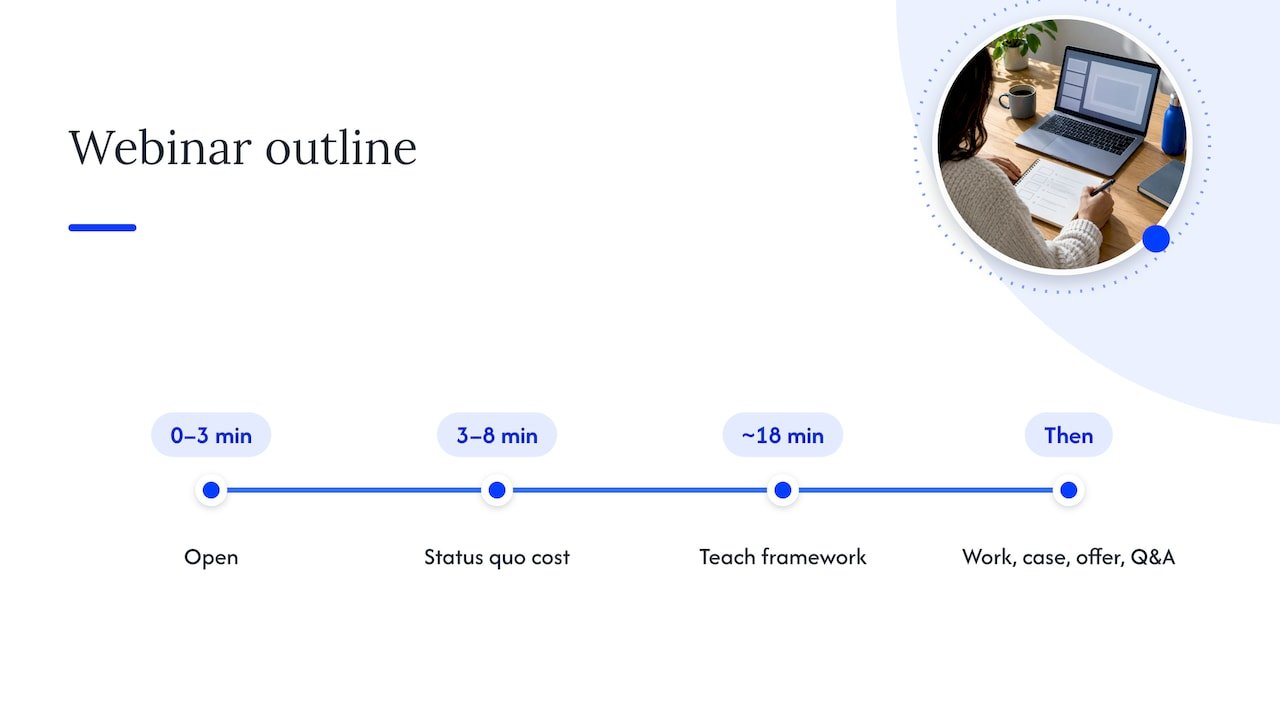
That shape follows a transcript-to-deck workflow that asks for one main point per slide with two to three supporting bullets, then iterates. Another script guide maps a 45-minute session roughly like this: open in the first three minutes, spend minutes 3 to 8 on the cost of staying with the status quo, teach your framework until about minute 18, then do on-screen work, a case, the offer and Q&A, according to ArWriter’s 2026 guide. Treat it as a starting skeleton, not a law. What matters is that your offer lands while people are still watching, not at the very end.
Read the outline out loud. If a section makes you think “I have no story for this,” cut it or replace it. As one marketer quoted in an AI script guide puts it, you cannot AI your way out of not knowing what to say.
Step 3: Turn the outline into slides
Now you can use a slide deck generator, a presentation design assistant, or the AI inside your presentation software. They work the same way: paste your outline or text, choose a slide count, and the tool drafts titles, bullets and a layout. Tools differ in price and style, so pick one that exports to PowerPoint, Google Slides or PDF, so you are never locked in.
How many slides?
One deck guide says a 45-minute webinar typically runs 25 to 35 slides with an interaction point every 8 to 10 minutes, and that webinar slides need larger text, simpler layouts and fewer animations because they are shared over a screen. Other templates land lower, around 18 to 22 slides for a 35-minute talk. The honest answer is that your pace decides. If you speak for a minute or more per slide on average, you are in a comfortable zone.
Slide rules that survive screen sharing
- One idea per slide, with a short headline you can say in one breath.
- Large type. Your viewers may be on a phone.
- A real example or screenshot you took yourself beats a stock illustration every time.
- Keep a consistent color palette. Most AI tools can build one from your logo, which saves an afternoon of fiddling.
If you want slide copy that sounds crisp, the same discipline we use for AI headline writing applies: short, specific, one promise per line.
Do not let AI storyboard your demo
This is the mistake we see most in AI-generated decks. A demo built from bullet points and stock screenshots feels hollow. The 2Slides guide recommends leaving the demo slides as placeholders and scripting them manually, with blank transition slides as a safety net if the live demo breaks. Do that. If you promote a tool as an affiliate, show your own screen, your own result and your own honest take.
Step 4: Write the script around the slides
Slides are the backdrop. The script is the show. Feed the model a transcript or recording of you speaking naturally, so it can pick up your phrasing, and ask for talking points per slide. Then ask it to write for the ear, not the eye: short sentences, plain words, a pause where you want people to think.
A simple five-step pass works well:
- Give AI your brief, deck or a past transcript.
- Outline the beats of the talk.
- Let AI draft the talk track.
- Edit it yourself and fact-check it.
- Move the result into speaker notes with a cue on each slide.
That is the same pipeline eesel’s script guide lays out, and it adds that the human edit is where conversion is won. If AI keeps giving you flat, corporate copy, our guide on making AI sound like you shows how to build a voice reference you can paste into any prompt, and humanizing AI content covers the cleanup pass.
Plant two or three personal stories. Mark them in the script so you never skip them. A presenter who tells a story keeps eyes on the screen; a presenter who reads bullets loses them.
Step 5: Build in engagement before you need it
A beautiful deck that is only a sequence of clicks will lose a room. Prezi’s team says as much: engagement features such as live polls and AI-generated quizzes matter as much as the build.
Practical placement:
- Put a poll in the first 8 to 10 minutes, when attention peaks, and read the results aloud. Zoom’s guidance on polls and Q&A in webinars says this makes engagement compound.
- Add a question slide every 8 to 10 minutes after that.
- Use AI to sort and surface questions during Q&A, but answer them yourself. AI can show you what was upvoted; it cannot decide what matters to your audience.
- Design one slide, the offer, with one link and one clear next step.
For a beginner affiliate, a simple poll like “Which of these have you tried?” gives you something real to say about the audience and tells you which of your recommendations to emphasize.
Step 6: Where the webinar funnel and the follow-up fit
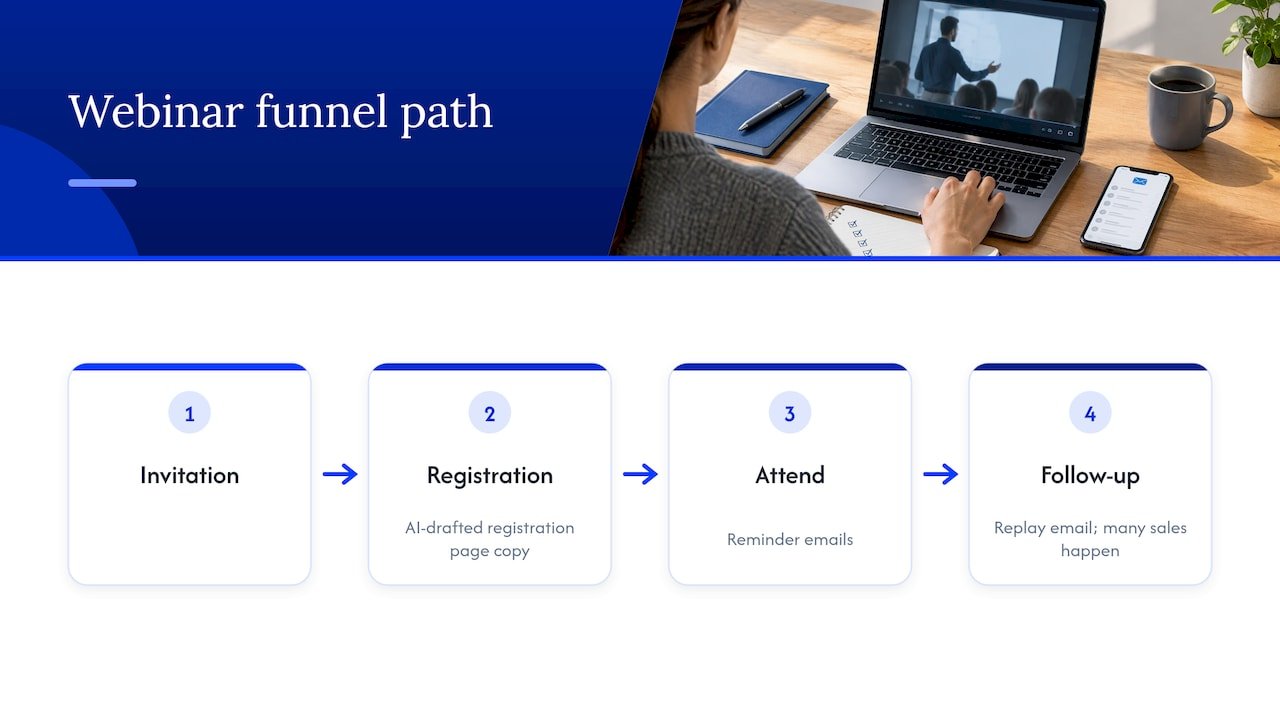
A webinar is one step in a path: someone sees your invitation, registers, attends, and then hears from you again. AI can help at the edges. It can draft the registration page copy, the reminder emails and the replay email, which is where many sales happen.
To map the whole path before you build slides, our funnel map and audit prompts will help you see where people drop. For the emails that follow, the AI email sequence briefs are built to be pasted straight into your assistant. And if your list is warm, a timely personal touch after the event matters; this playbook on lead follow-up calls shows how to decide who should hear from you first.
Step 7: Review like a skeptic before you go live
AI is confident even when it is wrong. Before you publish or present:
- Verify every statistic, price and product detail against the original page. Tell the model in your prompt not to invent figures or capabilities, then check anyway.
- Remove any claim you have not personally seen to be true. Your audience trusts you, not the tool.
- Disclose affiliate relationships clearly on a slide and in your script. The FTC’s endorsement guidance explains that material connections must be disclosed clearly.
- Plan two deliverables: the live session and the replay. A deck that works in an editor can fail when a video loses sound or speaker notes appear to attendees, so test on a second device.
- Rehearse once with a timer. Cut whatever runs long.
If you want a framework for using AI responsibly in your marketing, we also mapped it in our piece on ethical AI marketing.
What we think about AI and webinar slides
We have taught and coached for years, and one thing never changes: people do not remember slides, they remember how a talk made them feel. AI is a wonderful way to stop procrastinating on the blank page, and it can get a deck on the screen in an afternoon instead of a week.
But the deck is the easy part. What makes a viewer trust your recommendation is a real story, a real result and a voice that sounds like a person. Use AI for structure and speed, then spend the time you saved on the parts only you can do.
If you are just starting out in affiliate marketing, do not wait until your slides feel perfect. Run a small webinar, listen to the questions, and let those questions shape the next one.
Will
Put these workflows to work
If you want more ready-made ways to save time with AI, our AI affiliate workflows page collects recipes you can run right away, and our newsletter, videos and coaching give you more tips as you build your own webinar routine.

Webinar slides are one piece. Once your deck is done, our guide to blog to video AI shows how to repurpose the same material into videos that keep selling after the live event.
FAQ
Can AI make a whole webinar deck for me?
Yes, it can produce a full draft from a brief, an outline or a transcript, usually in a few minutes. Treat it as a first draft. You still need to add your stories, your own screenshots and a script for the demo and the offer.
How many slides should a webinar have?
For 45 minutes, plan roughly 25 to 35 simple slides if you move quickly, or fewer if you spend more time on each. Include an interaction point every 8 to 10 minutes. Your speaking pace should decide the final count.
What should I put in an AI prompt for webinar slides?
Give your audience, the one problem you solve, the takeaway, the single action you want afterward and your time limit. Ask for one main point per slide, short headlines and a note where a poll belongs. Add that the model must not invent statistics.
Can AI also write my webinar script?
It can draft a talk track from your outline and a sample of how you speak. Edit it for the ear, add your own stories and fact-check every claim. The edit is where the script starts sounding like you.
Sources
- How AI use in webinars builds a program that compounds (Zoom)
- How to Use AI to Build More Productive, Interactive Presentations (Prezi)
- How to Use AI to Create Interactive Webinar Slides (Twistly)
- How to Create a Webinar Deck with AI (2Slides)
- How to Use AI to Design the Perfect Webinar Slide Deck (Aevent)
- Write a Webinar Script with AI in 2026 (ArWriter)
- AI webinar script generator (eesel AI)
- AI Slide Deck Generator: Webinar Slides (aidowith.me)
- How to Make a Webinar Presentation with AI: Live and Replay (PopAI)
- Disclosures 101 for Social Media Influencers (FTC)