

For most marketers and creators, ChatGPT is the best all-around AI writing tool because it handles the widest range of formats, integrates with more platforms than any competitor, and has the lowest barrier to entry. That said, the right tool depends heavily on your specific job.
Here’s the honest shortlist before you read further:
- ChatGPT / ChatGPT Plus — Best all-around pick for content generation, rapid prototyping, and versatile workflows
- Claude / Claude Pro — Best for long documents, nuanced reasoning, and teams needing enterprise privacy controls
- Jasper — Best for marketing teams that need scalable templates and approval workflows
- Frase / Frase IO — Best for SEO-driven blog content and SERP-based brief generation
- Sudowrite — Best for fiction writers and creative prose
- Anyword — Best for ad copy with predictive performance scoring
The Clearscope guide to AI content writing tools makes a point worth repeating: SEO capability is one of the most underweighted selection criteria when marketers first pick a tool. Most people choose based on output quality alone, then discover six months later that their content doesn’t rank.
Pro Tip: Before committing to any paid plan, run one structured test: paste your brand voice guidelines into the tool, give it a real brief, and evaluate the output against your best-performing human-written piece. That single test reveals more than any feature comparison.
Key Takeaways
The strongest single insight from this comparison: the tool matters less than the workflow around it. A structured brand-voice prompt plus staged drafting plus human editing outperforms casual use of any premium tool.
| Point | Details |
|---|---|
| Match tool to primary job | SEO writers need Frase or Surfer SEO; fiction writers need Sudowrite or Novelcrafter; ad writers need Anyword. |
| Free tiers are real starting points | ChatGPT, Copy.ai, Rytr, and Gemini all offer usable free tiers for testing before committing to a paid plan. |
| Workflow beats tool selection | A brand voice kit plus staged prompts plus a human editing pass produces better output than any single tool used without structure. |
| Hallucination risk is real | Always verify specific claims, statistics, and named sources in AI output before publishing. |
| Willbuckley coaching | For affiliate marketers who want a structured workflow, Willbuckley’s coaching resources map each tool to a specific content job. |
Table of Contents
- The Best AI Writing Tools Reviewed
- How these tools compare side by side
- How to choose the right AI writing tool for your project
- How we tested these tools
- Which tool fits your specific writing job?
- A workflow that actually gets publishable results
- What you need to know about AI writing limitations and ethics
- How AI tools fit into a real daily workflow
- Want hands-on help building your AI writing workflow?
- Sources
The Best AI Writing Tools Reviewed
The tools below cover the full spectrum of writing jobs. Each entry focuses on practical fit, not vendor marketing. Pricing reflects publicly listed plans and changes frequently, so verify directly with each vendor.
1. ChatGPT (OpenAI) and ChatGPT Plus
Best for: All-around content generation, rapid prototyping, and multi-format output.
ChatGPT remains the most versatile AI writing assistant available. G2 reviewers consistently praise its broad capability set, from drafting blog posts and email sequences to generating ad copy and summarizing research. The free tier is genuinely useful. ChatGPT Plus unlocks GPT-4o, faster responses, image generation, and priority access during peak hours.
Where it stands out is flexibility. You can shift from writing a product description to outlining a 5,000-word guide to debugging a Python script, all in one conversation. The API access makes it embeddable in almost any workflow. Integrations include Zapier, Make, and direct API connections to WordPress and Google Docs via third-party tools.
The main limitation is that it doesn’t have native SEO research built in. You’ll need to pair it with a tool like Surfer SEO or Frase for keyword-optimized content.
2. Claude and Claude Pro (Anthropic)
Best for: Long-form documents, nuanced reasoning, and enterprise privacy requirements.
Claude handles longer context windows than most competitors, which makes it genuinely useful for editing full manuscripts, synthesizing research documents, or drafting multi-section reports in one session. Anthropic’s product pages document features including extended thinking, desktop extensions, connectors to Slack and Google Workspace, and specialized models like Claude for Microsoft 365. That integration depth is rare among AI writing tools.
Claude Pro adds priority access and extended context. For teams, the enterprise tier includes stronger privacy controls and data handling policies that matter in regulated industries.
One honest caveat: Claude’s output can feel more measured and less punchy than ChatGPT’s for short marketing copy. It’s the better tool when depth and accuracy matter more than speed and flair.
3. Google Gemini and Gemini Advanced
Best for: Research-backed drafting and workflows inside the Google ecosystem.
If your team lives in Google Docs, Gmail, and Google Drive, Gemini is the most frictionless option. G2 reviewers highlight its web-aware features and conversational abilities, though some note mixed results on creativity for longer pieces. Gemini Advanced (part of Google One AI Premium) unlocks the more capable model with deeper reasoning and longer context.
The practical advantage is real-time web access, which means Gemini can pull current information into a draft without you switching tabs. For research-heavy content, that saves meaningful time.
4. Jasper
Best for: Marketing teams that need templates, brand voice controls, and approval workflows at scale.
Jasper is built for teams, not solo writers. G2 listings for Jasper emphasize its enterprise positioning and template-focused workflows, and that reputation is earned. The platform offers over 50 templates covering everything from blog posts to LinkedIn ads to product descriptions. Brand voice settings let you train the tool on your company’s tone, and the workflow features include multi-user collaboration and content approval steps.
Pricing starts at a moderate monthly rate for individuals and scales up for teams. There’s a free trial but no permanent free tier. The learning curve is moderate, mostly because the template library is large and takes time to navigate.
5. Copy.ai and CopyAI
Best for: Quick marketing copy, idea generation, and teams that want accessible free tools.
Copy.ai’s tools page documents a wide range of free generators covering outlines, paragraphs, cold emails, and short marketing copy. G2 reviews for Copy.ai show strong user adoption for quick tasks, with repeated mentions of its free and low-cost entry points. The free tier is genuinely generous for solo creators testing the waters.
Where Copy.ai shines is speed for short-form tasks. Where it struggles is long-form coherence. A 2,000-word blog post drafted entirely in Copy.ai will need significant editing. Think of it as an idea accelerator, not a full content production system.
6. Writesonic
Best for: Teams needing a single platform to produce many content formats with consistent brand voice.
Writesonic’s content-agent approach is its real differentiator. Rather than generating one piece at a time, Writesonic’s content agents run a multi-step production flow that incorporates brand voice, format templates, and review steps. G2’s Writesonic page confirms this multi-format, brand-voice positioning. For a small content team producing blogs, social posts, and email newsletters simultaneously, that pipeline approach reduces the coordination overhead significantly.
Pricing starts at a moderate monthly rate for individuals. The free tier is limited but functional for testing.
7. Frase and Frase IO
Best for: SEO-driven long-form content and SERP-based brief generation.
Frase is the most SEO-native tool on this list. It pulls live SERP data, analyzes top-ranking pages for a given keyword, and builds a content brief automatically. You draft inside the same editor, with a real-time optimization score updating as you write. For content marketers whose primary job is ranking blog posts, this workflow is hard to beat.
Pricing starts around $15/month. There’s no permanent free tier, but a trial is available. The tool integrates with Google Search Console, which adds another layer of real-world performance data to your workflow.
8. Surfer SEO
Best for: Writers who want keyword optimization baked into the drafting environment.
Surfer SEO operates similarly to Frase but with a stronger emphasis on the on-page optimization layer. You write inside Surfer’s editor, and it scores your content against the top-ranking pages for your target keyword in real time. The Content Editor integrates with Google Docs, which makes it practical for teams already working in that environment.
Surfer also offers an AI writing feature, but most experienced users treat it as an optimization layer on top of human or AI-generated drafts rather than a primary content generator.
9. Anyword
Best for: Ad copy and conversion-optimized messaging with predictive performance scoring.
Anyword’s standout feature is its predictive performance scoring, which estimates how likely a given piece of copy is to convert before you publish it. That’s genuinely useful for paid media teams running A/B tests. You can generate multiple variations of an ad headline or email subject line and see predicted performance scores side by side.
It’s not the right tool for long-form content. The strength is narrow but real: if you write a lot of ad copy and want data to back your choices, Anyword earns its place in the stack.
10. Rytr
Best for: Solo creators and small teams on a tight budget.
Rytr’s marketing materials highlight templates, tone adaptation, and affordability as its core selling points, and that’s an accurate description. The free plan allows a limited number of characters per month, and the paid plans start low enough that budget is rarely a barrier. The template library covers common use cases: blog intros, product descriptions, social captions, and email subject lines.
The output quality is competent rather than exceptional. For someone just starting out with AI writing tools and not ready to commit to a $20/month subscription, Rytr is a sensible starting point.
11. Sudowrite
Best for: Fiction writers and creative prose.
Sudowrite is purpose-built for fiction. Features like “Story Engine,” “Describe,” and “Brainstorm” are designed around the specific problems novelists face: getting unstuck, generating sensory detail, and maintaining character voice across long drafts. Kindlepreneur’s roundup of AI writing tools for authors lists Sudowrite as a top pick for creative writers, and that assessment holds up.
It’s not a general-purpose tool. If you write marketing copy or SEO content, look elsewhere. If you write fiction and want an AI collaborator that understands narrative structure, Sudowrite is the most author-focused option available.
12. Novelcrafter
Best for: Authors building long-form fiction with structural complexity.
Novelcrafter goes further than Sudowrite on the structural side. It’s designed for writers managing multiple POV characters, complex timelines, and world-building details across a full novel. The tool lets you store character profiles, location notes, and plot outlines in a project database, then reference them during drafting to maintain consistency.
For a short story writer, this is overkill. For someone writing a 100,000-word fantasy novel, it’s the kind of scaffolding that prevents continuity errors and keeps the project coherent.
13. Perplexity
Best for: Research-first writers who need sourced, cited answers before drafting.
Perplexity functions more as a research assistant than a content generator, but that distinction makes it valuable at the front end of any writing workflow. It pulls live web sources, cites them inline, and gives you a starting point that’s verifiably grounded. Writers who struggle with hallucination risk in other tools often use Perplexity to gather facts first, then move to ChatGPT or Claude for drafting.
14. Koala AI
Best for: Affiliate bloggers and content sites that need SEO-optimized articles at volume.
Koala AI is built specifically for the “publish at scale” use case. It generates full blog posts with internal linking suggestions, pulls real-time data from the web, and formats output for direct WordPress publishing. For affiliate marketers running content sites, the workflow is unusually direct: keyword in, formatted article out, ready to review and post.
Output quality varies by topic complexity. Straightforward informational posts tend to come out well. Nuanced opinion pieces or technical deep dives need more human editing.
15. Mistral’s Le Chat
Best for: Privacy-conscious users and developers who want a capable European-origin model.
Le Chat is Mistral’s consumer-facing interface for its language models. It’s fast, capable, and offers a free tier that competes with ChatGPT’s free plan on most general writing tasks. For users who prefer a model developed outside the US tech ecosystem, or who have data residency considerations, Le Chat is worth evaluating.
16. OpenAI Playground
Best for: Developers and advanced users who want fine-grained control over model parameters.
The Playground gives you direct access to OpenAI’s models with adjustable temperature, system prompts, and model selection. It’s not a polished writing app, but it’s the best environment for testing prompts systematically before embedding them in a production workflow. If you’re building a content pipeline on top of the OpenAI API, the Playground is where you refine your prompt architecture.
17. HubSpot Content Assistant
Best for: Marketing teams already running HubSpot CRM and content workflows.
HubSpot’s Content Assistant is embedded directly in the HubSpot platform, which means it generates copy inside the same environment where you manage campaigns, landing pages, and email sequences. The integration removes the copy-paste step that slows down most AI writing workflows. The trade-off is that it’s only useful if you’re already a HubSpot customer.
18. Writer
Best for: Enterprise teams that need brand consistency, compliance controls, and team-wide style enforcement.
Writer positions itself as an enterprise writing platform rather than a general AI assistant. It includes a company-wide style guide enforcement layer, terminology controls, and compliance features that matter in regulated industries like healthcare and finance. For a 50-person content team that needs every piece of output to pass a brand and legal review, Writer’s governance features are genuinely differentiated.
19. Clearscope.io
Best for: Content teams that want keyword grading and topic coverage analysis integrated into editing.
Clearscope sits at the intersection of SEO research and content editing. You paste or write your draft, and Clearscope grades it against the top-ranking pages for your target keyword, surfacing missing topics and related terms. It’s not a content generator but a content optimizer, and it pairs well with any of the drafting tools above.
20. Article Forge
Best for: High-volume content sites that need bulk article generation with minimal manual input.
Article Forge generates full articles automatically from a keyword input. The output quality is functional for thin informational content but rarely reaches the depth or originality needed for competitive niches. It’s best suited to content operations where volume and speed matter more than nuance.
21. Peppertype (Pepper Content)
Best for: Teams that want AI-assisted content combined with access to human writers.
Pepper Content’s platform blends AI generation with a marketplace of human writers, which gives teams a hybrid option. You can use the AI tools for first drafts and scale up to human-written content for high-stakes pieces without switching platforms.
22. Raptor Write
Best for: Writers who need iterative long-form drafting with built-in editing aids.
Raptor Write focuses on the drafting and revision cycle for longer pieces. Its iterative approach, where you draft a section, review, and refine before moving forward, suits writers who find that most AI tools generate too much at once without enough structural control.
How these tools compare side by side
The table below covers the tools most readers will actually choose between. Features and pricing change frequently; verify current details on each vendor’s site.
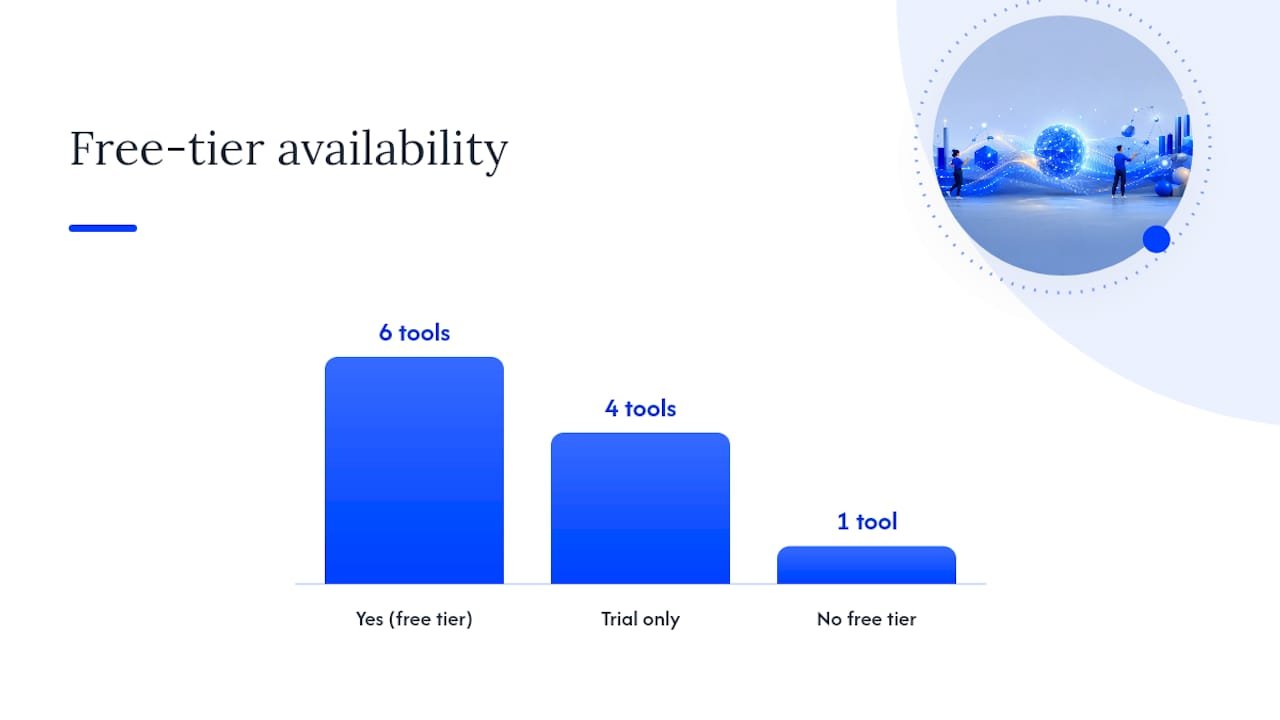
| Tool | Best for | Free tier | Long-form | SEO features | Templates | Key integrations |
|---|---|---|---|---|---|---|
| ChatGPT Plus | All-around versatility | Yes (limited) | Strong | None native | Prompt-based | API, Zapier, plugins |
| Claude Pro | Long docs, enterprise privacy | Yes (limited) | Very strong | None native | Prompt-based | Slack, Google Workspace |
| Gemini Advanced | Google ecosystem, research | Yes | Moderate | None native | Prompt-based | Google Docs, Gmail |
| Jasper | Marketing teams, scale | Trial only | Moderate | Partial | 50+ templates | WordPress, Google Docs |
| Copy.ai | Quick copy, free tools | Yes (generous) | Weak | None | Large library | Zapier |
| Writesonic | Multi-format brand voice | Yes (limited) | Moderate | Partial | Yes | API, WordPress |
| Frase IO | SEO long-form | Trial only | Strong | Strong | Brief templates | Google Search Console |
| Surfer SEO | On-page optimization | No | Moderate | Very strong | Limited | Google Docs |
| Anyword | Ad copy, conversion scoring | Trial only | Weak | None | Ad/email focused | API |
| Rytr | Budget solo creators | Yes | Weak | None | Many | Zapier |
| Sudowrite | Fiction, creative prose | Trial only | Strong | None | Story-focused | Limited |
| Novelcrafter | Long-form fiction structure | Trial only | Very strong | None | Novel-focused | Limited |
| Koala AI | Affiliate SEO blogs | Trial only | Strong | Moderate | Blog-focused | WordPress |
| Writer | Enterprise brand compliance | No | Moderate | None | Style-guided | Slack, API |
| Perplexity | Research and sourcing | Yes | Weak | None | None | Web sources |
| Clearscope.io | SEO content grading | No | Moderate | Very strong | None | Google Docs |
A note on this data: Tool features and pricing were assessed based on publicly available information. AI writing tools update frequently, sometimes monthly. Always check the vendor’s current pricing page before purchasing.
How to choose the right AI writing tool for your project
The single most useful question to ask before choosing a tool is: what is the primary job this tool needs to do? Most people skip that question and end up paying for features they don’t use.
Start with your primary writing job. If you write SEO blog content, SEO features are non-negotiable. If you write fiction, SEO features are irrelevant. If you run paid ads, predictive performance scoring matters. Match the tool’s core strength to your most frequent task.
Criteria to evaluate in order of importance:
- Output quality for your specific format (test with a real brief, not a generic one)
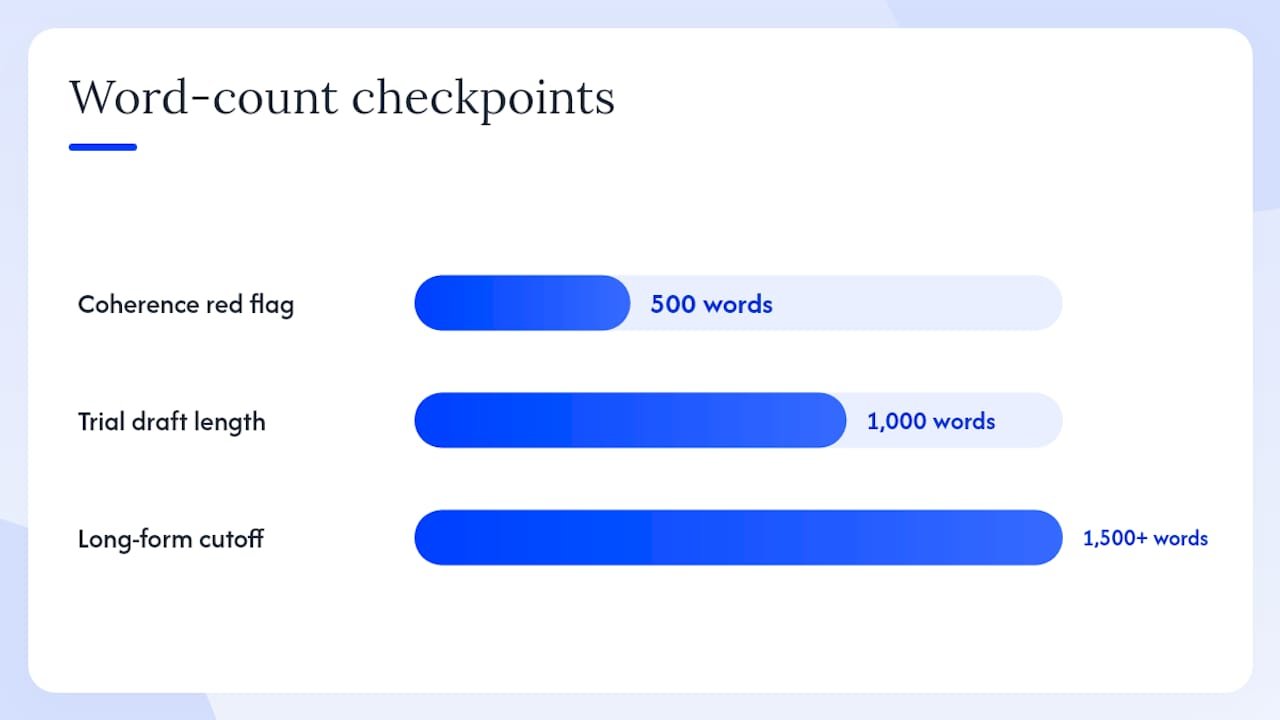
- Long-form capability if you write anything over 1,500 words regularly
- SEO features if organic traffic is part of your strategy
- Integrations with your existing stack (WordPress, Google Docs, CRM)
- Privacy and data controls if you work with sensitive client information
- Price relative to the volume of content you produce
What to test during a free trial:
- Paste your brand voice guidelines and a real brief, then evaluate the output against your best human-written piece
- Draft a 1,000-word piece and check whether the structure holds without heavy editing
- Export the output to your preferred format (Google Docs, WordPress, PDF) and confirm the formatting survives
- If you have a team, test the collaboration features with a second user account
Red flags to watch for:
- No export options or API access (locks you into the platform)
- Long-form outputs that lose coherence after the first 500 words
- No privacy policy or vague data handling terms
- Sample outputs on the marketing page that look nothing like what the tool actually produces
Three quick decision paths:
Solo writer or creator: Start with ChatGPT’s free tier. If you write fiction, add Sudowrite. If you need SEO, add Frase. Keep costs under $40/month total until you have a clear workflow.
Small marketing team (2–10 people): Jasper or Writesonic for template-driven production, paired with Surfer SEO or Frase for optimization. Budget $100–200/month for the combination.
Enterprise or content agency: Writer for brand compliance, Claude Pro for long-form and privacy, and Clearscope for content grading. Expect to invest in onboarding time to configure brand voice and style guides properly.
How we tested these tools
Every tool in this roundup was evaluated against a consistent set of tasks rather than vendor demos. The goal was to simulate real writing jobs, not showcase best-case outputs.
Evaluation steps:
- Structured prompt test: Each tool received the same brief: a 600-word SEO blog intro targeting a mid-competition keyword, with a specified tone and audience.
- Long-form drafting test: Tools with long-form claims were asked to draft a 1,500-word article from an outline, then evaluated for structural coherence, factual accuracy, and tone consistency.
- Short-form ad copy test: Each tool generated three Facebook ad headline variations for the same product, evaluated against Anyword’s performance scoring as a benchmark.
- Fiction paragraph test: Tools were given a character description and asked to write a 200-word scene opening. Evaluated for sensory detail, voice consistency, and originality.
- Hallucination check: Each tool was asked a factual question with a verifiable answer. Responses were checked against primary sources.
- Integration and export test: Outputs were exported to Google Docs and WordPress where the tool claimed compatibility.
Example prompts used:
- SEO blog: “Write a 600-word introduction for a post targeting the keyword ‘best project management tools for remote teams.’ Tone: practical and direct. Audience: small business owners.”
- Cold email: “Write a 5-sentence cold email from a marketing consultant to a SaaS founder. Goal: book a 20-minute call.”
- Ad copy: “Write three Facebook ad headlines for a $49 online course on email marketing. Audience: freelancers.”
- Fiction: “Write the opening paragraph of a thriller set in a Chicago parking garage at 2 AM. Third-person limited POV.”
Limitations: This review reflects tool capabilities at the time of testing. AI writing tools update frequently, and a feature that was weak during testing may have improved. Pricing was accurate at time of writing but changes often. Access levels tested were free and entry-level paid tiers unless otherwise noted.
Which tool fits your specific writing job?
Different writing jobs call for different tools. Here’s a direct mapping based on the testing above.
- SEO blog posts: Frase IO for brief generation and optimization, paired with ChatGPT or Writesonic for drafting. Frase’s live SERP integration means your brief is built from what’s actually ranking, not guesswork.
- Long-form ebooks or reports: Claude Pro for its extended context window and structural coherence. Load your outline and brand voice guidelines as a system prompt, then draft section by section.
- Fiction and creative writing: Sudowrite for short-to-medium fiction; Novelcrafter for full novels with complex structure. Both are covered in depth in Kindlepreneur’s author-focused roundup.
- Ad copy and conversion messaging: Anyword for its predictive scoring. Generate 5–10 variations, filter by predicted performance score, then A/B test the top two.
- Social media content: Copy.ai’s free generators handle social captions and short posts well. For volume, Writesonic’s multi-format agents can produce a week’s worth of social content from a single brief.
- Email sequences: Jasper’s email templates or ChatGPT with a detailed system prompt. The key is loading the full customer journey context before generating, not just the individual email.
- Research-backed articles: Perplexity to gather sourced facts first, then ChatGPT or Claude to draft. This two-step approach cuts hallucination risk significantly.
Pro Tip: For any AI-generated content you plan to publish, run a final “strip the AI tells” pass. Look for phrases like “in today’s world,” “it’s worth noting,” and overly parallel sentence structures. These patterns signal machine-generated text to both readers and search engines.
For a broader view of how AI writing tools compare from a marketing software perspective, the team at Sentient Concepts publishes comparative industry perspectives worth bookmarking.
A workflow that actually gets publishable results
The most effective AI writing workflow is not casual prompting. It’s a structured process: load a brand voice kit, use a format-specific writing framework, and apply human editing to strip AI tells. That sequence consistently produces better output than any single tool used without structure.
Step-by-step workflow:
- Build your brand voice kit. Collect 3–5 of your best-performing pieces. Identify recurring phrases, sentence length patterns, and tone markers. Paste these into a system prompt or “custom instructions” field as your baseline.
- Choose a format framework. Match the framework to the job: AIDA (Attention, Interest, Desire, Action) for ad copy and landing pages; PAS (Problem, Agitate, Solution) for email sequences; inverted pyramid for news-style content; outline-first for long-form.
- Run staged prompts. Don’t ask for the full piece in one prompt. Start with an outline, review it, then draft section by section. This keeps the structure under your control and reduces coherence drift in longer pieces.
- Edit for AI tells. Read the output aloud. Flag any sentence that sounds like a list item masquerading as prose, any phrase that hedges without adding information, and any paragraph that opens with a definition. Rewrite those sections in your own voice.
- Fact-check before publishing. Any specific claim, statistic, or named source in the AI output needs verification against a primary source. Tools like Perplexity can help, but the final check is your responsibility.
Quality rubric for evaluating AI output:
- Clarity: Can a reader understand the main point of each paragraph in one read?
- Originality: Does the piece say something the top-ranking pages don’t, or does it just restate common knowledge?
- Factual accuracy: Are all specific claims verifiable?
- Tone match: Does it sound like your brand, or like a generic AI assistant?
Pro Tip: If you manage a content team, assign one person as the “AI output reviewer” whose job is specifically to strip AI tells and verify facts before anything goes to the editor. This single role change tends to raise average content quality faster than switching tools.
Practitioners who get the best results train brand-voice modules on their highest-performing company copy and use format-specific rubrics to evaluate AI outputs against human-authored benchmarks. The tool matters less than the process around it.
What you need to know about AI writing limitations and ethics
AI writing tools are genuinely useful, but they come with real limitations that every publisher needs to understand before going live with AI-generated content.
Common technical limitations:
- Hallucinations: AI models generate plausible-sounding text, which sometimes means inventing facts, statistics, or citations that don’t exist. Always verify specific claims against primary sources.
- Factual drift in long documents: Coherence tends to degrade in very long outputs. A model that starts with accurate information may introduce errors as the document length increases.
- Source blending: Models trained on large text corpora can blend information from multiple sources in ways that produce inaccurate composites. This is especially common with statistics and named studies.
- Recency gaps: Most models have a training cutoff. For current events, product pricing, or recent research, always supplement with live web sources.
Is it legal to publish AI-written content in the U.S.?
Publishing AI-generated content is legal in the United States. There is currently no federal law prohibiting it. However, the U.S. Copyright Office has stated that AI-generated content without sufficient human authorship is not eligible for copyright protection. Content that involves substantial human creative input, such as editing, selection, and arrangement, may qualify. Disclosure practices vary by platform and publication; some require disclosure of AI assistance, others do not. Always check the specific policies of any platform you publish on.
Best-practice safeguards:
- Fact-check every specific claim, statistic, and named source before publishing
- Add citations to any factual claims you want readers to trust
- Disclose AI assistance where your platform or audience expects it
- Maintain human editorial review as the final step before publication
- Never publish AI-generated legal, medical, or financial advice without expert review
How AI tools fit into a real daily workflow
Honestly, the biggest shift in how I use AI tools day-to-day isn’t about which tool I pick. It’s about where in the workflow I bring AI in. I use ChatGPT to draft outlines and rough first sections, Claude for longer pieces where I need structural coherence across 2,000-plus words, and Perplexity when I need sourced facts fast before I start drafting.
The before/after that made the biggest difference was adding a brand voice system prompt to every session. Before that, every AI draft needed heavy editing to sound like me. After loading a 200-word voice description as a custom instruction, the editing time dropped noticeably. The output still needs a human pass, but it’s a refinement pass rather than a rewrite.
For affiliate marketing content specifically, the combination of Koala AI for initial drafts and Surfer SEO for optimization has been the most efficient pipeline I’ve found for informational posts. The key is treating AI output as a strong first draft, not a finished product.
Want hands-on help building your AI writing workflow?
Most marketers who struggle with AI tools aren’t using the wrong tool. They’re missing a structured workflow. At Willbuckley, the coaching and workflow resources are built specifically for affiliate marketers and creators who want to get real, repeatable results from AI writing tools rather than just experimenting with free trials.

The practical resources available include prompt libraries organized by content type, brand voice templates you can adapt in under an hour, and workflow guides that map each tool to a specific job in your content calendar. If you want to go further, the coaching and services page walks through what a hands-on engagement looks like. You can also browse the Willbuckley blog for free workflow posts before committing to anything. The free trials on every tool above are a perfectly good starting point. The coaching is for when you want a faster path to a workflow that actually sticks.
Sources
Pricing and features change frequently. Check each vendor’s current pricing page before purchasing, and revisit these resources when evaluating new tools.
- Claude — Anthropic product pages
- 15 Best AI Writing Tools for Authors (Sep 2025 Update) — Kindlepreneur
- Copy
- Free AI Writer, Content Generator & Writing Assistant | Rytr