

The most effective approach to AI keyword research is to ideate with a large language model, then validate every candidate with a dedicated keyword-data tool before you write a single word. That combination cuts wasted effort and surfaces long-tail terms you would never find by staring at a blank seed list.
Here is the fast path you can run in under 90 minutes:
- Seed collection. Pull 5–10 broad topics from your niche, your existing content, or a quick Google Autocomplete scan.
- AI expansion. Feed those seeds into ChatGPT or a similar LLM with a structured prompt asking for long-tail variants, intent labels, and a CSV-ready table.
- Validation. Run the output through Google Keyword Planner, Ahrefs, or Semrush to check real search volume, keyword difficulty, and CPC before you commit to any target.
One-line workflow you can copy right now: Seed in → LLM expands and labels → keyword tool validates → spreadsheet organizes → you publish.
Key Takeaways
AI keyword research works best when you treat LLMs as ideation engines and keyword-data tools as the validation layer, pairing each for what it does well.
| Point | Details |
|---|---|
| Ideate with AI, validate with data | Use ChatGPT for seed expansion and intent labeling, then confirm volume and KD with Ahrefs, Semrush, or Google Keyword Planner. |
| Structured prompts save hours | Requesting CSV or markdown table output from your LLM eliminates reformatting and makes imports into spreadsheets immediate. |
| Filter to 30–80 validated targets | A raw LLM list of hundreds of keywords shrinks to a workable 30–80 after removing zero-volume terms and near-duplicates. |
| QA the top 10–20 manually | Check SERP intent in a private browser for your highest-priority targets before committing to a content format. |
| Willbuckley accelerates the workflow | Willbuckley’s training provides prompt libraries and validation templates so affiliate marketers can run this process at scale. |
Table of Contents
- What can AI keyword tools actually do for you?
- Which AI-powered keyword tools are worth your time?
- How to use ChatGPT for keyword research that actually works
- A step-by-step workflow you can run in 30–90 minutes
- How to evaluate AI keyword tools and pick the right one
- Limitations of AI-generated keyword lists and how to QA them
- How does AI keyword research fit into competitor analysis?
- How do you use AI tools to spot keyword trends and seasonality?
- How should you export and organize AI-generated keyword data?
- How do you combine AI keyword research with your existing SEO data?
- Why the “ideate with AI, validate with data” approach works for affiliate marketers
- Willbuckley’s AI keyword research training cuts the learning curve fast
- Sources
What can AI keyword tools actually do for you?
AI keyword research is the practice of using large language models (LLMs) and AI-powered tools to generate, classify, and cluster keyword ideas, then pairing those ideas with a real keyword-data platform to confirm metrics. It is different from the old workflow of typing a seed into a single tool and scrolling through its suggestions. The AI layer adds speed, phrasing variety, and intent awareness that traditional tools rarely match on their own.
Where AI genuinely shines is in breadth. Give ChatGPT a seed phrase and a sentence of context, and it will return dozens of phrasing variations, question formats, and modifier combinations in seconds. It can also classify those terms by search intent (informational, commercial, transactional, navigational) and group them into topic clusters, which saves hours of manual sorting.
The hard limit is data. LLMs are strong for ideation, intent classification, and clustering but do not provide authoritative search-volume or difficulty metrics and must be paired with a keyword-data tool for validation. An LLM will confidently suggest a keyword that gets zero monthly searches, and it has no way to know that. Volume, keyword difficulty, CPC, and live SERP snapshots all require a proprietary index that no LLM currently has.
Pro Tip: To reduce hallucinations, paste a small real export (a 20-row Ahrefs CSV or a Google Autocomplete dump) directly into your prompt as context. The model anchors its suggestions to real demand signals instead of inventing plausible-sounding phrases.
Which AI-powered keyword tools are worth your time?
The tool you need depends on where you are in the workflow. No single platform does everything well, so most experienced SEOs use two or three in combination.
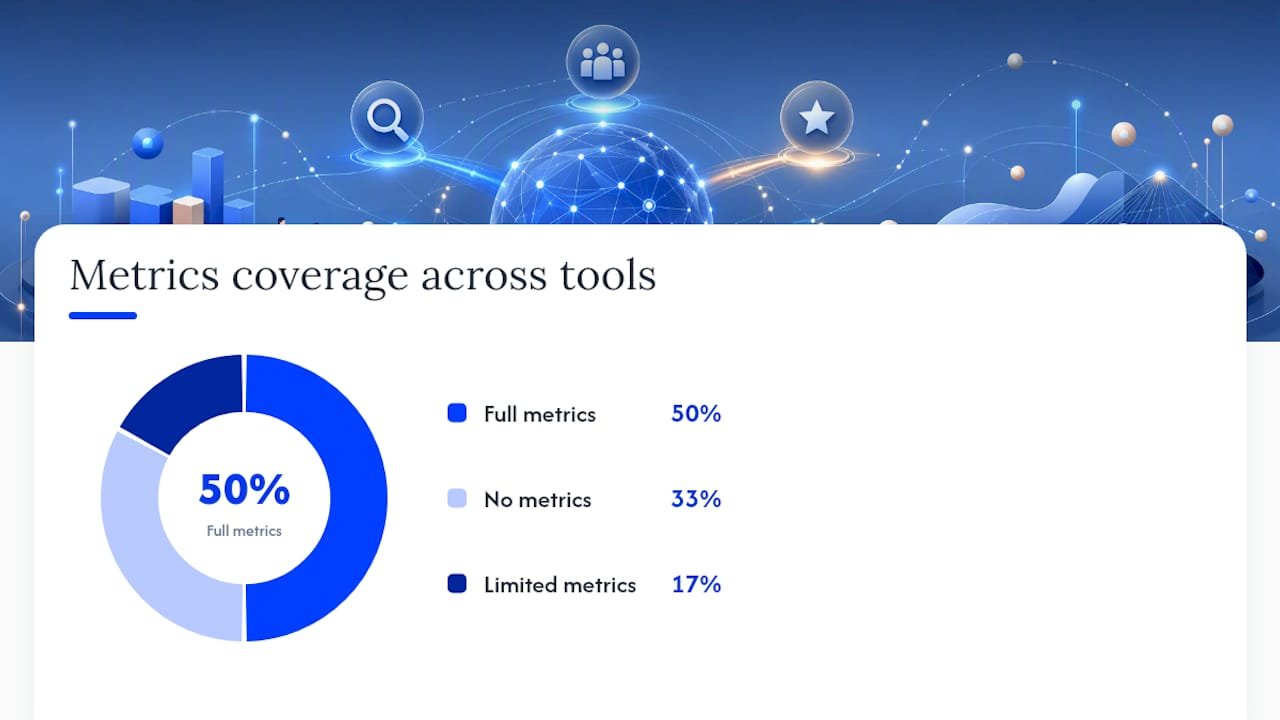
| Best for | Price / free tier | Metrics available | Key features | Ease of use | AI integrations |
|---|---|---|---|---|---|
| Rapid ideation and intent labeling | Free (ChatGPT free tier) | None natively | Seed expansion, phrasing, clustering, CSV output | Very easy | Native LLM; API available |
| Quick free keyword lists | Free, no login required | Limited (basic volume estimates) | Fast idea generation, question formats | Very easy | AI-generated suggestions |
| Volume, difficulty, and SERP data | Paid; limited free tier | Full: volume, KD, CPC, SERP | Keyword Explorer, competitor gap, trends | Moderate | Integrates with exported AI lists |
| All-in-one SEO + AI writing | Paid; trial available | Full: volume, KD, CPC, intent | AI content briefs, keyword magic tool | Moderate | Built-in AI features |
| Long-tail and local keywords | Paid; limited free | Volume, KD, CPC, SERP difficulty | Niche filters, SERP preview | Easy | Works alongside LLM exports |
| Clustering and organization | Free spreadsheet or low-cost apps | None (organizational layer) | Grouping, tagging, priority scoring | Easy | Import from any tool |
A solo blogger or affiliate marketer running lean can get surprisingly far with the free ChatGPT tier for ideation and Google Keyword Planner for volume checks. If you are building a content calendar for a site with real traffic goals, a paid platform like Ahrefs or Semrush gives you the keyword difficulty proxies and SERP context you need to prioritize intelligently.
Free AI keyword generators are useful for quick ideation but often lack the full metric set and export features necessary for solid validation. Treat them as a starting point, not a finishing line.
How to use ChatGPT for keyword research that actually works
ChatGPT fits in the first half of the pipeline: ideation, phrasing, intent labeling, and clustering. It does not belong in the validation half. Once you understand that boundary, the tool becomes genuinely powerful.
Advanced users employ iterative chain-of-thought prompting and staged refinement to avoid generic lists and produce niche-specific long-tail opportunities. The key is moving through stages rather than asking one big question.
A three-step LLM workflow
- Feed seeds and context. Paste your seed keywords and a one-sentence description of your site, audience, and goal. The more context you give, the less generic the output.
- Expand and label by intent. Ask the model to generate long-tail variants and classify each by intent (informational, commercial, transactional). Request a markdown table or CSV so the output is import-ready.
- Export for validation. Copy the table into a spreadsheet, then run the keyword column through your chosen keyword-data tool to add volume, difficulty, and CPC.
Copyable prompts you can use right now
Seed expansion prompt:
Intent classification prompt:
Topical clustering prompt:
Content brief prompt:
Asking LLMs for structured output like tables and CSV, and adding site context constraints, produces cleaner exports that are far easier to import into validation tools and spreadsheets.
Pro Tip: Use “onion prompting” to go deeper. After your first expansion, send a follow-up: “Now narrow to the 10 most commercially valuable terms from that list and generate 5 long-tail variants for each.” Each layer removes generic noise and surfaces more specific opportunities.
A step-by-step workflow you can run in 30–90 minutes
The deliverable at the end of this workflow is a spreadsheet of 30–80 validated keywords, clustered by topic and prioritized by intent and business value. A practical seed-to-validate workflow can convert a raw LLM output into a validated list of 30–80 useful targets after filtering.
-
Seed collection (5–10 min). List 5–10 broad topics from your niche. Pull from your existing content, Google Autocomplete, or a quick scan of your top-performing pages in Google Search Console.
-
AI expansion (10–15 min). Paste seeds into ChatGPT with the seed expansion prompt above. Ask for 30–50 variants per seed, labeled by intent, in a markdown table. Copy the output into a Google Sheet or Excel file.
-
De-duplicate and filter (5–10 min). Remove obvious duplicates and any keyword that is clearly off-topic. You will typically cut 20–30% of the raw list here. Use a simple regex filter or manual scan.
-
Validation with a keyword tool (20–30 min). Run the remaining keywords through Google Keyword Planner, Ahrefs, or Semrush. Add columns for monthly search volume, keyword difficulty (KD), and CPC. Remove zero-volume terms and any keyword with a difficulty score beyond your current domain authority.
-
Cluster and select top targets (10–15 min). Group keywords by topic cluster (you can use the clustering prompt above for this step too). From each cluster, pick 1–3 primary targets based on volume, difficulty, and commercial relevance to your site.
Spreadsheet columns to capture
Your working spreadsheet should include: Keyword | Search Intent | Monthly Volume | KD | CPC | Topic Cluster | Priority (High/Med/Low) | Content Format | Notes.
Attach a brief instruction row at the top of the sheet for any future contributor: “Add keywords from AI expansion only. Validate volume and KD before marking priority. High = target within 30 days. Med = next content sprint. Low = monitor.”
How to evaluate AI keyword tools and pick the right one
The single most important factor when choosing a keyword tool is whether it provides reliable volume and SERP context, or only ideation. A tool that gives you ideas without metrics is a brainstorming aid, not a research platform. Know which one you are buying before you commit.
Work through this checklist when you trial any tool:
- Metrics availability. Does it show monthly search volume, keyword difficulty, and CPC? Are those figures drawn from a proprietary index or estimated from a third-party source?
- Data freshness. How often is the index updated? Stale data leads to targeting keywords that have already peaked or collapsed.
- Exportability. Can you export a full keyword list as CSV or XLSX? A tool with no export forces you to manually copy data, which kills any automation plan.
- API and automation. Does it offer an API for batch processing? This matters once your workflow scales beyond a single site.
- Clustering. Does the tool group related keywords automatically, or do you handle that in a spreadsheet?
- Pricing model. Is there a meaningful free tier for testing, or does the paywall hit before you can evaluate the data quality?
Pro Tip: During any free trial, test the tool against 10 keywords you already know from Google Search Console. If the tool’s volume figures are wildly different from your actual impression data, treat its metrics with skepticism.
Red flags to watch for: no CSV export, metrics with no stated data source, volume figures that never show zero (real indexes always surface zero-volume terms), and no SERP preview. Any one of these should slow you down before you pay.
Limitations of AI-generated keyword lists and how to QA them
The main limitation is straightforward: LLMs do not have access to live search data. Treat them as ideation engines, not data sources, and your QA process becomes much simpler.
Here is a compact QA checklist to run on every AI-generated list before you act on it:
-
Bulk volume check. Paste the full list into Google Keyword Planner, Ahrefs, or Semrush’s bulk keyword tool. Flag every keyword with zero or near-zero monthly volume.
-
Remove zero-volume candidates. Unless a keyword is highly specific and commercially valuable for your niche (some long-tail transactional terms show low volume but convert well), cut anything that shows no search demand.
-
Merge near-duplicates. LLMs often generate slight variations of the same phrase (“best AI tools for affiliate marketing” and “top AI tools for affiliate marketers”). Consolidate these into one target keyword with the others as secondary variants.
-
Check SERP intent manually for top picks. For your top 10–20 candidates, open a private browser window and search the keyword. Look at what Google actually ranks: blog posts, product pages, YouTube videos, or comparison pages. If the SERP intent does not match your planned content format, either adjust the format or drop the keyword.
-
Verify with a second source. Cross-reference your top targets between two tools (e.g., Ahrefs and Google Keyword Planner). Consistent volume figures across tools signal reliable demand.
For scaling QA across larger lists, use the Ahrefs or Semrush API to batch-check volume and difficulty, then apply a spreadsheet formula to flag keywords outside your target KD range. Regex filters can catch obvious duplicates before manual review. Manual review stays essential for the top 10–20 keywords you plan to target first.
How does AI keyword research fit into competitor analysis?
Competitor analysis and AI ideation work best when you run them in parallel rather than sequentially. Start by exporting a competitor’s top-ranking keywords from Ahrefs or Semrush’s keyword gap tool. Then paste that export directly into your LLM prompt as context.
A prompt like “Here are 50 keywords my competitor ranks for: [paste list]. Identify gaps they are not covering well, generate 20 related long-tail variations I could target, and classify each by intent” produces far more targeted output than a cold seed prompt. The model anchors its suggestions to real demand signals from your actual competitive space.
You can also use AI to analyze SERP patterns. Ask ChatGPT to review a list of competitor page titles and meta descriptions, then suggest angles or keyword framings those pages are missing. This surfaces content differentiation opportunities that pure keyword-volume analysis tends to overlook.
One practical approach: run a competitor gap analysis in your keyword tool to find terms your competitors rank for but you do not, then feed that gap list into an LLM to generate subtopics, question variants, and content angles. The combination of real competitive data and AI-generated phrasing gives you a list that is both grounded in demand and differentiated in approach.
How do you use AI tools to spot keyword trends and seasonality?
AI tools handle trend identification differently depending on whether you are using an LLM or a dedicated platform. Google Trends remains the most reliable free source for seasonality data, and it pairs well with AI-generated keyword lists.

The practical workflow: generate your keyword list with an LLM, then run your top candidates through Google Trends to check whether demand is growing, stable, or declining. A keyword with strong volume today but a clear downward trend over 24 months is a weaker investment than a lower-volume term with a rising curve.
LLMs can also help you anticipate seasonal patterns by reasoning from context. A prompt like “Which of these keywords are likely to see seasonal demand spikes, and in which months? Explain your reasoning” will not give you precise volume data, but it will flag obvious seasonal patterns (holiday shopping terms, tax season queries, summer travel keywords) that you can then verify in Google Trends or a paid platform.
For affiliate marketers, this matters a lot. Timing content to land in search results 4–6 weeks before a seasonal peak gives Google time to index and rank the page before demand arrives. AI helps you identify the candidate terms; trend data tells you when to publish.
How should you export and organize AI-generated keyword data?
The export step is where most people lose time. A well-structured export from the start saves hours of cleanup later.
When prompting an LLM, always request structured output. A prompt ending with “Output as a CSV with columns: Keyword, Intent, Topic Cluster, Suggested Content Format” gives you a file you can paste directly into Google Sheets without reformatting. This is one of the clearest efficiency gains in the whole workflow.
From your keyword-data tool, export with all available metric columns: keyword, monthly volume, KD, CPC, and SERP features if available. Merge this with your LLM output using the keyword as the join key. In Google Sheets, a VLOOKUP or INDEX/MATCH on the keyword column pulls the metrics across in seconds.
Your final organized sheet should have one row per keyword and these columns at minimum: Keyword, Intent, Volume, KD, CPC, Topic Cluster, Priority, Content Format, and Status (Not Started / In Progress / Published). Color-code the Priority column (red/yellow/green) so you can scan the list at a glance. Keep a “Rejected” tab for zero-volume or off-topic terms you removed, so you do not accidentally re-add them in a future research session.
How do you combine AI keyword research with your existing SEO data?
Your existing Google Search Console data is one of the most underused inputs in any AI keyword workflow. Before you run a single prompt, export your top 200 queries from Search Console for the past 90 days. These are keywords Google already associates with your site, which means you have a baseline of real demand signals to work from.
Feed that export into an LLM with a prompt like “Here are the top queries my site currently ranks for: [paste list]. Suggest 30 related long-tail keywords I am likely missing, grouped by topic cluster.” The model uses your actual ranking footprint as context, so the suggestions are far more relevant than cold ideation.
You can also use AI to identify content gaps between your Search Console data and your competitor keyword exports. Paste both lists and ask the model to find terms that appear in the competitor list but not in yours, then prioritize by commercial intent. This turns a manual gap analysis that might take an hour into a five-minute prompt.
Pair this with your Google Analytics data to weight keywords by conversion potential. If certain topic clusters already drive sign-ups or affiliate clicks on your site, prioritize new keywords in those clusters over untested territory. AI helps you generate the candidates; your own analytics tell you which direction to grow.
Why the “ideate with AI, validate with data” approach works for affiliate marketers
Most affiliate marketers waste time on one of two extremes: either grinding through a keyword tool’s suggestions one by one, or trusting an AI list without checking whether anyone actually searches for those terms. Both approaches burn hours without proportional results.
The combined approach works because it plays to each tool’s strength. AI is fast and creative at the ideation stage, generating phrasing variations and intent classifications that a traditional keyword tool would never surface on its own. The keyword-data tool then acts as a filter, cutting the list down to terms with real demand and realistic ranking potential for your domain.
For affiliate marketers specifically, the long-tail terms that AI surfaces tend to have stronger commercial intent and lower competition than the head terms a keyword tool suggests by default. A phrase like “best AI writing tool for affiliate bloggers under $50” is never going to appear in a keyword tool’s top suggestions, but an LLM will generate it naturally from a well-crafted prompt, and it converts far better than a generic head term.
The moment to escalate from a DIY workflow to structured coaching or automation is when you are managing keyword research across more than two or three sites simultaneously, or when the volume of content production outpaces what a manual spreadsheet process can handle.
Willbuckley’s AI keyword research training cuts the learning curve fast
You now have the workflow. The honest challenge is that running it consistently across multiple sites, while keeping prompts sharp and validation tight, takes practice. That is exactly where Willbuckley’s coaching and training resources save you real time.

Willbuckley’s AI marketing training gives affiliate marketers a ready-to-use prompt library, pre-built validation spreadsheet templates, and step-by-step workflow guides you can implement the same day. You get the exact prompts that produce clean, import-ready keyword tables, plus the QA scripts that catch zero-volume terms before they waste a content slot. Try the free workflow in this article first. When you are ready to scale it across your full content calendar without rebuilding the process from scratch each time, the training resources at Willbuckley are the logical next step.
Sources
The resources below back up the workflow steps in this guide and give you the next level of detail on prompts, tool docs, and QA processes. Each one is worth bookmarking for your first few research sessions.
- How to use ChatGPT for keyword research (with actual prompts) — Search Engine Land
- How To Use ChatGPT For Keyword Research — Search Engine Journal