

For most websites, server-side or edge-delivered translation beats client-side scripts, because search engines need to crawl a real, indexed page, not a page that changes after JavaScript runs. If you want a shortlist to test this week: try Lokalise if you have a developer on hand and want glossary and translation memory controls baked in, try DeepL for clean, natural-sounding output on marketing pages, and try a DNS/proxy tool like the one behind Verbi’s edge-delivery model if you want translated language paths live, without touching your codebase.
Here’s the fast version of why this matters. Live website localization platforms generally split into two camps: script-based tools that inject translations in the browser, and server or edge-based tools that serve a persistent, translated page search engines can actually index. The second camp wins for organic visibility. Concepts like hreflang, translated sitemaps, and translation memory aren’t optional extras. They’re the difference between a translated page that ranks and one that just sits there looking multilingual.
What to do next: Pick one page, run it through your candidate tool, then open Google’s URL Inspection tool to confirm the rendered HTML (not just the visible browser output) contains the translated text and metadata. Fifteen minutes tells you more than any vendor pitch.
Key Takeaways
Server-side or edge delivery outperforms client-side script injection for SEO because search engines need fully rendered, translated HTML to index a page as its own ranking target.
| Point | Details |
|---|---|
| Pick the right model | Favor server-side or edge/proxy delivery over client-side scripts for anything you want indexed. |
| Match tool to task | Use Lokalise or TextUnited for governance, DeepL for translation quality, and DNS/proxy tools for fast rollout. |
| Translate the metadata too | Titles, meta descriptions, sitemaps, and hreflang tags need translation, not just visible page text. |
| Keep humans on critical pages | Reserve manual review for checkout, legal, and hero content; let AI handle high-volume pages. |
| Get a rollout plan first | Willbuckley offers planning sessions covering vendor checklists and launch review before you commit to a tool. |
Table of Contents
- Best AI Translation Services for Websites Compared
- How Do You Choose the Right Translation Tool?
- Client-Side, Server-Side, or Edge: Which Model Fits Your Site?
- Will Translated Pages Actually Rank in Search?
- Where Does Your Website Text Go During Translation?
- How Do You Keep Translation Quality Consistent at Scale?
- What Does an AI Website Translation Rollout Actually Look Like?
- Why One Model for Every Page Is the Wrong Approach
- Why Translation Should Be a Standing Job, Not a Project
- Get Help Planning Your AI Translation Rollout
- Frequently Asked Questions
- Sources
Best AI Translation Services for Websites Compared
Several tools show up repeatedly when developers search for AI translation for websites, and they fall into distinct categories: dedicated localization platforms, foundation model APIs, browser extensions, and legacy machine translation engines. Knowing which category a tool belongs to matters more than knowing its name, because the category determines whether it can even solve your problem.
Lokalise, TextUnited, and Taia sit in the localization-platform category. They orchestrate translation memory, glossaries, and multiple AI engines under one roof, which is why enterprise teams gravitate toward them. DeepL, Google Translate, and Microsoft Translator are dedicated machine translation engines, strong on raw language quality but thin on workflow tooling. OpenAI’s ChatGPT and GPT family, Google Gemini, and Anthropic Claude are foundation models that need to be wired into a pipeline through prompts or API calls. They’re flexible but require engineering effort to become an actual website translation system. Copy.ai leans toward adapting marketing messaging rather than literal translation. Microsoft/Bing Translator functions as both a consumer tool and an API layer for developers. And the AI Website Translator Chrome extension is useful for previewing a page in another language, but browser extensions don’t produce indexed, site-hosted language paths the way a real localization deployment does.
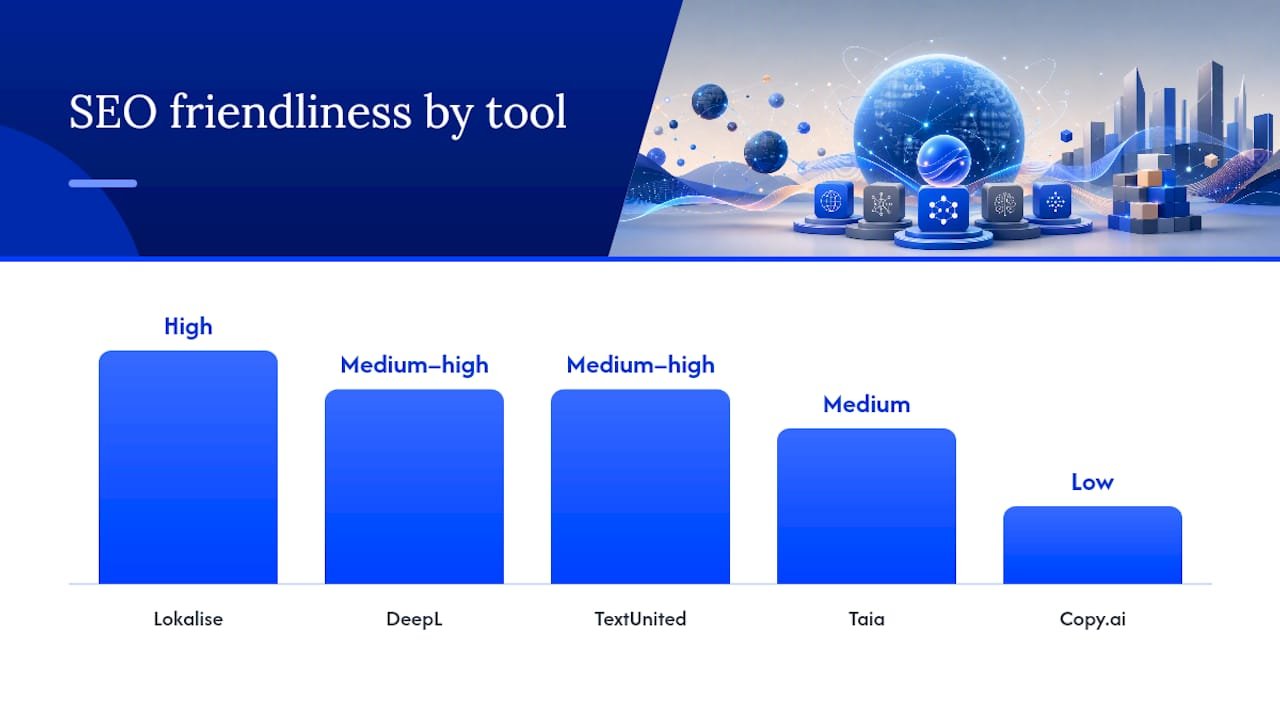
| Tool | Best for | Implementation model | SEO friendliness | Terminology control | Pricing shape |
|---|---|---|---|---|---|
| Lokalise | Enterprise teams needing governance | Plugin/API, server-integrated | High | Strong (glossary + TM) | Subscription |
| DeepL | Marketing copy quality | API, server-side | Medium to high (depends on setup) | Limited | Per-character/subscription |
| TextUnited | Mid-size teams with recurring content | API, workflow platform | Medium to high | Strong | Subscription |
| Taia | Managed translation with AI assist | Workflow platform | Medium | Moderate | Per-project |
| Copy.ai | Marketing copy adaptation | API, manual workflow | Low (not SEO-focused) | Limited | Subscription |
| OpenAI (ChatGPT/GPT) | Custom pipelines | API, developer-built | Depends entirely on build | Custom (prompt-based) | Per-API-call |
| Google Gemini | Google-ecosystem routing | API, developer-built | Depends entirely on build | Custom (prompt-based) | Per-API-call |
| Anthropic Claude | Privacy-sensitive workflows | API, developer-built | Depends entirely on build | Custom (prompt-based) | Per-API-call |
| Google Translate | Quick, free-tier translation | Client-side widget or API | Low as widget, medium via API | None | Free tier/API |
| Microsoft Translator | Enterprise Azure integration | API, server-side | Medium to high | Moderate | Per-API-call |
| AI Website Translator (extension) | Personal previews only | Client-side, in-browser | Very low (not indexable) | None | Free |
Lokalise stands out for governance. It combines intelligent routing across AI models with translation memory and glossary controls, which matters once you have more than a handful of pages and multiple contributors. The tradeoff is setup time and cost relative to a single API call.
DeepL’s advantage is sentence-level quality, especially across European language pairs, but it hands you translated strings, not a website. You still need a delivery layer.
TextUnited and Taia both blend AI output with managed human workflows, which suits teams that want AI speed without giving up a human safety net on brand-critical pages. They ask more of your time upfront (onboarding, workflow setup) than a pure API call would.
The foundation models, ChatGPT, Gemini, and Claude, give you the most creative control but the least structure out of the box. If your team can build and maintain a pipeline, they’re excellent for adapting idioms and marketing tone rather than translating word-for-word. If you can’t, you’re better served by a platform that already did that engineering for you.
Pro Tip: Don’t judge a tool by a single translated sentence. Test it on your longest paragraph and your shortest button label; that’s where quality gaps and layout breakage actually show up.
For a marketing site with a handful of pages, DeepL or Google Translate’s API paired with a simple server-side render often gets you 90% of the value at a fraction of the setup cost. For large e-commerce catalogs, Lokalise or TextUnited’s glossary and TM controls prevent product names and legal copy from drifting across thousands of SKUs. For a content-heavy blog publishing frequently, an orchestration platform that routes new posts through AI translation automatically, with human review reserved for pinned or evergreen pages, keeps pace without burning editorial hours.
How Do You Choose the Right Translation Tool?
Start with a single-page checklist before you demo anything. Your must-haves should include: server-side or edge rendering (not client-side-only), translated metadata support, glossary or terminology control, and a clear answer on where your text data goes during translation. Nice-to-haves include visual in-context editors, automated translation memory reuse, and native hreflang generation.
When you get a vendor on a call, ask these questions directly:
- Does the tool serve translated pages as real, crawlable URLs, or does it only alter the DOM after page load?
- How does caching work at the edge, and what happens to load times across language paths?
- Can we lock approved terminology so brand names and legal phrases never get auto-translated incorrectly?
- What’s the rollback process if a translated page breaks or ranks poorly?
- Where does our source text go during translation, and is it used to train the vendor’s models?
Watch for a few red flags. If a vendor can’t explain how metadata and sitemaps get translated, that’s a sign SEO wasn’t part of their design. If there’s no glossary or terminology feature at all, expect brand-name mishaps down the line. And if a sales rep dodges the data-flow question, assume the answer is “we send it to a third-party API with no special handling,” and factor that into your decision.
Client-Side, Server-Side, or Edge: Which Model Fits Your Site?
Three deployment models handle the actual mechanics of getting translated text in front of visitors, and they behave very differently once search engines get involved.
Client-side/script injection loads your original page, then swaps text in the browser using JavaScript. It’s the fastest to install (often a single script tag) but the weakest for SEO, since search crawlers may not execute or wait for that swap, leaving them to index your original-language content under a translated URL.
Server-side or proxy/edge delivery generates a persistent, translated version of each page and serves it directly, often through a DNS or reverse-proxy layer sitting in front of your existing site. This is how Verbi’s approach avoids a full rebuild while still producing indexable language paths, and it’s generally the stronger SEO choice because crawlers see fully rendered translated HTML on first request.
CMS plugins sit between these two, translating content at build time or on save, then storing the translated version as its own page within your existing content management system.
Quick mapping: a static marketing site with infrequent updates does fine with a CMS plugin. A headless CMS or JAMstack site benefits from edge/proxy delivery, since it already separates content from rendering. Large e-commerce catalogs with thousands of SKUs need server-side generation with strong caching, because client-side translation at that scale creates painfully slow, inconsistent pages.
Pro Tip: Picture your architecture as three doors into the same room: client-side hands the visitor a note after they’ve already walked in, server-side hands them a fully furnished room from the start, and edge/proxy builds that room just outside your existing house so you don’t have to renovate.

Will Translated Pages Actually Rank in Search?
Not automatically. Displaying translated text on the front end doesn’t guarantee search engines will crawl or rank it as a distinct page. You have to give each translated version the same SEO signals your original page already has.
Run through this checklist for every translated page:
- Translate the
<title>tag and meta description, not just the visible body copy. - Generate a separate sitemap entry (or multilingual sitemap) for each translated URL.
- Implement hreflang tags linking each language version to its counterparts.
- Decide on subdirectories (
/es/), subdomains (es.site.com), or country-code domains, and stay consistent; subdirectories are usually the simplest to maintain and the easiest to get indexing quickly.
To verify it’s working, use Google’s URL Inspection tool on a live translated page and check that the rendered HTML includes translated meta tags, not just body text. If your site uses heavy client-side rendering, look into pre-rendering or server-side snapshots so crawlers receive fully formed HTML instead of a JavaScript shell.
One more thing worth internalizing: translation and localization aren’t the same task. A literal translation of “free shipping” might miss the local search term entirely if shoppers in that market search for a different phrase. Adapting to actual search intent in each language, not just swapping words, is what separates pages that rank from pages that merely exist.
Where Does Your Website Text Go During Translation?
Most AI translation tools send your page text to a cloud API, whether that’s OpenAI, Google, Anthropic, DeepL, or Microsoft’s servers, process it, and return the translated version. That’s fine for public marketing copy. It’s a bigger question when your pages include user data, pricing tied to accounts, or anything touching personal information.
Ask any vendor these questions before sending real content through their pipeline:
- Is submitted text used to train their models, or is it excluded by default?
- How long is the text retained after translation, and can you request deletion?
- Is data encrypted in transit and at rest?
- Do they offer an on-premise, private-cloud, or edge deployment option for sensitive content?
If your site handles regulated data (health records, financial account details, anything under strict privacy law), lean toward server-side deployments where you control the API call and can filter what gets sent, or ask directly about on-prem options. For general marketing and product pages, standard cloud API routing through DeepL, Google Translate, or Microsoft Translator is the norm and rarely a concern.
Pro Tip: Keep a running list of which pages contain any personal or account-specific data, and exclude those from your automated translation pipeline by default. It’s easier to add them back deliberately than to discover later that customer emails got routed through a third-party API.
How Do You Keep Translation Quality Consistent at Scale?
Glossaries and translation memory are what keep a brand name, a legal disclaimer, or a product term from getting mangled across hundreds of pages. Platforms that pair AI translation with glossary and TM controls let you lock approved terms once and apply them everywhere automatically, instead of re-explaining your brand voice to a model every time.
Not every page deserves the same level of human review. Set clear rules:
- Hero sections and homepage headlines: human review required (first impressions carry the most conversion risk).
- Checkout and pricing pages: human review required (errors here cost revenue directly).
- Legal, compliance, and privacy pages: human review required (mistranslation is a liability issue, not a style one).
- Blog posts and evergreen support articles: AI translation with spot-check review is usually sufficient.
Before publishing any translated page, run through this quick approval sequence:
- Automated AI translation pass.
- Glossary and terminology check against your locked term list.
- Visual QA in a staging environment to catch layout breakage from longer or shorter translated strings.
- Human sign-off on any page flagged as brand-critical.
Hybrid workflows where AI handles volume and humans handle brand-critical segments consistently produce faster turnaround without sacrificing the pages that matter most to conversion.
What Does an AI Website Translation Rollout Actually Look Like?
- Get API keys or platform access set up in a staging environment first, never production.
- Run a pilot translation on 5 to 10 representative pages, including your homepage and one product or service page.
- Confirm sitemap discovery and hreflang tags generate correctly for the pilot pages.
- Review translations in a visual, in-context editor to catch layout breaks before they go live.
- Run functional tests (forms, checkout flows), visual tests (mobile and desktop), an SEO crawl test, and a page-speed check.
- Publish to production, monitor indexing status for two weeks, and keep a rollback plan ready: cache invalidation, the ability to unpublish a language path, and uptime health checks on each new locale.
Why One Model for Every Page Is the Wrong Approach
The strongest teams route content by type rather than defaulting to a single engine. Orchestration, matching the right model to the right content, consistently outperforms a one-size-fits-all setup, because a model that writes great marketing copy isn’t necessarily the one you want translating a legal disclaimer.
A simple orchestration matrix looks like this: homepage and marketing copy go to a creative-capable model like GPT or Gemini for tone adaptation; technical documentation goes to DeepL or Microsoft Translator for precision; legal and compliance text goes through a controlled, glossary-locked pipeline with mandatory human review; and high-volume support content goes through whichever engine your platform already has wired into translation memory.
Pro Tip: Think of orchestration like a kitchen brigade, not one cook trying to do every station. Assign tasks by strength, and quality goes up across the whole menu.
Why Translation Should Be a Standing Job, Not a Project
Treat translation as ownership, not a launch checklist you close out and forget. Someone on your team should own glossary updates and catch drift before it spreads across pages. In practice, that’s often as simple as reviewing new terms monthly and pushing small updates instead of re-translating the whole site every time your product changes.
Get Help Planning Your AI Translation Rollout
Picking the right tool is only half the job. The harder part is sequencing it: which pages get AI translation first, which routes need human review, and how you avoid the classic mistake of launching five new language paths that all rank nowhere. That planning work is exactly where a second set of eyes pays off.

Willbuckley works with marketers and site owners who want a clear plan before they touch a single API key, not another tool to add to the pile. Sessions focused on translation and localization rollouts typically cover a prioritized page-by-page rollout plan, a vendor evaluation checklist tailored to your stack and traffic, and a post-launch review to catch indexing or layout issues before they cost you rankings. If you’re staring at fifteen tool names and no clear starting point, visit Will Buckley’s site to see how a short planning session can save you weeks of trial and error. You could have your pilot pages mapped out by this time next week.
Frequently Asked Questions
Is AI translation for websites accurate enough for production use?
For most business and marketing content, yes, especially with tools like DeepL or platforms that pair AI output with glossary controls. Legal, medical, or highly technical pages still benefit from human review before publishing.
Do I need a developer to translate my website with AI?
Not always. DNS/proxy tools and CMS plugins can get a translated site live with minimal coding. Custom pipelines built on OpenAI, Gemini, or Claude do require developer time to wire up properly.
Will AI-translated pages show up in Google search results?
Only if they’re set up correctly: translated metadata, a sitemap entry, hreflang tags, and a crawlable URL structure. Without those, a translated page can exist on your site and still never rank.
What’s the difference between AI website translation and website localization?
Translation converts words from one language to another. Localization adapts tone, search intent, currency, and cultural references so the page actually resonates with that market, not just reads correctly in it.
Can I use ChatGPT or Gemini directly to translate my website?
You can, through their APIs, but you’ll need to build the pipeline yourself, including handling metadata, layout, and quality control. Dedicated platforms like Lokalise or TextUnited handle much of that structure out of the box.
Sources
A few pages worth bookmarking as you evaluate tools and plan your rollout:
- AI Website Translator | Live Website Localization Without Rebuilds | Smartcat
- Phrase: AI-Powered Localization & Translation Platform
- Website Translation Platform | 200+ Languages | ConveyThis
- Verbi — Translate Your Website Into 20+ Languages