

Use AI to surface and score affiliate link candidates across your content, but never let it publish placements alone. The right process pairs AI’s pattern-finding speed with human review for disclosure, anchor quality, and user experience. Optimize the whole thing for downstream merchant conversion and revenue per visit, not raw click counts.
TL;DR:
- Using AI to surface affiliate link candidates requires careful human review to ensure proper disclosures, anchor quality, and user experience are maintained.
- It is essential to include clear, near-link disclosures that explicitly state commission earnings, avoiding vague tags or banner-like styling.
- Tracking link placements with unique IDs and metadata in GA4 helps determine which links actually generate revenue, not just clicks.
- Testing anchor text and placement distance systematically across mobile and desktop helps optimize conversions without harming trust.
- Fixing existing link density issues and optimizing current placements offers a low-risk way to improve revenue before scaling automation efforts.
Table of Contents
- What AI Link Placement Actually Means for Affiliates
- Disclosure, UX, and the Guardrails That Aren’t Optional
- The Audit to Deploy Workflow That Actually Works
- Prompting AI Safely: Templates and Checks That Keep You Out of Trouble
- What to Track: Events, Metadata, and the Metrics That Matter
- Testing Placements Without Wrecking Reader Trust
- Will Buckley’s Take: Fix Links First, Then Automate
- Ready to Fix Your Links Before You Automate Anything Else
- Primary Sources and Further Reading
- Sources
- FAQ
What AI Link Placement Actually Means for Affiliates
AI link placement, in this context, means using machine learning tools to decide where inside your existing content an affiliate link should go, what words should carry it, and when it’s worth testing a variant. It has nothing to do with how Google arranges links inside AI Overviews. That’s a different problem for a different audience.
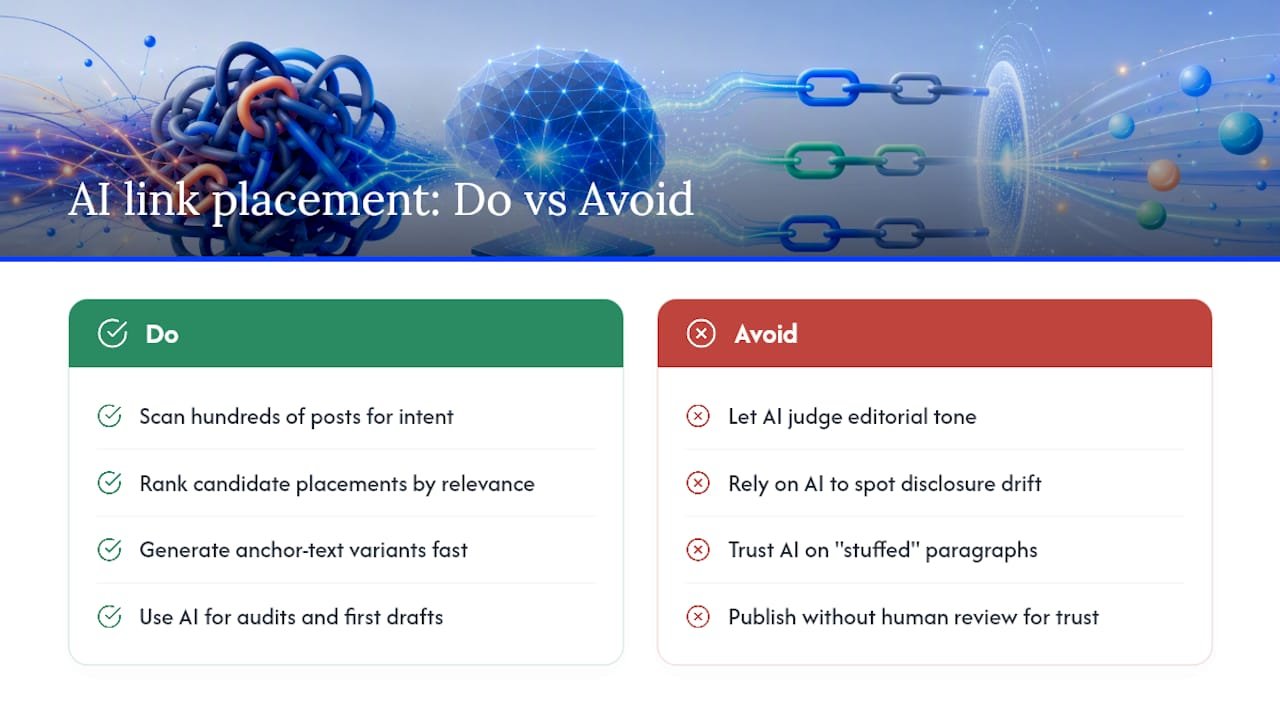
Where AI genuinely helps: scanning hundreds of posts to flag high-intent sentences, ranking candidate placements by relevance, and generating anchor text options fast. Where it falls short: judging tone, catching a disclosure that’s drifted too far from the link, or knowing when a paragraph already feels stuffed. Lean on AI for the site audits and the first-draft variant generation. Keep a human in the loop for anything that touches trust or compliance.
Disclosure, UX, and the Guardrails That Aren’t Optional
Before you let any tool touch your links, get the non-negotiables straight. The FTC’s endorsement guidance requires disclosures that are clear, conspicuous, and physically close to the recommendation or link itself. A vague “affiliate link” tag buried in a footer doesn’t cut it, and the FTC has said plainly that the phrase “affiliate link” alone may not be enough. Say what it means: you earn a commission.
Usability research backs this up from the reader’s side. NN/g’s work on hyperlink writing shows people scan the first few words of a link to decide if it’s worth clicking, so vague anchors like “click here” waste that scent entirely. The same research warns that links styled like ads get ignored outright, a phenomenon usability researchers call banner blindness.
Translate both into rules your AI workflow has to follow:
- Cap links per section and never duplicate the same destination twice on one page.
- Require every AI-suggested placement to carry a synced disclosure note, not a separate one that can drift.
- Reject any anchor styled or positioned to look like a banner or house ad.
Pro Tip: Build disclosure into the same output field as the link suggestion itself. If your AI tool generates a placement and an anchor, make it generate the disclosure line in the same breath, so nothing gets published without it.
The Audit to Deploy Workflow That Actually Works
Random link insertion is how sites end up over linked and under trusted. A five step sequence keeps AI useful without letting it run wild.
- Audit your existing link density. Pull every post with commercial intent and count current affiliate links per 500 words. Flag pages that are thin and pages that are already crowded.
- Let AI surface candidate sentences. Feed the tool your top pages and ask it to flag sentences where a product mention has no link yet, along with two or three anchor text options for each.
- Review anchors for tone and honesty. Swap generic phrasing for something descriptive and human. “This budget tripod” beats “this product” every time.
- Check disclosure proximity and visual styling. Make sure the disclosure sits near the link, not three paragraphs up, and confirm the link doesn’t look like a banner.
- Tag the placement before it goes live. Every link needs a structured ID and metadata attached before publishing, not after.
That last step matters more than most teams realize. Without it, you can’t tell which anchor variant on which page actually drove a sale three weeks later. At minimum, tag each placement with:
- A unique placement ID tied to the page and paragraph
- The anchor variant used
- Content type (review, tutorial, listicle) and device context
Skipping this step is the single most common reason affiliate teams can’t answer a simple question later: which link actually made money? Guides on internal linking with AI walk through a similar candidate discovery process, and the logic transfers directly to affiliate placements.
Prompting AI Safely: Templates and Checks That Keep You Out of Trouble
The prompt you write determines whether your AI tool finds smart placements or floods your content with junk. Split your prompts into two distinct jobs instead of asking for everything at once.
For discovery, ask the model to scan a specific page and return sentences with unlinked commercial intent, capped at a set number, say five candidates per 1,000 words, and required to skip any sentence that doesn’t already explain a benefit to the reader.
For anchor generation, feed it the candidate sentence and ask for three anchor options under six words each, front loaded with the most meaningful term, and explicitly told to avoid generic phrasing like “learn more” or “click here.”
Filter the output before it reaches your editor:
- Reject any anchor longer than eight words.
- Reject anchors that don’t include a noun tied to the product or benefit.
- Flag any suggestion sitting within two sentences of another link to the same merchant.
Then run a short human checklist before anything ships: Is the disclosure adjacent to this exact link? Does the anchor describe what the reader will get, not just what to do? Is this placement sitting in a spot that reads like an ad module rather than body content? Google’s own guidance on people-first content draws the same line: automation that adds real value to the reader is fine, automation aimed at gaming rankings isn’t.
Pro Tip: Keep your discovery and anchor prompts in separate saved templates. Blending both jobs into one giant prompt is the fastest way to get vague, unfiltered link suggestions.
What to Track: Events, Metadata, and the Metrics That Matter
Clicks tell you almost nothing on their own. A link that gets clicked constantly but never converts is a liability dressed up as a win.
Set up link clicks as tracked events in GA4, since the platform supports both recommended and custom event types for exactly this purpose. Each event should carry metadata: page_location, destination_url, anchor_variant, device, and content_type. Skipping these fields is how teams end up staring at a report full of clicks with no idea which page or anchor produced them.
One technical detail trips up almost everyone: GA4’s item-scoped promotion parameters take precedence over event-level parameters when both exist. Miss this and you’ll see “(not set)” filling your reports where a specific placement ID should be.
Beyond the click event itself, track three numbers that actually predict revenue:
- Click-through rate by placement and anchor variant, as a baseline signal only.
- Downstream merchant conversion, pulled from your affiliate network’s own reporting.
- Revenue per visit, which accounts for both conversion rate and order value together.
A placement with a mediocre CTR but strong merchant conversion beats a flashy anchor that gets clicked and abandoned. Optimize toward the second number, not the first.
Testing Placements Without Wrecking Reader Trust
Once tracking is solid, test deliberately instead of shipping every AI suggestion at once.
- Run anchor A/B tests first. Two anchor variants for the same link, same placement, measured against merchant conversion, not just clicks.
- Test placement distance next. Move the same link earlier or later in a paragraph and compare downstream results across a few weeks, not a few days.
- Check mobile separately. Placements that read fine on desktop often sit awkwardly in a mobile column, and behavior differs by device.
- Use sequential testing on lower-traffic pages where full randomization would take months to reach a usable sample, and reserve strict A/B splits for your highest-traffic pages.
The interpretation rule that matters most: a placement that lifts CTR but drags down merchant conversion isn’t a win. It’s often a sign the anchor overpromised, or the link jumped into an ad-like zone that readers click reflexively and regret. Favor the metric that tracks all the way to a sale.
Will Buckley’s Take: Fix Links First, Then Automate
Everyone wants to jump straight to full automation. I’d argue that’s backwards. The fastest, lowest-risk win in affiliate marketing is almost always fixing the links you already have before you build anything new. A single crowded page with mistimed anchors is costing you conversions right now, and you can fix that in a week.
Start narrow. Prove the workflow on ten pages before you scale it to a hundred. The pilot approach outlined here walks through exactly that sequencing, and it’s the same order I’d recommend to anyone asking where to start.
— Will
Ready to Fix Your Links Before You Automate Anything Else
A pilot program is built for affiliate marketers who want the audit to deploy workflow above without building the prompt templates, tracking tags, and review checklists from scratch themselves. It suits anyone sitting on a backlog of older posts with weak or outdated anchors, and no clear system for testing what actually converts.

This pilot runs over a few weeks and maps directly to what you just read: it sets up the audit, provides prompt bundles for discovery and anchor generation, and configures GA4 tracking so you can see which placement drove revenue instead of guessing. If you’re ready to stop losing conversions to links that were never optimized in the first place, check out the pilot program and see if your site qualifies for the next cohort.
Primary Sources and Further Reading
- FTC’s Endorsement Guides: What People Are Asking
- Set up events | Google Analytics | Google for Developers
- Writing hyperlinks: Salient, descriptive, start with keyword – NN/g
- Creating helpful, reliable, people-first content (Google)
- Role of AI in Content Strategy and SEO Success
Sources
- FTC’s Endorsement Guides: What People Are Asking
- Set up events | Google Analytics | Google for Developers
- Writing hyperlinks: Salient, descriptive, start with keyword – NN/g
- Creating helpful, reliable, people-first content (Google)
FAQ
Is AI link placement the same as Google’s AI Overviews?
No. AI link placement, as covered here, refers to using AI tools to decide where affiliate links go inside your own content. Google’s AI Overviews are a separate search feature with no connection to this workflow.
Do I need to disclose AI-suggested affiliate links differently?
No, the disclosure rule doesn’t change based on how the link was chosen. The FTC still requires a clear, conspicuous disclosure placed near the link, whether a human or an AI tool suggested the placement.
What should I measure besides click-through rate?
Track downstream merchant conversion and revenue per visit alongside clicks, since a high CTR with poor conversion often signals a misleading anchor. GA4’s event tracking setup lets you attach metadata like anchor variant and content type to trace results back to the exact placement.
How many affiliate links is too many on one page?
There’s no universal number, but a dense link web hurts both usability and trust, according to NN/g’s usability research. Set an explicit cap per section and a minimum distance between links pointing to the same merchant before you let any AI tool suggest placements.
Where should I start if I have hundreds of old posts to fix?
Audit your highest-traffic, highest-commercial-intent pages first rather than trying to fix everything at once. A pilot approach that starts with ten to twenty pages lets you validate the workflow before scaling it site-wide.