

Yes, you can use Google Ads for affiliate marketing, but not the way most people first try it. Google doesn’t want ads that exist only to pass a click along to someone else’s offer. The approach that holds up is sending paid traffic to a page you own, with real, original value on it, and then tracking what happens after the click so you know whether you’re making money.
If you’ve ever stared at a Google Ads dashboard full of clicks and wondered where the commissions went, you’re in good company. Most affiliates hit the same walls: disapproved ads, tracking that goes blank at the merchant’s checkout, and spend that quietly outruns earnings. This guide walks through each one in plain language, so you can decide whether paid search deserves a spot in your mix and how to run it without burning budget.
TL;DR
- Google Ads can send traffic to affiliate offers, but destinations that only exist to pass users along are disapproved, so build a page with original content first.
- Check your affiliate program’s own rules before you spend a dollar, especially on brand keywords, because Google treats breaking program rules as a policy violation.
- Tracking is the make-or-break piece: if Google can’t see commissions, its bidding can’t learn what a good click is.
- Judge every campaign by ROI and ROAS, not clicks, and treat a ROAS of 1.0 as break-even.
- Disclose your affiliate relationship clearly on the page people land on.
Table of Contents
- Can you really run Google Ads as an affiliate?
- Why direct linking to an offer usually fails
- Build a landing page worth landing on
- Setting up your first campaign
- Brand keywords and program rules
- Tracking commissions when the sale happens somewhere else
- Doing the profit math before you scale
- Common mistakes that cost affiliates money
- Where Google Ads fits next to other traffic
- Our perspective
- Put AI to work on the repetitive parts
- FAQ
- Sources
Can you really run Google Ads as an affiliate?
The short answer is yes, with conditions. Google’s Unfair advantage policy says advertisers can’t trick or get around the ad review process, and it names affiliates who advertise on Google Ads against the applicable affiliate program rules as a violation. So there are two layers of rules to respect: Google’s, and your merchant’s.
That second layer catches people by surprise. Some programs forbid paid search entirely. Others allow it but ban bidding on their brand name. Before you build anything, open your program’s terms and look for the words “paid search,” “PPC,” “trademark” and “brand bidding.” If the terms are silent, ask the affiliate manager and keep the reply. It takes five minutes and can save an account.
If you’re new to this, a gentle reminder: nobody gets this right on the first campaign. The goal of your first month isn’t profit. It’s learning how the rules, the tracking and the economics fit together, ideally on a small daily budget.
Why direct linking to an offer usually fails
The tempting setup is simple: write an ad, point it straight at your affiliate link, and collect commissions. It’s the thing most videos and forum threads promise. It’s also where most accounts run into trouble.
Google’s Google Ads policies cover abusing the ad network, which includes cloaking or other techniques that hide the true destination, and they list bridge or gateway destinations that are solely designed to send users elsewhere as disallowed. Google’s Insufficient original content policy goes further and says destinations that only link onward, such as bridge pages, doorways, gateways or other intermediate pages, can be disapproved.
Put those together and the picture is clear. A thin page with a headline and a big button is a bridge page in Google’s eyes, and so is a bare redirect. What passes is a destination that gives the visitor something useful of their own: a comparison, a tutorial, a calculator, a real review with your own screenshots and results.
We’ve written separately about bridge page examples and funnel formats. Those formats work well for organic and native traffic. For Google Ads, push them further toward genuine content, because the review standard is stricter.
Build a landing page worth landing on
Think of your landing page as a helpful article that happens to recommend something. A person searching “best email tool for a small coaching business” wants to know which one fits, what it costs and what could go wrong. If your page answers that, the affiliate link becomes the natural next step instead of the entire point.
A page that tends to earn approval and conversions has a handful of things in common. It opens with the answer to the searcher’s question. It shows your own experience, such as a screenshot of the dashboard or a short note about how you use the product. It compares at least a couple of options in plain terms. It carries a clear affiliate disclosure near the top, not buried in a footer. And it loads fast on a phone.
On that last point, there’s a lot of industry talk about landing pages converting better than direct links. One company blog reports landing pages converting at 4.3% or higher versus 0.5 to 1% for direct links. Treat that as a rough signal, not a promise. Your numbers will depend on the offer, the audience and the page. What matters more is that the page is yours, and you can improve it week by week.
Keep your disclosure visible
The Federal Trade Commission says that if there’s a connection between an endorser and a marketer that a significant minority of consumers wouldn’t expect, it should be disclosed clearly and conspicuously. Being paid a commission is exactly that kind of connection. Put a short, plain sentence above the first recommendation, and use words people actually understand. Our guide to affiliate disclosure examples has wording you can adapt. These are US rules, so if you serve readers elsewhere, check the advertising rules in those countries too.
Setting up your first campaign
Once the page exists, the campaign itself is the easy part. Here’s the flow in the order we’d tackle it.
Start with Search campaigns. They match your ad to what someone typed, which is the strongest buying signal you’ll find in paid media. Display and video can come later, once you know what converts.
Next, choose where and when to show ads. Begin with one country and one language, and look at which hours your audience actually buys. A narrow start keeps data clean.
Then pick a bidding approach. When you’re brand new, a manual or capped approach protects your budget while you gather data. Smart Bidding strategies that optimize on conversions need conversion data to work with. Google’s own Smart Bidding guide notes that Target ROAS requires a minimum of 15 conversions within a 30-day window, which is a useful reality check for small affiliate accounts that see only a few sales a month.
After that, build your keyword list. Think buyers, not browsers. Phrases that include words like “best,” “vs,” “pricing” or “review” tend to come from people closer to a decision. If you want a repeatable method, our five-step affiliate keyword research process and the AI keyword research workflow show how to find intent instead of just volume. Start with phrase and exact match so you aren’t paying for loose, irrelevant searches, and add negative keywords such as “free,” “jobs” or “login” as your search terms report fills up.
Finally, write ads that say what the page actually delivers. If your ad promises a comparison, the page should be a comparison. Mismatch between promise and page is one of the fastest routes to a disapproval and to wasted clicks.
Brand keywords and program rules
Bidding on the merchant’s own name is where affiliates most often step on a landmine. Many programs prohibit it because it competes with the merchant’s own ads and can pull their customers through an affiliate for a commission they’d have earned anyway. Some programs allow it with written permission. A few allow it freely.
The safest rule is to avoid brand terms unless the program’s terms or your affiliate manager clearly say yes. Even then, avoid putting the brand name in your ad text in a way that suggests you are the company. You’re an independent recommender, and your ad should read that way.
Tracking commissions when the sale happens somewhere else
Here’s the quiet problem behind most unprofitable affiliate campaigns: the purchase happens on a site you don’t control, so Google never sees it. Google gets the click, you see a number in your affiliate network a day or two later, and the two never meet. Without that connection, you can’t tell which keywords produce sales, and Smart Bidding has nothing meaningful to learn from.
Affiliate networks solve their half of the problem with their own tracking. Webgains, for example, describes a first-party cookie that records campaign, program and session details, then a conversion script on the order confirmation page that reports order value and reference so the commission can be validated. That tells the network who earned what. It doesn’t automatically tell Google.
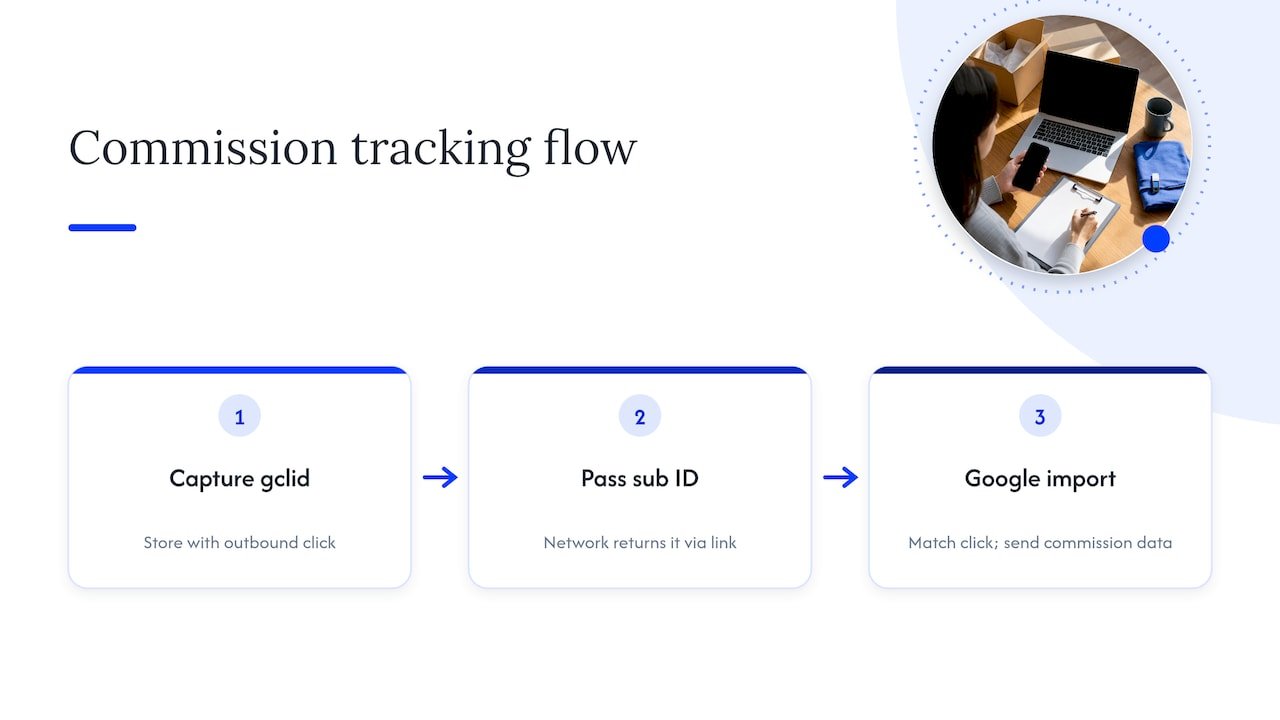
To close the loop yourself, you need three habits.
First, capture the Google click ID (the gclid) when someone lands on your page and store it alongside your outbound link click. Second, pass your own sub ID or click ID through the affiliate link so the network can return it to you. Third, when commissions are confirmed, match them back to the original click and send that as an offline conversion into Google Ads, ideally with the real commission value.
If that sounds like a lot, start smaller. Track outbound link clicks as your first conversion event with Google Tag Manager. We walk through exactly how in Google Tag Manager for affiliates, and the cookieless link tracking setup covers a lighter approach that doesn’t lean on browser cookies. Clicks aren’t sales, so don’t optimize on them forever, but they’re a fine starting signal while you collect real commission data.
One warning from Google itself is worth remembering: its Smart Bidding guide cautions that inaccurate conversion tracking can cause bidding instability, with swings in volume, CPA and ROAS. Clean data first, automation second.
Why attribution deserves a look
Paid search rarely works alone. Someone might read your article, leave, and come back through an ad a week later. If your tracking only credits the last click, you may undervalue the page that introduced them. Our guide to affiliate attribution models explains how to match each channel to its role and test what actually drives sales.
Doing the profit math before you scale
Clicks cost money, and commissions arrive later, so you need a simple way to see whether a campaign pays for itself. Two measures do most of the work.
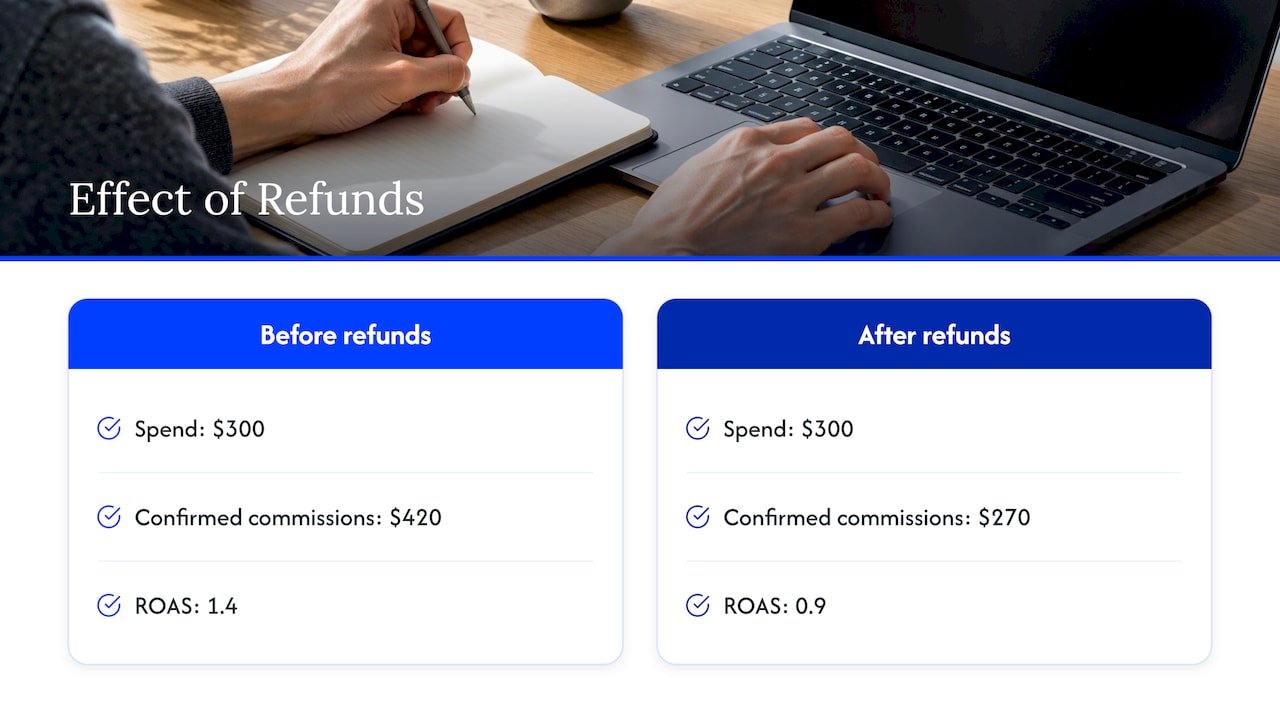
ROAS is your total commissions divided by your total ad spend. A ROAS of 1.0 means you earned back exactly what you spent. ROI is commissions minus spend, divided by spend, times 100. Positive means profit, zero means break-even, and negative means the ads cost more than they earned.
Here’s a worked example with made-up numbers. Say you spend $300 in a month and earn $420 in confirmed commissions. Your ROAS is 1.4, and your ROI is ($420 minus $300) divided by $300, which is 40%. That looks healthy, but if $150 of those commissions later get reversed because of refunds, your confirmed earnings drop to $270, and you’re at a ROAS of 0.9. Always judge on confirmed commissions, not pending ones.
It also helps to know your break-even cost per click before you bid. If your page converts one visitor in 50 to a sale and each sale pays $40, each click is worth about $0.80. Paying $1.50 for that click loses money no matter how nice the dashboard looks. Industry reports put paid search affiliate conversion rates anywhere from under 1% to over 10%, so measure your own rather than borrowing someone else’s.
If you see high-cost clicks everywhere, you’re in a competitive space. Recurring-commission offers like software subscriptions can justify higher bids because one signup keeps paying. One-time small commissions rarely can.
Common mistakes that cost affiliates money
Most wasted spend comes from a short list of avoidable habits. Knowing them early is a real shortcut.
The first is sending traffic to a thin page. We covered the policy angle above, but it’s also a conversion problem. Visitors who see nothing but a button have no reason to trust you.
The second is hiding where the link goes. Google’s policies list cloaking and other techniques that hide the true destination as part of abusing the ad network. Redirect chains and disguised links also make it harder to audit your own setup. If you run link cloaking on your site, read this breakdown of how to audit cloaked affiliate links so broken or outdated links don’t quietly leak commissions while your ads keep paying for the click.
The third is ignoring the affiliate program’s rules. Brand bidding, restricted ad copy and banned traffic sources can all lead to forfeited commissions, even when Google has no issue with your ad.
The fourth is optimizing on the wrong signal. If you tell Google a click on your outbound button is a conversion, it will find you more people who click buttons, not more people who buy. Move to confirmed sale data as soon as you can.
The fifth is scaling too early. Raising the budget before you have a few weeks of stable, profitable data just makes mistakes more expensive. Double slowly, and only what’s already working.
The last is forgetting the page decays. Offers change, links break and program terms get updated. A monthly check of your landing page, your links and your program rules is cheap insurance.
Where Google Ads fits next to other traffic
Paid search is fast, but it’s rarely the cheapest way to earn. Content that ranks, a YouTube channel or a newsletter can bring in traffic that doesn’t stop when your budget does. Many affiliates use Google Ads as a testing ground: they pay for traffic to learn which offers and angles convert, then build organic content around the winners. If you want to compare channels, our guides on native ads for affiliates and YouTube affiliate marketing are good next reads.
If you’re planning that broader mix, a walkthrough on planning campaigns for organic growth can help you decide what to test with paid traffic first and what to build for the long term.
Our perspective
We’ve seen the same pattern again and again with affiliates who come to us excited about paid search. They start with the ad, when the real work lives on either side of it: the page before the click and the tracking after it.
Our view is simple. Treat Google Ads as a way to test, not a way to shortcut. A small budget, a page that genuinely helps, and honest tracking will teach you more in three weeks than a big budget pointed at a bare affiliate link ever will.
That’s also where we think AI earns its place. Used well, it can speed up keyword grouping, first drafts of comparison pages and the tedious reporting that eats your evenings, while you keep the judgment and the personal experience that make a page worth trusting. We built our teaching around that balance: practical, time-saving, and honest about the effort involved.
If paid traffic feels overwhelming right now, that’s normal. Pick one offer, one page and one small budget, and let the data tell you what to do next.
Will
Put AI to work on the repetitive parts
Running paid campaigns means a lot of repeated small jobs: sorting search terms, drafting page variations, summarizing results. That’s where a good workflow pays you back in hours. Our AI affiliate workflows page lays out ready-to-run recipes you can adapt to your own campaigns, so you spend your time on strategy and the parts only you can do.

We also share practical tips, video tutorials and newsletters for affiliates learning to use AI in their marketing. You can start at willbuckley.com and pick the topic that matches where you are right now.
FAQ
Is Google Ads allowed for affiliate marketing?
Yes, as long as you follow Google’s policies and your affiliate program’s rules. Google specifically lists advertising against affiliate program rules as a violation, so read your program’s terms on paid search and brand bidding before you launch.
Can I link my ad straight to an affiliate link?
It’s risky. Google disapproves destinations whose only purpose is to send people to another site, including bridge pages and gateways. A page you own with original, useful content is the safer foundation, and it usually converts better because visitors have a reason to trust you.
How much money do I need to start?
There’s no official minimum, so decide what you can afford to lose while you learn. Start with a small daily budget on one campaign and judge it on confirmed commissions after a few weeks. Remember that Target ROAS bidding needs at least 15 conversions in 30 days, so manual bidding often makes more sense at the start.
How do I know if my campaign is profitable?
Compare confirmed commissions with ad spend. ROAS is commissions divided by spend, and 1.0 means break-even. ROI is commissions minus spend, divided by spend, times 100. Wait until refunds and reversals have cleared before you call a month a win.
Sources
- Unfair advantage – Advertising Policies Help
- Google Ads policies – Google Ads Help
- Insufficient original content – Advertising Policies Help
- FTC’s Endorsement Guides: What People Are Asking
- Display Smart Bidding Guide
- How does Webgains Conversion Tracking work?
- Is a Landing Page Good for Affiliate Marketing?
- Average Affiliate Conversion Rates by Traffic Source