

Have you ever opened LinkedIn with a plan to reach ten good prospects, then lost an hour to profiles, tabs and a blinking cursor? AI can take most of that weight off you, but only if you give it the right job. The data points one way: use AI to decide who to contact and to research them, then write and send the message yourself. That is the approach I teach affiliate marketers, and it is what the rest of this guide walks through.
TL;DR
- AI earns its keep in LinkedIn outreach on list building, research and scoring. It is much weaker as a ghostwriter of your first line.
- A hybrid routine (AI research and a rough draft, then your own rewrite) beat both AI-only and human-only openers in one 2026 A/B test.
- LinkedIn’s User Agreement bans bots and unauthorized automation for adding contacts or sending messages, so keep a person pressing send.
- Short, specific, no-pitch messages win. Track replies and meetings, not just acceptances.
Table of Contents
- What AI-assisted LinkedIn outreach actually means
- Where AI helps and where it quietly hurts
- Use AI to choose who you contact
- Writing the message: AI drafts, you decide
- Follow-ups without feeling spammy
- Stay inside LinkedIn’s rules
- Measure what matters
- A one-week routine you can start today
- Our perspective
- Take the next step with AI workflows
- FAQ
- Sources
What AI-assisted LinkedIn outreach actually means
In plain terms, it means using AI to analyze prospect information, draft personalized notes and take care of repetitive tasks while you keep the human touch. One outreach guide describes it that way, and notes that response data can help refine messages over time.
For an affiliate marketer, the prospects are usually one of two groups. Some are potential partners or creators you want to recruit for a program. Others are people in a niche you serve who might want the product you promote. Either way the job is the same: find the right people, understand them quickly, and start a real conversation. If you are earlier in the journey and want the bigger picture of the platform, our LinkedIn affiliate marketing playbook covers it.
Where AI helps and where it quietly hurts
This is the part most guides skip, and it is the most useful. The evidence is surprisingly consistent.
A 2025 B2B LinkedIn study of more than 20 million outreach attempts (data from 2024) found that AI-assisted first messages got a 4.19% reply rate against 2.60% for non-AI ones, a 61% lift on that first touch. Yet the overall reply rate only rose from 6.5% to 7.66%. AI sharpens the opener. It does not rescue a weak plan.
A Q1 2026 matched-pair test went further. AI-only openers replied at 2.1% to 4.2%, human-written ones at 6.2% to 9.1%, and hybrid openers at 8.4% to 13.8%. The hybrid was AI research with a human-rewritten opener. Likewise, a platform report covering 13.2 million connection requests found that unedited AI-personalized campaigns trailed the same accounts’ human-written templates on acceptance.
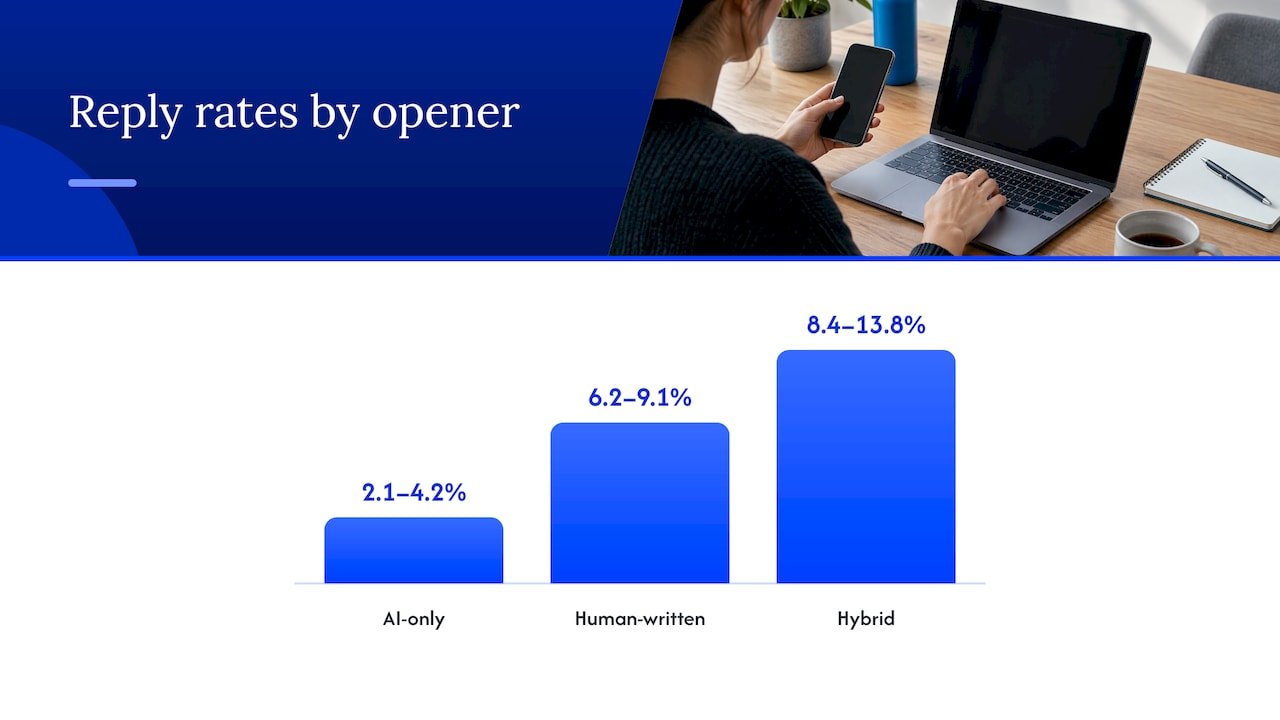
The pattern is easy to remember. AI is a strong researcher and a decent first-draft machine. It is a poor final voice.
Use AI to choose who you contact
Here is where the biggest gains sit. A mid-2026 report on more than 1,800 campaigns found that AI-assisted messages replied at about the same rate as manual ones, and concluded that the leverage lies in AI-driven targeting such as hiring, funding and job-change signals, not in AI-written prose.
Controlled tests point the same way. In fifteen tests across 6,870 prospects, a verified subject-matter-fit list got a 51.9% reply rate against 13.0% for a plain job-title list, while AI polishing the first line was roughly neutral. A better list did more than a better sentence.
A simple targeting routine
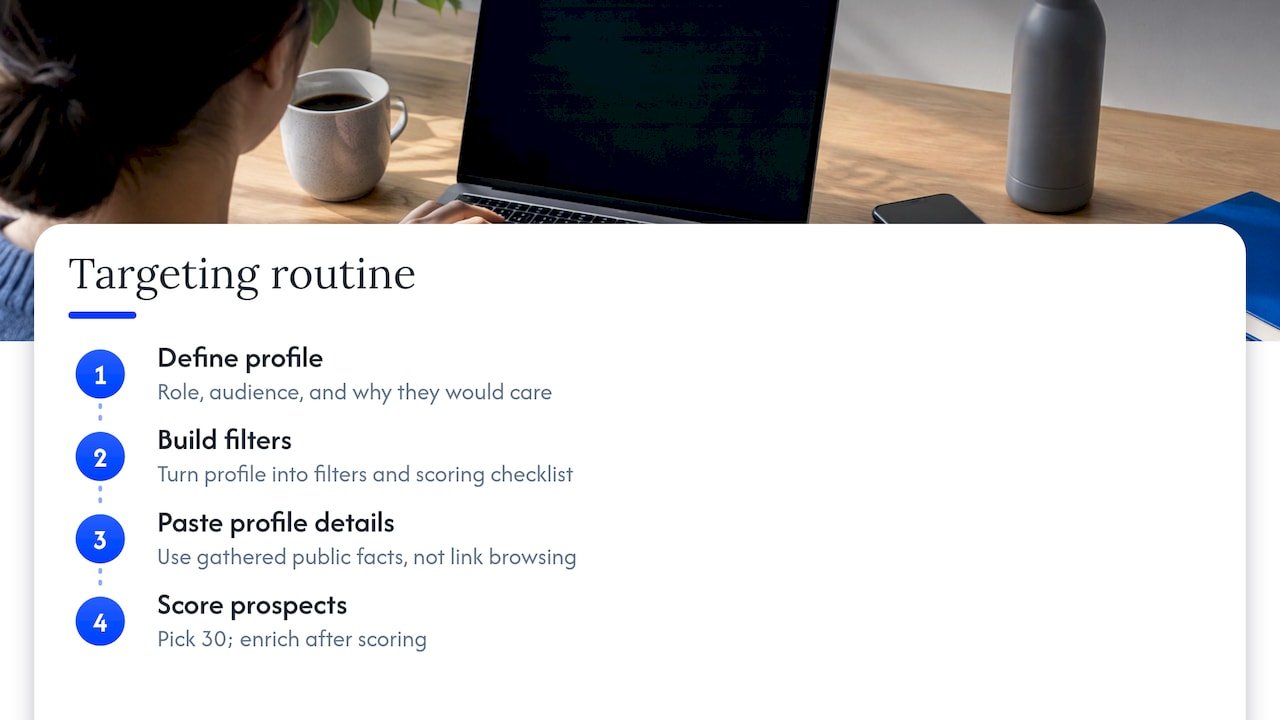
Start by writing down who you want in a few sentences: the role, the kind of audience or business, and the reason they would care about what you offer. This is your ideal customer or partner profile. Then ask an AI assistant to help you turn it into search filters and a scoring checklist. A model cannot reliably open a LinkedIn profile from a link, so paste in the public details you have gathered yourself rather than trusting it to browse. One prospecting guide warns that a model handed a profile URL may refuse or invent the page.
For partner recruitment, judge people on audience relevance, expertise, content quality and real engagement rather than follower counts. A recruitment guide from November 2026 lays out those criteria well. If you want to see how the same thinking applies to finding link and partner prospects, this AI link prospecting workflow shows how people keep control over who gets contacted and what gets sent.
Score first, enrich second. One workflow author puts it like this: one verified fact beats five scraped details. Pick the thirty people worth your time, not three hundred who might be.
Writing the message: AI drafts, you decide
Once you have a short list, give the AI one verified fact per person and one relevant point from your side. That is the whole prompt. A workable version looks like this: “Here is one fact about this person from their public post. Here is one thing I can offer that relates. Write a connection note under 200 characters. No flattery, no pitch, no ‘I came across your profile’, nothing that is not in the facts I gave you.” That structure comes from a published prompt workflow, and the constraints do the real work.
Then rewrite it. Read it out loud. If it sounds like something any assistant would produce for anyone, change it until it sounds like you. There is a reason: the team behind one set of controlled tests explains that generated first lines converged on a recognizable shape, and once a reader spots the pattern the personalization stops working. Their data also favors brevity: a 2.5-sentence, no-pitch message replied at 44.5% versus 18.6% for a longer, solution-heavy version.
Length and shape that tend to work
One set of recommendations suggests connection notes under 200 characters, first messages of 60 to 120 words with a single question, and follow-ups of 30 to 60 words that change the angle rather than just bumping the thread. Note that free accounts can only attach a note to a few requests a month, so check your own plan’s limit before you build a routine around notes. One rules summary reports three requests a month at 200 characters on a free account and notes that an older help page said five.
The note matters less than you might think for acceptance. In the same 2025 study, connection approval was 26.42% with a note and 26.37% without. Its value shows up afterward, in how people reply. The same study found that viewing a prospect’s profile before sending a message lifted replies to 11.87% from 4.88% for a message alone. So take thirty seconds to actually look.
If you want help making relevant messages without inventing or overusing personal details, this piece on turning weak ties into trust is a good companion.
Follow-ups without feeling spammy
Most replies need a second touch, and this is where people either quietly drift away or turn pushy. A calm, documented sequence solves both. A professional guide on automating LinkedIn outreach argues that a written sequence with CRM reminders and suppression rules makes follow-up consistent without turning conversations into indiscriminate sends. It also stresses that your list quality sets the ceiling: if the contacts are wrong, the fix is rebuilding the list, not tweaking the sequence.
Pace matters too. One analysis of 180,155 matured connection requests found acceptance peaked at 32.01% for accounts sending 10 to 19 invites a day and fell to 26.65% at 20 to 29 a day. More is not better. A steady trickle of relevant invitations beats a burst.
A sensible rhythm is three touches: a short connection request, a first message after acceptance that asks one question, and one follow-up that adds something new, such as a useful resource or a fresh angle. If they reply, stop the sequence and talk like a person. Speed counts here. In those same controlled tests, replies answered within 24 hours turned into meetings at 21.4%, against 3.6% after 48 hours. For a deeper look at building sequences, our guide to AI email sequences uses the same plug-and-play thinking.
Stay inside LinkedIn’s rules
This is the part to take seriously. LinkedIn’s User Agreement, in the version effective November 3, 2025, bans bots and unauthorized automated methods to add contacts or send messages, as well as scraping software. PipePlaybook’s guide notes that third-party tools that scrape or automate activity risk account restriction or shutdown. G2’s guidance says AI can streamline research, qualification, drafting, reminders and CRM entry, while a human should review and send invitations and messages.
So the safe shape is clear. Let AI do the thinking, the sorting and the drafting. Keep your own hands on the send button. If a tool promises to message people for you while you sleep, think about what happens when nobody reads the message before your prospect does. Your reputation, and your account, are the cost of finding out.
When you review a tool, ask which of the jobs it does: finding, reading, drafting, approving, sending and learning. A tool roundup from 2026 sorts products by who has the final say at each step. Pick the kind where you approve every message. For help sizing up what these systems cover and where approval belongs, see what AI integration services cover.
There is an ethical side as well: be honest about who you are and why you are writing, and never claim facts you do not have. Our piece on ethical AI marketing maps this to well-known frameworks.
Measure what matters
Acceptance rate is the easy number, and the least interesting. Track acceptance, reply rate, positive reply rate and meeting rate each week, and change one variable at a time on batches of 100 to 200 contacts, as one workflow guide suggests.
Replies can mislead. One team reported that 40% of the people they messaged replied for a full year while meetings per person messaged fell from 2.4% to below 1%. Count people messaged, replies, positive replies, meetings booked and meetings held as separate numbers. For you, that last one might be a call with a partner manager or a conversation with a potential customer. Whatever it is, decide by what it costs you to get it.
A one-week routine you can start today
On day one, write your ideal profile in three sentences. On day two, build a list of thirty people and have AI score them against it using details you collected. On day three, ask AI for a one-fact summary of each top prospect and look at their profile yourself. On day four, generate drafts with the tight prompt above, then rewrite every one in your own voice. On day five, send your first batch by hand. Over the weekend, note replies and set follow-up reminders. Do it again the next week, changing one thing.
It will feel slower than pasting in a bulk tool at first. It is not. You will spend your time on the part that actually moves the numbers.
Our perspective
Here is what I have learned from years of teaching and coaching: people do not fail because they lack a tool. They fail because they skip the thinking and jump to the sending. LinkedIn outreach with AI is the same story.
When we teach affiliate marketers to use AI, we start with the question underneath every workflow: what is the one job I want this to do for me? For outreach, the evidence says the answer is research and selection. The writing should still sound like a person you would want to talk to.
That is also why we keep the practical side simple. Small batches, one change at a time, a human on every message. It saves hours, it protects your account, and it keeps you proud of what goes out under your name. You can do this, and you do not need to do it all at once.
Will
Take the next step with AI workflows
If you want to see how this kind of thinking turns into repeatable routines, our ready-to-run AI affiliate workflows show how to put AI to work across your affiliate marketing, step by step and with time saved built in.
You can also browse more practical guides at willbuckley.com, including our look at AI workflow automation for affiliate marketers.
FAQ
Can I fully automate LinkedIn outreach with AI?
It is not a good idea. LinkedIn’s User Agreement prohibits bots and unauthorized automated methods for adding contacts or sending messages, and G2’s guidance recommends a human review and send invitations and messages. Let AI handle research, scoring and drafts, and send them yourself.
Should AI write my connection request?
Let it draft, then rewrite it. In one 2026 test, hybrid openers with human rewriting replied at 8.4% to 13.8%, well above AI-only ones. Give it one verified fact about the person and keep the note under 200 characters.
How many connection requests should I send a day?
There is no official safe number, so keep it modest and steady. One analysis of 180,155 requests found acceptance was highest at 10 to 19 invites a day and lower at 20 to 29. Quality of targeting matters more than volume.
What should I track to know if it is working?
Track acceptance, reply rate, positive reply rate and meetings held each week. Test one change at a time on batches of 100 to 200 contacts, as this workflow guide advises. Meetings held tell you more than replies alone.
Sources
- Best practices for AI-powered LinkedIn outreach
- Cold outreach benchmarks 2025
- 360Brew AI opener detection: Q1 2026 A/B data
- LinkedIn lead generation strategy report
- State of LinkedIn Outreach 2026
- Using Claude for LinkedIn outreach: what the data says
- LinkedIn prospecting prompts
- LinkedIn affiliate marketing: 7 ways to find and recruit
- LinkedIn AI prospecting workflow
- The perfect LinkedIn AI outreach strategy
- LinkedIn and X rules for promoting your product
- 27 ChatGPT prompts for LinkedIn connection requests
- How to automate LinkedIn outreach in 6 steps
- AI for LinkedIn outreach without breaking the rules
- AI LinkedIn outreach tools: can AI send without you?
- Do AI SDRs work? A 30 day measurement framework