

Perplexity is good for research when you treat it as a fast, cited starting point and not as the final word. It finds and organizes sources quickly, and it shows you where each claim came from. You still have to open those sources and decide what is true. This guide shows you how to set that up, step by step, with affiliate marketing research in mind.
Have you ever spent an hour opening twenty tabs just to answer one simple question about a niche, a competitor, or a tool? That is the problem Perplexity can take off your plate. The catch is that a polished answer can feel more reliable than it is. So we will cover both halves: getting the speed, and keeping the trust.
TL;DR
- Perplexity works best for exploring a topic, finding sources, and drafting a first synthesis. It does not replace your own reading.
- Research mode runs dozens of searches and returns a cited report, usually within a few minutes. Use it for broad questions, and use normal Pro Search for quick, focused ones.
- Citations do not make an answer accurate. Open the sources behind every number or claim you plan to publish.
- Start every session with the decision you need to make, control your sources, and end with a short verification pass.
- Turn verified findings into reusable templates so the research pays off more than once.
Table of Contents
- What Perplexity is actually good at
- Research mode, Pro Search, and when to use each
- Plans and limits, without the guesswork
- A repeatable Perplexity workflow for affiliate marketers
- How to check Perplexity’s sources and findings
- When to use a different approach
- Perspective
- Put your research to work
- FAQ
- Sources
What Perplexity is actually good at
Perplexity is an answer engine. You ask a question, it searches the web, and it writes a response with links to the pages it used. That last part matters. Instead of trusting a paragraph of unsourced text, you can click through and see what the page says.
Perplexity’s own help center describes Pro Search as the feature for research, analysis, and complex questions, where depth and source transparency matter most. That fits how most of us work. You are rarely asking a trivia question. You are asking something like “what are affiliates in this niche struggling with right now?” or “which networks pay recurring commissions for this kind of software?”
The tasks where it earns its keep are the early ones: mapping a topic, finding the main players, pulling together a list of sources to read, and spotting the questions worth digging into. One practical guide to using it for research frames it as a bounded assistant for discovery, navigation, and provisional synthesis, while you still do the evaluating, reading, and writing. We agree with that framing, and it is a comfortable way to work. You are not handing over your judgment. You are handing over the tab-hunting.
Research mode, Pro Search, and when to use each
There are two ways to go deeper than a plain question, and picking the right one saves time and usage.
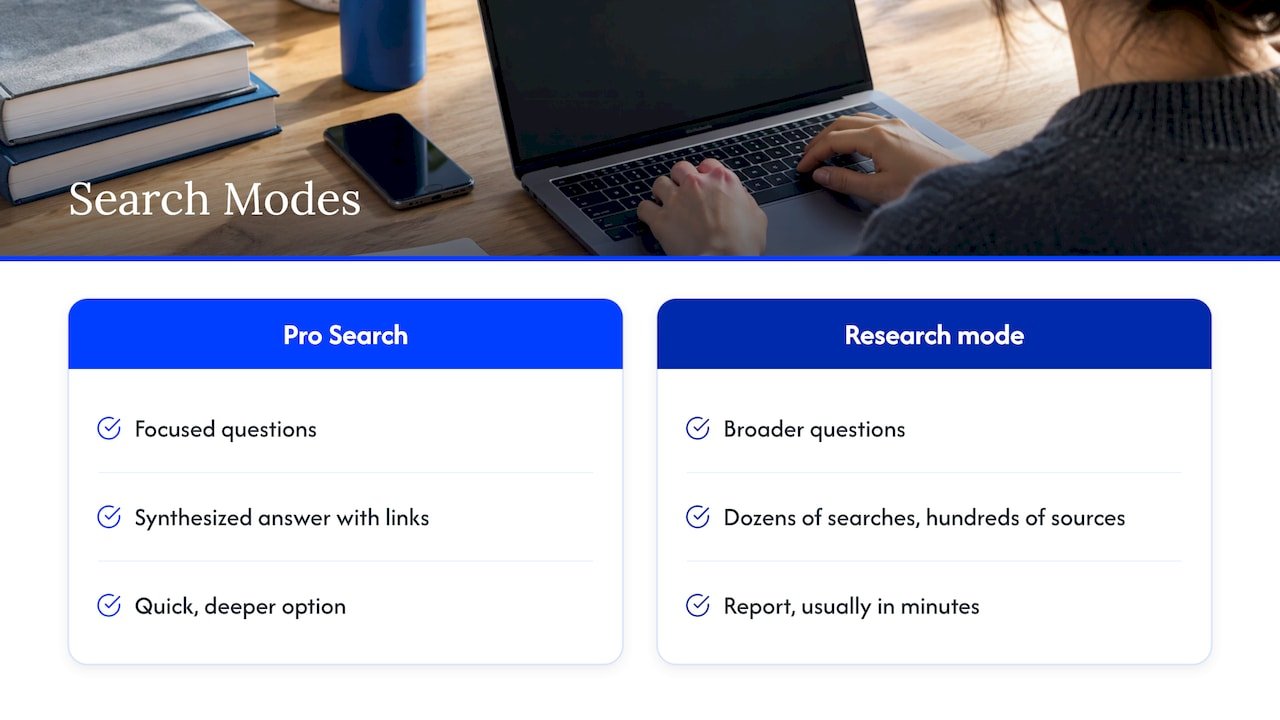
Pro Search is the quick, deeper option. Use it when you have a focused question: “What is the typical cookie duration for this program type?” or “Summarize what these three review sites say about this tool’s pricing.” You get a synthesized answer with links, fast.
Research mode is for the bigger question. According to the help center’s explanation of Research mode, it performs dozens of searches, reads hundreds of sources, and reasons through the material to deliver a report, finishing most tasks in a few minutes. You select it from the mode selector in the search box on the web, mobile, and Mac versions.
The advanced version has picked up some useful habits. Per the help center’s notes on Advanced Deep Research, it can ask clarifying questions before starting on broad queries, accept follow-ups while it is still running, show which sources it is reading, and produce reports you can edit and share. It can also run calculations, analyze data, and process documents you upload.
A simple rule of thumb: if you could answer your question in one good paragraph, use Pro Search. If you would normally need an afternoon and a spreadsheet, try Research mode, then plan to spend the saved time on checking.
Plans and limits, without the guesswork
Usage limits change, so treat the numbers here as a snapshot and confirm them on Perplexity’s own pricing page before you commit.
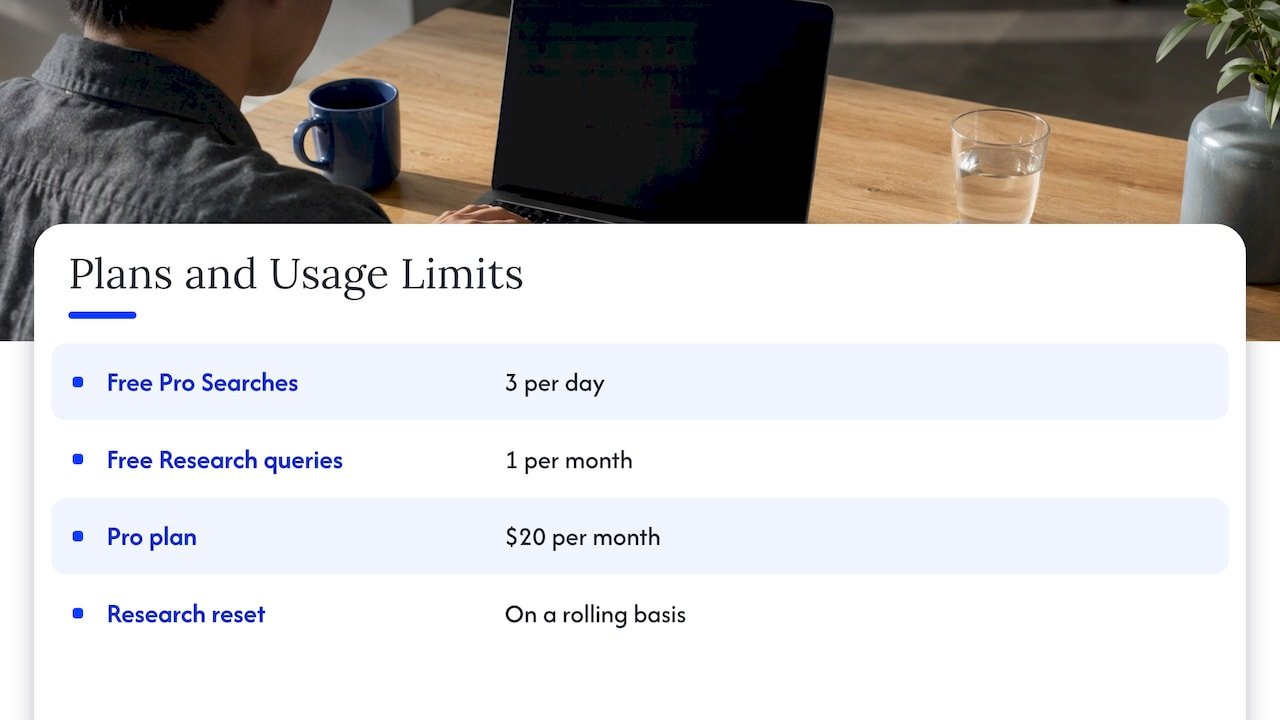
As of mid-2026, a comparison of research features reported that free users get 3 Pro Searches per day and 1 Research query per month, with higher allowances on enterprise tiers. A separate roundup lists the Pro plan at $20 per month, and notes it includes monthly API credits for developers. The free-tier numbers differ from source to source, which is a good reminder of how quickly these allowances move.
One detail is worth knowing before you burn through a quota. Perplexity states that Research limits reset on a rolling basis, not on a fixed calendar date, and renewing your subscription does not reset them. Access comes back automatically as older queries age out of the usage window.
So how do you choose? If you run a handful of research sessions a month, the free tier may be enough to learn the tool. If research is a weekly habit in your business, a paid plan tends to make sense. One comparison makes a fair point: a cheaper plan can cost more in the end if weak source selection creates hours of checking, while a top tier is wasteful if you only need occasional cited lookups. Match the plan to how often you really research.
A repeatable Perplexity workflow for affiliate marketers
A good workflow is one you can run the same way next Tuesday. Here is the one we would suggest, and you can adapt it to your niche.
Step 1: Start with the decision, not the topic
Before you open Perplexity, write one sentence about the decision this research will feed. “Should I add a review of this tool to my site?” is a decision. “Learn about AI tools” is a wander. A marketing strategy guide recommends exactly this order: define the decision first, run precise queries about the market, competitors, and customers, and then verify every important conclusion in the underlying sources. A clear decision also gives you something to measure the final report against.
Step 2: Control your sources
Perplexity’s answers are only as good as the sources it picks. You have more control over that than most people realize. Marketers can steer sources through the source selector (web, academic, social, finance, and others), through source rules written into the prompt, through uploaded files and connected apps, and through standing Project instructions, as laid out in a guide to prompting and source control.
In practice, that sounds like this: “Use only official program terms pages and published network documentation. Ignore affiliate review sites. Give me the publication date for each source.” If you build with the API, it also supports domain filters (up to 20 domains), recency filters, and date windows, per the same guide. For most of us, a clear sentence in the prompt does the job.
Step 3: Ask precise questions, then follow up
Broad questions get broad answers. Ask for one thing at a time: pricing, commission structure, terms, common complaints, recent changes. Ask for the date of each data point. Then use follow-ups to narrow. If you are doing keyword work, our AI keyword research workflow shows how to feed this kind of research into a content plan.
Step 4: Run the verification pass
This is the step that separates research you can quote from research you have to hedge. We cover it in full in the next section.
Step 5: Turn findings into reusable assets
A report that sits in a tab helps nobody. Ask what each significant finding changes, then map your conclusions to the evidence behind them, the decision they support, the action to test, and the metric that will tell you if it worked. This is the structure suggested in a guide to planning marketing strategy with Perplexity. Then store the output as templates, such as email outlines, landing page layouts, and content briefs, so one good research session feeds many pieces of content. If you want to go further, our prompt library guide walks through building a set of copy-ready prompts.
How to check Perplexity’s sources and findings
Here is the honest part. A citation is a pointer, not a guarantee.
The Georgia State University Library puts it plainly in its guide to Perplexity: citations do not automatically make an AI answer accurate, and you should open and check important sources yourself. The University of Tennessee’s research guide adds that Perplexity uses relatively few sources in its answers, can say something is in a source when it is not, and may pull sources without vetting their quality unless you set an academic focus.
Researchers have measured the gap. A May 2026 study on arXiv, Cited but Not Verified, found that even the strongest frontier models keep link validity above 94% yet reach only 39 to 77% factual accuracy. It also found that more retrieval does not mean more accurate citations.
Broken or invented links are a smaller problem than wrong claims, but they exist. An audit of 26,435 cited URLs across 53 AI models found that 0.26% did not exist. For Perplexity’s Sonar models, the invented-URL rates were about 0.04% and 1.05% depending on the model. These are low numbers, and they are still a reason to click before you cite.
A 15-minute check you can repeat
Here is a routine that takes about fifteen minutes for a short brief. A market research workflow guide describes the same idea: the check you run on an answer is what makes research quotable.
First, list every number, date, price, and named claim in the report. Second, open the cited page for each one and confirm the page really says it. Third, look at the date and the data period, because a report can blend an older figure with a newer one without telling you. Fourth, ask who published the page and what they gain from the claim. A vendor’s own blog is fine for what the vendor offers, and a poor source for how the market is doing. Fifth, for anything important, find a second source, ideally an official or primary page, and cite that one.
The same market research guide warns that Perplexity can repeat a wrong number confidently when several weak sources repeat it, and can summarize a paywalled report from a press release without truly reading it. Both are easy to catch once you know to look.
A useful pattern is the handoff: Perplexity for cited source discovery, then you open and read the sources, then scholarly databases if you need them, then drafting help from a writing tool, then a final manual check of every claim, quote, and number. One comparison of research tools describes this handoff model as a common workflow.
When to use a different approach
Perplexity is not the right tool for every job, and knowing that keeps you out of trouble.
Research mode produces a structured report that can be exported, but it does not give you a reproducible literature search. That means it cannot stand in for the documented procedures of a systematic or scoping review, as one practical guide points out. It also notes that a polished report is not evidence that the method was complete.
For affiliate marketers, this translates simply. If you are testing a claim that will go into a review, a comparison, or a recommendation people will spend money on, do the final reading yourself. If you need exhaustive, repeatable evidence, use databases and your own notes, and let Perplexity help you find the starting points. Our piece on AI product reviews covers three workflows for keeping that trust intact, and our evidence pack approach explains why the proof should come before the draft.
One more thing, since you are thinking about Perplexity as a research tool. Your own audience may be using it too. If you want your content to be found in its answers, this guide on how to rank in Perplexity walks through the basics for SEOs.
Perspective
We use AI research tools every week, and here is what we have learned: speed is not the hard part anymore. Trust is.
Most affiliate marketers we talk to do not struggle with finding information. They struggle with finishing. They run a great research session, feel the buzz of having “the answer,” and then either never act on it or publish something they have not checked. Both outcomes cost you. One wastes the work, and the other can cost you your readers’ trust.
That is why we teach research as a loop, not a lookup. Decide what you need to know, let the tool gather, check what matters, and turn it into something reusable. When you do it that way, the time you save is real, because you are not redoing the work when someone asks “where did you get that?”
If you are just starting, be kind to yourself. Your first few sessions will feel slower because of the verification step. That is normal, and it gets faster. The habit is worth far more than the shortcut.
Will
Put your research to work
Research is only useful if it ends up in something you ship. If you want ready-made ways to do that, our AI affiliate workflows page gives you recipes you can run, from research through to published content.

Want more practical, step-by-step help with AI for affiliate marketing? Start at willbuckley.com for coaching, tips, and tutorials built around saving you time without cutting corners.
FAQ
Is Perplexity good for doing research?
Yes, for the early and middle stages. It is strong at topic mapping, source discovery, and first-pass synthesis, and it links to the pages it used. It is weaker as a final authority, so open and confirm the sources behind anything you plan to publish.
How can I use Perplexity for research?
Start by writing down the decision you need to make. Then choose Pro Search for focused questions or Research mode for broad ones, tell it which kinds of sources to use, and ask for dates. Finish by checking the cited pages for every important number or claim.
Is Perplexity or a general chatbot better for research?
They do different jobs. Perplexity is built around cited web answers, which makes it handy for finding and reviewing sources. A general chatbot is often better for drafting and reworking text. Many people use them in sequence: discover and verify first, then draft, then check again.
How do I verify what Perplexity tells me?
Open each cited page and confirm it states the exact claim. Check the publication date and the data period, and look at who published it and why. For statistics and prices, find an official or primary page and cite that instead. A short routine like this takes around fifteen minutes for a brief.
Are Perplexity’s research limits the same for everyone?
No. They depend on your plan, and they change over time. Research limits reset on a rolling basis, not on your billing date. Check Perplexity’s current plan page for today’s numbers before you rely on a figure.
Sources
- Getting started with Perplexity, Perplexity Help Center
- What is Research mode?, Perplexity Help Center
- What’s New in Advanced Deep Research, Perplexity Help Center
- Perplexity: Pros and Cons of Using AI for Literature Searching, University of Tennessee Knoxville
- Perplexity: Generative AI and Research, Georgia State University Library
- Cited but Not Verified, arXiv
- Which AI model invents the most URLs?, AI Labs Audit
- Perplexity vs ChatGPT for Research: Sources, Files, and Limits, Context Wire
- Perplexity AI usage and pricing guide, AI PICKS
- Perplexity AI for Research: A Practical Guide
- Perplexity prompting and source control for marketers
- Use Perplexity for Market Research: Complete Workflow
- Perplexity vs ChatGPT for Research, Otio