

Cookie duration is the length of time a tracking cookie stays active in a visitor’s browser, and it directly decides how long you can still get credit for a sale after someone clicks your link. Set too short, you lose commissions on slower buyers. Set too long, you run into browser limits and privacy rules that quietly override what you asked for.
TL;DR:
- Browser limits, especially Chrome’s one-year cap, prevent cookies set for longer than this period from lasting that long, regardless of server requests.
- Short cookie windows of 24 to 48 hours suit impulse purchases, while 7 to 30 days cover most ecommerce needs; longer periods risk browser overrides.
- Privacy regulations suggest consent invalidation after 6 to 13 months, making it essential to align cookie duration with regional legal guidelines.
- Managing cookies with Max-Age is more predictable than using Expires, and resetting expiry only on meaningful actions helps maintain accurate attribution.
- Auditing cookie settings involves checking response headers and matching them with privacy policies, favoring Max-Age over Expires when possible.
Table of Contents
- How cookie duration gets set behind the scenes
- Real-world cookie lifespans and the caps browsers now enforce
- What cookie duration means for affiliate tracking and attribution
- Privacy rules that shape how long cookies should last
- A practical checklist for choosing your cookie duration
- Auditing and fixing cookie duration on your affiliate links
- Choosing cookie duration without losing sleep over privacy
- Guides that help you put this into practice
- FAQ
- Sources
How cookie duration gets set behind the scenes
Every cookie’s lifespan comes from two possible attributes in the server’s Set-Cookie header: Expires and Max-Age. Expires names an exact calendar date and time when the cookie should die. Max-Age instead counts down in seconds from the moment the cookie lands in the browser, and when both are present, Max-Age wins.
If neither attribute shows up, you get a session cookie: one that should disappear the moment the browser closes, though some browsers restore old sessions on relaunch and bring those cookies back with them. A persistent cookie, by contrast, keeps living until its set date arrives or someone wipes it manually.
Here’s what matters for anyone managing tracking links:
- Max-Age is usually the safer choice because it avoids clock-sync problems between the visitor’s device and your server.
- Setting a cookie’s Max-Age to 0 deletes it immediately, which is the standard way to force a tracking cookie to expire.
- Refreshing a cookie’s expiry every time someone returns can make it behave like it never expires at all, according to MDN’s cookie guide.
Real-world cookie lifespans and the caps browsers now enforce
Different jobs call for wildly different lifespans. A login “remember me” cookie might run 30 to 90 days. Analytics cookies used to stretch out two years as a default, though plenty of platforms now trim that back. Advertising and affiliate tracking cookies tend to land somewhere between a day and 90 days, depending on how long it typically takes someone to buy.
Here’s the catch: the browser gets the final say, not you.
- Chrome caps any requested cookie expiration at a little over one year, no matter what your server asks for.
- Safari’s Intelligent Tracking Prevention can shrink script-set tracking cookies down to a matter of days in certain scenarios.
- Storage pressure or built-in privacy protections can also cause early eviction, even inside your requested window, as RFC 6265 notes when it says user agents may remove cookies ahead of schedule.
A cookie you set for 400 days or more never actually lasts that long in Chrome, because the browser quietly clamps it down regardless of what your Set-Cookie header requests. That single fact changes how you should plan any long-window affiliate program.
What cookie duration means for affiliate tracking and attribution
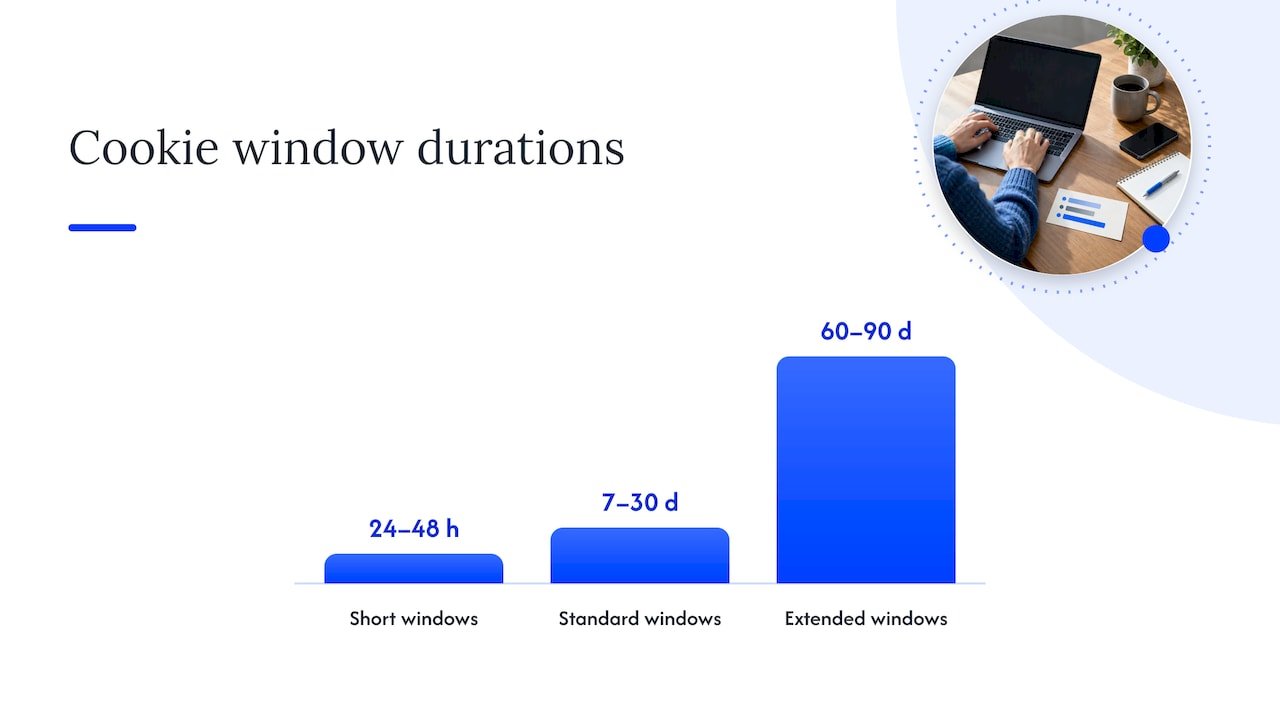
In affiliate marketing, cookie duration is usually called the cookie window: the stretch of time between someone clicking your link and still getting you credited for their purchase. Get the window wrong and you either pay out on sales you had nothing to do with, or you shortchange partners who did real work driving a slow-to-convert customer.
A few patterns show up again and again:
- Short windows (24 to 48 hours) suit impulse buys and flash sales where people decide fast.
- Standard windows (7 to 30 days) cover most everyday ecommerce and digital product sales.
- Extended windows (60 to 90 days) fit higher-consideration purchases like software subscriptions or courses.
- “Lifetime” cookies exist in some programs but are rare and usually reserved for high-value referral relationships.
Overlapping cookies create another wrinkle. If a shopper clicks three different affiliate links before buying, most programs use last-click attribution, meaning whichever cookie fires closest to check out wins the commission, though some use first-click instead. Resetting a cookie’s expiry every time a visitor returns can also quietly shift credit toward whoever gets the most recent click, which is worth knowing if you’re relying on repeat visits to stay in the running.
Privacy rules that shape how long cookies should last
Technical limits aren’t the only ceiling on cookie duration. Consent rules matter just as much, and they’re often misunderstood. The EDPB’s guidelines on consent state plainly that GDPR sets no fixed time limit on how long consent remains valid. Instead, duration should match the purpose of the processing, and consent needs to be refreshed whenever that purpose changes.
National regulators have filled in some of that gap with their own recommendations:
- France’s data protection authority has suggested a 13-month ceiling as reasonable practice for many cookies.
- Other authorities point to 6 to 12 month consent refreshes as a sensible rhythm.
- The EDPB’s broader guidance ties good practice back to the purpose principle rather than a single universal number.
It helps to think of three separate clocks running at once: how long the cookie itself stays in the browser, how long the consent behind it stays valid, and how long you’re allowed to retain the data it collects. Treating those as one clock is a common and avoidable mistake.
A practical checklist for choosing your cookie duration
Picking a number shouldn’t be a guess. Walk through these questions in order:
- How long does your typical sales cycle run, from first click to final purchase?
- What’s the hard technical ceiling your platform or browser enforces?
- What does your privacy policy or regional guidance say about acceptable consent windows?
- Does the business goal favor rewarding the first referrer or the most recent one?
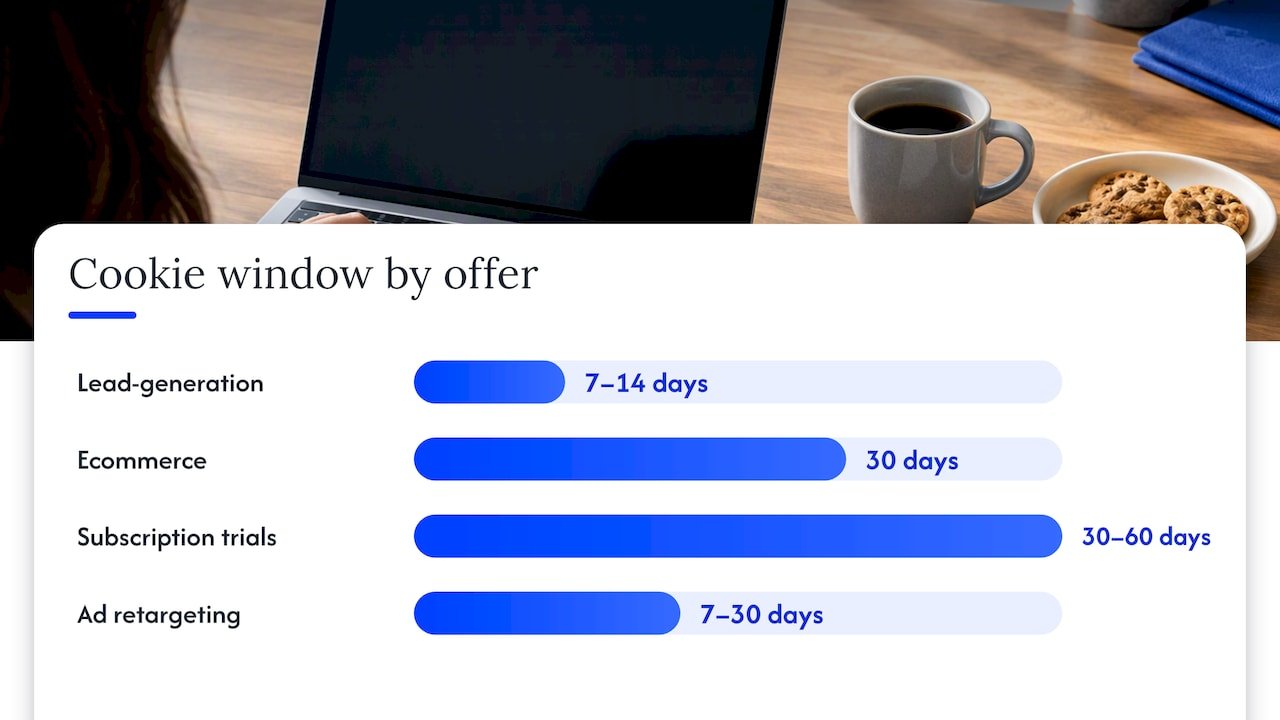
For reference, lead-generation offers often work well with 7 to 14 day windows, ecommerce with 30 days, subscription trials with 30 to 60 days, and ad retargeting with 7 to 30 days depending on the product.
A few operational habits keep things clean: reset a cookie’s expiry only when someone takes a meaningful action, like a new visit or a cart addition, not on every page load. Keep your consent records in a separate log from your cookie expiry settings. And resist the urge to stretch every cookie to the maximum your platform allows, since longer isn’t automatically better once attribution disputes and privacy complaints enter the picture.
Pro Tip: Document your chosen cookie windows in one place alongside the reasoning behind each, so you’re not reverse-engineering your own logic a year from now.
Auditing and fixing cookie duration on your affiliate links
If you run affiliate links on your own site or manage a program, a quick audit beats guessing. Open your browser’s developer tools, check the Set-Cookie headers on your key pages, and compare what you find against your consent management platform’s logs and your analytics or attribution tool’s own cookie settings.
Common fixes once you spot a problem:
- Switch Expires-based cookies to Max-Age where possible, for more predictable behavior.
- Force immediate expiration with Max-Age=0 when a cookie has served its purpose.
- Reset meaningful cookies on conversion events rather than every page visit.
- Store consent timestamps separately from the technical cookie expiry itself.
If your traffic leans heavily on redirects, it’s worth piloting server-side or cookieless tracking setups as a backup, since bounce-tracking mitigations in some browsers can clear site storage after roughly 45 days of inactivity, which quietly breaks redirect-only flows.
Choosing cookie duration without losing sleep over privacy
Chasing the longest possible cookie window is a losing game now that browsers clamp expirations and regulators expect purpose-driven consent. The better move is matching your window to how your customers actually buy, documenting that choice, and treating cookieless or server-side tracking as a real backup rather than an afterthought. Readers who want the hands-on version of this can find more detail in our guides on AI-driven marketing analytics.
— Will
Guides that help you put this into practice
Once you know what duration you need, the next step is making your tracking actually hold up to browser limits and privacy rules instead of quietly breaking under them. We’ve put together a few resources that walk through exactly that.

- Our cookieless affiliate tracking setup walks through building a server-side alternative in under an hour.
- Our conversion optimization workflows show how attribution windows connect to real campaign results.
- For partner reading on reducing reliance on client-side cookies, Vertical Brands’ cookieless playbook covers the broader shift happening across growth teams.
If you’re ready to fix your tracking setup instead of just reading about it, our YouTube automation affiliate playbook walks you through the practical steps start to finish.
FAQ
What does a 30-day cookie duration mean in an affiliate program?
A 30-day cookie duration means you have 30 days from the moment someone clicks your affiliate link to earn credit if they complete a qualifying purchase. After that window closes, a new click (yours or a competing affiliate’s) typically resets who gets credited.
What is the 80/20 rule in affiliate marketing?
The Pareto principle is the general observation that a small share of your efforts or partners tends to produce most of your results. In affiliate marketing, it commonly shows up as a handful of top affiliates or content pieces driving most of the revenue, though the exact split varies by program.
How does cookie expiration work?
Cookie expiration is controlled by the Expires or Max-Age attributes set in the Set-Cookie header, and Max-Age takes priority when both appear. Once that time passes, or once Max-Age is set to 0, the browser deletes the cookie and any tracking tied to it stops.
Can you explain what cookies are and how they work?
Cookies are small pieces of data a website asks your browser to store, used for things like staying logged in, remembering preferences, or tracking which link brought you to a page. The server sends the cookie through an HTTP header, the browser holds onto it for the requested duration, and it gets sent back on future visits until it expires or gets deleted.
Do browsers always honor the cookie duration a website requests?
Not always. Chrome caps requested durations at roughly 400 days regardless of what a site asks for, and Safari’s tracking prevention can shorten script-set cookies even further in some cases, so the actual lifespan can end up shorter than planned.