

If you run affiliate sites, prioritize meeting Core Web Vitals (LCP, INP, CLS) right now. They mark the fastest path from traffic to conversions, and they decide whether your review pages even get discovered. Run PageSpeed Insights on your top three landing pages today and check your origin CrUX data before you touch anything else.
TL;DR:
- Compare field results with targets of LCP 2.5 seconds or less, INP 200 milliseconds or less, and CLS 0.1 or less.
- A perfect Lighthouse score from one simulated session does not prove real visitors meet thresholds; use CrUX field data to prioritize fixes.
- Compress and resize images, enable caching, and remove unused plugins before developer work; these low effort changes can address LCP without code.
- Focus effort on highest traffic landing pages and best converting reviews, then compare affiliate click rates and conversions with a prechange baseline.
- Test one change at a time on staging, then verify affiliate tracking and click reports the next day before deploying it live.
Table of Contents
- Why site speed matters specifically for affiliates
- Core Web Vitals for affiliates: what to measure and target thresholds
- High-impact technical fixes: quick wins vs developer work
- Tools and resources affiliates should use (free first)
- A compact 1-4 week action plan affiliates can execute
- Will Buckley’s affiliate-first speed checklist and practical notes
- How site speed affects affiliate monetization beyond SEO
- Advanced AI-driven techniques for affiliate site speed
- Integrating site speed work into an automated affiliate workflow
- Author perspective: tradeoffs to accept to protect earnings
- Faster pages, measured results
- FAQ
- Sources
Why site speed matters specifically for affiliates
Your readers click an affiliate link within seconds of landing, or they bounce to a competitor’s comparison page. A slow review page does not just frustrate people. It quietly kills the exact behavior your revenue depends on.
Search visibility compounds the problem. Google uses mobile-first indexing, and Core Web Vitals factor into how pages rank, which means a sluggish comparison chart can lose both the click and the ranking that would have sent the click in the first place.
Affiliate pages carry unique risk factors:
- Comparison tables and pricing widgets often load third-party scripts that block rendering.
- Image-heavy review posts frequently skip compression, dragging out load time.
- Embedded trackers and ad tags add requests that delay interactivity exactly when a reader is ready to click “buy.”
We’ve found that the pages generating the most affiliate revenue are often the slowest, because they carry the most widgets, tables, and tracking pixels. That’s backwards, and it’s fixable.
Core Web Vitals for affiliates: what to measure and target thresholds
Three metrics matter now, and Google’s Core Web Vitals documentation defines each one with a clear “Good” threshold:
- Largest Contentful Paint (LCP): the time until your biggest visible element loads, target 2.5 seconds or less.
- Interaction to Next Paint (INP): how fast your page responds to clicks and taps, target 200 milliseconds or less.
- Cumulative Layout Shift (CLS): how much your layout jumps around as it loads, target 0.1 or less.
These thresholds are measured based on real user visits, not just your best test run. That distinction matters: a page can score perfectly in a single lab test and still fail Core Web Vitals for most actual visitors.
This is why field data deserves priority over lab scores. Lab tools like Lighthouse are useful for debugging a specific issue, but they test one simulated session. Field data, pulled from the Chrome UX Report (CrUX), reflects what real people on real devices and real networks experienced.
Don’t chase a perfect 100 in PageSpeed Insights. Diminishing returns set in fast, and the hours spent shaving off the last few lab points are better spent getting your field metrics into the “Good” range where conversions actually respond.
High-impact technical fixes: quick wins vs developer work
Not every fix deserves the same hour of your week. Start where the effort is lowest and the payoff is immediate, then move toward changes that need a developer.
- Compress and resize images before upload, and serve modern formats like WebP.
- Enable browser caching through your hosting panel or a caching plugin.
- Remove plugins you don’t actively use, especially ones that load scripts on every page.
- Cut unnecessary redirect chains on your affiliate links and internal navigation.
- Add a content delivery network (CDN) to serve assets closer to your visitors.
- Switch to faster hosting or reduce time to first byte (TTFB) if your current plan is shared and overcrowded.
- Minify your CSS and JavaScript files to cut transfer size.
- Split large JavaScript bundles so the browser isn’t parsing code it doesn’t need on first load.
- Audit long tasks that block INP, often caused by affiliate tracking scripts or chat widgets.
- Simplify DOM and CSS complexity on pages with heavy comparison tables.
Cloudflare’s performance guidance lists image optimization, caching, CDN adoption, and trimming render-blocking JavaScript as the core techniques that move the needle fastest, and that order roughly matches the effort-to-payoff curve above.
Pro Tip: Fix images and caching first. Those two changes alone often resolve LCP issues without touching a line of code.
Tools and resources affiliates should use (free first)
You don’t need a paid audit to find your biggest problems. Start with the free tools built for exactly this job, then add monitoring once you’ve handled the obvious fixes.
- Diagnostics: PageSpeed Insights gives you both a lab test through Lighthouse and field data pulled from CrUX in one report, which covers most of what you need to prioritize.
- Field monitoring: the web-vitals JavaScript library can be added to your site to capture real user INP data and flag which specific scripts or click handlers are causing slow interactions.
- Origin-level data: when a single page gets too little traffic for CrUX to report on it directly, pull origin-level CrUX data through the API to get a usable baseline anyway.
- Image and CDN services: handle resizing, compression, and geographic delivery so your server isn’t doing that work on every request.
- Caching plugins: store a ready-to-serve version of your pages so repeat visitors load almost instantly.
- Hosting: the foundation underneath all of it, since no plugin fixes a server that’s simply too slow to respond.
A compact 1-4 week action plan affiliates can execute
You don’t need a quarter-long project to see a real difference. A focused month gets you there.
- Week 0: Run PageSpeed Insights on your top five pages, pull origin CrUX data, and strip out any plugin or script you don’t actively need.
- Weeks 1-2: Compress images, turn on caching, add a CDN, and start watching field metrics for movement.
- Weeks 3-4: Tackle script splitting and hosting upgrades, then compare conversion rates against your pre-project baseline.
| Week | Focus | Checkpoint |
|---|---|---|
| 0 | Baseline and cleanup | PSI and CrUX scores recorded |
| 1 to 2 | Images, caching, CDN | Field LCP trending down |
| 3 to 4 | Scripts and hosting | Conversion rate compared to baseline |
Will Buckley’s affiliate-first speed checklist and practical notes
We built our own checklist around the pages that actually make money, not every page on the site.
- Start with your highest-traffic landing pages and your best-converting reviews, not your archive pages.
- Audit every plugin for overlap. Two caching plugins or three SEO plugins running analytics calls will fight each other.
- Defer non-critical widgets like chat boxes and related-post carousels so they load after the main content.
- Before running any speed experiment, confirm your affiliate link tracking and click pixels still fire correctly. A faster page that breaks your tracking isn’t a win.
Pro Tip: Test one change at a time on a staging copy, and check your affiliate click reports the next day before rolling the change out to your live pages.
We cover more of this hands-on approach in our WordPress theme guidance for affiliates, where theme choice alone can shift your baseline load time before you touch a single plugin setting.
How site speed affects affiliate monetization beyond SEO
Rankings are only half the story. Speed also touches the mechanics that put money in your account.
Ad impressions depend on a page actually finishing its load. If a visitor bounces before your ad units render, that impression never counts, and a slow page loses revenue even when the click already happened.
Affiliate link tracking has its own timing risk. Many tracking pixels and redirect scripts fire during page load, and a page that’s still loading scripts when a visitor clicks can lose or delay that click’s attribution. A fast page gives tracking scripts time to load and fire cleanly before the visitor acts.
Affiliate network acceptance criteria add another layer. Some networks and advertisers review a publisher’s site quality, including load performance, before approving an application or renewing a partnership. A consistently slow site can quietly cost you access to better-paying programs, not just rankings.
For measuring conversion impact on review and comparison pages once your fixes are live, track click-through rate on your affiliate links alongside your Core Web Vitals scores so you can see both sides of the equation move together.
Advanced AI-driven techniques for affiliate site speed
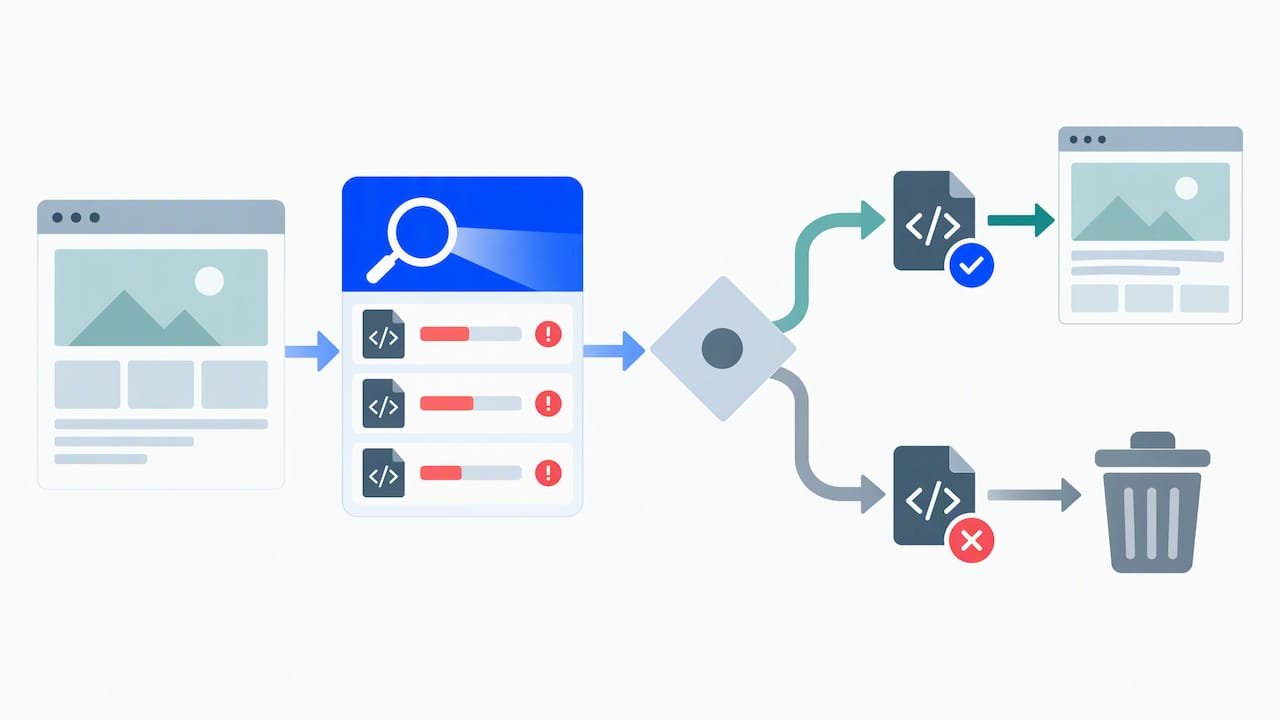
AI tools now handle parts of speed diagnosis that used to take a developer’s afternoon. Several platforms can crawl your site, flag render-blocking scripts, and suggest a prioritized fix list based on which issues affect the most pages.
Image optimization has moved almost entirely to automated pipelines: upload a photo and an AI-driven service resizes, compresses, and serves the right format to each visitor’s device without manual intervention on every post.
For diagnosing INP problems specifically, pairing the web-vitals attribution build with Long Animation Frame entries helps you see which script or click handler is responsible for a slow interaction, and some monitoring dashboards now summarize that data into a plain-language list of what to fix first instead of raw technical output.
None of this replaces judgment. An automated scan can tell you which script is slow. Deciding whether that script is your affiliate network’s required tracking code or a carousel plugin you can simply delete still takes a human decision, and that’s where your time is best spent.
Integrating site speed work into an automated affiliate workflow
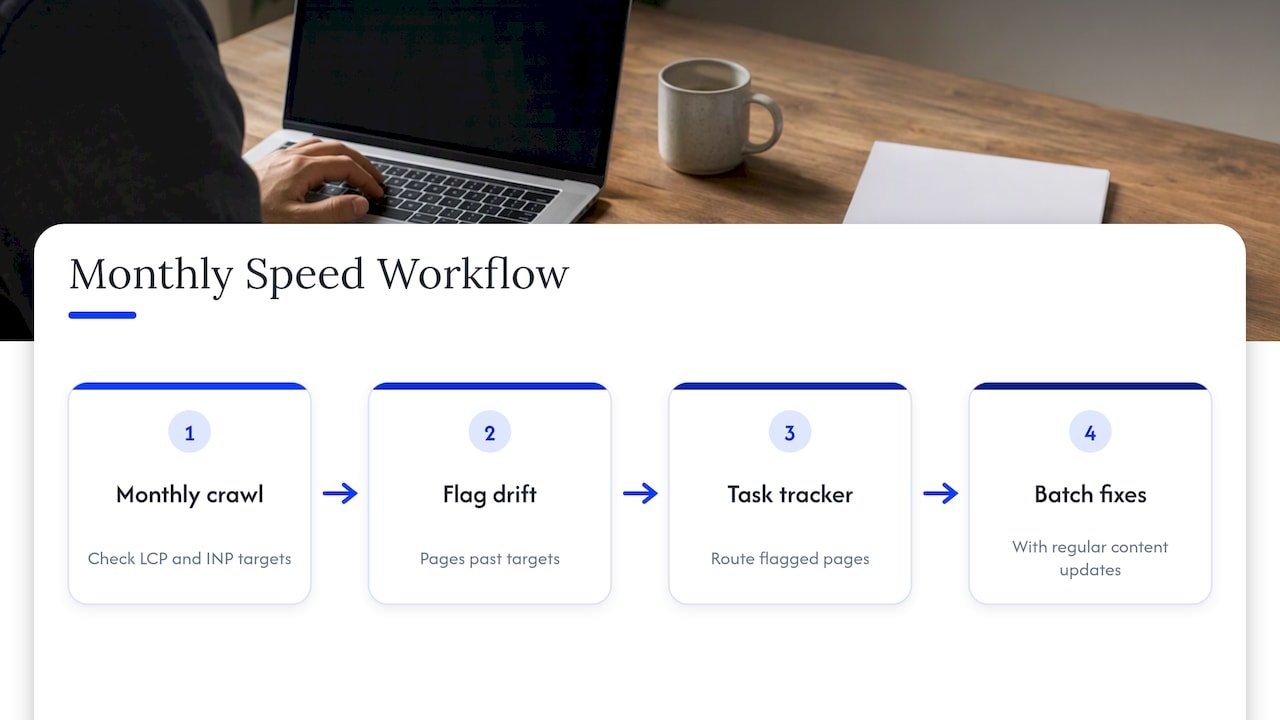
Speed work doesn’t have to sit in its own silo. Once you’ve got a baseline from PageSpeed Insights and CrUX, that data can feed directly into the same workflow you use for content production and link management.
A practical setup looks like this: schedule a monthly automated crawl that flags any page whose LCP or INP has drifted past your targets, route that list into your existing task tracker, and batch the fixes alongside your regular content updates instead of treating speed as a separate emergency project.
If you’re already running automation to fix broken affiliate links on a schedule, add a speed check to that same cadence. The two problems, dead links and slow pages, both erode conversions quietly, and catching both in one monthly pass saves you from running separate audits.
For sites built on a programmatic content model across dozens or hundreds of pages, bake your speed fixes into the template itself. Fixing image compression and script loading at the template level means every new page you generate inherits the fix automatically, instead of needing a manual pass later.
Author perspective: tradeoffs to accept to protect earnings
We’d rather see a plainer page that loads fast than a feature-packed one that drives readers away before the affiliate link ever gets clicked. Cut the widget before you cut the testing time.
Small wins compound. A half-second saved on image load times, repeated across fifty pages, moves your site-wide numbers more than one dramatic fix on a single post.
Spend your first hours on the cheapest fixes. Hire help only once you’ve exhausted what a compression tool and a caching plugin can do on their own.
— Will
Faster pages, measured results
We help affiliate marketers turn speed fixes into actual conversion gains, not just better lab scores. Once your pages load fast, the next step is making sure your automation and link health keep pace with them.

- Pair your speed fixes with a tracked rollout so you can see the conversion lift, not just the PageSpeed number.
- Start with our pilot program for fixing affiliate links and automating the cleanup, built to run in two to four weeks alongside the fixes in this guide.
FAQ
What is the 80/20 rule in affiliate marketing?
A small share of your pages, often your best review or comparison posts, generates most of your affiliate revenue. Applied to site speed, it means fixing your highest-traffic pages first delivers far more return than spreading effort evenly across your entire site.
What is a good website speed?
A good website meets Core Web Vitals thresholds: LCP at 2.5 seconds or faster, INP at 200 milliseconds or faster, and CLS at 0.1 or lower. Meeting all three consistently, rather than scoring perfectly in a single lab test, is what counts as genuinely fast.
Where can I get traffic for my affiliate links?
Search traffic from well-optimized, fast-loading review and comparison content is one of the most durable sources, since speed and content quality both feed into how Google ranks a page. Our guide on what actually moves affiliate revenue covers the content side of that equation in more depth.
Can I use ChatGPT for affiliate marketing?
Yes, many affiliate marketers use ChatGPT for drafting content, brainstorming comparison angles, and organizing research, though the output still needs a human edit for accuracy and voice. We walk through practical prompts and workflows in our guide to ChatGPT for affiliate marketing.