

Affiliate links are not an automatic spam trigger, but they often travel with risky signals: denylisted destinations, redirect chains and weak engagement. Before your next send, authenticate your sending domain with SPF, DKIM and DMARC, add a List-Unsubscribe header, and stop mailing purchased lists. Follow Gmail’s sender guidelines and CAN-SPAM to help protect your ability to keep monetizing. I’m Will, and this is the playbook I coach.
TL;DR:
- Gmail cites 0.3% spam complaints as an eligibility ceiling, so monitor Postmaster Tools and your email service provider dashboard before rates approach it.
- Publish DMARC at p=none while reviewing reports, confirm SPF and DKIM pass, and add an unsubscribe header that supports one click removal.
- Purchased lists can contain spam traps and unconsenting addresses, risking sender reputation or email provider suspension; use double opt in and suppress persistently inactive subscribers.
- Route affiliate clicks through a bridge page on your domain, screen partner URLs with Google Safe Browsing, SURBL, and Spamhaus, and avoid redirect chains.
- Federal law requires marketers to honor opt out requests within 10 business days, and affiliate arrangements do not shield other parties in the chain.
Table of Contents
- Do affiliate links trigger spam filters on their own?
- How do mailbox providers score your messages?
- Which technical settings should you fix first?
- How do list hygiene and content protect your reputation?
- What does a safe affiliate link workflow look like?
- Why I put list health ahead of monetization
- Want templates and audits for this checklist?
- FAQ
- Sources
Do affiliate links trigger spam filters on their own?
A link earning you a commission is not necessarily a spam trigger. What filters and providers react to is the company the link keeps: the reputation of the destination domain, how many hops sit between the click and the final page, and how recipients behave after opening.
Gmail’s guidelines warn that brands tied to marketing spam can see their domain reputation suffer, and they recommend monitoring affiliate programs so you can drop affiliates who spam. Mailchimp’s guidance echoes this: affiliate links are often allowed, yet accounts can still be suspended for predominantly promotional content or links to denylisted domains.
Here is what tends to raise the risk:
- Destinations on a denylist or with a poor reputation
- URL shorteners and third-party redirectors that many senders abuse
- Long redirect chains between the email and the final page
- Display text that shows one domain while the link points to another
- Emails that read like pure advertising with no value for the reader
Legal exposure matters too. Under the FTC’s CAN-SPAM compliance guide, affiliate arrangements do not shield anyone in the chain, and opt-out requests must be honored within 10 business days. The FTC has gone after more than one party in an affiliate chain, as in its Double spammy case. If your affiliates send badly, that can land on you.
How do mailbox providers score your messages?
Providers look at the whole picture, not just links. Authentication comes first: Gmail guidance treats SPF, DKIM and DMARC as essential for serious senders, because they prove the mail really comes from your domain.
Next comes recipient behavior. Gmail’s Verified Sender guidance asks senders to keep user-reported spam rates very low, with examples citing 0.3% as a ceiling for eligibility, and it recommends watching your numbers in Postmaster Tools. Treat that as a hard line you never want to approach.
Infrastructure counts as well:
- Sending from a domain you control, with proper DNS records and TLS
- Avoiding shared or abused redirect domains that borrow someone else’s bad reputation
- Keeping complaint and bounce rates low enough that your ESP never has to step in
ESPs enforce their own rules on top of the mailbox providers. Mailchimp’s Acceptable Use Policy says denylisted URLs trigger scanning and can lead to stopped emails or account suspension. A denylisted link can lead to stopped emails or account suspension, depending on the provider’s policies.
Which technical settings should you fix first?
These steps can help improve deliverability, so work through them in order:
- Set up SPF and DKIM for your sending domain and confirm they pass.
- Publish a DMARC record, starting at p=none so you can read the reports before tightening anything.
- Add a List-Unsubscribe header with one-click unsubscribe. Gmail’s sender FAQ ties missing headers and failed authentication to enforcement.
- Watch Postmaster Tools and your ESP dashboard for spam rates, bounces and reputation shifts.
- Send from a consistent branded domain, never a free @gmail address, and avoid sudden volume spikes. HubSpot’s deliverability guidance recommends a gradual ramp-up.
If DNS records feel foggy, Digistrat’s explainer on SPF, DKIM and DMARC walks through why getting them wrong is costly.
Pro Tip: Change one thing at a time and send a small batch before the full list, so you know exactly which change moved your numbers.
How do list hygiene and content protect your reputation?
Your list does more for inbox placement than any clever link trick. Brevo’s deliverability guide names contact-list quality as the primary factor and notes that bounce and complaint thresholds can lead to account suspension.
- Never buy a list. Purchased lists may contain spam traps that can harm a domain or IP address’s reputation.
- Use double opt-in so every address belongs to someone who wants your mail.
- Re-engage quiet subscribers, then suppress or remove the ones who stay silent.
- Lead with value, and disclose the affiliate relationship plainly. Our affiliate disclosure examples give you wording you can copy.
- Skip URL shorteners, cap the number of external links, and use descriptive link text placed in context.
Have you ever opened an email that felt like a billboard? Your readers feel the same way, and a spam complaint costs you more than a skipped sale. If you’re still building, our guide to building an affiliate email list covers the opt-in workflow from the start.
What does a safe affiliate link workflow look like?
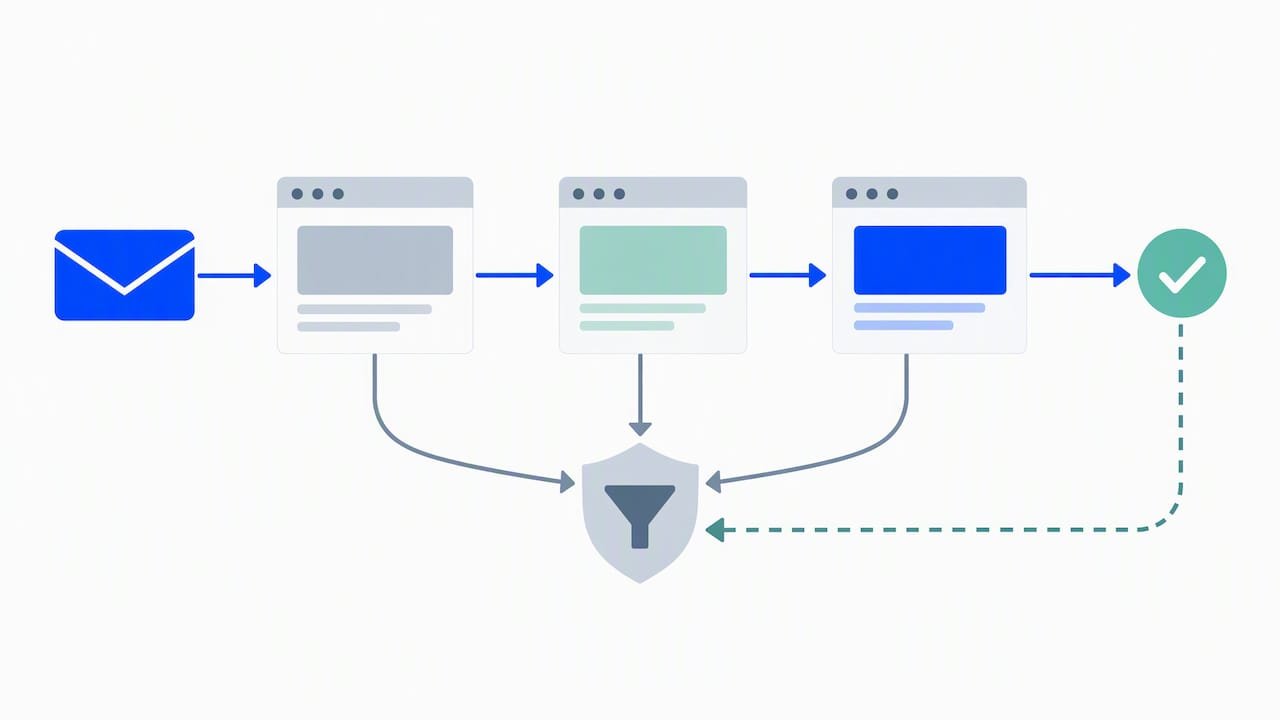
The goal is simple: the recipient should see your domain first, and nothing in the chain should look shady.
- Send readers to a bridge page on your own domain that holds the affiliate link, so your URL is the first thing they and the filters see.
- If you must redirect, host the redirect on a subdomain of your sending domain. Avoid third-party redirectors and redirect chains.
- Check every partner link before sending with reputation tools such as Google Safe Browsing, SURBL and Spamhaus, and skip known denylisted domains.
- Limit how many affiliate links go into one message, then review complaints after each campaign.
- Ramp volume slowly when you add a new link type or a new segment.
Cloaking alone does not fix deliverability. It hides the destination from readers, not from the systems that scan where the link ends up. Our AI link placement audit shows how to test placement before you hit send.
Pro Tip: Keep a short log of every link you send and the complaint rate that followed, so you can spot a bad destination within a campaign or two.
Why I put list health ahead of monetization
I have coached enough affiliates to see the same pattern: the ones who protect their list earn more over time than the ones who squeeze every send. A burned domain costs far more than one skipped promotion. So I start with authentication, then audience-first content, then links. I help affiliates explore link placement and subject-line-to-content alignment with AI workflows, and I share practical guidance in the newsletter.
— Will
Want templates and audits for this checklist?
We built our resources for affiliates who want to keep deliverability intact while earning from links. Our AI newsletter growth guide shows how to grow a list you can safely mail, and our AI workflow automation guide helps you turn this checklist into a repeatable routine. Join the newsletter for practical guidance. It’s optional, and this article stands on its own.

FAQ
How do I improve my email deliverability?
Start with authentication (SPF, DKIM and DMARC), then add a List-Unsubscribe header and keep your spam complaints low. Use a clean, opted-in list and ramp volume gradually, as HubSpot recommends.
Can you buy email lists for marketing?
You can, but you should not. Purchased lists often contain spam traps and people who never agreed to hear from you, which damages your sender reputation and can get your ESP account suspended. Build your own list with double opt-in instead.
How do I get clicks on affiliate links without hurting deliverability?
Make the email useful first, then place one relevant link in context with descriptive text. Send readers through a bridge page on your own domain, and avoid shorteners and long redirect chains.
Do affiliate links automatically send emails to spam?
No. Trouble starts when links point to denylisted or low-reputation domains, or when the email draws complaints. Clean authentication and engaged subscribers keep affiliate links from becoming a problem.
Sources
- Email sender guidelines – Gmail Help
- CAN-SPAM Act: A Compliance Guide for Business | Federal Trade Commission
- Improve email deliverability