

If you want the short answer: pick Elementor if you value a gentle learning curve, a huge library of templates and add-ons, and fast marketing pages. Pick Bricks if you are comfortable with a steeper start and want cleaner code, a lighter baseline and a price that does not climb with features. Both build real, profitable affiliate sites, so the better question is which one matches how you work.
Have you ever spent a weekend choosing a tool, only to realize you never started building? That happens a lot with page builders. Let’s make the decision simple.
TL;DR
- Elementor is a plugin that sits on top of your theme. Bricks is a theme that controls the whole site.
- Elementor wins on ecosystem, templates and ease of learning. Bricks wins on lean output, built-in features and reusable styling.
- One independent test found Bricks lighter and faster out of the box, but hosting, plugins and content move those numbers a lot.
- Bricks lists four plans, from $79 per year to a $599 lifetime license. Elementor’s current amounts are on its own pricing page.
- Moving from Elementor to Bricks means rebuilding, not converting, so choose carefully before you publish dozens of pages.
Table of Contents
- The basic difference: plugin versus theme
- Editing experience: familiar versus precise
- Features, templates and add-ons
- Speed, code output and SEO
- Pricing and plan limits
- Requirements to check with your host
- Which one fits your situation
- Thinking about switching later
- Our take
- Build faster once the builder is chosen
- FAQ
- Sources
The basic difference: plugin versus theme
This is the part most comparisons bury, and it explains almost everything else. Elementor is a plugin you install on an existing theme, while Bricks is itself a WordPress theme with live front-end editing and built-in functionality. In practice, Bricks controls the whole site as the active theme, and Elementor sits above whichever theme you run.
What does that mean for you? With Elementor, you choose a theme first (usually a lightweight one), then design pages on top. With Bricks, headers, footers, templates and global styles all live in one place, and there is no separate theme to coordinate. That is tidy, but it also means Bricks is a commitment: if you ever leave, you leave the theme too.
Bricks describes itself as a visual site builder for self-hosted WordPress, with full-site editing, clean HTML and CSS output, responsive controls, dynamic data, query loops, reusable design systems, custom code, WooCommerce building, menus, conditions and interactions. Elementor describes itself as a drag-and-drop builder with AI tools, templates, WooCommerce support, integrations and managed hosting options. Those two sentences already tell you the personalities: Bricks leans toward structure, Elementor toward a broad toolbox.
Editing experience: familiar versus precise
Elementor’s editor feels like painting on the page. You drag a widget in, click it, tweak it, and see the result. It is friendly, and that is the reason so many freelancers and clients like it. Elementor’s own documentation notes that editing is not available on phones or tablets, so plan to build from a desktop browser.
Bricks gives you a similar visual canvas, but it puts more emphasis on structure: a panel showing how every element nests, and class-based styling you define once and reuse. A studio that works with both describes Bricks’ reusable classes against Elementor’s widget-by-widget adjustments. The same write-up concludes that Elementor is easier to learn and often quicker for simple marketing pages, while Bricks’ class system repays the steeper start on larger sites where you keep making repeated changes.
Here is a way to feel the difference. Imagine you decide to change the button color across forty review pages. In a class-based setup, you edit one class. In a widget-based setup, you may be hunting through pages or relying on global settings you configured earlier. If your site will stay at ten pages, that difference barely matters. If you are building a review library that grows every month, it matters a lot.

Features, templates and add-ons
Elementor’s biggest advantage is its surroundings. A practitioner comparison puts it this way: Elementor’s strengths are its large widget, template and add-on ecosystem, marketing tools and mature WooCommerce workflow, while Bricks emphasizes native query loops, dynamic data, reusable classes, custom breakpoints and developer-level code control, with a smaller third-party ecosystem.
Elementor’s own materials list Theme Builder, dynamic content, WooCommerce widgets, marketing forms, popups, advanced design controls and custom code or CSS among its Pro capabilities. Its newer subscription, Elementor One, bundles creation, optimization and management, including AI generation, image optimization, an email sender, accessibility tools and a site manager, all drawing on shared credits.
Bricks takes the opposite route and builds more in. Its built-in features page says native functions such as AJAX filtering, popups, mega menus, forms, maps, API queries and password protection can reduce your reliance on specialist plugins, while admitting that specialist plugins still make sense for deeper requirements. The Bricks pricing page adds that every plan includes all features, 149 elements, updates, support, community templates, the Query Loop Builder, Menu Builder, Popup Builder and WooCommerce Builder.
For affiliate sites, a few of these matter more than others:
Comparison tables and review grids. Query loops and dynamic data let you pull custom fields (price, rating, pros, cons) into repeatable cards. Bricks does this natively. Elementor can do it with its Pro dynamic content tools and add-ons.
Popups and forms. Email capture is where many affiliate sites earn their first real return. Both builders cover this, either in the box or within paid tiers.
Landing and bridge pages. If you run warm-up pages before sending traffic to an offer, Elementor’s template abundance gets you to a first draft quickly. Our guides to bridge page examples and presell page examples show the layouts worth copying in either builder.
Speed, code output and SEO
This is where the internet argues loudest, so let’s be careful. One hands-on test reported that Bricks scored 97 on desktop PageSpeed after optimization versus 91 for Elementor, with a total page size of 280KB versus 490KB. The same source is clear that results vary with hosting, themes, plugins and content. Another review notes that Elementor’s asset optimization features can reduce its loading cost, but its baseline is generally heavier than Bricks, and third-party add-ons may not benefit fully.
So is Bricks faster? Out of the box, usually yes. Bricks says it produces clean HTML and CSS and fast-loading sites, and the independent numbers point the same way. But a 91 is still a good score, and a well-hosted, well-cached Elementor site with sensible images will beat a sloppy Bricks site every time. If you want to close the gap on Elementor, this walkthrough on how to increase Elementor page speed covers the practical steps.
On SEO, neither builder gives you a ranking edge by itself. The test above found that SEO depends on performance and correct configuration, and that both builders support headings, metadata and schema. Where Bricks helps is that lighter pages leave you less caching, image and asset work to do. Where Elementor helps is that its popularity means plenty of tutorials and integrations when something breaks. If you want to automate some of the SEO workload on either one, an Elementor SEO automation tool can handle things like content planning and structured data.
Rankings on affiliate sites also depend on trust signals and honest disclosures far more than on which builder you used. Our guide to EEAT for affiliate sites walks through the five steps worth doing first.
Pricing and plan limits
Money is where the two feel most different, so here is what the official pages say.
| Bricks | Elementor | |
|---|---|---|
| Model | Theme license | Plugin subscription |
| Entry plan | Starter, $79 per year, 1 site | Essential, 1 site, 57 Pro widgets, Theme Builder, forms |
| Mid plans | Business, $149 per year, 3 sites | Advanced Solo (1 site, 85 widgets, popups, custom code and CSS, ecommerce); Advanced (3 sites) |
| Top plans | Agency, $249 per year, unlimited sites; Ultimate Lifetime, $599 once, unlimited sites | Expert, 25 sites; One, a broader create, optimize and manage toolkit |
| Features per tier | All features on every plan | Features grow with the tier |
Bricks’ figures come from its pricing page. For Elementor, the plan structure is on its pricing page, which shows amounts in USD, bills subscriptions annually, excludes taxes until checkout, renews at list price and offers a 30-day money-back guarantee on annual plans only. Check that page for the current amounts before you budget, since they change.
The practical takeaway: Bricks is simpler to price because you never have to wonder which tier unlocks the popup builder. With Elementor, the cheapest plan may lack features you want, such as popups or custom code, which sit in the Advanced Solo tier. If you run several affiliate sites, compare the site limits side by side, because that is where the real cost difference shows up.
Requirements to check with your host
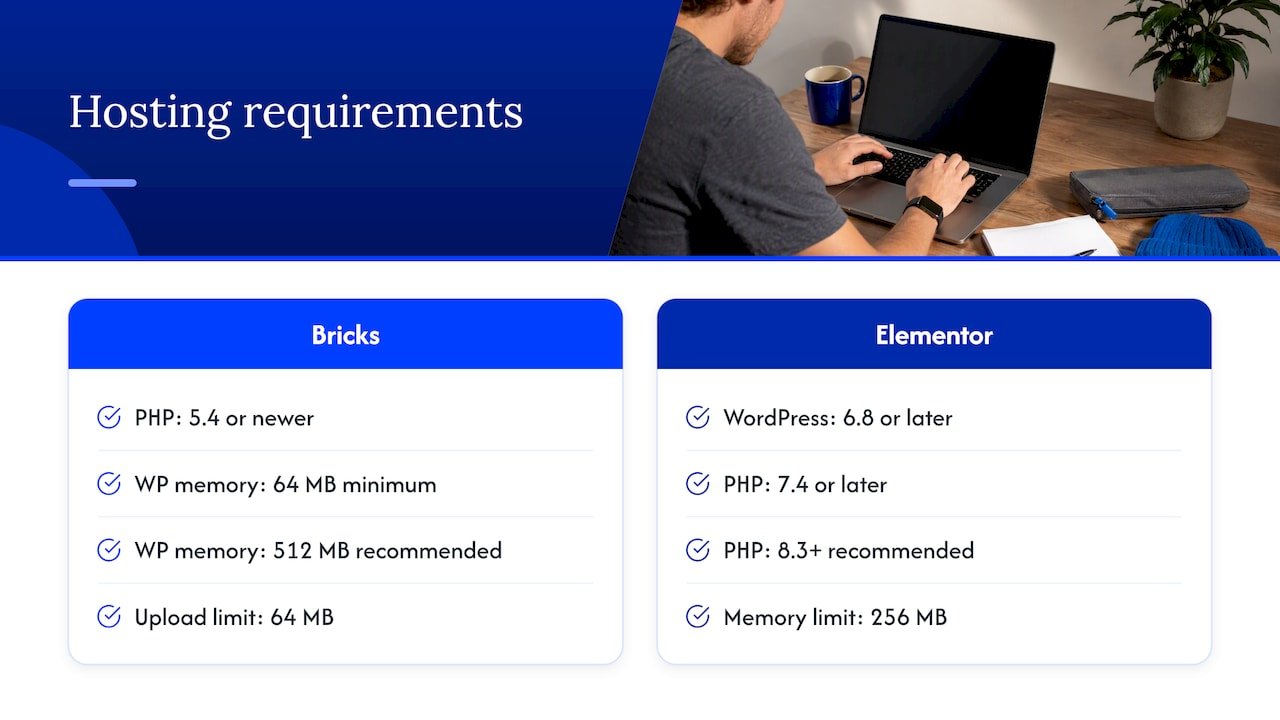
Before buying either one, look at your hosting. Bricks lists PHP 5.4 or newer, at least 64 MB of WordPress memory (512 MB recommended) and a 64 MB upload limit. Elementor’s documentation asks for WordPress 6.8 or later, PHP 7.4 or later (8.3 or newer recommended), and a 256 MB memory limit, with 512 MB recommended and 768 MB for best performance. If you are on very cheap shared hosting, Elementor’s higher memory appetite is one more reason it can feel sluggish in the editor.
Which one fits your situation
A practitioner assessment lays out the split well. Choose Elementor when non-technical clients, rapid marketing-page production, abundant templates, third-party integrations or existing Elementor skills matter most. Choose Bricks when you need reusable design systems, dynamic data, custom queries, lower plugin dependence and precise markup.
Translated for affiliate marketers:
You are just starting. Go with Elementor if you want a gentle on-ramp and a template for almost everything. Go with Bricks if you enjoy learning systems and want to avoid rebuilding later.
You run a content-heavy review site. Bricks’ query loops, dynamic data and classes pay off as page counts grow.
You build quick landing pages for campaigns. Elementor’s templates and marketing tools speed up the first version.
You build for clients. Elementor’s familiarity makes handoffs easier, since many clients have seen it before.
If you are still deciding on the theme layer too, see our breakdown of the best WordPress themes for affiliates, which covers speed and monetization.
Thinking about switching later
Here is the honest warning. There is no one-click converter. A review of the two reports that moving from Elementor to Bricks has no converter and requires manual rebuilding, ideally on a staging copy. Another source notes that deactivating Elementor can leave shortcode or builder data behind, and Bricks sites need rebuilding if you leave the Bricks theme.
So treat any switch as a rebuild. Work on staging, list every add-on and custom snippet, keep your URLs identical, and compare layout, speed and indexed pages before you go live. A migration can keep your SEO intact when URLs and content stay the same, but it is worth checking layout shift, anchor IDs, lazy loading and cache behavior afterward. The time it takes may easily outweigh any license savings, which is the strongest argument for choosing well the first time.
Our take
We have watched many affiliates lose weeks to tool choices, and here is what we would tell a friend. The builder is rarely the reason a site fails. Slow publishing, thin content and unclear offers do far more damage than 200KB of extra page weight.
That said, if you plan to build a large library of comparison and review pages, we lean toward the system that makes repeated edits painless, and for many that is Bricks. If you want to be live this week and learn as you go, Elementor’s ecosystem is hard to argue with. Pick one, build a real page this week, and measure it. Your own pages on your own hosting will tell you more than any benchmark.
Whatever you choose, keep your attention on what makes money: useful pages, honest recommendations and a repeatable workflow.
— Will
Build faster once the builder is chosen
Picking a builder is the easy part. Turning it into a steady content engine is where most affiliates stall. If you want help with that, our guide to AI workflow automation for affiliate marketers shows how to cut repetitive tasks so you spend your time on pages that earn.

You can also browse the Willbuckley blog for step-by-step tutorials, tips and tool walkthroughs for affiliate marketers using AI.
FAQ
Is Bricks better than Elementor?
Not across the board. Bricks tends to produce lighter code and includes more features natively, which suits developers and large content sites. Elementor is easier to learn and has a bigger ecosystem of templates and add-ons, which suits beginners and fast marketing pages.
Is Elementor the same as WordPress?
No. WordPress is the content management system that runs your site. Elementor is a plugin that adds a visual drag-and-drop editor on top of it, while Bricks is a theme that does something similar.
Is Bricks cheaper than Elementor?
It depends on how many sites you run and which features you need. Bricks lists $79 per year for one site, $149 for three, $249 for unlimited sites and a $599 lifetime option, with all features on every plan. Elementor’s tiers unlock features as you move up, so check its pricing page for current amounts.
Can I switch from Elementor to Bricks without rebuilding?
No. There is no converter, so you rebuild pages manually, preferably on a staging site, and keep URLs unchanged to protect your rankings.
Does the builder affect my SEO?
Indirectly. Both support headings, metadata and schema, so the bigger factor is page speed and correct setup. A lighter baseline gives you less optimization work, but hosting, images and content quality still matter more.
Sources
- Bricks – Visual Site Builder for WordPress
- Pricing – Bricks
- Built-in WordPress Features – Bricks
- Getting Started – Bricks Academy
- Requirements – Bricks Academy
- Elementor
- Elementor One
- Elementor website builder pricing
- Elementor System Requirements
- Best WordPress theme builders, Elementor blog
- Bricks Builder vs Elementor, Cloudways
- Bricks vs Elementor 2026, WPSymposium
- Best WordPress Page Builders 2026, WP Depth
- Page builder test, TopTut
- Best WordPress Page Builders 2026, WPPioneer
- Bricks vs Elementor vs Framer, Mauerwerk Studio
- How to increase Elementor page speed
- Elementor SEO automation